
- Posts: 424
- Thank you received: 11
change dropdown of mini cart module to dropup
- BluepointWebdesign
-
 Topic Author
- Offline
Less
More
5 years 11 months ago #326807
by BluepointWebdesign
change dropdown of mini cart module to dropup was created by BluepointWebdesign
-- HikaShop version -- : 4..4.0
-- Joomla version -- : 3.9.x
-- PHP version -- : 7.3
Hello,
We use the module of the midi cart and have placed this at the bottom of the site.. How can we change it to a dropup instead of a dropdown.. otherwise it is not visible.
-- Joomla version -- : 3.9.x
-- PHP version -- : 7.3
Hello,
We use the module of the midi cart and have placed this at the bottom of the site.. How can we change it to a dropup instead of a dropdown.. otherwise it is not visible.
Please Log in or Create an account to join the conversation.

5 years 11 months ago #326823
by nicolas
Replied by nicolas on topic change dropdown of mini cart module to dropup
Hi,
If you edit the "Front-end CSS File" setting in the HikaShop configuration, you'll find this CSS which controls the display of the dropdown system:
So you need to add a bit of CSS to it to make it work like you want.
What CSS to use exactly would depend on the situation on your website. I would need the URL to a page with it to be able to check on the situation to say precisely.
If you edit the "Front-end CSS File" setting in the HikaShop configuration, you'll find this CSS which controls the display of the dropdown system:
Code:
div.hikashop_cart_dropdown_container {
position:relative;
}
div.hikashop_cart_dropdown_content {
z-index:1000;
position:absolute;
width:auto;
padding:4px;
border:1px solid #808080;
background-color:white;
}
What CSS to use exactly would depend on the situation on your website. I would need the URL to a page with it to be able to check on the situation to say precisely.
Please Log in or Create an account to join the conversation.
Less
More
- Posts: 212
- Thank you received: 17
4 years 11 months ago #337581
by smithshop123
Replied by smithshop123 on topic change dropdown of mini cart module to dropup
Hi,
we have a similar issue. As per the attached image, our product image sits below the popup cart. Unfortunately when you click on 'Checkout' it selects the image below instead of the button.
We can fix this in firebug by changing the image's z-index to -1 but we don't know where to edit the source file to make this permanent. Any assistance on where this is located would be appreciated.
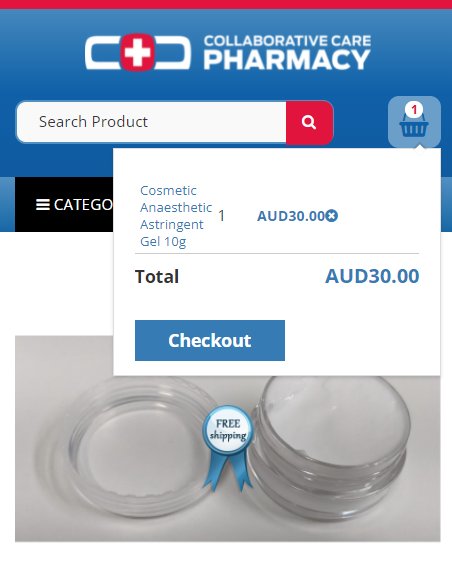
Regards,
Ian and Stu
we have a similar issue. As per the attached image, our product image sits below the popup cart. Unfortunately when you click on 'Checkout' it selects the image below instead of the button.
We can fix this in firebug by changing the image's z-index to -1 but we don't know where to edit the source file to make this permanent. Any assistance on where this is located would be appreciated.
Regards,
Ian and Stu
Please Log in or Create an account to join the conversation.
4 years 11 months ago #337585
by nicolas
Replied by nicolas on topic change dropdown of mini cart module to dropup
Hi,
I'm not able to reproduce the problem on your website :
i.imgur.com/JCxrP4s.png
When I open the cart module on a product page, the checkout button works fine and it is on top of the product image.
Could you provide precise instructions ? It is only with FireFox that you have the issue ? Which version ? On which product page exactly ?
I'm not able to reproduce the problem on your website :
i.imgur.com/JCxrP4s.png
When I open the cart module on a product page, the checkout button works fine and it is on top of the product image.
Could you provide precise instructions ? It is only with FireFox that you have the issue ? Which version ? On which product page exactly ?
Please Log in or Create an account to join the conversation.
Less
More
- Posts: 212
- Thank you received: 17
4 years 11 months ago #337596
by smithshop123
Replied by smithshop123 on topic change dropdown of mini cart module to dropup
Apologies,
this only occurs on mobile phones when selecting the 'checkout' button whilst on any product page.
Regards,
Ian
this only occurs on mobile phones when selecting the 'checkout' button whilst on any product page.
Regards,
Ian
Please Log in or Create an account to join the conversation.
4 years 11 months ago #337602
by nicolas
Replied by nicolas on topic change dropdown of mini cart module to dropup
Hi,
Well, I checked on my Android smartphone with Chrome and I don't have the issue either.
Could you please double check ?
Do you only have the issue with a specific type of smartphone ? Or a specific mobile browser ?
Well, I checked on my Android smartphone with Chrome and I don't have the issue either.
Could you please double check ?
Do you only have the issue with a specific type of smartphone ? Or a specific mobile browser ?
Please Log in or Create an account to join the conversation.
Less
More
- Posts: 212
- Thank you received: 17
4 years 11 months ago #337616
by smithshop123
Replied by smithshop123 on topic change dropdown of mini cart module to dropup
Hi,
can you try it with the product I've shown in the image from my original post (cosmetic anaesthetic astringent). It happens when the 'checkout' button is over the product image on the product page. Some product images aren't big enough or are cropped enough to not be affected.
This happens on all phones we have tested (e.g. pixel 2, HTC U11, Samsung S20 FE, Iphone XR).
Thanks again,
Ian and Stu
can you try it with the product I've shown in the image from my original post (cosmetic anaesthetic astringent). It happens when the 'checkout' button is over the product image on the product page. Some product images aren't big enough or are cropped enough to not be affected.
This happens on all phones we have tested (e.g. pixel 2, HTC U11, Samsung S20 FE, Iphone XR).
Thanks again,
Ian and Stu
Please Log in or Create an account to join the conversation.
4 years 11 months ago - 4 years 11 months ago #337627
by Philip
Replied by Philip on topic change dropdown of mini cart module to dropup
Hello,
We process an analyze directly on your website, and we noticed several things that could explain your display problem described.
- You use a custom version of the default frontend file css, maybe from a too old version of HikaShop ?
=> At least there should be commands coming from the frontend file which are missing to manage the dropdown cart, and so try to use the default frontend file css
- We have seen some strange anomalies that we are unable to reproduce on our localhost, see my picture :

The proceed button work as expected, and the badge don't go over the card
Maybe this come from the template, and your specific display, proportions, positions etc...
Can you process a test with a default template like ProtoStar to check if that solve your issue ?
If that solve at least part of your display issue, you have to contact the template creator support.
Awaiting your returns to progress on your subject.
Regards
We process an analyze directly on your website, and we noticed several things that could explain your display problem described.
- You use a custom version of the default frontend file css, maybe from a too old version of HikaShop ?
=> At least there should be commands coming from the frontend file which are missing to manage the dropdown cart, and so try to use the default frontend file css
- We have seen some strange anomalies that we are unable to reproduce on our localhost, see my picture :
The proceed button work as expected, and the badge don't go over the card
Maybe this come from the template, and your specific display, proportions, positions etc...
Can you process a test with a default template like ProtoStar to check if that solve your issue ?
If that solve at least part of your display issue, you have to contact the template creator support.
Awaiting your returns to progress on your subject.
Regards
Last edit: 4 years 11 months ago by Philip.
Please Log in or Create an account to join the conversation.
Less
More
- Posts: 212
- Thank you received: 17
4 years 11 months ago - 4 years 11 months ago #337657
by smithshop123
Replied by smithshop123 on topic change dropdown of mini cart module to dropup
Hi,
setting the css front end to 'default' didn't work but switching off the 'Free shipping' badge did work. If you can point me to where its z-index is controlled (i.e. the badges), I might be able to put in a temporary fix until we can investigate further.
Thanks,
Ian and Stu
We found a workaround to give us time to figure out the problem. Changing the Badge to 10% and moving it to the bottom right placed it out from under the 'checkout' button on mobiles.
Many thanks for looking into this. We had some work done on the site by a coder and they changed the default views against our wishes. We need to figure out how to keep the custom look of our shopping cart/minicart icon via the language file rather than changing the view.
setting the css front end to 'default' didn't work but switching off the 'Free shipping' badge did work. If you can point me to where its z-index is controlled (i.e. the badges), I might be able to put in a temporary fix until we can investigate further.
Thanks,
Ian and Stu
We found a workaround to give us time to figure out the problem. Changing the Badge to 10% and moving it to the bottom right placed it out from under the 'checkout' button on mobiles.
Many thanks for looking into this. We had some work done on the site by a coder and they changed the default views against our wishes. We need to figure out how to keep the custom look of our shopping cart/minicart icon via the language file rather than changing the view.
Last edit: 4 years 11 months ago by smithshop123. Reason: found a workaround
Please Log in or Create an account to join the conversation.
4 years 11 months ago - 4 years 11 months ago #337661
by Philip
Replied by Philip on topic change dropdown of mini cart module to dropup
Hello,
By using your navigator inspector tool you can find the relative css command :

As, you can see it's an inline css command and so in order to override it, you must use an "!important"
Example :
.html_class_element_targeted {
command: value !important;
}
Hope this will help you.
Regards
By using your navigator inspector tool you can find the relative css command :
As, you can see it's an inline css command and so in order to override it, you must use an "!important"
Example :
.html_class_element_targeted {
command: value !important;
}
Hope this will help you.
Regards
Last edit: 4 years 11 months ago by Philip.
The following user(s) said Thank You: smithshop123
Please Log in or Create an account to join the conversation.
Time to create page: 0.086 seconds