

- Posts: 366
- Thank you received: 26
Missing classes
5 years 8 months ago #328623
by Thrane
Missing classes was created by Thrane
-- url of the page with the problem -- :
new.coinsnstamps.store/kurv
-- HikaShop version -- : 4.4.0
-- Joomla version -- : 3.9.24
-- PHP version -- : 7.4
Hi
I'm working on a shop at new.coinsnstamps.store and noticed that on the checkout page, some classes are missing in the code compared to another shop I made.
And these files has not been altered.
On the first page I see this:
<td data-title="Samlet pris"> <span class="hikashop_product_price_full">
<span class="hikashop_product_price">$12.00</span> </span>
</td>
The code on the other page is:
<td data-title="Samlet pris" class="hikashop_cart_product_total_value"><span class="hikashop_product_price_full">
<span class="hikashop_product_price hikashop_product_price_0">DKK 25,00</span> </span>
</td>
What have I missed?
Kind regards
Thomas
-- HikaShop version -- : 4.4.0
-- Joomla version -- : 3.9.24
-- PHP version -- : 7.4
Hi
I'm working on a shop at new.coinsnstamps.store and noticed that on the checkout page, some classes are missing in the code compared to another shop I made.
And these files has not been altered.
On the first page I see this:
<td data-title="Samlet pris"> <span class="hikashop_product_price_full">
<span class="hikashop_product_price">$12.00</span> </span>
</td>
The code on the other page is:
<td data-title="Samlet pris" class="hikashop_cart_product_total_value"><span class="hikashop_product_price_full">
<span class="hikashop_product_price hikashop_product_price_0">DKK 25,00</span> </span>
</td>
What have I missed?
Kind regards
Thomas
Please Log in or Create an account to join the conversation.

5 years 8 months ago #328641
by nicolas
Replied by nicolas on topic Missing classes
Hi,
I don't see the issue on your link.
The first page of the checkout does have the hikashop_cart_product_total_value class in the cart view.
However, I suppose that you're actually talking about the cart details page, which isn't a checkout page. And there, there is no hikashop_cart_product_total_value class in the cart table.
So if you don't want that, then you probably want to edit the menu item you're using to access the cart details page and instead use the type "HikaShop checkout". Then, you can just change the "checkout" workflow" in the HikaShop configuration to have the cart view in the first step, on its own so you'll get a similar look as the cart details page.
I don't see the issue on your link.
The first page of the checkout does have the hikashop_cart_product_total_value class in the cart view.
However, I suppose that you're actually talking about the cart details page, which isn't a checkout page. And there, there is no hikashop_cart_product_total_value class in the cart table.
So if you don't want that, then you probably want to edit the menu item you're using to access the cart details page and instead use the type "HikaShop checkout". Then, you can just change the "checkout" workflow" in the HikaShop configuration to have the cart view in the first step, on its own so you'll get a similar look as the cart details page.
Please Log in or Create an account to join the conversation.
5 years 8 months ago #328654
by Thrane
Replied by Thrane on topic Missing classes
Oh, I'm pretty sure you're right here!
Will check, thanks!
But if I would like the cart-display and need the prices to align right, which file do I need to edit?
Will check, thanks!
But if I would like the cart-display and need the prices to align right, which file do I need to edit?
Please Log in or Create an account to join the conversation.

5 years 8 months ago - 5 years 8 months ago #328665
by Philip
Replied by Philip on topic Missing classes
Hello,
The most easy to align prices, the most easy is to edit (with custom css code)your frontend css file, have a look on this documentation to see how to proceed.
Hope this help you to achieved what you need.
Regards
The most easy to align prices, the most easy is to edit (with custom css code)your frontend css file, have a look on this documentation to see how to proceed.
Hope this help you to achieved what you need.
Regards
Last edit: 5 years 8 months ago by Philip.
Please Log in or Create an account to join the conversation.
5 years 8 months ago #328696
by Thrane
Replied by Thrane on topic Missing classes
Thanks, but there is no class for that item ...
That's the issue!
That's the issue!
Please Log in or Create an account to join the conversation.
5 years 7 months ago #329532
by Thrane
Replied by Thrane on topic Missing classes
Hi
I still haven't solved this and now I need to get it fixed on a new site:
new.stanleyseeds.dk/kurv
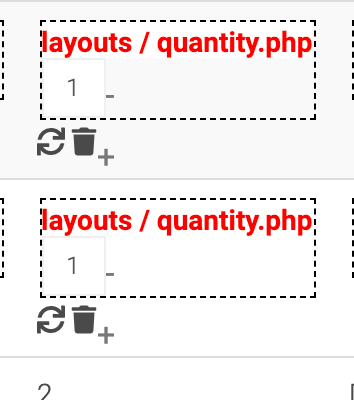
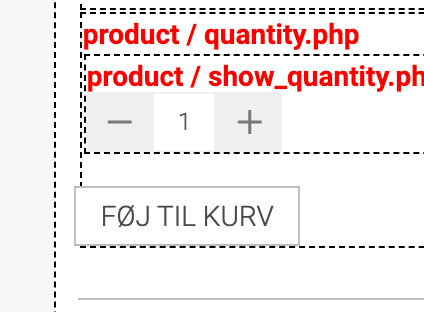
I don't get the quantity left right, like on other pages.
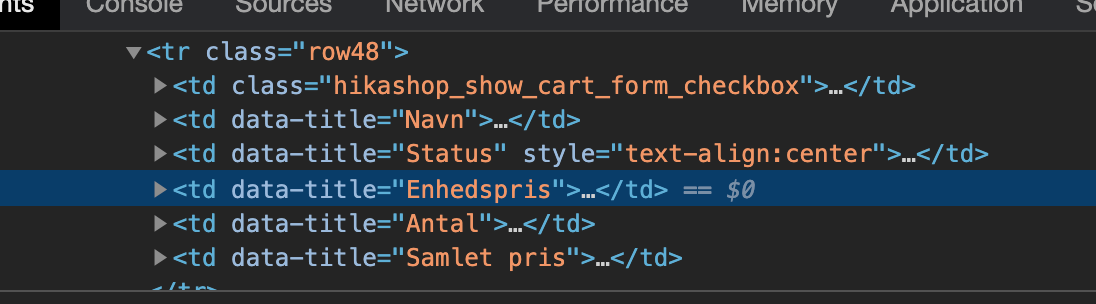
And the table > td has no classes I can target in my CSS.
Where can I fix this?
Kind regards
Thomas
I still haven't solved this and now I need to get it fixed on a new site:
new.stanleyseeds.dk/kurv
I don't get the quantity left right, like on other pages.
And the table > td has no classes I can target in my CSS.
Where can I fix this?
Kind regards
Thomas
Please Log in or Create an account to join the conversation.
5 years 7 months ago #329573
by nicolas
Replied by nicolas on topic Missing classes
Hi,
So you're talking about the left-right quantity input method.
That's strange, the left-right quantity input method works fine on the cart details page on my end:
i.imgur.com/6Xtw5Bz.png
Can you check with the default template of Joomla if you still have that ? It might come from an old view override in your template.
But you can still target the tds in your CSS.
For example:
So you're talking about the left-right quantity input method.
That's strange, the left-right quantity input method works fine on the cart details page on my end:
i.imgur.com/6Xtw5Bz.png
Can you check with the default template of Joomla if you still have that ? It might come from an old view override in your template.
But you can still target the tds in your CSS.
For example:
Code:
td[data-title="Antal"]{ background-color: green; }
Please Log in or Create an account to join the conversation.
5 years 7 months ago #329584
by Thrane
Replied by Thrane on topic Missing classes
Yes I am - and they work on default template.
I have made some minor changes to the quantity file.
I made their spans to divs.
But it's no reflected this page, så where can I edit that?
And great about the td!
I have made some minor changes to the quantity file.
I made their spans to divs.
But it's no reflected this page, så where can I edit that?
And great about the td!
Please Log in or Create an account to join the conversation.
5 years 7 months ago #329596
by nicolas
Replied by nicolas on topic Missing classes
Hi,
If it works with the default template, then it comes from custom view overrides.
I suppose that you're using an old version of a view override which doesn't support the quantity input mode for that view.
So I would recommend to delete the view override on the quantity file via the menu Display>Views and redo the modifications in the view file.
If it works with the default template, then it comes from custom view overrides.
I suppose that you're using an old version of a view override which doesn't support the quantity input mode for that view.
So I would recommend to delete the view override on the quantity file via the menu Display>Views and redo the modifications in the view file.
Please Log in or Create an account to join the conversation.
5 years 7 months ago #329620
by Thrane
Replied by Thrane on topic Missing classes
Makes sense and I tracked it down now - thanks for pushing me in the right direction, Nicolas!
Please Log in or Create an account to join the conversation.
Time to create page: 0.239 seconds