

- Posts: 431
- Thank you received: 19
Error after update to v4.4.1
5 years 8 months ago #329575
by neo191987
Error after update to v4.4.1 was created by neo191987
-- HikaShop version -- : 4.4.1
-- Joomla version -- : 3.9.24
-- PHP version -- : 7.4.15
Hi after the update, I get the following error: Warning: file_get_contents(file): failed to open stream: No such file or directory in /administrator/components/com_hikashop/helpers/image.php on line 909
Tested in php 7.3 and php 7.4
-- Joomla version -- : 3.9.24
-- PHP version -- : 7.4.15
Hi after the update, I get the following error: Warning: file_get_contents(file): failed to open stream: No such file or directory in /administrator/components/com_hikashop/helpers/image.php on line 909
Tested in php 7.3 and php 7.4
Please Log in or Create an account to join the conversation.

5 years 8 months ago #329578
by nicolas
Replied by nicolas on topic Error after update to v4.4.1
Hi,
This warning indicates that for a product / category on the page you're looking at, there is an image referenced but the corresponding file cannot be found and thus it can't generate the thumbnail for it.
I don't think this is linked to the update.
Could you provide more information on where you get that error ? What product ? What URL ? Could you do a screenshot of the settings of that product ?
This warning indicates that for a product / category on the page you're looking at, there is an image referenced but the corresponding file cannot be found and thus it can't generate the thumbnail for it.
I don't think this is linked to the update.
Could you provide more information on where you get that error ? What product ? What URL ? Could you do a screenshot of the settings of that product ?
Please Log in or Create an account to join the conversation.
5 years 8 months ago #329580
by neo191987
Replied by neo191987 on topic Error after update to v4.4.1
Yes, that's right. The problem is not caused by the update, I checked through a clean installation and everything works properly. I will write more if I find out where the reason is.
Please Log in or Create an account to join the conversation.
5 years 8 months ago #329609
by neo191987
Replied by neo191987 on topic Error after update to v4.4.1
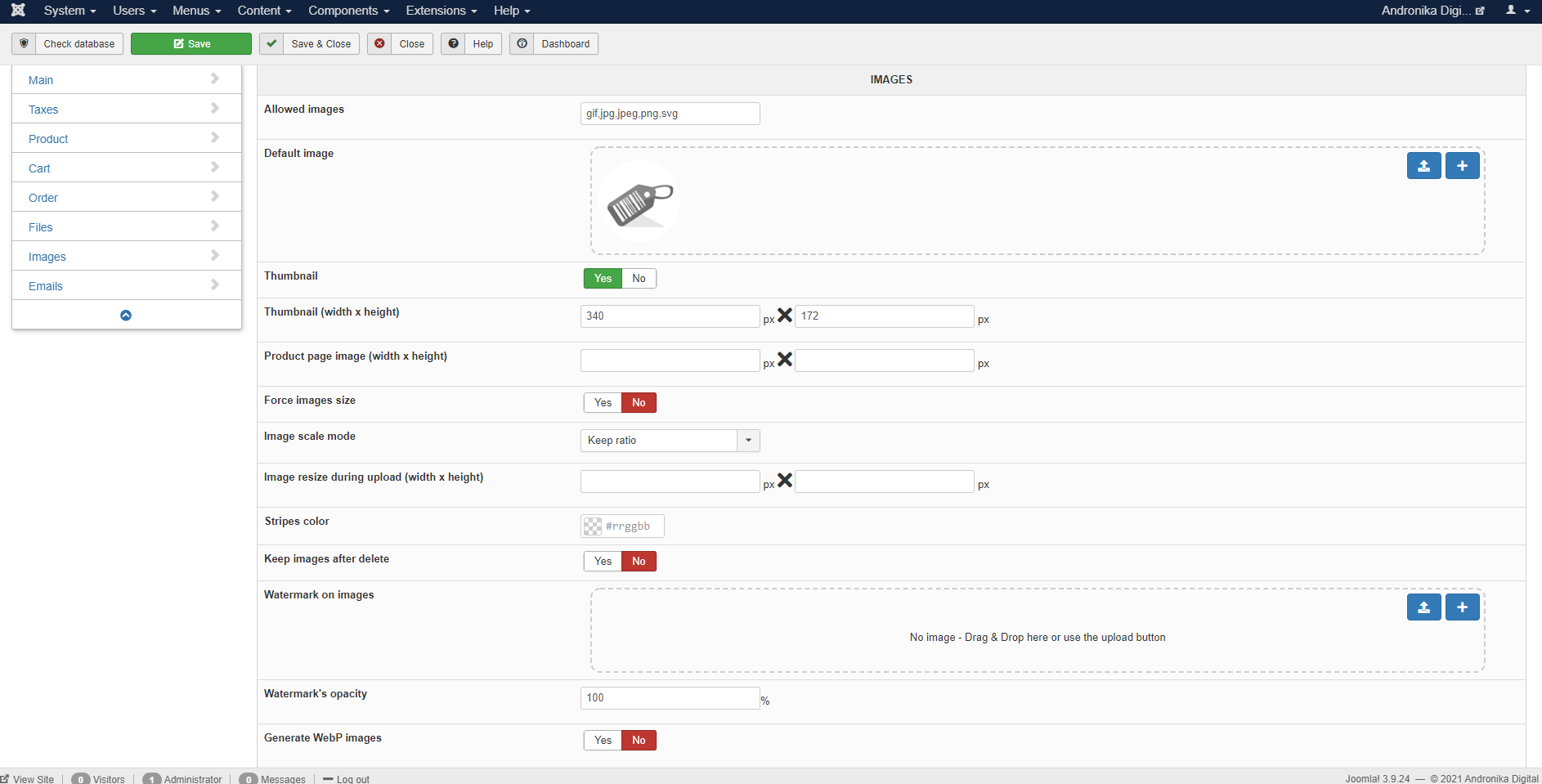
I understand where the problem was coming from. If no value is entered in the Thumbnail (width x height) fields, this error will occur. I think there was a similar problem before.
www.hikashop.com/forum/install-update/89...yed-4-1-0-fixed.html
Please Log in or Create an account to join the conversation.
5 years 8 months ago #329610
by nicolas
Replied by nicolas on topic Error after update to v4.4.1
Hi,
Ah yes, the thumbnail width/height setting shouldn't be empty as that's the main setting to define the size of the thumbnails everywhere in HikaShop so you don't want to leave it empty.
Ah yes, the thumbnail width/height setting shouldn't be empty as that's the main setting to define the size of the thumbnails everywhere in HikaShop so you don't want to leave it empty.
The following user(s) said Thank You: neo191987
Please Log in or Create an account to join the conversation.

5 years 7 months ago #330811
by iafdesign
Replied by iafdesign on topic Error after update to v4.4.1
I have the same problem, the message 'Warning: file_get_contents(vial3_borosilicate.gif): failed to open stream: No such file or directory in /home/sites/4a/2/2bef3de369/public_html/administrator/components/com_hikashop/helpers/image.php on line 909' appears after upgrading to v.4.4.1.
I've checked the thumbnail size fields and there was already a value.
I have replicated the problem on a development server, so can give you access if you need.
I've attached a copy of the problem message and also the image configuration.
I've checked the thumbnail size fields and there was already a value.
I have replicated the problem on a development server, so can give you access if you need.
I've attached a copy of the problem message and also the image configuration.
Please Log in or Create an account to join the conversation.
5 years 7 months ago #330814
by nicolas
Replied by nicolas on topic Error after update to v4.4.1
Hi,
I've reproduced the issue and in fact it only happens in some specific case based on your shop settings and how you configure the images.
I've added a patch for it. Download the install package on our website and install it on yours and it will add the patch for the warning.
I've reproduced the issue and in fact it only happens in some specific case based on your shop settings and how you configure the images.
I've added a patch for it. Download the install package on our website and install it on yours and it will add the patch for the warning.
The following user(s) said Thank You: iafdesign
Please Log in or Create an account to join the conversation.
5 years 7 months ago #330827
by iafdesign
Replied by iafdesign on topic Error after update to v4.4.1
I've applied the updated 4.4.1 and can report that it solves the problem.
Thanks for the rapid response.
Thanks for the rapid response.
Please Log in or Create an account to join the conversation.
5 years 7 months ago - 5 years 7 months ago #330857
by neo191987
Replied by neo191987 on topic Error after update to v4.4.1
Hi, I found an error in line 356 in /components/com_hikashop/views/product/tmpl/listing.php
Pagination will return an error.
Code:
<div class="hikashop_products_pagination hiraw', 'kashop_products_pagination_bottom">
<?php echo str_replace('&tmpl=raw', '', $this->pagination->getListFooter($this->params->get('limit'))); ?>
<span class="hikashop_results_counter"><?php echo $this->pagination->getResultsCounter(); ?></span>
</div>
Pagination will return an error.
Last edit: 5 years 7 months ago by neo191987.
Please Log in or Create an account to join the conversation.
5 years 7 months ago #330863
by nicolas
Replied by nicolas on topic Error after update to v4.4.1
Hi,
What error did you get ?
What error did you get ?
Please Log in or Create an account to join the conversation.
5 years 7 months ago - 5 years 7 months ago #330865
by neo191987
Replied by neo191987 on topic Error after update to v4.4.1
Hi, I fixed the problem in my file, but I decided to report it for fix. the problem is in the form and the first class.
php error: Warning: str_replace() expects at least 3 parameters, 2 given in \components\com_hikashop\views\product\tmpl\listing.php on line 355
jquery error: Uncaught Error: Syntax error, unrecognized expression: div.hikashop_products_pagination.'kashop_products_pagination_bottom
fix
php error: Warning: str_replace() expects at least 3 parameters, 2 given in \components\com_hikashop\views\product\tmpl\listing.php on line 355
jquery error: Uncaught Error: Syntax error, unrecognized expression: div.hikashop_products_pagination.'kashop_products_pagination_bottom
fix
Code:
<form action="<?php echo str_replace('&tmpl=raw','',hikashop_currentURL()); ?>" method="post" name="adminForm_<?php echo $this->params->get('main_div_name').$this->category_selected; ?>_bottom">
<div class="hikashop_products_pagination hikashop_products_pagination_bottom">
<?php echo str_replace('&tmpl=raw','',$this->pagination->getListFooter($this->params->get('limit'))); ?>
<span class="hikashop_results_counter"><?php echo $this->pagination->getResultsCounter(); ?></span>
</div>
<input type="hidden" name="filter_order_<?php echo $this->params->get('main_div_name').$this->category_selected; ?>" value="<?php echo $this->pageInfo->filter->order->value; ?>" />
<input type="hidden" name="filter_order_Dir_<?php echo $this->params->get('main_div_name').$this->category_selected; ?>" value="<?php echo $this->pageInfo->filter->order->dir; ?>" />
<?php echo JHTML::_('form.token'); ?>
</form>
Last edit: 5 years 7 months ago by neo191987.
Please Log in or Create an account to join the conversation.
5 years 7 months ago #330881
by nicolas
Replied by nicolas on topic Error after update to v4.4.1
Hi,
Thank you for that. I've added the patches on our end.
For anyone else wanting to fix these, just download the HikaShop install package on our website and install it on yours.
Thank you for that. I've added the patches on our end.
For anyone else wanting to fix these, just download the HikaShop install package on our website and install it on yours.
The following user(s) said Thank You: neo191987
Please Log in or Create an account to join the conversation.
5 years 7 months ago - 5 years 7 months ago #331193
by neo191987
Replied by neo191987 on topic Error after update to v4.4.1
Hi, I found a bug to fix.
There is no ID in the input and the "Reset" button on the search will not work.
File: /components/com_hikashop/views/upload/tmpl/galleryimage.php
Line: 22
Must be
There is no ID in the input and the "Reset" button on the search will not work.
File: /components/com_hikashop/views/upload/tmpl/galleryimage.php
Line: 22
Code:
<input type="text" name="search" value="<?php echo $this->escape($this->pageInfo->search);?>" class="text_area" onchange="document.adminForm.submit();" />
Must be
Code:
<input type="text" id="search" name="search" value="<?php echo $this->escape($this->pageInfo->search);?>" class="text_area" onchange="document.adminForm.submit();" />
Last edit: 5 years 7 months ago by neo191987.
Please Log in or Create an account to join the conversation.
5 years 7 months ago #331203
by nicolas
Replied by nicolas on topic Error after update to v4.4.1
Hi,
Nicely spotted ! We'll fix that. Thanks !
Nicely spotted ! We'll fix that. Thanks !
Please Log in or Create an account to join the conversation.
Time to create page: 0.093 seconds