

- Posts: 74
- Thank you received: 9
Swiper for thumbnails are placed the left
5 years 4 months ago - 5 years 4 months ago #332665
by Wella
Swiper for thumbnails are placed the left was created by Wella
-- HikaShop version -- : 4.4.2
-- Joomla version -- : 3.9.26
Hi,
I have updated the latest version of Hikashop 4.4.2 I’ve noticed that you’ve added a feature to swiped left or right to navigate the different thumbnails on the product page and I found it very nice. At our website I saw arrow on the row, I am wondering if this is correct. This is what we have:
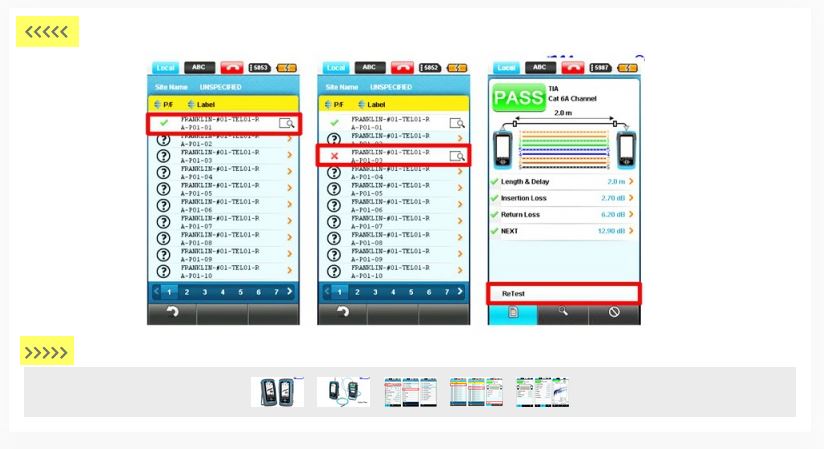
This is what I saw in your blog:
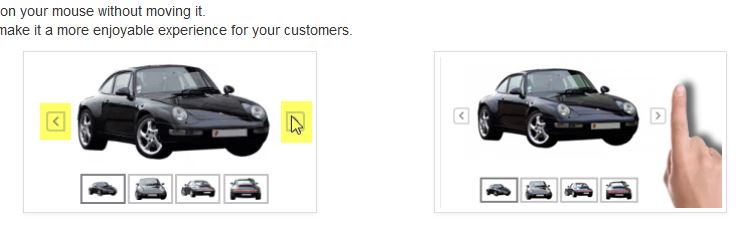
Any idea? What should I do to have the arrow(swiper) same as shown as at your website?
Regards,
Wella
[Moderator : Please, don't edit a message a long time after posted it, this mess up our service ticket and can't increase our answer delay, thanks for your attention.]
-- Joomla version -- : 3.9.26
Hi,
I have updated the latest version of Hikashop 4.4.2 I’ve noticed that you’ve added a feature to swiped left or right to navigate the different thumbnails on the product page and I found it very nice. At our website I saw arrow on the row, I am wondering if this is correct. This is what we have:
This is what I saw in your blog:
Any idea? What should I do to have the arrow(swiper) same as shown as at your website?
Regards,
Wella
[Moderator : Please, don't edit a message a long time after posted it, this mess up our service ticket and can't increase our answer delay, thanks for your attention.]
Last edit: 5 years 4 months ago by Philip.
Please Log in or Create an account to join the conversation.

5 years 4 months ago - 5 years 4 months ago #332670
by Philip
Replied by Philip on topic Swiper for thumbnails are placed the left
Hello,
You have this issue because you choose to don't use at all the HikaShop frontend file css, and this feature need some specific css command to be well displayed.
Now, your return leads us to improve this specific subject, for our futur release this command will be in the hikashop.css file, in order to prevent this kind of issue.
Now, in order to help you to correct this I advice you to analyze the default 4.4.2 frontend file css, around line 820, look for :
".hikashop_slide_prev" to see this :

This finish as you can see around the line 900, you have to use all this part in your frontend file css.
regards
You have this issue because you choose to don't use at all the HikaShop frontend file css, and this feature need some specific css command to be well displayed.
Now, your return leads us to improve this specific subject, for our futur release this command will be in the hikashop.css file, in order to prevent this kind of issue.
Now, in order to help you to correct this I advice you to analyze the default 4.4.2 frontend file css, around line 820, look for :
".hikashop_slide_prev" to see this :
This finish as you can see around the line 900, you have to use all this part in your frontend file css.
regards
Last edit: 5 years 4 months ago by Philip.
Please Log in or Create an account to join the conversation.
5 years 4 months ago #332729
by Wella
Replied by Wella on topic Swiper for thumbnails are placed the left
Hi Philip,
Nice to hear that this command will be included in the next release of the hikashop.css file.
Anyway, I have added the entire code and it is now repaired.
Thank you so much for your help.
Regards,
Wella
Nice to hear that this command will be included in the next release of the hikashop.css file.
Anyway, I have added the entire code and it is now repaired.
Thank you so much for your help.
Regards,
Wella
The following user(s) said Thank You: Philip
Please Log in or Create an account to join the conversation.
5 years 4 months ago #333070
by Wella
Replied by Wella on topic Swiper for thumbnails are placed the left
Hi Philip,
There is a leftover issue regarding this swiper.
When for example a product page is open and I need to go to the product menu which is hover, the swiper is visible on top of the hover menu.
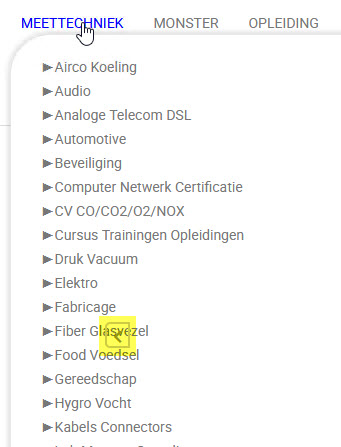
How can I solve this?
There is a leftover
issue regarding this swiper.When for example a product page is open and I need to go to the product menu which is hover, the swiper is visible on top of the hover menu.
How can I solve this?
Please Log in or Create an account to join the conversation.
5 years 4 months ago - 5 years 4 months ago #333074
by Philip
Replied by Philip on topic Swiper for thumbnails are placed the left
Hello,
Thanks for your returns, this will help us to correct this for our futur release.
Now, in order to help you to solve this now, follow me step by step :
1. Go to YourWebsite\media\com_hikashop\css folder
2. Open it, and go around line 740
3. See my screenshot and reproduce the situation, in details you have to comment the "z-index" css order.

Sorry for the convenience and we hope this solution will help to solve your issue.
Regards
Thanks for your returns, this will help us to correct this for our futur release.
Now, in order to help you to solve this now, follow me step by step :
1. Go to YourWebsite\media\com_hikashop\css folder
2. Open it, and go around line 740
3. See my screenshot and reproduce the situation, in details you have to comment the "z-index" css order.
Sorry for the convenience and we hope this solution will help to solve your issue.
Regards
Last edit: 5 years 4 months ago by Philip.
Please Log in or Create an account to join the conversation.
5 years 4 months ago #333111
by Wella
Replied by Wella on topic Swiper for thumbnails are placed the left
Hi Philip,
It works.
Thanks alot for your support!
Regards,
Wella
It works.
Thanks alot for your support!
Regards,
Wella
The following user(s) said Thank You: Philip
Please Log in or Create an account to join the conversation.
Time to create page: 0.233 seconds