

- Posts: 44
- Thank you received: 3
Admin page view shows old / aged version
5 years 5 months ago #333198
by dean
Admin page view shows old / aged version was created by dean
-- HikaShop version -- : 4.4.3
-- Joomla version -- : 3.9.27
-- Browser(s) name and version -- : All
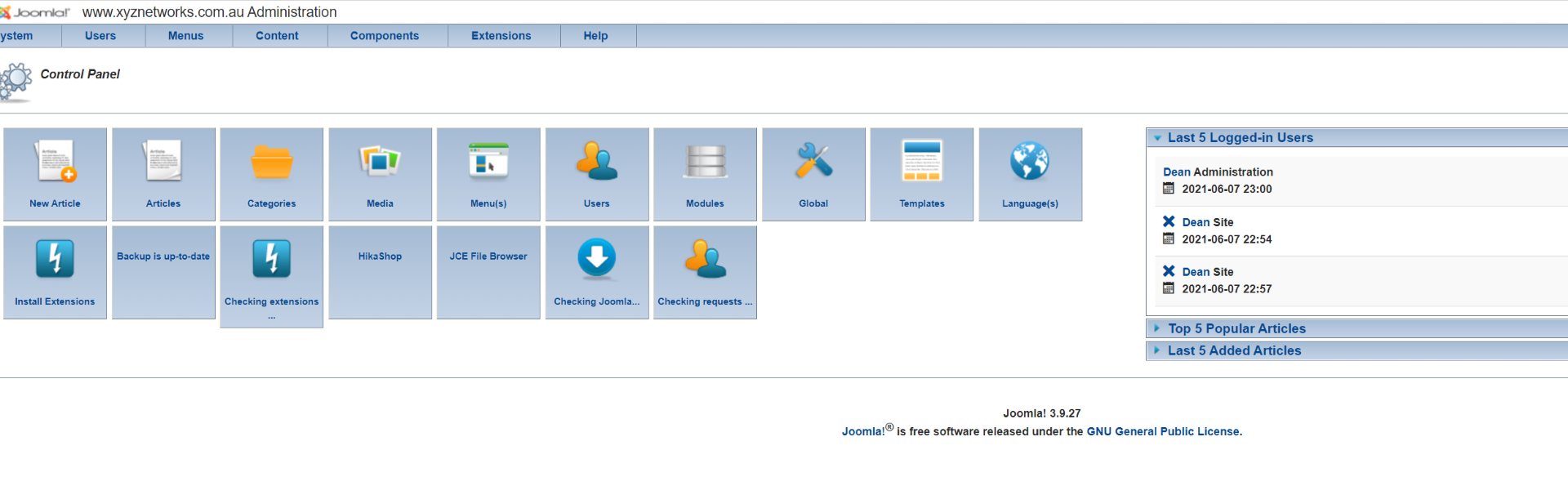
I am not sure how I ended up with what looks like a backend administrator page but can someone advise how I restore m Joomla v3.9.27 admin page? Screenshot attached
Please Log in or Create an account to join the conversation.

5 years 5 months ago #333221
by nicolas
Replied by nicolas on topic Admin page view shows old / aged version
Hi,
You probably switched your backend Joomla template from "isis" to "hathor" in the Joomla templates manager for your backend.
So please check there.
Please Log in or Create an account to join the conversation.
5 years 5 months ago #333222
by dean
Replied by dean on topic Admin page view shows old / aged version
Thanks for the reply and I have checked all of that and gone through countless attempts to switch it back and it just does not switch back. I should add that at no stage did I manually change it
Please Log in or Create an account to join the conversation.
5 years 5 months ago #333224
by dean
Replied by dean on topic Admin page view shows old / aged version
I should also state I am running a RocketTheme template and want to sue that admin interface
Please Log in or Create an account to join the conversation.
5 years 5 months ago #333237
by nicolas
Replied by nicolas on topic Admin page view shows old / aged version
Hi,
So can you provide a screenshot of your Joomla template manager for the backend area ?
Please Log in or Create an account to join the conversation.
5 years 5 months ago #333253
by dean
Replied by dean on topic Admin page view shows old / aged version
Pic attached, and Hathor was the theme I was using but now that is terribly broken, unselectable and I have what looks like a 1920s version of ISIS.
Please Log in or Create an account to join the conversation.
5 years 5 months ago #333258
by nicolas
Replied by nicolas on topic Admin page view shows old / aged version
Hi,
Are you sure you have isis selected as your backend template ?
Again, please provide a screenshot of the templates manager. This page:
i.imgur.com/IfHqTPf.png
Make sure that isis is selected.
Your screenshots indicates that you're using "hathor" not "isis":
i.imgur.com/lcrPpxq.png
The following user(s) said Thank You: dean
Please Log in or Create an account to join the conversation.
5 years 5 months ago #333464
by dean
Replied by dean on topic Admin page view shows old / aged version
That was correct. Old admin template was selected.. but I didnt select it... its back to Isis now
Please Log in or Create an account to join the conversation.
Time to create page: 0.096 seconds