
- Posts: 12
- Thank you received: 3
no checkbox on product page
- nadjashields
-
 Topic Author
- Offline
Less
More
5 years 3 months ago #333472
by nadjashields
no checkbox on product page was created by nadjashields
-- HikaShop version -- : HikaShop Starter: 4.4.3
-- Joomla version -- : Joomla! 3.9.27 Stable
-- PHP version -- : 7.4.20
-- Browser(s) name and version -- : Version 91.0.4472.77 (Official Build) (64-bit)
-- Error-message(debug-mod must be tuned on) -- : no check box on product page only radio button
hika shop uploads multiple versions of the same image in the variant section
where do i find the css to change product font size please? I am not a coder so I am struggling a bit.
also my hikashop is 4.4.2 but joomla says there is no update available!
Hi there,
the issues I am having are the following:
- no check box on product page only radio button
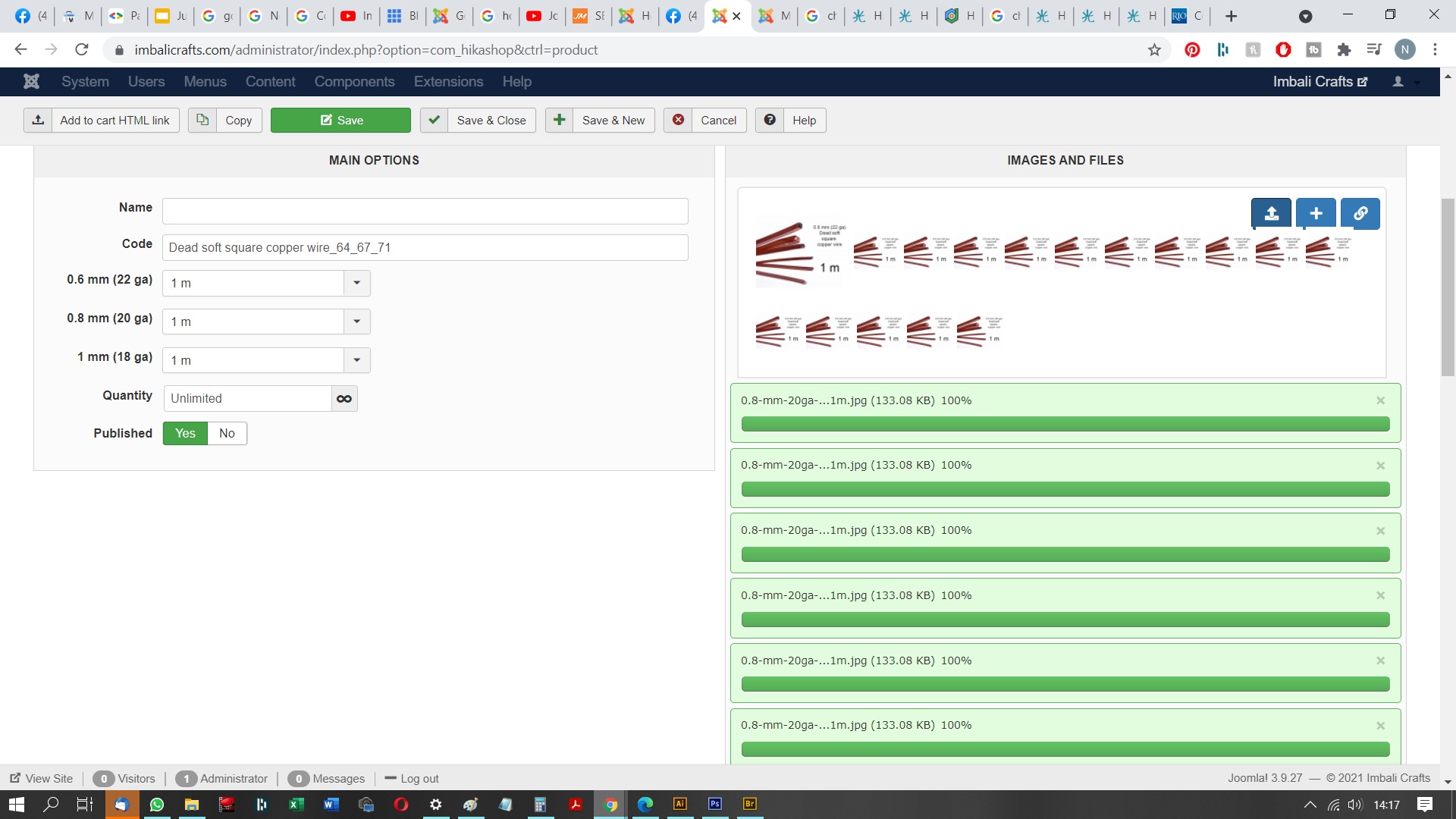
- hika shop uploads multiple versions of the same image in the variant section
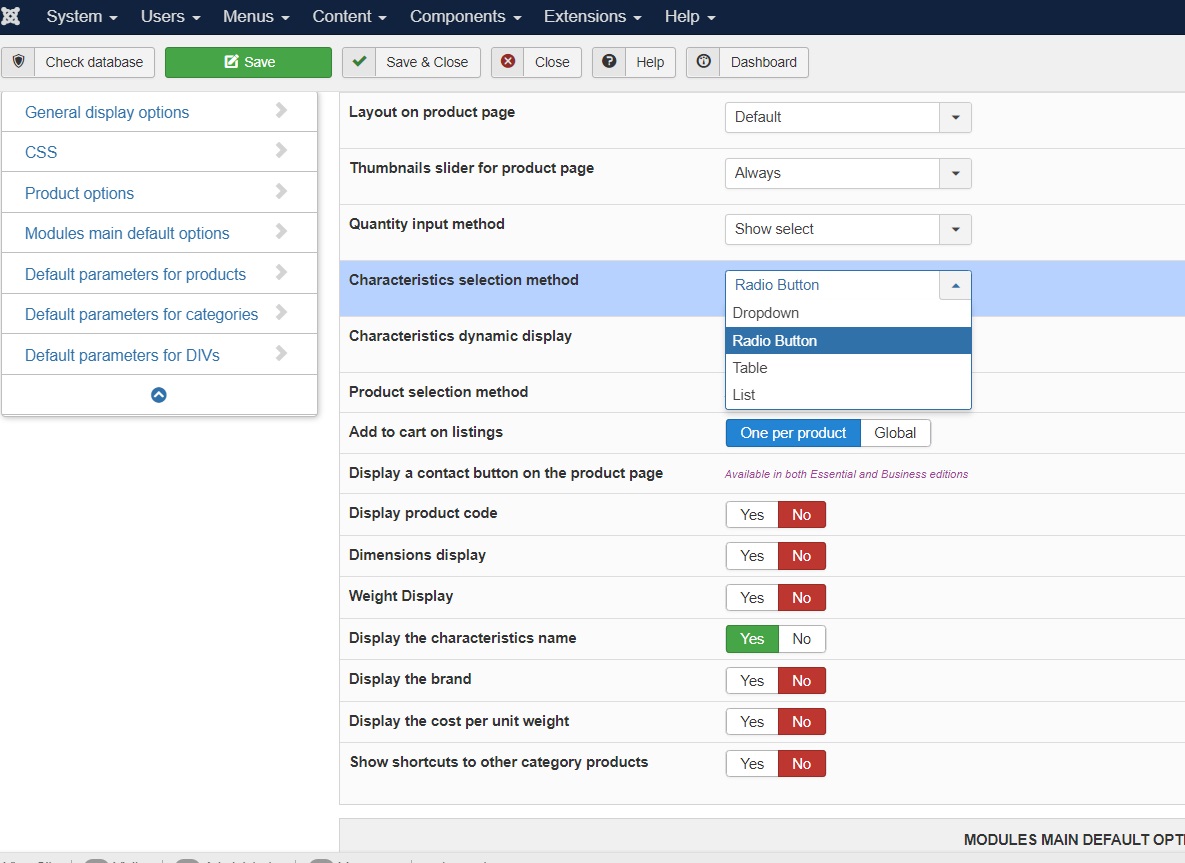
- where do i find the css to change product font size please? I am not a coder so I am struggling a bit.
also my hikashop is 4.4.2 but joomla says there is no update available yet.
-- Joomla version -- : Joomla! 3.9.27 Stable
-- PHP version -- : 7.4.20
-- Browser(s) name and version -- : Version 91.0.4472.77 (Official Build) (64-bit)
-- Error-message(debug-mod must be tuned on) -- : no check box on product page only radio button
hika shop uploads multiple versions of the same image in the variant section
where do i find the css to change product font size please? I am not a coder so I am struggling a bit.
also my hikashop is 4.4.2 but joomla says there is no update available!
Hi there,
the issues I am having are the following:
- no check box on product page only radio button
- hika shop uploads multiple versions of the same image in the variant section
- where do i find the css to change product font size please? I am not a coder so I am struggling a bit.
also my hikashop is 4.4.2 but joomla says there is no update available yet.
Please Log in or Create an account to join the conversation.

5 years 3 months ago #333480
by nicolas
Replied by nicolas on topic no checkbox on product page
Hi,
- The characteristic selection method is only for the frontend.
In the backend, it's always a dropdown. Also, you usually don't have to use these dropdowns since you usually generate the variants from the characteristic values selectors and then delete the variants you don't need. Changing the selected values can be done but it's normally quite rare to use them.
- The issue with the image upload on variants has been fixed on our end. You need to update to HikaShop 4.4.3. The update is not yet activated as "automatic" as we're waiting for more feedback on it. In the mean time, if you wish to update, you can download the install package of the 4.4.3 on our website and install it on yours.
- HikaShop doesn't define any font size. That's usually defined by the Joomla template you're using.
So what to do exactly will usually depends on how your Joomla template is done and what you want to change exactly. So I'm afraid I can't provide a useful answer there besides telling you to contact your template support and make sure you specify precisely what you want to change where.
- The characteristic selection method is only for the frontend.
In the backend, it's always a dropdown. Also, you usually don't have to use these dropdowns since you usually generate the variants from the characteristic values selectors and then delete the variants you don't need. Changing the selected values can be done but it's normally quite rare to use them.
- The issue with the image upload on variants has been fixed on our end. You need to update to HikaShop 4.4.3. The update is not yet activated as "automatic" as we're waiting for more feedback on it. In the mean time, if you wish to update, you can download the install package of the 4.4.3 on our website and install it on yours.
- HikaShop doesn't define any font size. That's usually defined by the Joomla template you're using.
So what to do exactly will usually depends on how your Joomla template is done and what you want to change exactly. So I'm afraid I can't provide a useful answer there besides telling you to contact your template support and make sure you specify precisely what you want to change where.
Please Log in or Create an account to join the conversation.
Time to create page: 0.190 seconds