
unable to add pricing to new product & variants

5 years 3 months ago #334311
by khotso
unable to add pricing to new product & variants was created by khotso
-- HikaShop version -- : 4.4.3
-- Joomla version -- : 3.9.28
-- PHP version -- : 7.4.20
-- Browser(s) name and version -- : google chrome 91.0.4472.124
-- Error-message(debug-mod must be tuned on) -- : n/a
Hi Team
when adding a new product to my category I am unable to add a price to each variant I also have problem setting up pricing for the product.
previous products set up before the upgrade was able to set prices without any problem
Thanks
-- Joomla version -- : 3.9.28
-- PHP version -- : 7.4.20
-- Browser(s) name and version -- : google chrome 91.0.4472.124
-- Error-message(debug-mod must be tuned on) -- : n/a
Hi Team
when adding a new product to my category I am unable to add a price to each variant I also have problem setting up pricing for the product.
previous products set up before the upgrade was able to set prices without any problem
Thanks
Please Log in or Create an account to join the conversation.

Less
More
- Posts: 12953
- Thank you received: 1778
5 years 3 months ago - 5 years 3 months ago #334328
by Mohamed Thelji
Replied by Mohamed Thelji on topic unable to add pricing to new product & variants
Hello,
Can you give us more information through some screenshots about how you set you product's price and what happens when you press save ? Did you have any error message ?
Kind regards,
Mohamed
Can you give us more information through some screenshots about how you set you product's price and what happens when you press save ? Did you have any error message ?
Kind regards,
Mohamed
Last edit: 5 years 3 months ago by Mohamed Thelji.
Please Log in or Create an account to join the conversation.
5 years 3 months ago #334388
by khotso
Replied by khotso on topic unable to add pricing to new product & variants
see attached to the earlier email
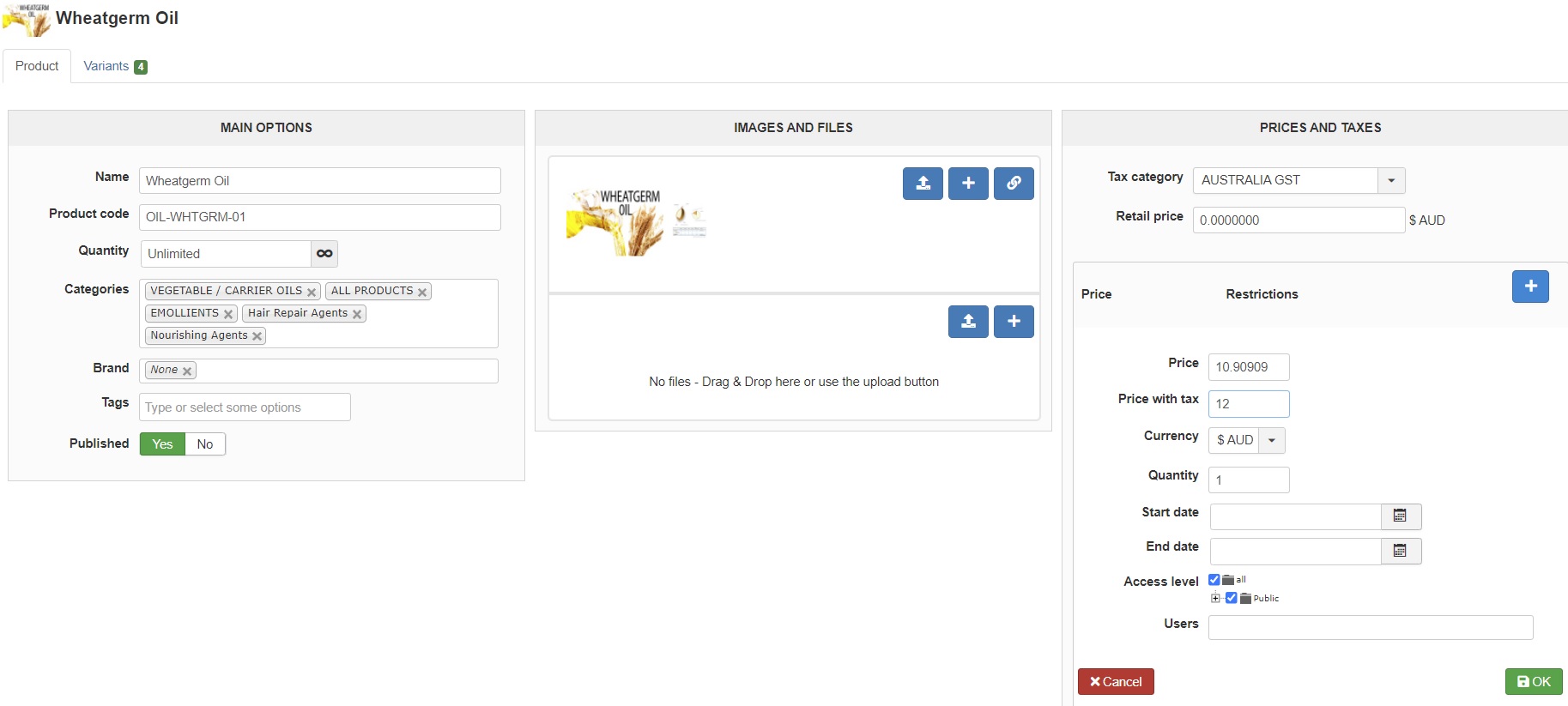
pricing update manually price added via price and taxes tab
price added as GST/VAT paid screen shot 2
tabbed through and then main" save" button pressed ; this then reverts to main tab and upon checking finds no pricing updated on the appropriate variant as per screenshot 3
similar when trying to press the ÓK' on the price and taxes field
no error message received
pricing update manually price added via price and taxes tab
price added as GST/VAT paid screen shot 2
tabbed through and then main" save" button pressed ; this then reverts to main tab and upon checking finds no pricing updated on the appropriate variant as per screenshot 3
similar when trying to press the ÓK' on the price and taxes field
no error message received
Please Log in or Create an account to join the conversation.

5 years 3 months ago #334393
by nicolas
Replied by nicolas on topic unable to add pricing to new product & variants
Hi,
I'm not sure what you mean.
If you enter the price in the main product, it won't appear in the listing of the variants in the "variants" tab of the product.
However, it will still be used by the variants on the frontend.
If you want to see a price for each variant in the variants listing, you need to edit each variant on that listing and enter the price for each one in the edit area that will appear after on click on the edit icon of each variant.
I'm not sure what you mean.
If you enter the price in the main product, it won't appear in the listing of the variants in the "variants" tab of the product.
However, it will still be used by the variants on the frontend.
If you want to see a price for each variant in the variants listing, you need to edit each variant on that listing and enter the price for each one in the edit area that will appear after on click on the edit icon of each variant.
Please Log in or Create an account to join the conversation.
5 years 3 months ago #334507
by khotso
Replied by khotso on topic unable to add pricing to new product & variants
Hi Team
will go through my workflow for this
1 select product main tab
2 then select the variant tab
3 select a specific variant
4 complete the pricing
5 save
have now reloaded the latest update/download file but this still does not allow me to make pricing modification
appreciate the input
will go through my workflow for this
1 select product main tab
2 then select the variant tab
3 select a specific variant
4 complete the pricing
5 save
have now reloaded the latest update/download file but this still does not allow me to make pricing modification
appreciate the input
Please Log in or Create an account to join the conversation.
5 years 3 months ago #334517
by nicolas
Replied by nicolas on topic unable to add pricing to new product & variants
Hi,
I'm not able to reproduce the issue.
However, I would recommend that when you edit a price, you click on the OK button at the end of the price form, before you save.
And when you save the variant, you should do it with the "save" button on the right side of the screen, not the one at the top, which is for the main product data.
Please try like that.
I'm not able to reproduce the issue.
However, I would recommend that when you edit a price, you click on the OK button at the end of the price form, before you save.
And when you save the variant, you should do it with the "save" button on the right side of the screen, not the one at the top, which is for the main product data.
Please try like that.
Please Log in or Create an account to join the conversation.
5 years 3 months ago #334604
by khotso
Replied by khotso on topic unable to add pricing to new product & variants
Thank you; yes looks as if I messed up by not using the save on RHS of the screen
working now as should
working now as should
Please Log in or Create an account to join the conversation.
Time to create page: 0.099 seconds