

- Posts: 214
- Thank you received: 21
Problem editing product under PHP8
5 years 1 month ago - 5 years 1 month ago #335782
by LOCELO
Problem editing product under PHP8 was created by LOCELO
-- HikaShop version -- : 4.4.3
-- Joomla version -- : 3.10.2
-- PHP version -- : 8.0.10
Hello,
I have a problem with PHP8 8.0.10 when editing a product in backend.
url : /administrator/index.php?option=com_hikashop&ctrl=product&task=edit&cid[]=1390
Template Isis, same problem whatever the product.
The error disappears under PHP 7.4
All other backend links seem to work normally.with PHP 8 sa far as I can see, creating a new product is OK
Patrick
-- Joomla version -- : 3.10.2
-- PHP version -- : 8.0.10
Hello,
I have a problem with PHP8 8.0.10 when editing a product in backend.
url : /administrator/index.php?option=com_hikashop&ctrl=product&task=edit&cid[]=1390
An error has occurred
0 Cannot access offset of type string on string
Back to the control panel
Template Isis, same problem whatever the product.
The error disappears under PHP 7.4
All other backend links seem to work normally.with PHP 8 sa far as I can see, creating a new product is OK
Patrick
Last edit: 5 years 1 month ago by LOCELO.
Please Log in or Create an account to join the conversation.

5 years 1 month ago #335791
by nicolas
Replied by nicolas on topic Problem editing product under PHP8
Hi,
Can you reproduce the issue after activating the "error reporting" and "debug mode" of the Joomla configuration page ?
That will allow you to get the full error message along with the callstack.
That would help us better understand what's going on in order to provide a fix.
Can you reproduce the issue after activating the "error reporting" and "debug mode" of the Joomla configuration page ?
That will allow you to get the full error message along with the callstack.
That would help us better understand what's going on in order to provide a fix.
Please Log in or Create an account to join the conversation.
5 years 1 month ago #335795
by LOCELO
Replied by LOCELO on topic Problem editing product under PHP8
Hi;,
Here is the screenshot of the error page.
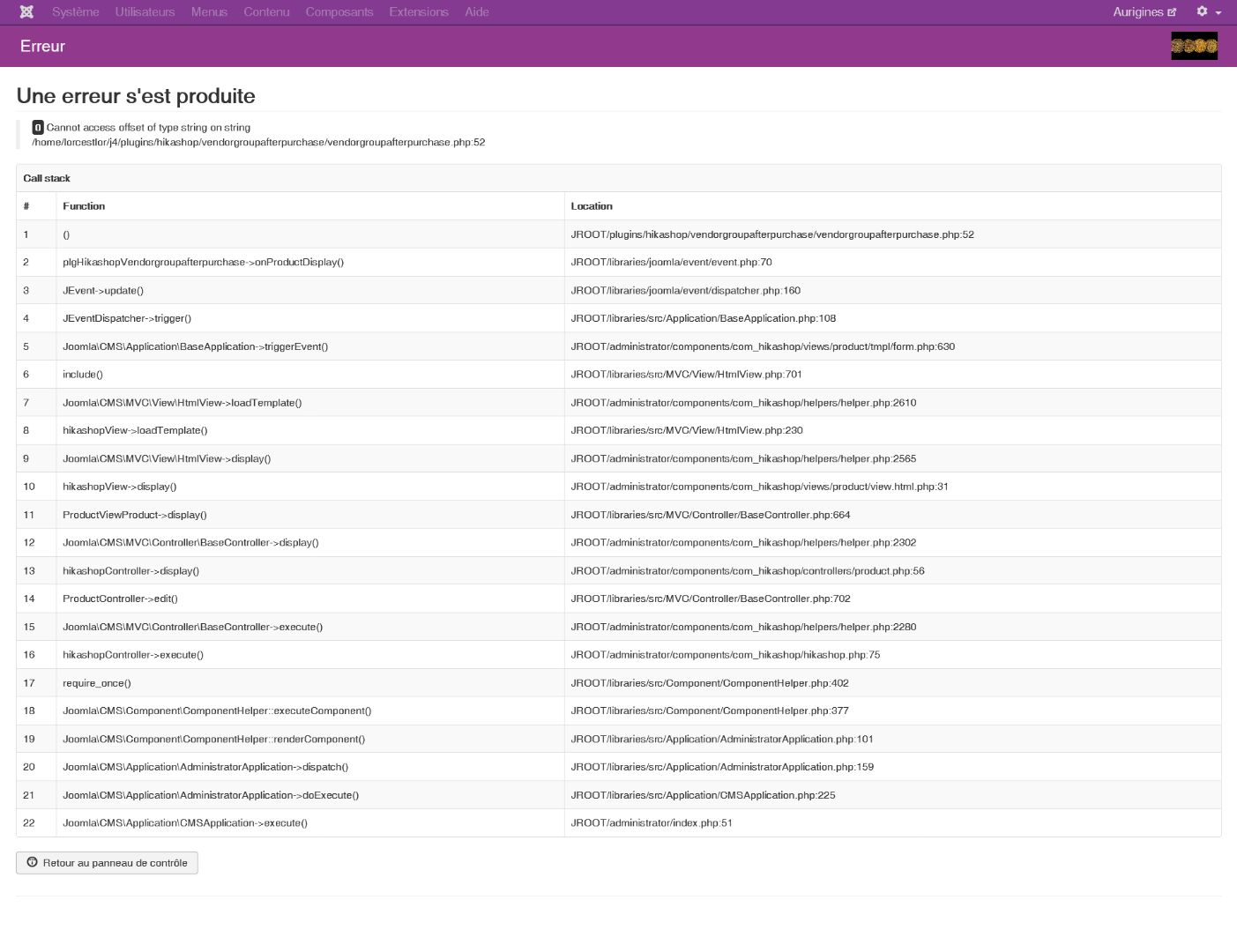
Here is the screenshot of the error page.
Please Log in or Create an account to join the conversation.

5 years 1 month ago #335799
by Jerome
Jerome - Obsidev.com
HikaMarket & HikaSerial developer / HikaShop core dev team.
Replied by Jerome on topic Problem editing product under PHP8
Hello,
That's an issue with the HikaMarket plugin "vendorgroupafterpuchase".
You need to edit the plugin and replace the line
By
It will avoid that "product_vendor_params" be considered as a string.
We will add that patch in the HIkaMarket package too.
Regards,
That's an issue with the HikaMarket plugin "vendorgroupafterpuchase".
You need to edit the plugin and replace the line
Code:
if(!empty($product->product_vendor_params) && is_string($product->product_vendor_params))
Code:
if(empty($product->product_vendor_params))
$product->product_vendor_params = array();
if(!empty($product->product_vendor_params) && is_string($product->product_vendor_params))
We will add that patch in the HIkaMarket package too.
Regards,
Jerome - Obsidev.com
HikaMarket & HikaSerial developer / HikaShop core dev team.
The following user(s) said Thank You: LOCELO
Please Log in or Create an account to join the conversation.
5 years 1 month ago #335802
by LOCELO
Replied by LOCELO on topic Problem editing product under PHP8
It's OK !
Thank you!
Regards
Thank you!
Regards
Please Log in or Create an account to join the conversation.
4 years 10 months ago #338036
by Barnard
Replied by Barnard on topic Problem editing product under PHP8
Ok looks like a similar problem so I'm tagging it onto this thread.
J 3.10.4
PHP 8.0.13
In the backend I can see the list of orders but get an error once I click on one.
An error has occurred.
0 Cannot access offset of type string on string
Can you see whats going wrong from the attachments?
(Note: this error only happens on PHP 8.0.13. If I roll back to PHP 7.4.26 orders can be viewed. )
Cheers
Rich
J 3.10.4
PHP 8.0.13
In the backend I can see the list of orders but get an error once I click on one.
An error has occurred.
0 Cannot access offset of type string on string
Can you see whats going wrong from the attachments?
(Note: this error only happens on PHP 8.0.13. If I roll back to PHP 7.4.26 orders can be viewed. )
Cheers
Rich
Please Log in or Create an account to join the conversation.
4 years 10 months ago #338050
by nicolas
Replied by nicolas on topic Problem editing product under PHP8
Hi,
The error seems to be linked to a custom field of the type "custom text".
Add the code:
just before the code of the line 2129 of the error message in administrator/components/com_hikashop/classes/field.php and it should fix the problem.
Let us know how it goes so that we can include this on our end.
The error seems to be linked to a custom field of the type "custom text".
Add the code:
Code:
if(empty($field->field_options))
return '';
if(is_string($field->field_options))
$field->field_options = hikashop_unserialize($field->field_options);
Let us know how it goes so that we can include this on our end.
Please Log in or Create an account to join the conversation.
4 years 10 months ago #338058
by Barnard
Replied by Barnard on topic Problem editing product under PHP8
yes that's fixed the error. thank you
The following user(s) said Thank You: nicolas
Please Log in or Create an account to join the conversation.
Less
More
- Posts: 2
- Thank you received: 0
3 years 10 months ago #347616
by dharmitpatel316@gmail.com
Replied by dharmitpatel316@gmail.com on topic Problem editing product under PHP8
Hello, I have a similar issue where, when I upgrade PHP to 8.x from 7.4.x, when viewing product page under Hikashop-> Product -> Click on any existing product to edit, it shows blank page with bunch of text with no formatting.
Errors from inspect element is attached to the thread.
I am able to fix this by going back to 7.4.x
Joomla 3.10.11
Hikashop is 4.7
Hikamarket 4.1.1
PHP 7.4.x
Error in PHP 8.X
Errors from inspect element is attached to the thread.
I am able to fix this by going back to 7.4.x
Joomla 3.10.11
Hikashop is 4.7
Hikamarket 4.1.1
PHP 7.4.x
Error in PHP 8.X
Please Log in or Create an account to join the conversation.
3 years 10 months ago #347620
by nicolas
Replied by nicolas on topic Problem editing product under PHP8
Hi,
First, please activate the "debug" setting of the Joomla configuration and try again.
You'll get an error message at the bottom of that error page which will explain where the problem is. Please provide the full error message there and we should be able to tell you what to do.
Looking at the screenshot of the working product edit page, it seems you're using JCE for your HTML editor, and since it happens only on the product edit page and not on the listing, it might be that you didn't update JCE and the version you have is not compatible with PHP8. But I can't say for sure without the error message.
First, please activate the "debug" setting of the Joomla configuration and try again.
You'll get an error message at the bottom of that error page which will explain where the problem is. Please provide the full error message there and we should be able to tell you what to do.
Looking at the screenshot of the working product edit page, it seems you're using JCE for your HTML editor, and since it happens only on the product edit page and not on the listing, it might be that you didn't update JCE and the version you have is not compatible with PHP8. But I can't say for sure without the error message.
Please Log in or Create an account to join the conversation.
Less
More
- Posts: 2
- Thank you received: 0
3 years 10 months ago #347638
by dharmitpatel316@gmail.com
Replied by dharmitpatel316@gmail.com on topic Problem editing product under PHP8
The problem I ran into by doing the debug settings is that, it won't even load the debug module on the webpage causing me not to get the full error message that will help us.
Although, I took your suggestion on JCE and upgraded it to the latest one JCE Pro 2.9.32 and then upgraded PHP to latest one PHP 8.2.0 and now it is working like a charm without any issues.
Also, What else I noticed is that JCE plugin was not working fine if I upgrade the PHP prior to the JCP upgrade.
This is the issue I was trying to resolve. Thank you very much.
Thanks
Dharmit
Although, I took your suggestion on JCE and upgraded it to the latest one JCE Pro 2.9.32 and then upgraded PHP to latest one PHP 8.2.0 and now it is working like a charm without any issues.
Also, What else I noticed is that JCE plugin was not working fine if I upgrade the PHP prior to the JCP upgrade.
This is the issue I was trying to resolve. Thank you very much.
Thanks
Dharmit
Please Log in or Create an account to join the conversation.
Time to create page: 0.133 seconds