

- Posts: 58
- Thank you received: 2
1054 - Unknown column 'order_product_price_before_discount' in 'field list'
4 years 6 months ago #341365
by westernex
1054 - Unknown column 'order_product_price_before_discount' in 'field list' was created by westernex
-- url of the page with the problem -- :
westernex.com.au
-- HikaShop version -- : 4.5.1
-- Joomla version -- : 3.10.8
-- PHP version -- : 8.0.18
Customers can not order when they send their oder off, they receive: 1054 - Unknown column 'order_product_price_before_discount' in 'field list'
This could be related to updating the website to the latest Hikashop version, not sure.
The debug reporting does not seem to have anything unusual and the error reporting is set to maximum. There is no error message.
-- HikaShop version -- : 4.5.1
-- Joomla version -- : 3.10.8
-- PHP version -- : 8.0.18
Customers can not order when they send their oder off, they receive: 1054 - Unknown column 'order_product_price_before_discount' in 'field list'
This could be related to updating the website to the latest Hikashop version, not sure.
The debug reporting does not seem to have anything unusual and the error reporting is set to maximum. There is no error message.
Please Log in or Create an account to join the conversation.

4 years 6 months ago #341366
by nicolas
Replied by nicolas on topic 1054 - Unknown column 'order_product_price_before_discount' in 'field list'
Hi,
This indicates a problem with the update process.
Please click on the "check database" button in the HikaShop configuration and it should fix the problem.
This indicates a problem with the update process.
Please click on the "check database" button in the HikaShop configuration and it should fix the problem.
Please Log in or Create an account to join the conversation.
4 years 6 months ago #341367
by westernex
Replied by westernex on topic 1054 - Unknown column 'order_product_price_before_discount' in 'field list'
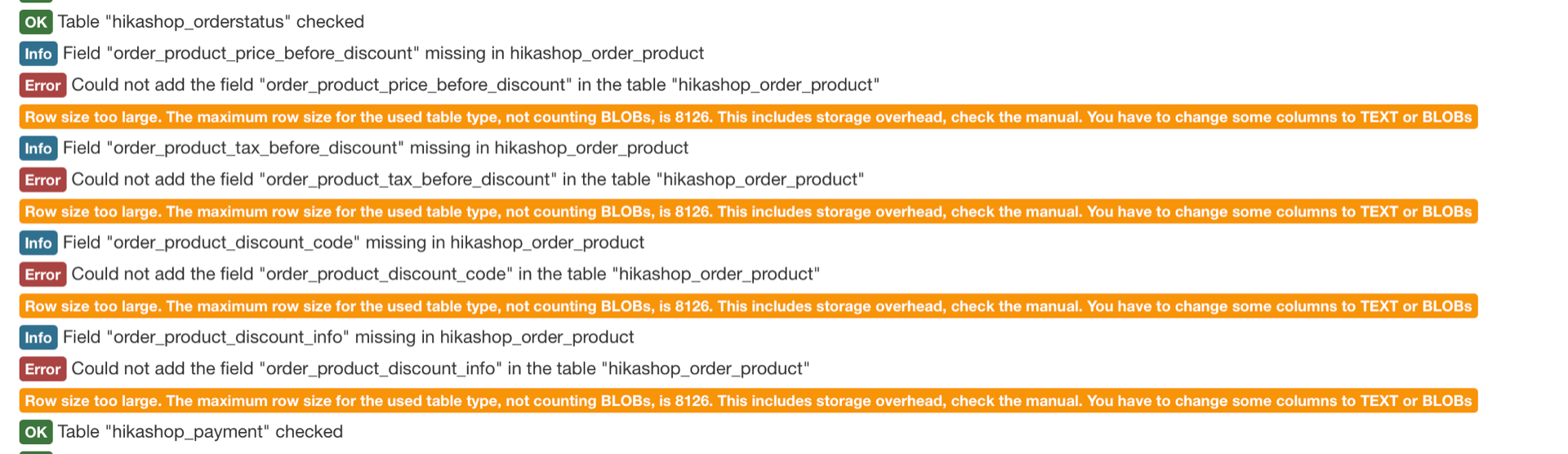
This is what I see when I run the CHECK DATABASE function:
Please Log in or Create an account to join the conversation.
4 years 6 months ago - 4 years 6 months ago #341368
by nicolas
Replied by nicolas on topic 1054 - Unknown column 'order_product_price_before_discount' in 'field list'
Hi,
This indicates that you have too many columns in the hikashop_order_product and hikashop_cart_product tables.
I suppose that you must have created and deleted a lot of custom item fields in the past.
Go in your PHPMyAdmin and open these two tables and delete the columns of previously deleted custom item fields and it will then allow you to run the "check database" and the checkout will work again.
This indicates that you have too many columns in the hikashop_order_product and hikashop_cart_product tables.
I suppose that you must have created and deleted a lot of custom item fields in the past.
Go in your PHPMyAdmin and open these two tables and delete the columns of previously deleted custom item fields and it will then allow you to run the "check database" and the checkout will work again.
Last edit: 4 years 6 months ago by nicolas.
Please Log in or Create an account to join the conversation.
4 years 6 months ago #341370
by westernex
Replied by westernex on topic 1054 - Unknown column 'order_product_price_before_discount' in 'field list'
Just to be clear, I can delete all the records in these two tables? Right?
Please Log in or Create an account to join the conversation.
4 years 6 months ago #341372
by nicolas
Replied by nicolas on topic 1054 - Unknown column 'order_product_price_before_discount' in 'field list'
No. Not the records. I'm talking about the columns.
You need to check the structure of the tables and you'll see all the columns.
www.hostgator.com/help/article/dropping-...-table-in-phpmyadmin
You need to check the structure of the tables and you'll see all the columns.
www.hostgator.com/help/article/dropping-...-table-in-phpmyadmin
Please Log in or Create an account to join the conversation.
4 years 6 months ago #341375
by westernex
Replied by westernex on topic 1054 - Unknown column 'order_product_price_before_discount' in 'field list'
I got the columns - what do I actually delete now? There were many different people adding to this over the years. Thank you
hikashop_order_product
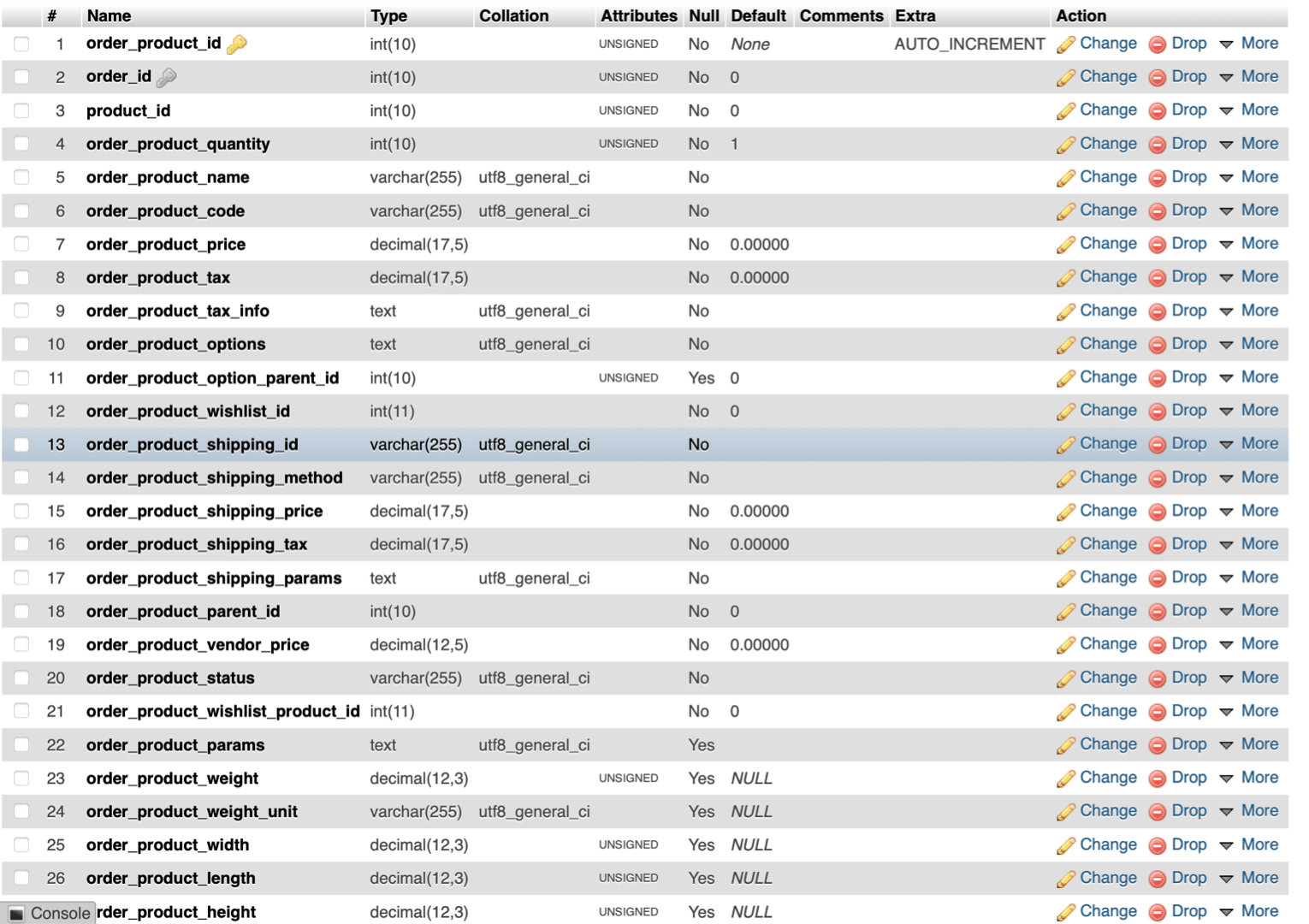
hikashop_cart_product
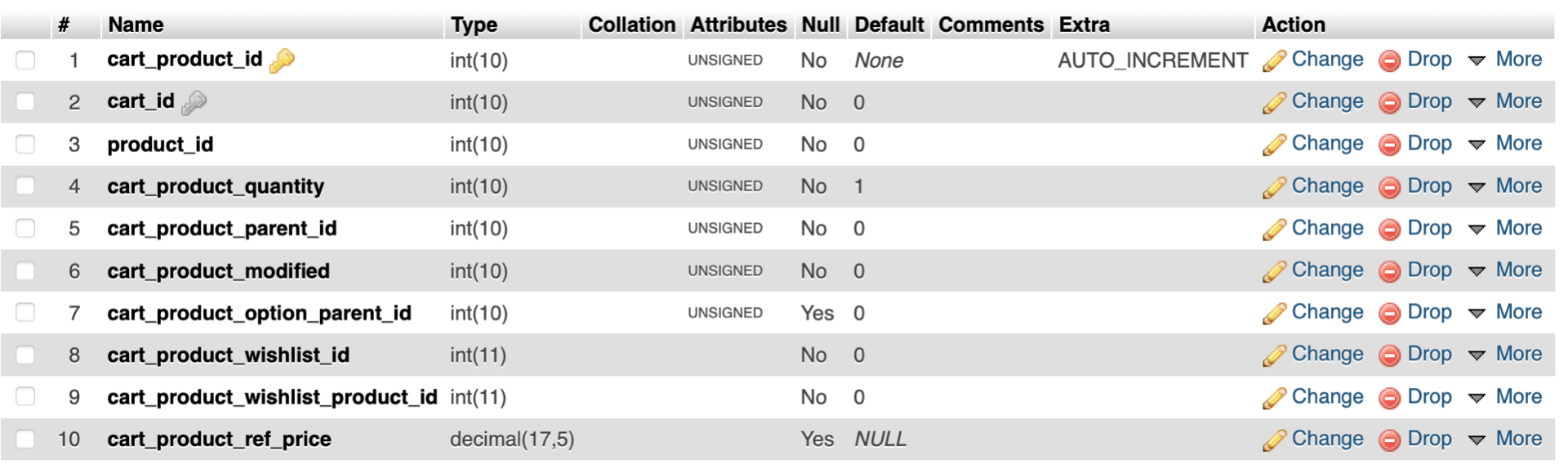
hikashop_order_product
hikashop_cart_product
Please Log in or Create an account to join the conversation.
4 years 6 months ago #341376
by nicolas
Replied by nicolas on topic 1054 - Unknown column 'order_product_price_before_discount' in 'field list'
Hi,
These are the default columns of the tables. Don't you have more columns in these tables ?
If not, then it's not a deleted custom field issue but a MySQL server setup issue.
Here is a page talking about this:
stackoverflow.com/questions/15585602/cha...l-row-size-too-large
There are several solutions proposed there.
The simplest is to run a small MySQL query to change the ROW_FORMAT of the tables:
ALTER TABLE `my_table` ROW_FORMAT=DYNAMIC;
However, this might not help and you might need to add an extra option like:
innodb_strict_mode=0
in your my.cnf file (the configuration file for the MySQL server).
But there are more potential solutions provided on that link.
Basically, it will require some tests to find what is the solution that works for you as it depends on how your MySQL server is configured.
These are the default columns of the tables. Don't you have more columns in these tables ?
If not, then it's not a deleted custom field issue but a MySQL server setup issue.
Here is a page talking about this:
stackoverflow.com/questions/15585602/cha...l-row-size-too-large
There are several solutions proposed there.
The simplest is to run a small MySQL query to change the ROW_FORMAT of the tables:
ALTER TABLE `my_table` ROW_FORMAT=DYNAMIC;
However, this might not help and you might need to add an extra option like:
innodb_strict_mode=0
in your my.cnf file (the configuration file for the MySQL server).
But there are more potential solutions provided on that link.
Basically, it will require some tests to find what is the solution that works for you as it depends on how your MySQL server is configured.
Please Log in or Create an account to join the conversation.
4 years 6 months ago #341382
by westernex
Replied by westernex on topic 1054 - Unknown column 'order_product_price_before_discount' in 'field list'
I will need to create a test environment.
Feeling a little out of dept - is there a possibility to receive support?
Feeling a little out of dept - is there a possibility to receive support?
Please Log in or Create an account to join the conversation.
4 years 6 months ago #341384
by nicolas
Replied by nicolas on topic 1054 - Unknown column 'order_product_price_before_discount' in 'field list'
Hi,
I can work on it, yes. However, it requires backend access, PHPMyAdmin access and server access (if the mysql configuration needs to be changed. So that means SSH access, or cpanel. Basically, what your hosting provided you to manage your server).
Also, please understand that this is the realm of server setup, not HikaShop user support.
So first, it's not my expertise. I know quite a bit about server management, but my speciality is HikaShop/Joomla/PHP/JS.
I'll basically try the different solutions proposed on the link I gave you and potentially do some more research on what the solution could be.
And second, I'll have to charge you extra for the time spent looking into. I expect it will be around 100€. Less if I can find a solution quickly, more if I need to spend several hours on it.
You can use our contact form to provide the credentials if you're ok with that:
www.hikashop.com/support/contact-us.html
Make sure you provide the URL of this forum thread for reference in your message.
I can work on it, yes. However, it requires backend access, PHPMyAdmin access and server access (if the mysql configuration needs to be changed. So that means SSH access, or cpanel. Basically, what your hosting provided you to manage your server).
Also, please understand that this is the realm of server setup, not HikaShop user support.
So first, it's not my expertise. I know quite a bit about server management, but my speciality is HikaShop/Joomla/PHP/JS.
I'll basically try the different solutions proposed on the link I gave you and potentially do some more research on what the solution could be.
And second, I'll have to charge you extra for the time spent looking into. I expect it will be around 100€. Less if I can find a solution quickly, more if I need to spend several hours on it.
You can use our contact form to provide the credentials if you're ok with that:
www.hikashop.com/support/contact-us.html
Make sure you provide the URL of this forum thread for reference in your message.
Please Log in or Create an account to join the conversation.
4 years 6 months ago #341387
by westernex
Replied by westernex on topic 1054 - Unknown column 'order_product_price_before_discount' in 'field list'
Sent you an email.
Please Log in or Create an account to join the conversation.
4 years 6 months ago #341388
by nicolas
Replied by nicolas on topic 1054 - Unknown column 'order_product_price_before_discount' in 'field list'
Hi,
You're in luck. I was able to fix the problem by just runing the MySQL query I was talking about in your PHPMyAdmin.
After that, the "check database" button worked its magic and I was able to finish an order on your checkout without problem.
I won't charge anything as it only took me 2 minutes.
You're in luck. I was able to fix the problem by just runing the MySQL query I was talking about in your PHPMyAdmin.
After that, the "check database" button worked its magic and I was able to finish an order on your checkout without problem.
I won't charge anything as it only took me 2 minutes.
The following user(s) said Thank You: westernex
Please Log in or Create an account to join the conversation.
4 years 6 months ago #341389
by westernex
Replied by westernex on topic 1054 - Unknown column 'order_product_price_before_discount' in 'field list'
Nicolas, you are a champion!!! Thank you very much!
Please Log in or Create an account to join the conversation.
Time to create page: 0.115 seconds