

- Posts: 52
- Thank you received: 4
Show totalprices op prodict card
4 years 3 months ago #342338
by Ginius
Show totalprices op prodict card was created by Ginius
Try to post again. Last one was removed.
I like to have on the product page a total price of the product on the moment the user enters the amount of products.
See attachment for example:
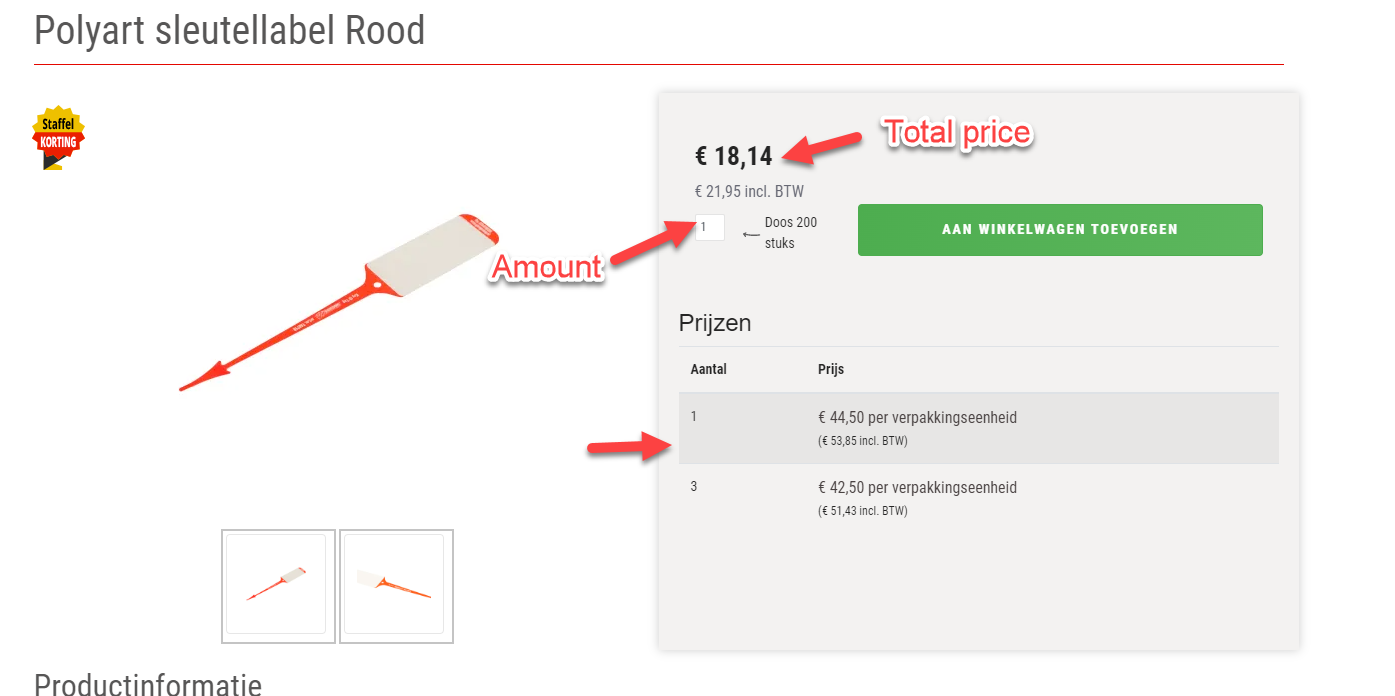
Is this already an option in HikaShop. If not is it possible?
I like to have on the product page a total price of the product on the moment the user enters the amount of products.
See attachment for example:
Is this already an option in HikaShop. If not is it possible?
Please Log in or Create an account to join the conversation.

4 years 3 months ago - 4 years 3 months ago #342340
by Philip
Replied by Philip on topic Show totalprices op prodict card
Hello,
We see 2 solutions for have what you requested :
1. You can use the option plugin, if you have elements to added to your main products, such as accessories, equipment or spare parts.
See this documentation to learn more about this.
2. If you use the Characteristics to generate variant from your main product (learn more about Characteristic/variants, here )
When you will have generated variants, it will be possible to enter for each variants a different price.
Later, when user will select different variant, price will be automatically change, before the add to cart and the checkout process.
Hope this will help you to achieved what you need.
Regards
We see 2 solutions for have what you requested :
1. You can use the option plugin, if you have elements to added to your main products, such as accessories, equipment or spare parts.
See this documentation to learn more about this.
2. If you use the Characteristics to generate variant from your main product (learn more about Characteristic/variants, here )
When you will have generated variants, it will be possible to enter for each variants a different price.
Later, when user will select different variant, price will be automatically change, before the add to cart and the checkout process.
Hope this will help you to achieved what you need.
Regards
Last edit: 4 years 3 months ago by Philip.
Please Log in or Create an account to join the conversation.
4 years 3 months ago #342345
by Ginius
Replied by Ginius on topic Show totalprices op prodict card
Could be I misunderstand you, but what i mean is that it is a normal product.
If I enter an amount of 1 the showed price is 44,50.
If I enter 2 the showed price is 2 x 44,50 = 89,00
If I enter 3 the showed price is 3 x 43,50 = 130,50
The showed price is on the product sheet. Already before adding it to the shopping basket.Just like the variant versions.
So it is easy, just the ammount time the graduated price (staffel).
If I enter an amount of 1 the showed price is 44,50.
If I enter 2 the showed price is 2 x 44,50 = 89,00
If I enter 3 the showed price is 3 x 43,50 = 130,50
The showed price is on the product sheet. Already before adding it to the shopping basket.Just like the variant versions.
So it is easy, just the ammount time the graduated price (staffel).
Please Log in or Create an account to join the conversation.
4 years 3 months ago #342346
by Ginius
Replied by Ginius on topic Show totalprices op prodict card
Could be I misunderstand you, but what i mean is that it is a normal product.
If I enter an amount of 1 the showed price is 44,50.
If I enter 2 the showed price is 2 x 44,50 = 89,00
If I enter 3 the showed price is 3 x 43,50 = 130,50
The showed price is on the product sheet. Already before adding it to the shopping basket.Just like the variant versions.
So it is easy, just the ammount time the graduated price (staffel).
If I enter an amount of 1 the showed price is 44,50.
If I enter 2 the showed price is 2 x 44,50 = 89,00
If I enter 3 the showed price is 3 x 43,50 = 130,50
The showed price is on the product sheet. Already before adding it to the shopping basket.Just like the variant versions.
So it is easy, just the ammount time the graduated price (staffel).
Please Log in or Create an account to join the conversation.

4 years 3 months ago #342351
by nicolas
Replied by nicolas on topic Show totalprices op prodict card
Hi,
There is no option in HikaShop to do that.
However, it's possible with a bit of javascript added to the product page.
Something like that:
You can put that at the top of the product / show view file via the menu Display>Views.
There is no option in HikaShop to do that.
However, it's possible with a bit of javascript added to the product page.
Something like that:
Code:
<script>
document.getElementById('hikashop_product_quantity_field_1').addEventListener('input', function(event){
var total_price = parseFloat(this.value)*parseFloat(document.querySelector('[itemprop="price"]').getAttribute('content'));
document.getElementById('hikashop_product_price_with_options_main').innerHTML = 'Total price: € ' + total_price;
});
</script>
Please Log in or Create an account to join the conversation.
Time to create page: 0.212 seconds