
Published/Unpublished Icon in Admin missing after J4 update

4 years 3 months ago #343786
by jazzmang
-- HikaShop version -- : 4.6.1
-- Joomla version -- : 4.1.5
-- PHP version -- : 8.1.
-- Browser(s) name and version -- : Any
It doesn't matter if it is a category, product, or anything with a publish, but the product listing view is attached.
I've used Firefox, which shows where the icon should be (Edge/Chome will show nothing).
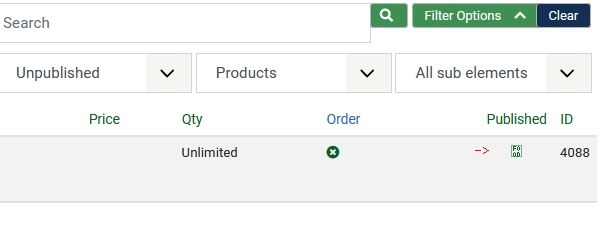
All other font awesome icons appear.
The CSS code doesn't appear to be using the new Font Awesome 5 but instead the IcoMoon, which is no longer in the default Joomla admin template Atum. Here is the class on the A tag:
class="icon-publish"
I'm not sure if that is supposed to be "fa fa-edit" or what, but without the font call, it makes it hard to work with.
I re-installed today's build of HikaShop 4.6.1 just to make sure something wasn't updated but still cannot see the proper icon.
Show just fine in J3, but then the default template has IcoMoon.
-- Joomla version -- : 4.1.5
-- PHP version -- : 8.1.
-- Browser(s) name and version -- : Any
It doesn't matter if it is a category, product, or anything with a publish, but the product listing view is attached.
I've used Firefox, which shows where the icon should be (Edge/Chome will show nothing).
All other font awesome icons appear.
The CSS code doesn't appear to be using the new Font Awesome 5 but instead the IcoMoon, which is no longer in the default Joomla admin template Atum. Here is the class on the A tag:
class="icon-publish"
I'm not sure if that is supposed to be "fa fa-edit" or what, but without the font call, it makes it hard to work with.
I re-installed today's build of HikaShop 4.6.1 just to make sure something wasn't updated but still cannot see the proper icon.
Show just fine in J3, but then the default template has IcoMoon.
Please Log in or Create an account to join the conversation.

4 years 2 months ago - 4 years 2 months ago #343790
by Philip
Replied by Philip on topic Published/Unpublished Icon in Admin missing after J4 update
Hello,
Usually this may be caused by the font-awesome library not being loaded on the page. That's the library used by HikaShop to display the icons of the buttons and edition links that you don't see anymore.
Now, your specific issue, is quite strange because, if I understand you well you have this issue only for this page AND this icon only...
We would need a backend access to check the situation on the page to be able to tell you.
This can be linked to another extension or even the template you're using which has its own font-awesome which breaks ours.
Note : Use our Contact us form to provide these elements, and add an Url link to this topic (to keep the link)
Awaiting your elements to progress on your subject.
Regards
Usually this may be caused by the font-awesome library not being loaded on the page. That's the library used by HikaShop to display the icons of the buttons and edition links that you don't see anymore.
Now, your specific issue, is quite strange because, if I understand you well you have this issue only for this page AND this icon only...
We would need a backend access to check the situation on the page to be able to tell you.
This can be linked to another extension or even the template you're using which has its own font-awesome which breaks ours.
Note : Use our Contact us form to provide these elements, and add an Url link to this topic (to keep the link)
Awaiting your elements to progress on your subject.
Regards
Last edit: 4 years 2 months ago by Philip.
Please Log in or Create an account to join the conversation.
4 years 2 months ago - 4 years 2 months ago #343807
by jazzmang
Replied by jazzmang on topic Published/Unpublished Icon in Admin missing after J4 update
Not quite, as I mentioned, happens everywhere the published/unpublished icon is supposed to pop up.
However, I found the issue.
We use a custom user.css for the Joomla4 Atum Administrator template to help reduce some of the glare and super-sized look and feel. It is based on github.com/TheStyleGuyzTeam/J4Atum-user-css .
It had a class setting the font weight to 400, which only caused problems when combined in a table and a tag.
That's why it only was showing up in Hikashop. It was the exact right combo for that specific tag/location.
We adjusted for that, and it now appears fine.
However, I found the issue.
We use a custom user.css for the Joomla4 Atum Administrator template to help reduce some of the glare and super-sized look and feel. It is based on github.com/TheStyleGuyzTeam/J4Atum-user-css .
It had a class setting the font weight to 400, which only caused problems when combined in a table and a tag.
That's why it only was showing up in Hikashop. It was the exact right combo for that specific tag/location.
We adjusted for that, and it now appears fine.
Last edit: 4 years 2 months ago by jazzmang.
The following user(s) said Thank You: Philip
Please Log in or Create an account to join the conversation.

Less
More
- Posts: 15
- Thank you received: 1
2 years 5 months ago #361453
by cesarsupport
Replied by cesarsupport on topic Published/Unpublished Icon in Admin missing after J4 update
Hello.
Do you know if there is finally a solution for this problem ?
-- HikaShop version -- : 5.0.4
-- Joomla version -- : 5.1.1
-- PHP version -- : 8.3.
-- Browser(s) name and version -- : Any
Do you know if there is finally a solution for this problem ?
-- HikaShop version -- : 5.0.4
-- Joomla version -- : 5.1.1
-- PHP version -- : 8.3.
-- Browser(s) name and version -- : Any
Please Log in or Create an account to join the conversation.

2 years 4 months ago #361456
by nicolas
Replied by nicolas on topic Published/Unpublished Icon in Admin missing after J4 update
Hi,
While the result is similar, the cause is different.
The cause of the problem for @jazzmang was custom modifications to the Joomla backend template.
Your problem comes from changes made by Joomla with the release of the 5.1.0.
We had to adapt HikaShop on our end in order to cope with these new changes. The modifications have been added on our end:
www.hikashop.com/forum/product-category-...r-symbol/360934.html
So download the install package of HikaShop 5.0.4 on our website and install it on yours in order to get the patch and you won't have the problem anymore.
While the result is similar, the cause is different.
The cause of the problem for @jazzmang was custom modifications to the Joomla backend template.
Your problem comes from changes made by Joomla with the release of the 5.1.0.
We had to adapt HikaShop on our end in order to cope with these new changes. The modifications have been added on our end:
www.hikashop.com/forum/product-category-...r-symbol/360934.html
So download the install package of HikaShop 5.0.4 on our website and install it on yours in order to get the patch and you won't have the problem anymore.
Please Log in or Create an account to join the conversation.
Time to create page: 0.059 seconds