

- Posts: 94
- Thank you received: 0
How can I add a 5% surcharge to all orders at checkout
4 years 3 weeks ago #345152
by paul_sugg
How can I add a 5% surcharge to all orders at checkout was created by paul_sugg
Client wants to add a global 5% surcharge (for cost of fuel increase) at checkout - so customers shop and add products and when they view the cart for checkout the surcharge is added to all orders. This will apply to all users.
Thanks
Thanks
Please Log in or Create an account to join the conversation.

4 years 3 weeks ago - 4 years 3 weeks ago #345154
by Philip
Replied by Philip on topic How can I add a 5% surcharge to all orders at checkout
Hello,
The best way to proceed, can be to add in all your payment method a Percentage of 5%, in the Generic Configuration part.
Now, this will required maybe some adjustments like hide price aside payment method in checkout (via Css), Add a block Text in your Checkout Workflow in order to inform customers of this additional cost, and create an language override to modify the "payment fee" translation (see this documentation ).
Hope this will help you to achieved your need.
Regards
The best way to proceed, can be to add in all your payment method a Percentage of 5%, in the Generic Configuration part.
Now, this will required maybe some adjustments like hide price aside payment method in checkout (via Css), Add a block Text in your Checkout Workflow in order to inform customers of this additional cost, and create an language override to modify the "payment fee" translation (see this documentation ).
Hope this will help you to achieved your need.
Regards
Last edit: 4 years 3 weeks ago by Philip.
The following user(s) said Thank You: paul_sugg
Please Log in or Create an account to join the conversation.
4 years 1 week ago #345447
by paul_sugg
Replied by paul_sugg on topic How can I add a 5% surcharge to all orders at checkout
So we have implemented on the site however we do not want the surcharge to apply to the delivery charge just the goods how can we apply the surcharge before adding delivery?
See screenshot attached.
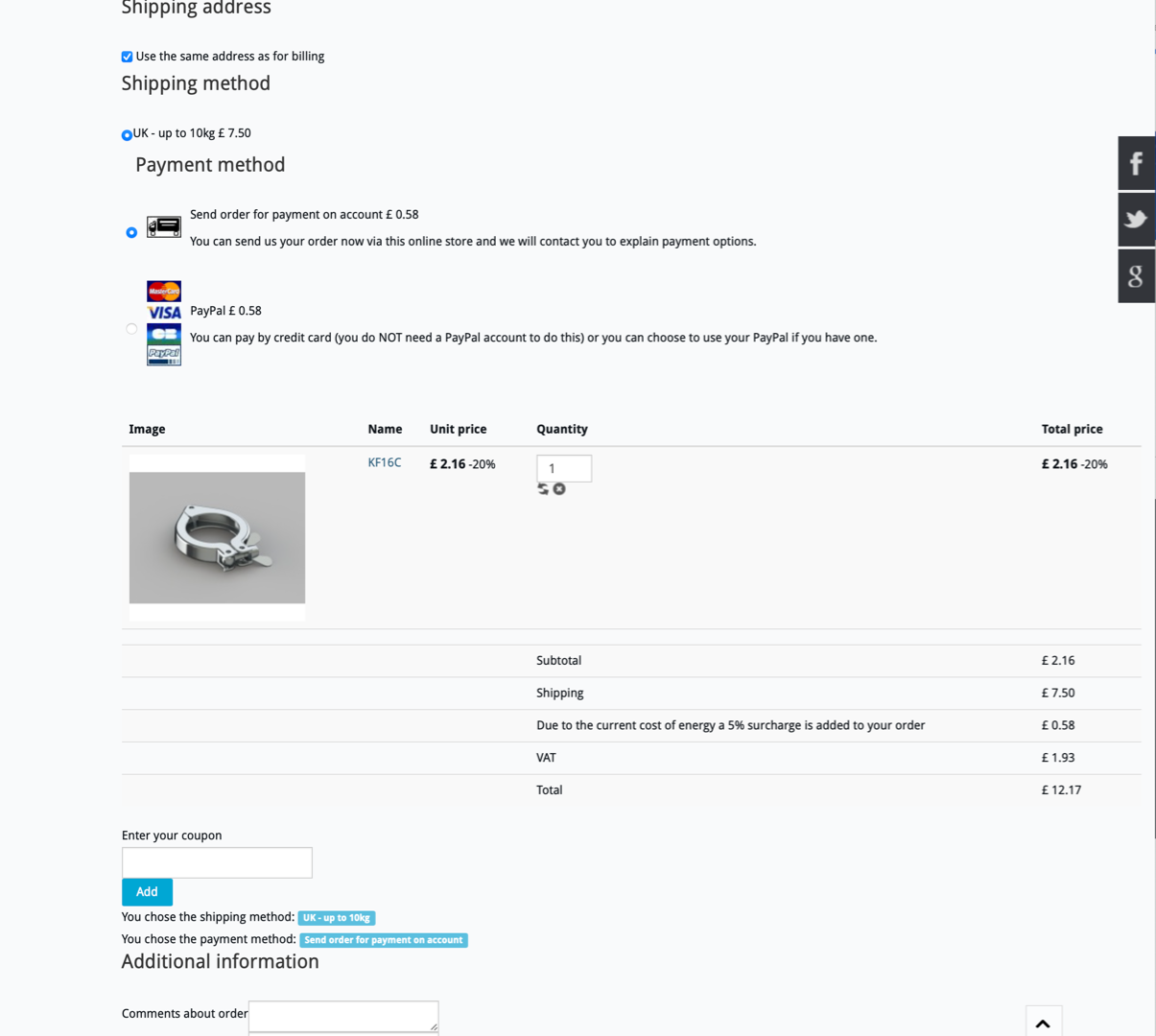
See screenshot attached.
Please Log in or Create an account to join the conversation.
4 years 1 week ago - 4 years 1 week ago #345449
by FDBI
Replied by FDBI on topic How can I add a 5% surcharge to all orders at checkout
Hi,
I don't know if it's a good practice, but you can achieve this by using taxes (if I understood the problem correctly).
In Hikashop -> System -> Taxes :
1) Create a 5% rate ('Manage rates' button at top)
2) Create a tax ('New' button at top) with :
- choose the tax category used for your products (if you have more than one, you must repeat the operation with the other categories)
- select the rate previously created
- set cumulative tax to 'Yes'
Idea to be confirmed by someone from Hikashop
I don't know if it's a good practice, but you can achieve this by using taxes (if I understood the problem correctly).
In Hikashop -> System -> Taxes :
1) Create a 5% rate ('Manage rates' button at top)
2) Create a tax ('New' button at top) with :
- choose the tax category used for your products (if you have more than one, you must repeat the operation with the other categories)
- select the rate previously created
- set cumulative tax to 'Yes'
Idea to be confirmed by someone from Hikashop
Last edit: 4 years 1 week ago by FDBI.
Please Log in or Create an account to join the conversation.

4 years 1 week ago - 4 years 1 week ago #345448
by nicolas
Replied by nicolas on topic How can I add a 5% surcharge to all orders at checkout
Hi,
In that case, you could use an auto loaded coupon with a negative percentage.
However, this means that users wouldn't be able to enter coupons on your checkout, unless you add the multicoupon plugin we have on our marketplace.
Or, you could also do it with a tax rule as Yaya27 said: You would have to activate the "cumulative tax" setting of your tax rule(s) and create a tax rule for the 5% surcharge and configure it to apply to the tax category of the products but not the tax category of the shipping methods. That way, you would get two tax rows on the checkout, one for VAT, one for that 5% surcharge.
In that case, you could use an auto loaded coupon with a negative percentage.
However, this means that users wouldn't be able to enter coupons on your checkout, unless you add the multicoupon plugin we have on our marketplace.
Or, you could also do it with a tax rule as Yaya27 said: You would have to activate the "cumulative tax" setting of your tax rule(s) and create a tax rule for the 5% surcharge and configure it to apply to the tax category of the products but not the tax category of the shipping methods. That way, you would get two tax rows on the checkout, one for VAT, one for that 5% surcharge.
Last edit: 4 years 1 week ago by nicolas.
Please Log in or Create an account to join the conversation.
Time to create page: 0.115 seconds