

- Posts: 9
- Thank you received: 2
Cart not on page after update to Joomla 4
3 years 11 months ago #346565
by aberg
Cart not on page after update to Joomla 4 was created by aberg
-- HikaShop version -- : 4.6.2
-- Joomla version -- : 4.2.5
-- PHP version -- : 8
-- Browser(s) name and version -- : Edge
-- Error-message(debug-mod must be tuned on) -- : None
After the update from joomla 3 to 4 the cart module don’t work anymore or maybe its work but it isn’t not longer on the page
Have try several things without any results
How do I get the cart on the page?
Of course module is enable
-- Joomla version -- : 4.2.5
-- PHP version -- : 8
-- Browser(s) name and version -- : Edge
-- Error-message(debug-mod must be tuned on) -- : None
After the update from joomla 3 to 4 the cart module don’t work anymore or maybe its work but it isn’t not longer on the page
Have try several things without any results
How do I get the cart on the page?
Of course module is enable
Please Log in or Create an account to join the conversation.

3 years 11 months ago #346571
by nicolas
Replied by nicolas on topic Cart not on page after update to Joomla 4
Hi,
I would recommend to go in the Joomla plugins manager and configure the settings of the HikaShop cart notification plugin.
There, you can configure how the system should behave after an add to cart. You could for example have it redirect to the checkout (with the cart), or display a popup with a button to proceed to the checkout.
Also, it's possible to display the cart content as a module with the "HikaShop cart module". You can configure it via the Joomla modules manager. If you don't see it after updating, it could be that the template you're using doesn't use the same position names as the previous one and you need to change the position of the module.
I would recommend to go in the Joomla plugins manager and configure the settings of the HikaShop cart notification plugin.
There, you can configure how the system should behave after an add to cart. You could for example have it redirect to the checkout (with the cart), or display a popup with a button to proceed to the checkout.
Also, it's possible to display the cart content as a module with the "HikaShop cart module". You can configure it via the Joomla modules manager. If you don't see it after updating, it could be that the template you're using doesn't use the same position names as the previous one and you need to change the position of the module.
Please Log in or Create an account to join the conversation.
3 years 11 months ago #346669
by aberg
Replied by aberg on topic Cart not on page after update to Joomla 4
Thanks, the cart was indeed publish on the left corner and not good vissable.
It,s only a small line, and I wonder how to get the the category’s and cart together visable on the pages.
You talk about a module , but if I click in the menu only all category are visable.
How to put the cart to the right site as I had on Joomla 3?
It,s only a small line, and I wonder how to get the the category’s and cart together visable on the pages.
You talk about a module , but if I click in the menu only all category are visable.
How to put the cart to the right site as I had on Joomla 3?
Please Log in or Create an account to join the conversation.
3 years 11 months ago #346673
by nicolas
Replied by nicolas on topic Cart not on page after update to Joomla 4
Hi,
Go in the Joomla modules manager. There, click on the "new" button. Select the "HikaShop cart module". And then configure it to be displayed on the right sidebar position of your template and it should work.
Go in the Joomla modules manager. There, click on the "new" button. Select the "HikaShop cart module". And then configure it to be displayed on the right sidebar position of your template and it should work.
Please Log in or Create an account to join the conversation.
3 years 11 months ago #346689
by aberg
Replied by aberg on topic Cart not on page after update to Joomla 4
Try this, but no results.
Please see the Attachtments how is is on the live site with Joomla 3 and now on the testsite after migration
Joomla 3- Live site
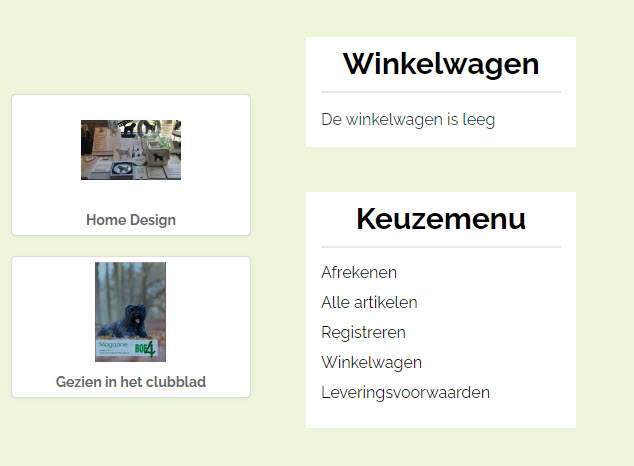
Joomla 4 -after migration on test site
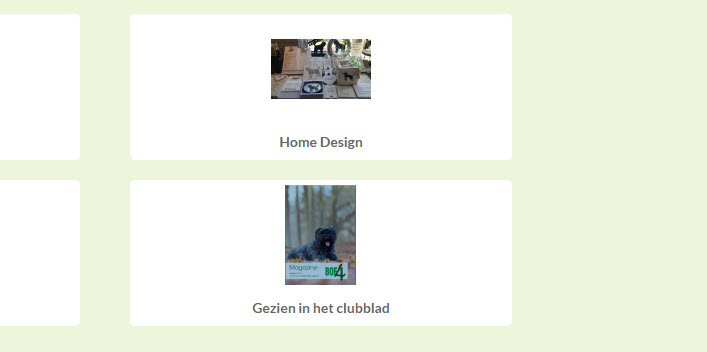
Please see the Attachtments how is is on the live site with Joomla 3 and now on the testsite after migration
Joomla 3- Live site
Joomla 4 -after migration on test site
Please Log in or Create an account to join the conversation.
3 years 11 months ago #346696
by nicolas
Replied by nicolas on topic Cart not on page after update to Joomla 4
Are you using the same template on Joomla 3 and Joomla 4 ?
It seems the problem is in the template since the "Keuzemenu" module is also not being displayed there and this module seems to be a menu module of Joomla, which is not linked to HikaShop. I would recommend reporting the issue to the template provider support.
It seems the problem is in the template since the "Keuzemenu" module is also not being displayed there and this module seems to be a menu module of Joomla, which is not linked to HikaShop. I would recommend reporting the issue to the template provider support.
Please Log in or Create an account to join the conversation.
Time to create page: 0.094 seconds