

- Posts: 8
- Thank you received: 0
New email history entries have no data in the backend
3 years 10 months ago #348023
by zerioni
New email history entries have no data in the backend was created by zerioni
-- HikaShop version -- : 4.7.0
-- Joomla version -- : 4.2.6
-- PHP version -- : 8.1
We recently upgraded from joomla 3 to 4, following the joomla documentation. Everything is working from the front end as expected. The issue we're seeing in new emails in the Customers->email history have no details populated for the admin (emails are sending correctly). The only thing I can find out of place is this in the check database results:
OK Table "hikashop_email_log" checked
Error Unknown column 'action_button_type' in 'where clause'
Error hikashop_config: Duplicate entry 'website' for key 'PRIMARY'
Error
ALTER TABLE #__hikashop_config ADD PRIMARY KEY(config_namekey)
OK Product categories checked
But I'm not sure if that would be related or what the best way to go about fixing it would be.
-- Joomla version -- : 4.2.6
-- PHP version -- : 8.1
We recently upgraded from joomla 3 to 4, following the joomla documentation. Everything is working from the front end as expected. The issue we're seeing in new emails in the Customers->email history have no details populated for the admin (emails are sending correctly). The only thing I can find out of place is this in the check database results:
OK Table "hikashop_email_log" checked
Error Unknown column 'action_button_type' in 'where clause'
Error hikashop_config: Duplicate entry 'website' for key 'PRIMARY'
Error
ALTER TABLE #__hikashop_config ADD PRIMARY KEY(config_namekey)
OK Product categories checked
But I'm not sure if that would be related or what the best way to go about fixing it would be.
Please Log in or Create an account to join the conversation.

3 years 10 months ago #348024
by nicolas
Replied by nicolas on topic New email history entries have no data in the backend
Hi,
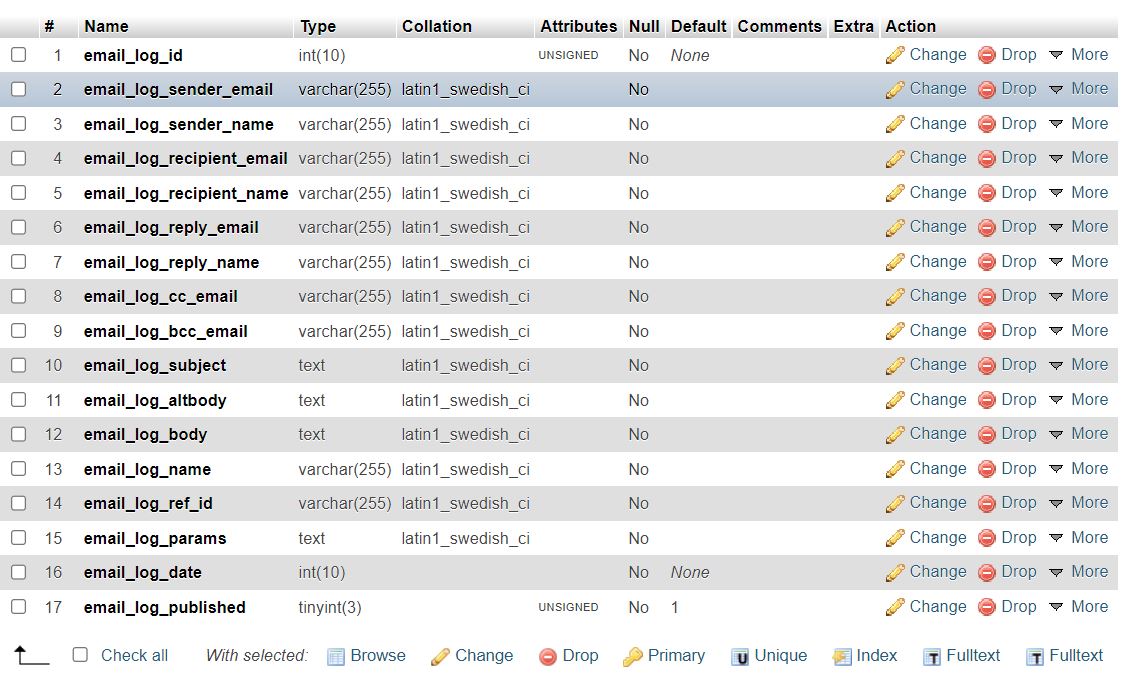
Could you open the table hikashop_email_log via your PHPMyAdmin and look at its structure ?
Then, please provide a screenshot of that page. I'm also thinking there might be a problem with that table in the database, preventing the email history plugin from adding new email data properly into it.
Could you open the table hikashop_email_log via your PHPMyAdmin and look at its structure ?
Then, please provide a screenshot of that page. I'm also thinking there might be a problem with that table in the database, preventing the email history plugin from adding new email data properly into it.
Please Log in or Create an account to join the conversation.
3 years 10 months ago #348071
by zerioni
Replied by zerioni on topic New email history entries have no data in the backend
Thanks for replying! Attached is the screenshot of the structure from phpMyAdmin. I noticed that it doesn't have a primary key index, which seems odd. Please let me know any problems you see here!
Please Log in or Create an account to join the conversation.
3 years 10 months ago #348072
by zerioni
Replied by zerioni on topic New email history entries have no data in the backend
Actually I've just answered my own question: since migrating and losing the primary key index, all the new emails have an id of 0
Please Log in or Create an account to join the conversation.
3 years 10 months ago #348074
by nicolas
Replied by nicolas on topic New email history entries have no data in the backend
Hi,
Yes, that's precisely the problem. You're missing the primary key and auto_increment on the table.
For some reason, it seems your migration removed it...
You can run this MySQL query via your PHPMyAdmin to add it back:
However, this query will only work after you've deleted all the elements with the same email_log_id, and since you have many entries with the value 0 in it, you'll have to delete these first.
A simpler simpler would be to just delete the hikashop_email_log table completely from the database. HikaShop will automatically recreate it next time it sends an email with the proper primary key and auto_increment.
Yes, that's precisely the problem. You're missing the primary key and auto_increment on the table.
For some reason, it seems your migration removed it...
You can run this MySQL query via your PHPMyAdmin to add it back:
Code:
ALTER TABLE #__hikashop_email_log MODIFY email_log_id INT(10) AUTO_INCREMENT PRIMARY KEY;
A simpler simpler would be to just delete the hikashop_email_log table completely from the database. HikaShop will automatically recreate it next time it sends an email with the proper primary key and auto_increment.
Please Log in or Create an account to join the conversation.
3 years 10 months ago #348075
by zerioni
Replied by zerioni on topic New email history entries have no data in the backend
Thanks so much! Just to be sure, if we go with the simple option, am I totally dropping the table, not just truncating it
Please Log in or Create an account to join the conversation.
3 years 10 months ago #348079
by nicolas
Replied by nicolas on topic New email history entries have no data in the backend
Hi,
Yes, you need to drop it. If you truncate it, you'll still have the same problem.
Yes, you need to drop it. If you truncate it, you'll still have the same problem.
Please Log in or Create an account to join the conversation.
Time to create page: 0.064 seconds