

- Posts: 16
- Thank you received: 0
Hikashop checkout page not rendering correctly after upgrading to 4.7.1
3 years 8 months ago - 3 years 8 months ago #348913
by ildiwhite
-- HikaShop version -- : 4.7.1
-- Joomla version -- : 4.2.7
-- PHP version -- : 8.0.27
-- Browser(s) name and version -- : Firefox 109.0
-- Error-message(debug-mod must be tuned on) -- : -
Dear Support,
Issue 1:
After upgrading to Hikashop Business 4.7.1, the user data (Login and Address) page of the Checkout process is not rendering correctly. The right sidebar is in the main area and you have to scroll down to see the content.
Please help me to correct this. I use a customized Cassiopeia template.
Issue 2:
The custom field address_tax_number is not displayed in the address though it is configured. It is a conditional field, it depends on the value of the address_situation custom field. I would like to have this feld in emails an on the forntend.
Contact me for login details.
Thank you,
Ildikó
-- Joomla version -- : 4.2.7
-- PHP version -- : 8.0.27
-- Browser(s) name and version -- : Firefox 109.0
-- Error-message(debug-mod must be tuned on) -- : -
Dear Support,
Issue 1:
After upgrading to Hikashop Business 4.7.1, the user data (Login and Address) page of the Checkout process is not rendering correctly. The right sidebar is in the main area and you have to scroll down to see the content.
Please help me to correct this. I use a customized Cassiopeia template.
Issue 2:
The custom field address_tax_number is not displayed in the address though it is configured. It is a conditional field, it depends on the value of the address_situation custom field. I would like to have this feld in emails an on the forntend.
Contact me for login details.
Thank you,
Ildikó
Last edit: 3 years 8 months ago by ildiwhite. Reason: Full name removed.
Please Log in or Create an account to join the conversation.

3 years 8 months ago #348918
by nicolas
Replied by nicolas on topic Hikashop checkout page not rendering correctly after upgrading to 4.7.1
Hi,
1. Try renaming the folder templates/YOUR_TEMPLATE/html/com_hikashop/checkout via FTP.
It will deactivate the overrides you might have in your template for the HikaShop checkout. Hopefully, it will help.
2. You need to add the corresponding tag to the "address format" setting, under the Checkout tab of the HikaShop configuration:
www.hikashop.com/support/documentation/5...ml#checkout_shipping
1. Try renaming the folder templates/YOUR_TEMPLATE/html/com_hikashop/checkout via FTP.
It will deactivate the overrides you might have in your template for the HikaShop checkout. Hopefully, it will help.
2. You need to add the corresponding tag to the "address format" setting, under the Checkout tab of the HikaShop configuration:
www.hikashop.com/support/documentation/5...ml#checkout_shipping
Please Log in or Create an account to join the conversation.
3 years 8 months ago - 3 years 8 months ago #348922
by ildiwhite
Replied by ildiwhite on topic Hikashop checkout page not rendering correctly after upgrading to 4.7.1
Hi Nicolas,
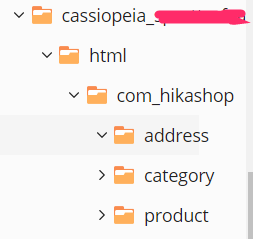
1. There is no Chekout folder there, see attached picture (hikashop.png).
2. (Note: this issue was already present before the version update.)
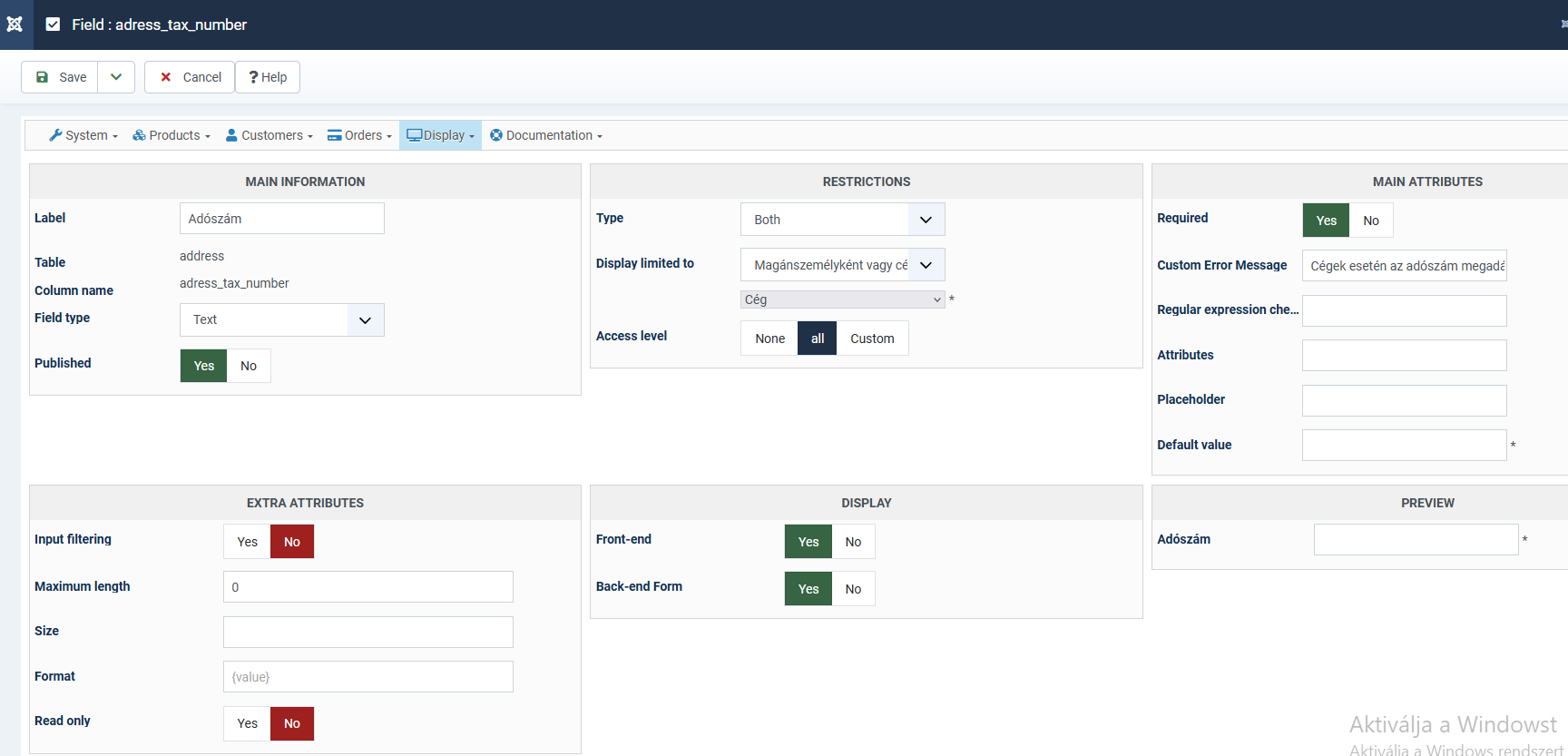
The name of the custom field is address_tax_number, it is enabled on frontend and backend (see second screenshot: address_tax_number.png).
The address format is:
{address_company}
{address_tax_number}
{address_title} {address_firstname} {address_lastname}
{address_street}
{address_post_code} {address_city} {address_state}
{address_country}
<?php if(!empty($this->address->address_telephone)) echo JText::sprintf('TELEPHONE_IN_ADDRESS','{address_telephone}');?>
<?php if(!empty($this->address->address_vat)) echo JText::sprintf('VAT_IN_ADDRESS','{address_vat}'); ?>
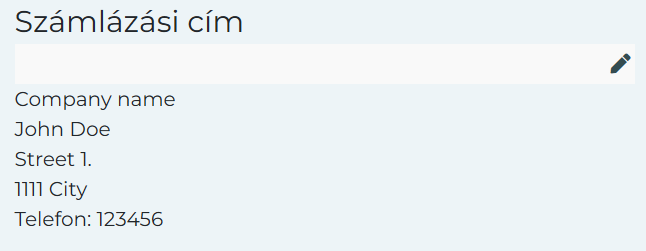
And the result: After the company name the firstname and lastname are displayed. See third screenshot (tax_number_missing.png).
Thank you for your help.
Regards,
Ildikó

1. There is no Chekout folder there, see attached picture (hikashop.png).
2. (Note: this issue was already present before the version update.)
The name of the custom field is address_tax_number, it is enabled on frontend and backend (see second screenshot: address_tax_number.png).
The address format is:
{address_company}
{address_tax_number}
{address_title} {address_firstname} {address_lastname}
{address_street}
{address_post_code} {address_city} {address_state}
{address_country}
<?php if(!empty($this->address->address_telephone)) echo JText::sprintf('TELEPHONE_IN_ADDRESS','{address_telephone}');?>
<?php if(!empty($this->address->address_vat)) echo JText::sprintf('VAT_IN_ADDRESS','{address_vat}'); ?>
And the result: After the company name the firstname and lastname are displayed. See third screenshot (tax_number_missing.png).
Thank you for your help.
Regards,
Ildikó
Last edit: 3 years 8 months ago by ildiwhite.
Please Log in or Create an account to join the conversation.

3 years 8 months ago - 3 years 8 months ago #348925
by Philip
Replied by Philip on topic Hikashop checkout page not rendering correctly after upgrading to 4.7.1
Hello,
Please complete with these elements in order to be able to better understand the situation :
- An url link to your website (where we can see your display issue with your "right sidebar")
- The complete custom field setting screenshot (form)
Awaiting your elements
Regards
Please complete with these elements in order to be able to better understand the situation :
- An url link to your website (where we can see your display issue with your "right sidebar")
- The complete custom field setting screenshot (form)
Awaiting your elements
Regards
Last edit: 3 years 8 months ago by Philip.
Please Log in or Create an account to join the conversation.
3 years 8 months ago - 3 years 8 months ago #348944
by ildiwhite
Replied by ildiwhite on topic Hikashop checkout page not rendering correctly after upgrading to 4.7.1
Hi,
The page is (url removed).
If you add a product to the cart, after the second step you can see the problem.
The screenshot:
 .
.
Thank you,
Ildikó
The page is (url removed).
If you add a product to the cart, after the second step you can see the problem.
The screenshot:
Thank you,
Ildikó
Last edit: 3 years 8 months ago by ildiwhite. Reason: url removed
Please Log in or Create an account to join the conversation.
3 years 8 months ago #348946
by nicolas
Replied by nicolas on topic Hikashop checkout page not rendering correctly after upgrading to 4.7.1
Hi,
1. So what if you rename the whole templates/YOUR_TEMPLATE/html/com_hikashop folder ? Does it help ?
2. Try saving the HikaShop configuration once. This should rewrite all the template overrides for the address format and fix the problem.
1. So what if you rename the whole templates/YOUR_TEMPLATE/html/com_hikashop folder ? Does it help ?
2. Try saving the HikaShop configuration once. This should rewrite all the template overrides for the address format and fix the problem.
Please Log in or Create an account to join the conversation.
3 years 8 months ago - 3 years 8 months ago #348957
by ildiwhite
Replied by ildiwhite on topic Hikashop checkout page not rendering correctly after upgrading to 4.7.1
Hi,
1.Rename did not help.
Can the unclosed tag be the reason? See screenshots.
 (túlcsordulás=overflow).
(I could reproduce the issue on a different site with a new Hikashop install. The issue occures when clickin on the Registration.)
2. Save did not help.
Regards,
Ildikó
1.Rename did not help.
Can the unclosed tag be the reason? See screenshots.
(I could reproduce the issue on a different site with a new Hikashop install. The issue occures when clickin on the Registration.)
2. Save did not help.
Regards,
Ildikó
Last edit: 3 years 8 months ago by ildiwhite.
Please Log in or Create an account to join the conversation.
3 years 8 months ago #348962
by nicolas
Replied by nicolas on topic Hikashop checkout page not rendering correctly after upgrading to 4.7.1
Hi,
1. Yes. I suppose this comes from a faulty translation override. Change the second <strong> tag to </strong> and it should help.
2. Then, please delete the address format customization, save the configuration, add back your changes and save again. It should hopefully help.
1. Yes. I suppose this comes from a faulty translation override. Change the second <strong> tag to </strong> and it should help.
2. Then, please delete the address format customization, save the configuration, add back your changes and save again. It should hopefully help.
Please Log in or Create an account to join the conversation.
3 years 8 months ago #348999
by ildiwhite
Replied by ildiwhite on topic Hikashop checkout page not rendering correctly after upgrading to 4.7.1
Hi Nicolas,
Everything is perfect!
1. I found and corrected the error in the official translation. Now everything is fine.
2. It was my fault. there was a typo in the column name :oops: ... After correcting it the field is displayed correctly.
Thank you for the support.
Regards,
Ildikó
Everything is perfect!
1. I found and corrected the error in the official translation. Now everything is fine.
2. It was my fault. there was a typo in the column name :oops: ... After correcting it the field is displayed correctly.
Thank you for the support.
Regards,
Ildikó
Please Log in or Create an account to join the conversation.
Time to create page: 0.348 seconds