

- Posts: 33
- Thank you received: 0
Standard Hikashop urls in Main Menu are being rewritten
3 years 6 months ago #351022
by HarborRV
Standard Hikashop urls in Main Menu are being rewritten was created by HarborRV
-- url of the page with the problem -- :
langecraft.com/NEW/
-- HikaShop version -- : 4.7.2
-- Joomla version -- : 4.2.9
-- PHP version -- : 8.0.28
-- Browser(s) name and version -- : Chrome
-- Error-message(debug-mod must be tuned on) -- : 404 Page Not found
langecraft.com/NEW/
I have added several menu items to the "Main Menu" and the urls are being re written.
As you can see from the screenshot that the url is correct, from the second screenshot the actual url is something stupid.
index.php?option=com_hikashop&view=user&layout=cpanel
get's changed to
langecraft.com/NEW/index.php/Products/user-profile
Not sure what I did wrong or what process is changing the menu urls?
Second question, how do I remove the footer url with link to Hika?
-- HikaShop version -- : 4.7.2
-- Joomla version -- : 4.2.9
-- PHP version -- : 8.0.28
-- Browser(s) name and version -- : Chrome
-- Error-message(debug-mod must be tuned on) -- : 404 Page Not found
langecraft.com/NEW/
I have added several menu items to the "Main Menu" and the urls are being re written.
As you can see from the screenshot that the url is correct, from the second screenshot the actual url is something stupid.
index.php?option=com_hikashop&view=user&layout=cpanel
get's changed to
langecraft.com/NEW/index.php/Products/user-profile
Not sure what I did wrong or what process is changing the menu urls?
Second question, how do I remove the footer url with link to Hika?
Please Log in or Create an account to join the conversation.

3 years 6 months ago #351030
by nicolas
Replied by nicolas on topic Standard Hikashop urls in Main Menu are being rewritten
Hi,
1. The fact that the URL gets changed is normal. That's what the SEF system in Joomla does. For example, for the page langecraft.com/NEW/index.php/hikashop-me...r-user-control-panel
the part "hikashop-menu-for-user-control-panel" is the alias of the menu item and it's Joomla's SEF system which automatically changes the parameters of the URL to use the alias of the menu item instead in order to make it nicer for users and search engines.
Now, for the langecraft.com/NEW/index.php/Products/user-profile it would mean that "user-profile" is the alias of the menu item, and "Products" is the alias of the parent menu item.
But it generates a 404 error, and the alias on your screenshot is "profile". That would suggest that another extension comes and changes the URL to something else for some reason.
Using the extension 4SEF ( extensions.joomla.org/extension/4sef/ ) for example could lead to such a predicament based on how you configure it.
Are you using any SEF extension ?
HikaShop doesn't normally play a role in all this so I'm not sure what's going on.
2. Turn off the "show footer" setting under the Display tab of the HikaShop configuration
1. The fact that the URL gets changed is normal. That's what the SEF system in Joomla does. For example, for the page langecraft.com/NEW/index.php/hikashop-me...r-user-control-panel
the part "hikashop-menu-for-user-control-panel" is the alias of the menu item and it's Joomla's SEF system which automatically changes the parameters of the URL to use the alias of the menu item instead in order to make it nicer for users and search engines.
Now, for the langecraft.com/NEW/index.php/Products/user-profile it would mean that "user-profile" is the alias of the menu item, and "Products" is the alias of the parent menu item.
But it generates a 404 error, and the alias on your screenshot is "profile". That would suggest that another extension comes and changes the URL to something else for some reason.
Using the extension 4SEF ( extensions.joomla.org/extension/4sef/ ) for example could lead to such a predicament based on how you configure it.
Are you using any SEF extension ?
HikaShop doesn't normally play a role in all this so I'm not sure what's going on.
2. Turn off the "show footer" setting under the Display tab of the HikaShop configuration
Please Log in or Create an account to join the conversation.
3 years 6 months ago #351046
by HarborRV
Replied by HarborRV on topic Standard Hikashop urls in Main Menu are being rewritten
This is a fresh, raw install of Joomla and Hikashop. Upgraded from starter to business. Nothing else installed. I am not getting why it's adding the "Products" alias. If I manually edit that word out the proper aliases work.
There are no menu aliases with that word with a capital "P"
There are no menu aliases with that word with a capital "P"
Please Log in or Create an account to join the conversation.
3 years 6 months ago #351047
by HarborRV
Replied by HarborRV on topic Standard Hikashop urls in Main Menu are being rewritten
I added a menu option in the "Hikashop default menus" and it did the same thing. See the "Cart" menu item at the top.
Please Log in or Create an account to join the conversation.
3 years 6 months ago #351048
by HarborRV
Replied by HarborRV on topic Standard Hikashop urls in Main Menu are being rewritten
In Joomla config, when I turn off "Search Engine Friendly URLs" everything works as expected. So now it's a Joomla issue, I hope you can still help me fix it.
John
John
Please Log in or Create an account to join the conversation.
3 years 6 months ago #351049
by nicolas
Replied by nicolas on topic Standard Hikashop urls in Main Menu are being rewritten
Hi,
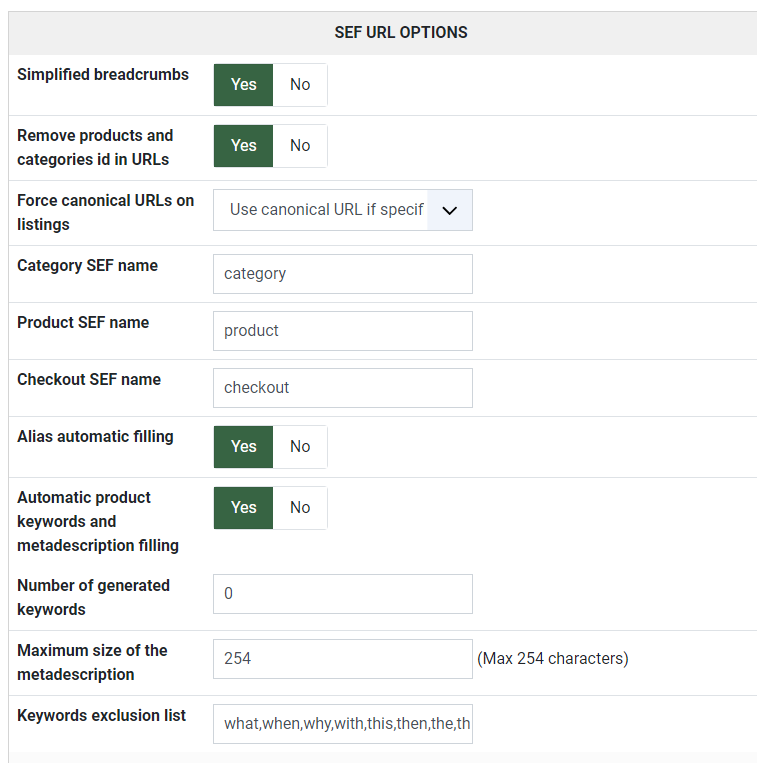
Can you provide a screenshot of the settings under the SEF section of the Features tab in the HikaShop configuration ?
Can you provide a screenshot of the settings under the SEF section of the Features tab in the HikaShop configuration ?
Please Log in or Create an account to join the conversation.
3 years 5 months ago #351421
by HarborRV
Replied by HarborRV on topic Standard Hikashop urls in Main Menu are being rewritten
Here's the screen shot hope this helps
Please Log in or Create an account to join the conversation.
3 years 5 months ago #351430
by nicolas
Replied by nicolas on topic Standard Hikashop urls in Main Menu are being rewritten
Hi,
Thanks. I don't see anything strange.
Maybe if I could check the settings of your menu items in the backend, I could figure out something. Could you provide a backend access via our contact form ?
www.hikashop.com/support/contact-us.html
Thanks. I don't see anything strange.
Maybe if I could check the settings of your menu items in the backend, I could figure out something. Could you provide a backend access via our contact form ?
www.hikashop.com/support/contact-us.html
Please Log in or Create an account to join the conversation.
3 years 5 months ago #351473
by HarborRV
Replied by HarborRV on topic Standard Hikashop urls in Main Menu are being rewritten
all set up, check your email for contact form
Please Log in or Create an account to join the conversation.
3 years 5 months ago - 3 years 5 months ago #351481
by HarborRV
Replied by HarborRV on topic Standard Hikashop urls in Main Menu are being rewritten
In Global Config I turned Search engine friendly back on and it seems to be working. Now I get redundant (catagories/product/) in the url.
langecraft.com/NEW/index.php/catagories/...ed-from-natural-wood
NOW the Products are working but menu items under my Main Menu/Control Panel are not working.
langecraft.com/NEW/index.php/catagories/...ed-from-natural-wood
NOW the Products are working but menu items under my Main Menu/Control Panel are not working.
Last edit: 3 years 5 months ago by HarborRV.
Please Log in or Create an account to join the conversation.
3 years 5 months ago #351488
by HarborRV
Replied by HarborRV on topic Standard Hikashop urls in Main Menu are being rewritten
Cannot check out either
Please Log in or Create an account to join the conversation.
3 years 5 months ago #351494
by nicolas
Replied by nicolas on topic Standard Hikashop urls in Main Menu are being rewritten
Hello,
We have received your backend references but unfortunately it seems that there is an error in one of these references because unfortunately impossible to connect.
Can you double check please.
We have received your backend references but unfortunately it seems that there is an error in one of these references because unfortunately impossible to connect.
Can you double check please.
Please Log in or Create an account to join the conversation.
3 years 5 months ago #351536
by HarborRV
Replied by HarborRV on topic Standard Hikashop urls in Main Menu are being rewritten
I double checked and re-sent the info via your contact page.
langecraft.com/NEW/administrator/
langecraft.com/NEW/administrator/
Please Log in or Create an account to join the conversation.
3 years 5 months ago #351593
by nicolas
Replied by nicolas on topic Standard Hikashop urls in Main Menu are being rewritten
Hi,
We got the access and it's working now, thanks.
I had a look at your settings and I don't see how that "Products" is being added to the SEFed URLs of the "Control Panel" sub menu items.
Could you provide a FTP access so that we could look deeper into it ?
We got the access and it's working now, thanks.
I had a look at your settings and I don't see how that "Products" is being added to the SEFed URLs of the "Control Panel" sub menu items.
Could you provide a FTP access so that we could look deeper into it ?
Please Log in or Create an account to join the conversation.
3 years 5 months ago #351611
by HarborRV
Replied by HarborRV on topic Standard Hikashop urls in Main Menu are being rewritten
Could you please email me direct, as a paid member, I believe I should not have to wait for public forum to communicate.
John
John
Please Log in or Create an account to join the conversation.

3 years 5 months ago - 3 years 5 months ago #351624
by Philip
Replied by Philip on topic Standard Hikashop urls in Main Menu are being rewritten
Last edit: 3 years 5 months ago by Philip.
Please Log in or Create an account to join the conversation.
Time to create page: 0.151 seconds