

- Posts: 173
- Thank you received: 8
Backend template not displaying properly for product display options
3 years 4 months ago - 3 years 4 months ago #351923
by ianspeed
-- HikaShop version -- : 4.7.2
-- Joomla version -- : Latest
-- PHP version -- : All
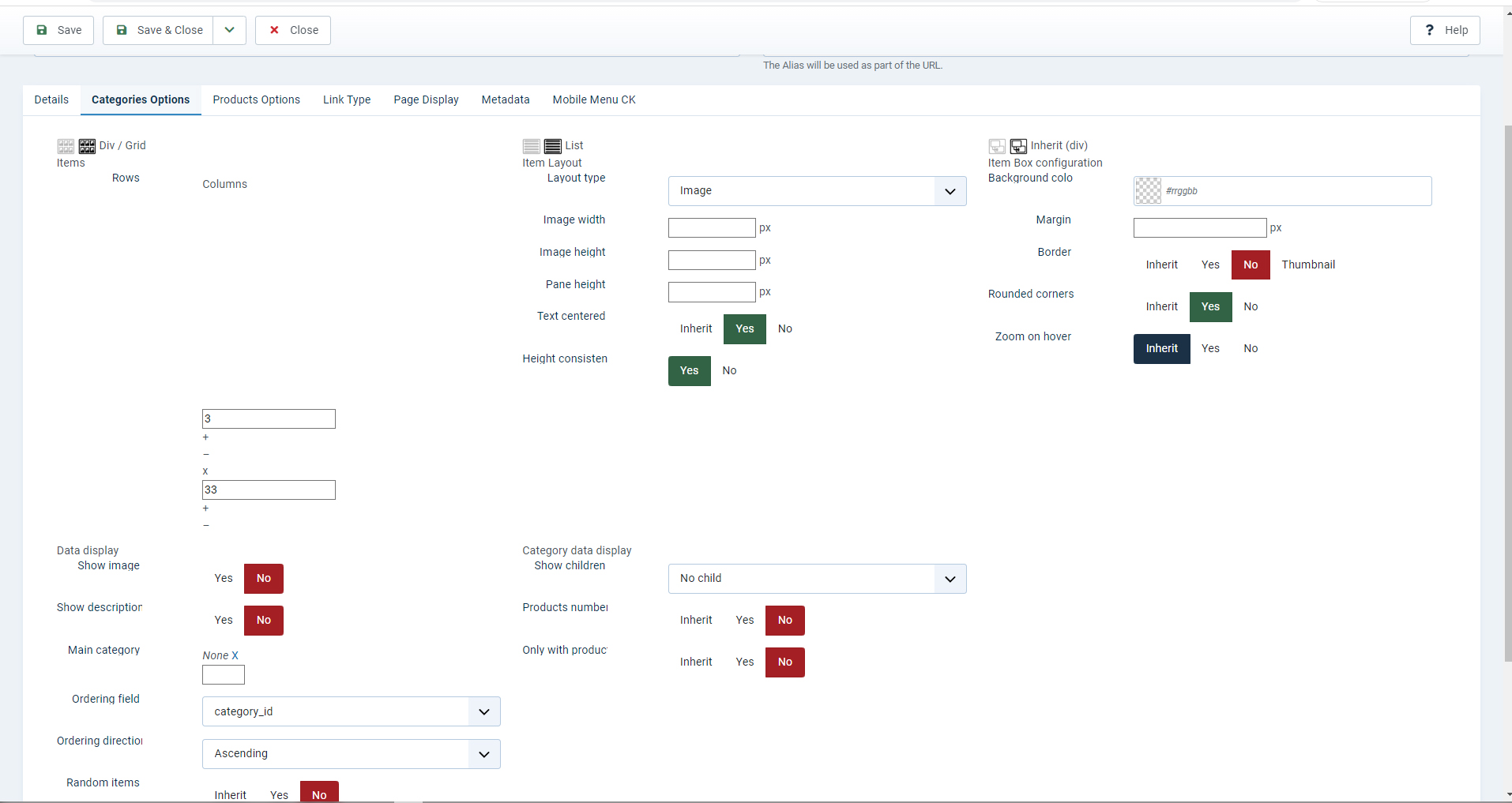
After upgrade to Joomla4 and data port for Hikashop, I'm having an issue with some of the Atum renderings in Hikashop. Any ideas?
Thank
Ian
-- Joomla version -- : Latest
-- PHP version -- : All
After upgrade to Joomla4 and data port for Hikashop, I'm having an issue with some of the Atum renderings in Hikashop. Any ideas?
Thank
Ian
Last edit: 3 years 4 months ago by ianspeed.
Please Log in or Create an account to join the conversation.

3 years 4 months ago #351925
by nicolas
Replied by nicolas on topic Backend template not displaying properly for product display options
Hi,
This sounds like you're missing the backend default CSS of HikaShop.
Go in the Hikashop configuration and under the Display tab, make sure that the "backend CSS" setting is set to "default". Based on your screenshot, it would seem it is set to "none".
This sounds like you're missing the backend default CSS of HikaShop.
Go in the Hikashop configuration and under the Display tab, make sure that the "backend CSS" setting is set to "default". Based on your screenshot, it would seem it is set to "none".
The following user(s) said Thank You: ianspeed
Please Log in or Create an account to join the conversation.
3 years 4 months ago #351928
by ianspeed
Replied by ianspeed on topic Backend template not displaying properly for product display options
That's sorted now  thank you Nicolas.
Not sure how I managed to set that!
Only other major problem is the category listing images are left adjusted, but the associated products under the main product are centered...
Thanks
Ian
thank you Nicolas.Not sure how I managed to set that!
Only other major problem is the category listing images are left adjusted, but the associated products under the main product are centered...
Thanks
Ian
Please Log in or Create an account to join the conversation.

3 years 4 months ago #351943
by Philip
Replied by Philip on topic Backend template not displaying properly for product display options
Hello,
Sorry for this return but we aren't sure to understand your display issue, can you precise the idea trough a screenshot (with relative part red bordered)?
Awaiting your returns
Regards
Sorry for this return but we aren't sure to understand your display issue, can you precise the idea trough a screenshot (with relative part red bordered)?
Awaiting your returns
Regards
Please Log in or Create an account to join the conversation.
3 years 4 months ago #352124
by ianspeed
Replied by ianspeed on topic Backend template not displaying properly for product display options
Hi Philip,
Have an issue with the bootstrapv2, have managed to upgrade to Joomla4 under a test environment, everything is working with the exception of the front end styling.
I'm using Template Creator CK and at first thought it was an issue with the Template being generated for Joomla4 so I CEd to have a look, and he said "I think that the problem is between Joomla4 + Bootstrap and Hikashop. As you can see, the problem (for the add to cart for example) is the same on Cassiopeia"
Have an issue with the bootstrapv2, have managed to upgrade to Joomla4 under a test environment, everything is working with the exception of the front end styling.
I'm using Template Creator CK and at first thought it was an issue with the Template being generated for Joomla4 so I CEd to have a look, and he said "I think that the problem is between Joomla4 + Bootstrap and Hikashop. As you can see, the problem (for the add to cart for example) is the same on Cassiopeia"
Please Log in or Create an account to join the conversation.
3 years 4 months ago #352127
by Philip
Replied by Philip on topic Backend template not displaying properly for product display options
Hello,
By using your provided link we weren't able to see any display issue, can you confirm that your problem is solved?
We weren't able to see any display issue, sorry for this return.
Regards
By using your provided link we weren't able to see any display issue, can you confirm that your problem is solved?
We weren't able to see any display issue, sorry for this return.
Regards
Please Log in or Create an account to join the conversation.
3 years 4 months ago #352134
by ianspeed
Replied by ianspeed on topic Backend template not displaying properly for product display options
Hi Philip,
No, unfortunately it isn't solved.
I sent two attachments on my last email, screenshot8 is the one that is correct, i.e. input etc Screenshot9 is the one that isn't displaying properly.
Also under Joomla3 displaying the product category using thumbnail shows me a border, but under Joomla4 I have no border?
Here is a link for for the J4 and J3
www.thegoatcompany.co.uk/random-dyed-moh...gory_pathway-22.html
Joomla4 Version:
www.thegoatcompany.co.uk/joomla4/random-...gory_pathway-22.html
I've changed the background colour on the J4 version to an eggshell blue...
Thanks
Ian
No, unfortunately it isn't solved.
I sent two attachments on my last email, screenshot8 is the one that is correct, i.e. input etc Screenshot9 is the one that isn't displaying properly.
Also under Joomla3 displaying the product category using thumbnail shows me a border, but under Joomla4 I have no border?
Here is a link for for the J4 and J3
www.thegoatcompany.co.uk/random-dyed-moh...gory_pathway-22.html
Joomla4 Version:
www.thegoatcompany.co.uk/joomla4/random-...gory_pathway-22.html
I've changed the background colour on the J4 version to an eggshell blue...
Thanks
Ian
Please Log in or Create an account to join the conversation.
3 years 4 months ago #352136
by ianspeed
Replied by ianspeed on topic Backend template not displaying properly for product display options
I probably need to change the title to front end template not showing correctly!
Please Log in or Create an account to join the conversation.
3 years 4 months ago - 3 years 4 months ago #352143
by Philip
Replied by Philip on topic Backend template not displaying properly for product display options
Hello,
We will need these elements to try to better understand your root issue for both website :
- Url link to your backend access (administrator)
- Backend user references (with maximum Acl)
Use our Contact us form to provide these elements, and don't forget to add an Url link to this topic.
Regards
We will need these elements to try to better understand your root issue for both website :
- Url link to your backend access (administrator)
- Backend user references (with maximum Acl)
Use our Contact us form to provide these elements, and don't forget to add an Url link to this topic.
Regards
Last edit: 3 years 4 months ago by Philip.
Please Log in or Create an account to join the conversation.
3 years 4 months ago - 3 years 4 months ago #352152
by Philip
Replied by Philip on topic Backend template not displaying properly for product display options
Hello,
I process some tests in your website with Joomla4 and find something, see my screenshot :

It seems that your template have several style (2017 & 2021), we process some tests with the 2021 for the Joomla 4, and it seems that it's really more close that your wanted display.
Did you process some tests with the "Newskin-2021" ?
Maybe there are still some adjustments to proceed?
Awaiting your returns to progress on your subject.
Regards
I process some tests in your website with Joomla4 and find something, see my screenshot :
It seems that your template have several style (2017 & 2021), we process some tests with the 2021 for the Joomla 4, and it seems that it's really more close that your wanted display.
Did you process some tests with the "Newskin-2021" ?
Maybe there are still some adjustments to proceed?
Awaiting your returns to progress on your subject.
Regards
Last edit: 3 years 4 months ago by Philip.
Please Log in or Create an account to join the conversation.
3 years 4 months ago #352167
by ianspeed
Replied by ianspeed on topic Backend template not displaying properly for product display options
Hi Philip,
I don't seem to be getting notifications of your replies!
That is a template modified under J3 and and not J4.
If I attempt to modify that template to J4 then it loses the formatting.
If you go in to Template Creator in Components for that template and set it to Jooomla4 it will lose the formatting.
This is the problem, can't modify my templates without breaking the template.
Thanks
Ian
I don't seem to be getting notifications of your replies!
That is a template modified under J3 and and not J4.
If I attempt to modify that template to J4 then it loses the formatting.
If you go in to Template Creator in Components for that template and set it to Jooomla4 it will lose the formatting.
This is the problem, can't modify my templates without breaking the template.
Thanks
Ian
Please Log in or Create an account to join the conversation.
3 years 4 months ago #352175
by Philip
Replied by Philip on topic Backend template not displaying properly for product display options
Hello,
I'm sorry but I'm not sure to understand your message, did you mean that using (like shown in my screenshot) it break your display?
This would surprise me a little because during our tests the product page was almost like the Joomla3 version.
Can you be more specific in your feedback.
sorry for this return
Regards
I'm sorry but I'm not sure to understand your message, did you mean that using (like shown in my screenshot) it break your display?
This would surprise me a little because during our tests the product page was almost like the Joomla3 version.
Can you be more specific in your feedback.
sorry for this return
Regards
Please Log in or Create an account to join the conversation.
3 years 4 months ago #352185
by ianspeed
Replied by ianspeed on topic Backend template not displaying properly for product display options
If I modify newskin-2021 template or re-generate, it will lose that formatting for the input quantity, as happened with .
Newskin-2021 has not been modified under J4 since upgrading from J3, as with Newskin-2017, as soon as I make any changes the formatting goes from the input quantities etc
I'll re-generate it now and you'll see that it no longer longer looks the same...
Newskin-2021 has not been modified under J4 since upgrading from J3, as with Newskin-2017, as soon as I make any changes the formatting goes from the input quantities etc
I'll re-generate it now and you'll see that it no longer longer looks the same...
Please Log in or Create an account to join the conversation.
3 years 4 months ago - 3 years 4 months ago #352207
by Philip
Replied by Philip on topic Backend template not displaying properly for product display options
Hello,
We have now progress on the subject, and it seems that we have to work on this specific view.
In details, and especially for this configuration there are class that lacking for new bootstrap standards, and so we have to correct this.
On your side, we see a solution in order to fix this quickly on your side :
I added some Css command in a style_custom.css file.

On our side we will made some adjustments for your specific configuration to correct this in our futur release.
regards
We have now progress on the subject, and it seems that we have to work on this specific view.
In details, and especially for this configuration there are class that lacking for new bootstrap standards, and so we have to correct this.
On your side, we see a solution in order to fix this quickly on your side :
I added some Css command in a style_custom.css file.
On our side we will made some adjustments for your specific configuration to correct this in our futur release.
regards
Last edit: 3 years 4 months ago by Philip.
The following user(s) said Thank You: ianspeed
Please Log in or Create an account to join the conversation.
3 years 4 months ago #352209
by ianspeed
Replied by ianspeed on topic Backend template not displaying properly for product display options
Thanks Philip,
Glad we got there in the end!
All the best
Ian
Glad we got there in the end!
All the best
Ian
The following user(s) said Thank You: Philip
Please Log in or Create an account to join the conversation.
3 years 4 months ago #352215
by ianspeed
Replied by ianspeed on topic Backend template not displaying properly for product display options
Hi Philip,
Just noticed one issue that I'm a little confused by, if a variant is selected then the formatting for the button seems to go wrong?
Thanks
Ian
Just noticed one issue that I'm a little confused by, if a variant is selected then the formatting for the button seems to go wrong?
Thanks
Ian
Please Log in or Create an account to join the conversation.
3 years 4 months ago - 3 years 4 months ago #352219
by Philip
Replied by Philip on topic Backend template not displaying properly for product display options
Hello,
We adjust the css command but we note that one of your display issue, in description precisely from main product to variant one your text seems to shift down.
After analyze, in your html the difference come from a <p> added by error for main product and not for variant version.
See my screenshot :

You have to edit the your relative view file to correct this.
Regards
We adjust the css command but we note that one of your display issue, in description precisely from main product to variant one your text seems to shift down.
After analyze, in your html the difference come from a <p> added by error for main product and not for variant version.
See my screenshot :
You have to edit the your relative view file to correct this.
Regards
Last edit: 3 years 4 months ago by Philip.
The following user(s) said Thank You: ianspeed
Please Log in or Create an account to join the conversation.
Time to create page: 0.366 seconds