
- Posts: 1
- Thank you received: 0
Syncronization plugin not working
- SjengAarts
-
 Topic Author
- Offline
Less
More
3 years 1 week ago #356269
by SjengAarts
Syncronization plugin not working was created by SjengAarts
-- url of the page with the problem -- :
scoutingulestraten.nl
-- HikaShop version -- : 5.0.0
-- Joomla version -- : 4.4.0
-- PHP version -- : 8.0.30
-- Browser(s) name and version -- : Chrome
-- Error-message(debug-mod must be tuned on) -- : ReflectionFunction::__construct(): Argument #1 ($function) must be of type Closure|string, array given
When the HikaShop user synchronization plugin is activated
our site gives error code below:
ReflectionFunction::__construct(): Argument #1 ($function) must be of type Closure|string, array given
Can somebody help me to cure this?
-- HikaShop version -- : 5.0.0
-- Joomla version -- : 4.4.0
-- PHP version -- : 8.0.30
-- Browser(s) name and version -- : Chrome
-- Error-message(debug-mod must be tuned on) -- : ReflectionFunction::__construct(): Argument #1 ($function) must be of type Closure|string, array given
When the HikaShop user synchronization plugin is activated
our site gives error code below:
ReflectionFunction::__construct(): Argument #1 ($function) must be of type Closure|string, array given
Can somebody help me to cure this?
Please Log in or Create an account to join the conversation.

3 years 6 days ago #356274
by nicolas
Replied by nicolas on topic Syncronization plugin not working
Hi,
You're the first one reporting this issue.
Could you activate debug setting of the joomla configuration and reproduce the error ?
It should give an error message with more information about the problem.
You're the first one reporting this issue.
Could you activate debug setting of the joomla configuration and reproduce the error ?
It should give an error message with more information about the problem.
Please Log in or Create an account to join the conversation.
3 years 6 days ago #356285
by 2CEVENTS
Replied by 2CEVENTS on topic Syncronization plugin not working
Same for me under joomla 5
Please Log in or Create an account to join the conversation.
3 years 6 days ago #356286
by nicolas
Replied by nicolas on topic Syncronization plugin not working
Hi,
Could you activate debug setting of the joomla configuration and reproduce the error ?
It should give an error message with more information about the problem.
Could you activate debug setting of the joomla configuration and reproduce the error ?
It should give an error message with more information about the problem.
Please Log in or Create an account to join the conversation.
3 years 6 days ago #356289
by 2CEVENTS
Replied by 2CEVENTS on topic Syncronization plugin not working
Too few arguments to function plgSystemHikashopuser::onContentPrepareForm(), 1 passed in ...com_hikashop/pluginCompatJ4.php on line 58 and exactly 2 expected
Please Log in or Create an account to join the conversation.
3 years 6 days ago #356290
by nicolas
Replied by nicolas on topic Syncronization plugin not working
Hi,
Download again the install package of HikaShop 5.0.0 on our website and install it on yours and it will add a patch which should fix the problem.
Download again the install package of HikaShop 5.0.0 on our website and install it on yours and it will add a patch which should fix the problem.
Please Log in or Create an account to join the conversation.
3 years 6 days ago - 3 years 6 days ago #356294
by 2CEVENTS
Replied by 2CEVENTS on topic Syncronization plugin not working
Can you send me ? My subscription went out for a short time. Thanks (i had version 5. but bugged )
Last edit: 3 years 6 days ago by 2CEVENTS.
Please Log in or Create an account to join the conversation.
3 years 5 days ago #356296
by nicolas
Replied by nicolas on topic Syncronization plugin not working
Hi,
We don't usually do that.
Please ask through our contact form, along with your previous order number :
www.hikashop.com/support/contact-us.html
We don't usually do that.
Please ask through our contact form, along with your previous order number :
www.hikashop.com/support/contact-us.html
Please Log in or Create an account to join the conversation.
2 years 11 months ago #356682
by Fjody
Replied by Fjody on topic Syncronization plugin not working
Hi,
I am using Free version of Hikashop.
yesterday, when upgrading from Joomla 4 -> Joomla 5, I had to disable to "non-compatible" plugins:
hikashop_user_synchronization_plugin
hikashop_payment_notification_plugin
After the upgrade, I enabled payment notification. That was OK.
But enabling hikashop_user_synchronization_plugin broke my backend + the website frontend.
I had to disable the plugin via MySQL adminer to get my website working again.
So the user synchronization is turned off and I am getting this warning
"The HikaShop user synchronization plugin has been either removed or disabled from the website. It is a critical part of HikaShop and should not be disabled if you're using HikaShop on your website.Please enable that plugin via the Joomla plugins manager and then logout/login from the backend."
Is the solution to download Hikashop 5 and upload the component to rewrite old files?
Simple "Updating" in Joomla does not solve this problem?
I am using Free version of Hikashop.
yesterday, when upgrading from Joomla 4 -> Joomla 5, I had to disable to "non-compatible" plugins:
hikashop_user_synchronization_plugin
hikashop_payment_notification_plugin
After the upgrade, I enabled payment notification. That was OK.
But enabling hikashop_user_synchronization_plugin broke my backend + the website frontend.
I had to disable the plugin via MySQL adminer to get my website working again.
Code:
Too few arguments to function plgSystemHikashopuser::onContentPrepareForm(), 1 passed in /home/www/ ... /domains ... /www/administrator/components/com_hikashop/pluginCompatJ4.php on line 58 and exactly 2 expected.
So the user synchronization is turned off and I am getting this warning
"The HikaShop user synchronization plugin has been either removed or disabled from the website. It is a critical part of HikaShop and should not be disabled if you're using HikaShop on your website.Please enable that plugin via the Joomla plugins manager and then logout/login from the backend."
Is the solution to download Hikashop 5 and upload the component to rewrite old files?
Simple "Updating" in Joomla does not solve this problem?
Please Log in or Create an account to join the conversation.
2 years 11 months ago #356686
by nicolas
Replied by nicolas on topic Syncronization plugin not working
Hi,
During the update of HikaShop, the Joomla installer will update the plugins preinstalled with HikaShop.
If you still have that error with HikaShop 5.0.0 installed, it means it wasn't able to update the user synchronization plugin files during the update of HikaShop due to permissions on its files or its folder.
So the simplest is to manually overwrite via FTP the files in plugins/system/hikashopuser/ with the files from back/extensions/plg_system_hikashopuser/ in the install package of HikaShop 5.0.0.
During the update of HikaShop, the Joomla installer will update the plugins preinstalled with HikaShop.
If you still have that error with HikaShop 5.0.0 installed, it means it wasn't able to update the user synchronization plugin files during the update of HikaShop due to permissions on its files or its folder.
So the simplest is to manually overwrite via FTP the files in plugins/system/hikashopuser/ with the files from back/extensions/plg_system_hikashopuser/ in the install package of HikaShop 5.0.0.
Please Log in or Create an account to join the conversation.
2 years 11 months ago #356695
by Fjody
Replied by Fjody on topic Syncronization plugin not working
I have just done it - rewritten 3 files (HTML, XML, PHP) and it broke my Backend + Frontend again.
I had to disable "Hikashop user synchronization plugin" through MySQL Adminer to get it working.
This is the message I got on my frontpage after enabling the plugin (the number is a bit different - it says 3 expected)
I had to disable "Hikashop user synchronization plugin" through MySQL Adminer to get it working.
This is the message I got on my frontpage after enabling the plugin (the number is a bit different - it says 3 expected)
Code:
0 - Too few arguments to function plgSystemHikashopuser::onContentPrepare(), 1 passed in /home/www/ ... /domains/ ... /www/administrator/components/com_hikashop/pluginCompatJ4.php on line 58 and at least 3 expected
Please Log in or Create an account to join the conversation.
2 years 11 months ago #356698
by nicolas
Replied by nicolas on topic Syncronization plugin not working
Hi,
Then maybe you have this problem:
www.hikashop.com/forum/integrations/9071...op-issue/355885.html
Try to follow the indications there. It should hopefully help.
Then maybe you have this problem:
www.hikashop.com/forum/integrations/9071...op-issue/355885.html
Try to follow the indications there. It should hopefully help.
Please Log in or Create an account to join the conversation.
2 years 11 months ago #356701
by Fjody
Replied by Fjody on topic Syncronization plugin not working
There is one small progress.
After deleting the code, the Frontend is working, except the "Contact form". The Contact form is broken - gives this error (again number 2)
Backend (Plugins settings) is still broken and I can't access anything while the plugin is enabled.
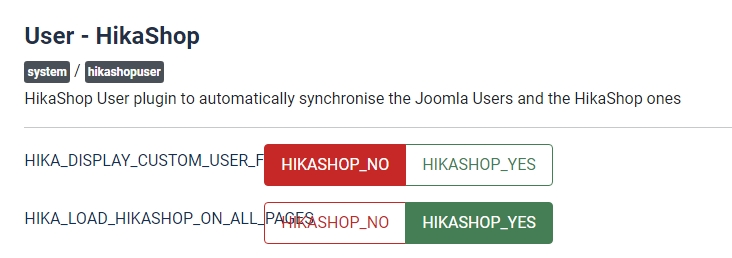
If it helps, when I open the User synchronization plugin, I can see this:
After deleting the code, the Frontend is working, except the "Contact form". The Contact form is broken - gives this error (again number 2)
Code:
0 - Too few arguments to function plgSystemHikashopuser::onContentPrepareForm(), 1 passed in /home/www/ ... /domains/ ... /www/administrator/components/com_hikashop/pluginCompatJ4.php on line 58 and exactly 2 expected
Backend (Plugins settings) is still broken and I can't access anything while the plugin is enabled.
If it helps, when I open the User synchronization plugin, I can see this:
Please Log in or Create an account to join the conversation.
2 years 11 months ago #356718
by nicolas
Replied by nicolas on topic Syncronization plugin not working
Hi,
I've made a new patch, and also included the patch for the onContentPrepare issue on our end.
Could you download again the install package of HikaShop on our website and try again to update with it via the Joomla extensions installer on your website ?
I've made a new patch, and also included the patch for the onContentPrepare issue on our end.
Could you download again the install package of HikaShop on our website and try again to update with it via the Joomla extensions installer on your website ?
Please Log in or Create an account to join the conversation.
2 years 11 months ago #356719
by Fjody
Replied by Fjody on topic Syncronization plugin not working
Downloaded and updated via Joomla installer.
This time it worked. Frontend + Backend seem to be OK.
Thank you for solving the problem.
This time it worked. Frontend + Backend seem to be OK.
Thank you for solving the problem.
The following user(s) said Thank You: nicolas
Please Log in or Create an account to join the conversation.
Time to create page: 0.111 seconds