

- Posts: 172
- Thank you received: 27
Currency Settings
2 years 10 months ago - 2 years 10 months ago #357282
by yerg55
Currency Settings was created by yerg55
-- HikaShop version -- : 5.0.2
Been asked to resolve issues with a J! install and resolved that with update and php settings as well
They also asked me to update HikaShop and a component ... all done.
I saw the following when asked to remove UK £ out of their available currencies.
Instead of GBP £ they have £ £
Makes no sense. :whistle:
Then see the same done with HKD 元 which is 元 and 元 as well as the Malaysian Ringgit MYR RM now RM and RM
I'm now wondering if they have edited a file or database field instead of using the Locale information > Format settings.
Have searched to see if files have been edited or else database has as well.
Asked them what had been done and ... "we don't know, our developer has gone AWOL"
Went through my local test server looking for solutions and at a total loss.
They are still in testing mode thank goodness, as they have 4 payment options and I reckon something will most likely go horribly wrong somewhere.
Any pointers?
Thanks
Been asked to resolve issues with a J! install and resolved that with update and php settings as well
They also asked me to update HikaShop and a component ... all done.
I saw the following when asked to remove UK £ out of their available currencies.
Instead of GBP £ they have £ £
Makes no sense. :whistle:
Then see the same done with HKD 元 which is 元 and 元 as well as the Malaysian Ringgit MYR RM now RM and RM
I'm now wondering if they have edited a file or database field instead of using the Locale information > Format settings.
Have searched to see if files have been edited or else database has as well.
Asked them what had been done and ... "we don't know, our developer has gone AWOL"
Went through my local test server looking for solutions and at a total loss.
They are still in testing mode thank goodness, as they have 4 payment options and I reckon something will most likely go horribly wrong somewhere.
Any pointers?
Thanks
Last edit: 2 years 10 months ago by yerg55.
Please Log in or Create an account to join the conversation.

2 years 10 months ago #357289
by nicolas
Replied by nicolas on topic Currency Settings
Hi,
It probably means that someone edited the currency in the menu System>Currencies and changed the "currency code" from "GBP" to "£".
If not, a screenshot of the settings of the currency would be great as the problem is probably in there.
It probably means that someone edited the currency in the menu System>Currencies and changed the "currency code" from "GBP" to "£".
If not, a screenshot of the settings of the currency would be great as the problem is probably in there.
Please Log in or Create an account to join the conversation.
2 years 10 months ago #357336
by yerg55
Replied by yerg55 on topic Currency Settings
Here's what's there for the UK Pound

Settings page
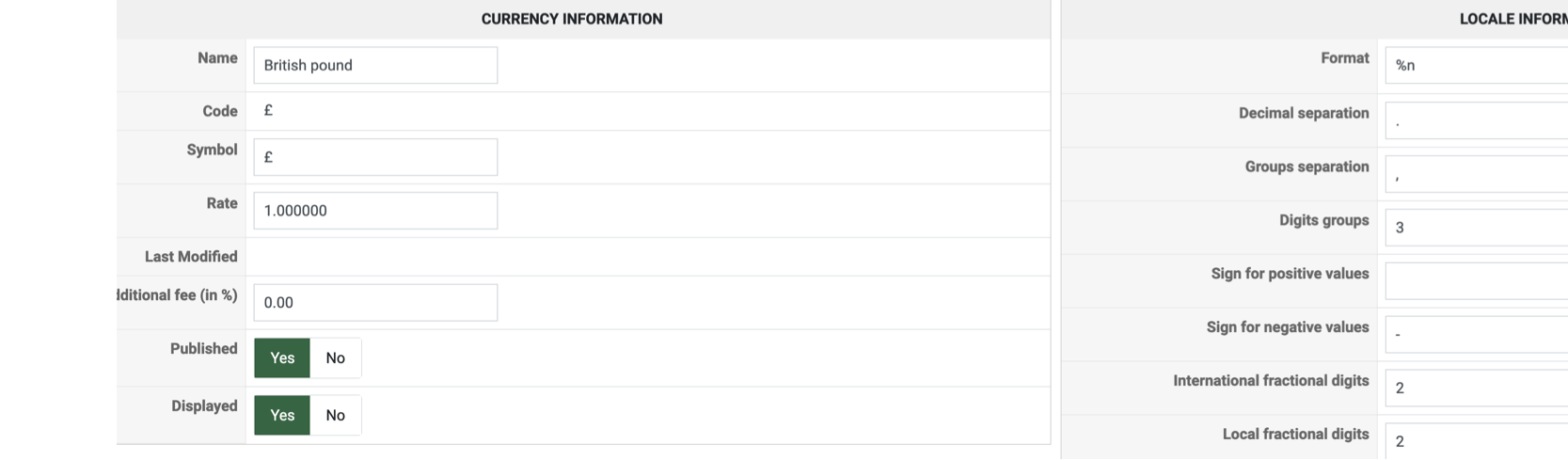
Settings page
Please Log in or Create an account to join the conversation.
2 years 10 months ago #357338
by nicolas
Replied by nicolas on topic Currency Settings
Hi,
Indeed, the problem is that the "code" field should contain the currency code GBP and not the symbol.
That code should normally not be changed as payment gateways rely on the currency code when processing payments.
Indeed, the problem is that the "code" field should contain the currency code GBP and not the symbol.
That code should normally not be changed as payment gateways rely on the currency code when processing payments.
Please Log in or Create an account to join the conversation.
2 years 10 months ago #357359
by yerg55
Replied by yerg55 on topic Currency Settings
Dug around and they FINALLY found some notes
The currency table had been edited to show the £ instead of the GBP
Simple solution for the ignorant was to change %i to %n in the Locale information > Format to achieve what was sought :silly:
The currency table had been edited to show the £ instead of the GBP
Simple solution for the ignorant was to change %i to %n in the Locale information > Format to achieve what was sought :silly:
The following user(s) said Thank You: nicolas
Please Log in or Create an account to join the conversation.
Time to create page: 0.167 seconds