

- Posts: 72
- Thank you received: 5
Colors expanded Currency switcher
2 years 9 months ago #358535
by mlehr
Colors expanded Currency switcher was created by mlehr
I want to adjust the color and the background color of the expanded Currency switcher, both for the white space at the 1st arrow and the blue part at the 2nd arrow. See screenshot.
Which selectors should I use to adjust this?
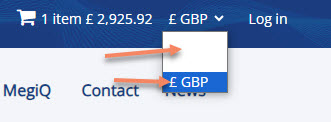
Which selectors should I use to adjust this?
Please Log in or Create an account to join the conversation.

2 years 9 months ago - 2 years 9 months ago #358537
by nicolas
Replied by nicolas on topic Colors expanded Currency switcher
Hi,
We would first need to know where you are with the CSS to be able to say what you're missing.
I suppose you just want to add some CSS like this:
select option { color: black; }
But that should already be the case by default. So it tells me that this display issue is linked to the CSS already added to the select and thus I need to look at the page and analyze the CSS to say what's wrong exactly.
So could you provide the URL of that page ?
We would first need to know where you are with the CSS to be able to say what you're missing.
I suppose you just want to add some CSS like this:
select option { color: black; }
But that should already be the case by default. So it tells me that this display issue is linked to the CSS already added to the select and thus I need to look at the page and analyze the CSS to say what's wrong exactly.
So could you provide the URL of that page ?
Last edit: 2 years 9 months ago by nicolas.
Please Log in or Create an account to join the conversation.
2 years 9 months ago #358552
by mlehr
Replied by mlehr on topic Colors expanded Currency switcher
Please Log in or Create an account to join the conversation.
2 years 9 months ago #358553
by nicolas
Replied by nicolas on topic Colors expanded Currency switcher
Hi,
So the issue comes from:
which you've added to
www.test.megiq.com/templates/g5_helium/custom/scss/custom.scss
The white color there applies to the select, and this includes the options inside it.
So, to avoid that, you can add after it this code:
So the issue comes from:
Code:
.hikashop_currency_module select {
padding: 2px;
border: 0px solid #ddd;
border-radius: 3px;
background: none;
color: #fff;
}
The white color there applies to the select, and this includes the options inside it.
So, to avoid that, you can add after it this code:
Code:
.hikashop_currency_module select option{
color: #000;
}
The following user(s) said Thank You: mlehr
Please Log in or Create an account to join the conversation.
Time to create page: 0.096 seconds