
- Posts: 424
- Thank you received: 11
multilanguage is not directing after category listing page to products
- BluepointWebdesign
-
 Topic Author
- Offline
Less
More
1 year 9 months ago #365291
by BluepointWebdesign
multilanguage is not directing after category listing page to products was created by BluepointWebdesign
-- HikaShop version -- : 5.2
-- Joomla version -- : 5.1.4
-- PHP version -- : 8.1.x
Hi,
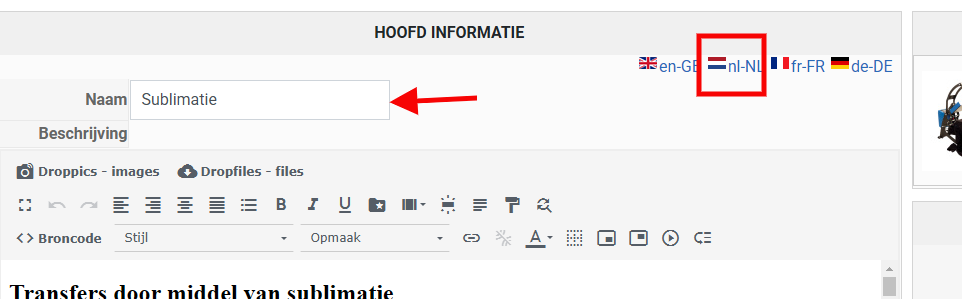
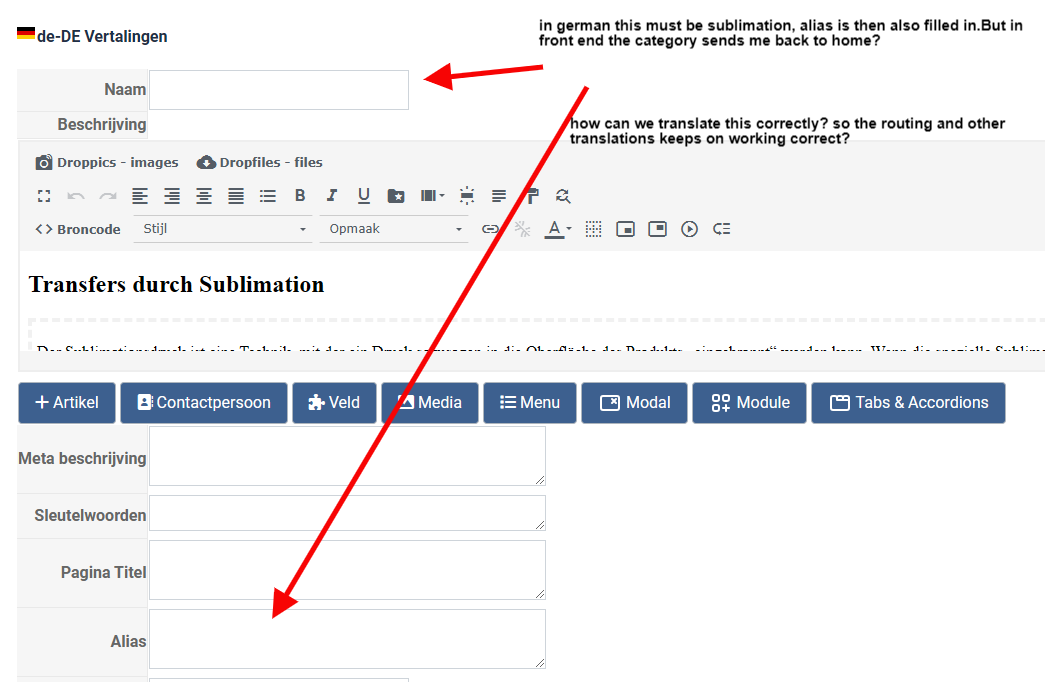
I made my website multilangual but wit a menu category menu item for hikashop, translation of the category name goes nice, but when i click on the button to go inside the category after translated the name it directs me to the homepage, looks like hikashop can not find the category then.
How can i get this name translation done so i will go to the right and translated products?
-- Joomla version -- : 5.1.4
-- PHP version -- : 8.1.x
Hi,
I made my website multilangual but wit a menu category menu item for hikashop, translation of the category name goes nice, but when i click on the button to go inside the category after translated the name it directs me to the homepage, looks like hikashop can not find the category then.
How can i get this name translation done so i will go to the right and translated products?
Please Log in or Create an account to join the conversation.

1 year 9 months ago #365292
by nicolas
Replied by nicolas on topic multilanguage is not directing after category listing page to products
Hi,
I'm not sure what the problem is.
Could you provide the URL of the website with instructions to reproduce the problem ?
I'm not sure what the problem is.
Could you provide the URL of the website with instructions to reproduce the problem ?
Please Log in or Create an account to join the conversation.
- BluepointWebdesign
-
Topic Author
- Offline
Less
More
- Posts: 424
- Thank you received: 11
1 year 9 months ago #365324
by BluepointWebdesign
Replied by BluepointWebdesign on topic multilanguage is not directing after category listing page to products
Hi Nicolas,
Thanks for your message, i put all for now in confidential, so i can type all in once to explain and guide you to reproduce my problem.
Regards,
Mark
Thanks for your message, i put all for now in confidential, so i can type all in once to explain and guide you to reproduce my problem.
This message contains confidential information
Regards,
Mark
Please Log in or Create an account to join the conversation.
1 year 9 months ago #365326
by nicolas
Replied by nicolas on topic multilanguage is not directing after category listing page to products
Hi,
Ok, so your problem is a SEF URL issue with the translated alias.
The problem is multifold:
- When you translate something in HikaShop, without using Falang (like on your website), then HikaShop will add it as a translation override. So, since the name of the category in Dutch is Sublimatie, and its translation in German is Sublimation, it will add a translation override like this in the German language override file:
SUBLIMATIE="Sublimation"
- This means that the same translation override will be used for the alias since you entered "Sublimatie" as the alias too in the category and the translation override matches with it too.
- However, you have the "Support translated aliases in URLs" setting disabled in the HikaShop configuration, so, when HikaShop routes the SEFed URL to display the page, it won't search in the translation overrides (this is turned off by default for efficiency as it can use a lot of resources).
- On top of this, you've turned on the "Remove products and categories id in URLs" setting of the HikaShop configuration, so that the id of the category is not available in the SEFed URL.
Without the id to rely on, and with the translated alias in the URL not matching with the alias in the category, and not being able to look for a match in the translation overrides, HikaShop can't find a suitable category. So it generates a 404 error, which, I think is picked up by RSSeo! on your website and redirected to the homepage, preventing the error page from displaying.
So, the simplest is to activate the "Support translated aliases in URLs" setting. I've done it for you and I can see that the Sublimation URL now works.
Ok, so your problem is a SEF URL issue with the translated alias.
The problem is multifold:
- When you translate something in HikaShop, without using Falang (like on your website), then HikaShop will add it as a translation override. So, since the name of the category in Dutch is Sublimatie, and its translation in German is Sublimation, it will add a translation override like this in the German language override file:
SUBLIMATIE="Sublimation"
- This means that the same translation override will be used for the alias since you entered "Sublimatie" as the alias too in the category and the translation override matches with it too.
- However, you have the "Support translated aliases in URLs" setting disabled in the HikaShop configuration, so, when HikaShop routes the SEFed URL to display the page, it won't search in the translation overrides (this is turned off by default for efficiency as it can use a lot of resources).
- On top of this, you've turned on the "Remove products and categories id in URLs" setting of the HikaShop configuration, so that the id of the category is not available in the SEFed URL.
Without the id to rely on, and with the translated alias in the URL not matching with the alias in the category, and not being able to look for a match in the translation overrides, HikaShop can't find a suitable category. So it generates a 404 error, which, I think is picked up by RSSeo! on your website and redirected to the homepage, preventing the error page from displaying.
So, the simplest is to activate the "Support translated aliases in URLs" setting. I've done it for you and I can see that the Sublimation URL now works.
Please Log in or Create an account to join the conversation.
- BluepointWebdesign
-
Topic Author
- Offline
Less
More
- Posts: 424
- Thank you received: 11
1 year 9 months ago #365335
by BluepointWebdesign
Replied by BluepointWebdesign on topic multilanguage is not directing after category listing page to products
Hi Nicolas,
Thanks for this superurb explaination. Super!!
Thanks a lot this is working great.
Regards,
Mark
Thanks for this superurb explaination. Super!!
Thanks a lot this is working great.
Regards,
Mark
Please Log in or Create an account to join the conversation.
- BluepointWebdesign
-
Topic Author
- Offline
Less
More
- Posts: 424
- Thank you received: 11
1 year 9 months ago #365336
by BluepointWebdesign
Replied by BluepointWebdesign on topic multilanguage is not directing after category listing page to products
Hi just another quick reply,
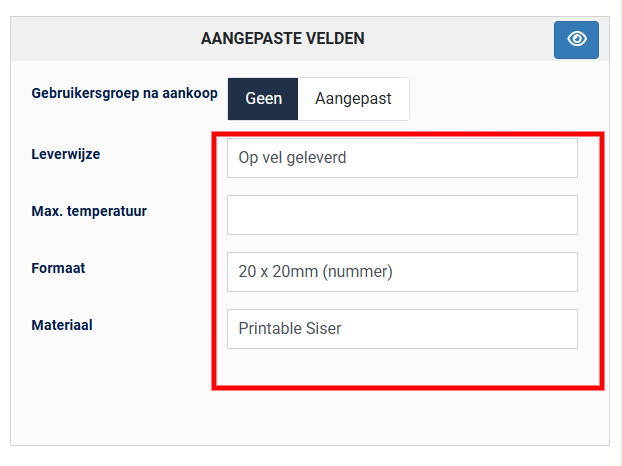
We have some custom text fields for the products also, but the name of the custom field we can translate, that is allright.
How can we set a translation for the input text for the different languages?
We have some custom text fields for the products also, but the name of the custom field we can translate, that is allright.
How can we set a translation for the input text for the different languages?
Please Log in or Create an account to join the conversation.
1 year 9 months ago #365337
by nicolas
Replied by nicolas on topic multilanguage is not directing after category listing page to products
Hi,
In the settings of the custom field, turn on the "translatable" setting. The custom field will then be present in the translation popup of the product.
In the settings of the custom field, turn on the "translatable" setting. The custom field will then be present in the translation popup of the product.
Please Log in or Create an account to join the conversation.
- BluepointWebdesign
-
Topic Author
- Offline
Less
More
- Posts: 424
- Thank you received: 11
1 year 9 months ago #365347
by BluepointWebdesign
Replied by BluepointWebdesign on topic multilanguage is not directing after category listing page to products
Hi Nicolas,
Thanks for pointing out to this setting, i think i need a pair of new glasses.
Have a nice weekend!
Mark
Thanks for pointing out to this setting, i think i need a pair of new glasses.
Have a nice weekend!
Mark
Please Log in or Create an account to join the conversation.
Time to create page: 0.098 seconds