

- Posts: 301
- Thank you received: 6
Coupon Code Location And Smaller Checkout Product Image
1 year 8 months ago #365902
by fan4chevy
Coupon Code Location And Smaller Checkout Product Image was created by fan4chevy
-- Joomla version -- : 5
Is there a way to move the coupon code location to be in the area of the total rather than at the top of the page like my image?
Is there a way to change the size of the product image in the checkout without effecting other areas?
THank you.
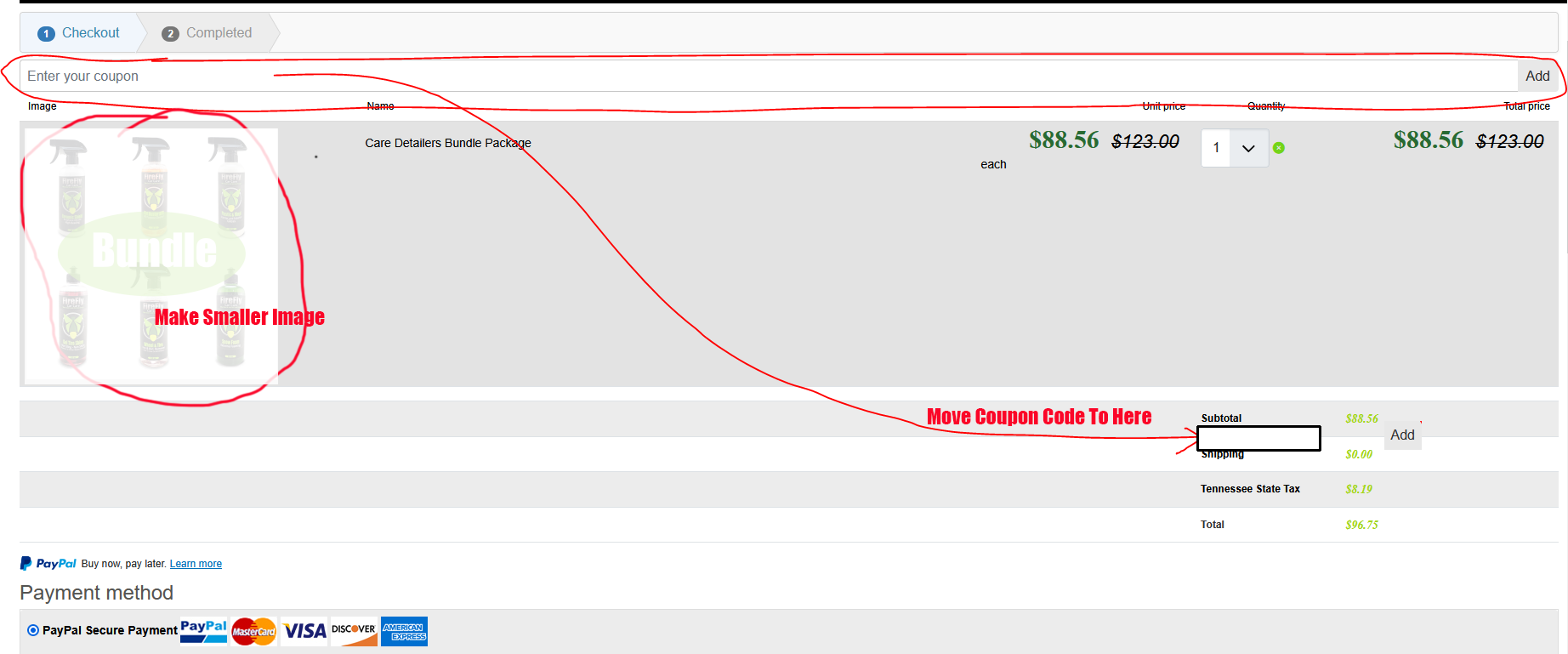
Is there a way to move the coupon code location to be in the area of the total rather than at the top of the page like my image?
Is there a way to change the size of the product image in the checkout without effecting other areas?
THank you.
Please Log in or Create an account to join the conversation.

1 year 8 months ago #365904
by nicolas
Replied by nicolas on topic Coupon Code Location And Smaller Checkout Product Image
Hi,
Moving the coupon input inside the cart area is not possible.
The size of the thumbnails in the cart area can be adapted with CSS code. For example:
Moving the coupon input inside the cart area is not possible.
The size of the thumbnails in the cart area can be adapted with CSS code. For example:
Code:
.hikashop_cart_product_image_value img {
width: 50px;
}
Please Log in or Create an account to join the conversation.
1 year 8 months ago #365919
by nicobraam
Replied by nicobraam on topic Coupon Code Location And Smaller Checkout Product Image
Hello,
I didn't wanted to open a new topic because i think it is related to this question.
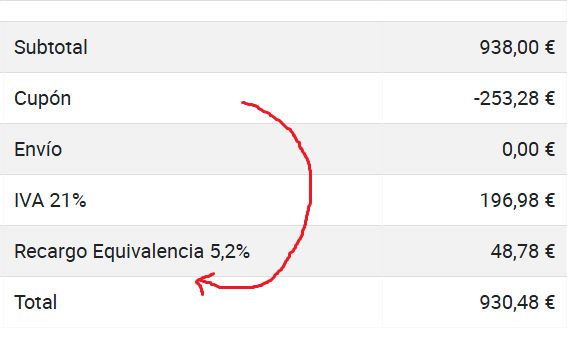
Is it possible to move the coupon amount (or line) just above the total? (See image)
Thanks in advance
I didn't wanted to open a new topic because i think it is related to this question.
Is it possible to move the coupon amount (or line) just above the total? (See image)
Thanks in advance
Please Log in or Create an account to join the conversation.
1 year 8 months ago #365921
by nicolas
Replied by nicolas on topic Coupon Code Location And Smaller Checkout Product Image
Hi,
That is possible, yes.
You can edit the view file checkout / show_block_cart via the menu Display>Views.
There, you can use the drag & drop interface to move the coupon row down.
That is possible, yes.
You can edit the view file checkout / show_block_cart via the menu Display>Views.
There, you can use the drag & drop interface to move the coupon row down.
Please Log in or Create an account to join the conversation.
1 year 8 months ago #365934
by fan4chevy
Replied by fan4chevy on topic Coupon Code Location And Smaller Checkout Product Image
I tried modifying the block but it did not move the coupon to the totals area. However, if I could even just shrink the coupon line rather than taking entire page that would be great too. So putting it to the right under the totals so it is easy for my customers to see it.
See image.
Thank you very much.
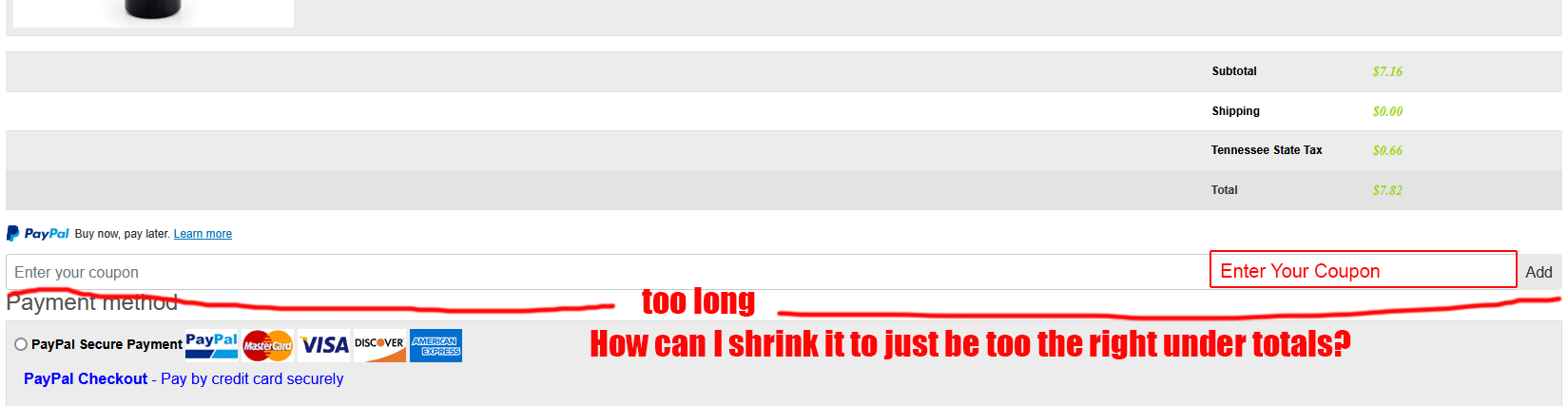
See image.
Thank you very much.
Please Log in or Create an account to join the conversation.
1 year 8 months ago #365941
by nicolas
Replied by nicolas on topic Coupon Code Location And Smaller Checkout Product Image
Hi,
The coupon input field doesn't take the whole width by default.
On the default template of Joomla, it looks like this: i.imgur.com/2CRxkoT.png
So, what I see on your screenshot tells me that your Joomla template must have CSS code which forces all the input fields to take as much width as possible. Since I don't know the exact code used by your template for this, I can't tell you what exact CSS code will work for sure to shrink it.
For that, I'll first need to analyze the CSS code already there first.
Could you provide the URL of your shop in order to look at this ?
The coupon input field doesn't take the whole width by default.
On the default template of Joomla, it looks like this: i.imgur.com/2CRxkoT.png
So, what I see on your screenshot tells me that your Joomla template must have CSS code which forces all the input fields to take as much width as possible. Since I don't know the exact code used by your template for this, I can't tell you what exact CSS code will work for sure to shrink it.
For that, I'll first need to analyze the CSS code already there first.
Could you provide the URL of your shop in order to look at this ?
Please Log in or Create an account to join the conversation.
Time to create page: 0.116 seconds