

- Posts: 637
- Thank you received: 26
Condition issue?
11 months 3 weeks ago - 11 months 3 weeks ago #368907
by Lumiga
Kind regards,
Lumiga
Condition issue? was created by Lumiga
-- HikaShop version -- : 6.1.0
-- Joomla version -- : 5.3.4
-- PHP version -- : 8.3
Hi HikaShop team,
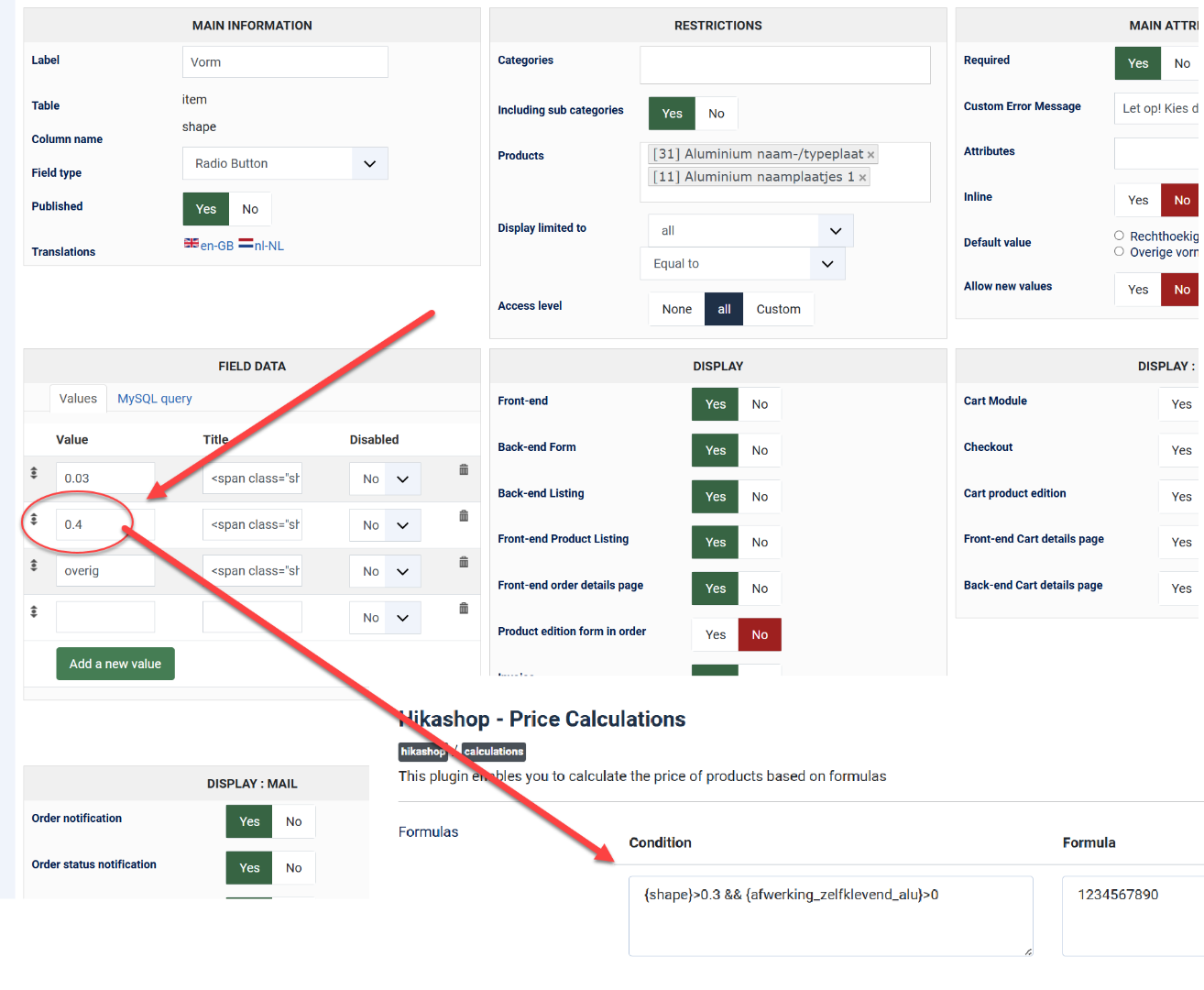
I’m experiencing an issue with a price calculation condition using decimal values.
Here’s the condition I’m trying to use:
When {shape} has a value like 0.4, the condition does not work.
However, when I change the value from the shape into (for example 2), the condition works correctly.
So it looks like decimal numbers (with a dot) are not being parsed or compared properly inside conditions, while integers are.
But also, why will these conditions don't work?
Thanks in advance for your help!
Best regards,
Lumiga
-- Joomla version -- : 5.3.4
-- PHP version -- : 8.3
Hi HikaShop team,
I’m experiencing an issue with a price calculation condition using decimal values.
Here’s the condition I’m trying to use:
Code:
{shape}>0.3 && {afwerking_zelfklevend_alu}>0
When {shape} has a value like 0.4, the condition does not work.
However, when I change the value from the shape into (for example 2), the condition works correctly.
So it looks like decimal numbers (with a dot) are not being parsed or compared properly inside conditions, while integers are.
But also, why will these conditions don't work?
Code:
{shape}=0.4
{shape}="0.4"
Thanks in advance for your help!
Best regards,
Lumiga
Kind regards,
Lumiga
Last edit: 11 months 3 weeks ago by Lumiga.
Please Log in or Create an account to join the conversation.

11 months 3 weeks ago #368908
by nicolas
Replied by nicolas on topic Condition issue?
Hi,
Ideally, I would recommend avoiding decimals as much as possible with PHP. That will avoid issues.
You could multiply everything by 100 here. That way, you would have the values 3 and 40 and in the condition, you would have {shape}>30 and it would be mathematically the same, but without any decimals. And if you need to use {shape} in the formula, you can always divide it by 100 in the formula.
However, your custom field can have both strings and numbers: 0.4 and 0.03 are numbers but overig is a string.
And then you're using > in the condition. But "overid > 0.3" doesn't make sense since you can't mathematically compare a word and a number.
That might actually be a bigger problem here.
Ideally, I would recommend avoiding decimals as much as possible with PHP. That will avoid issues.
You could multiply everything by 100 here. That way, you would have the values 3 and 40 and in the condition, you would have {shape}>30 and it would be mathematically the same, but without any decimals. And if you need to use {shape} in the formula, you can always divide it by 100 in the formula.
However, your custom field can have both strings and numbers: 0.4 and 0.03 are numbers but overig is a string.
And then you're using > in the condition. But "overid > 0.3" doesn't make sense since you can't mathematically compare a word and a number.
That might actually be a bigger problem here.
Please Log in or Create an account to join the conversation.
Time to create page: 0.207 seconds