
PayPal gateway not working

1 year 2 weeks ago - 1 year 2 weeks ago #368986
by grayt7
PayPal gateway not working was created by grayt7
-- HikaShop version -- : 6.1
-- Joomla version -- : 5.3.4
-- PHP version -- : 8.4
Hey,
I have an odd error on the site. PayPal does work but after payment it goes to an error page (See screenshots). There are no overrides and I have tested on the default template.
Also, sometimes, payment is taken, even though the message is "The payment request was refused by PayPal"
Can you please help me try to get to the bottom of this please?
Many thanks.
-- Joomla version -- : 5.3.4
-- PHP version -- : 8.4
Hey,
I have an odd error on the site. PayPal does work but after payment it goes to an error page (See screenshots). There are no overrides and I have tested on the default template.
Also, sometimes, payment is taken, even though the message is "The payment request was refused by PayPal"
Can you please help me try to get to the bottom of this please?
Many thanks.
Last edit: 1 year 2 weeks ago by grayt7.
Please Log in or Create an account to join the conversation.

1 year 2 weeks ago #368987
by nicolas
Replied by nicolas on topic PayPal gateway not working
Hi,
For the "syntax error", please reproduce it with the "debug" setting of the Joomla configuration page turned on. It will display more information on the error and with it, we should be able to tell you what to do.
For the other one, please look for errors in the console of your browser while on that page. It should provide more information on the issue.
For the "syntax error", please reproduce it with the "debug" setting of the Joomla configuration page turned on. It will display more information on the error and with it, we should be able to tell you what to do.
For the other one, please look for errors in the console of your browser while on that page. It should provide more information on the issue.
Please Log in or Create an account to join the conversation.
1 year 2 weeks ago - 1 year 2 weeks ago #368991
by grayt7
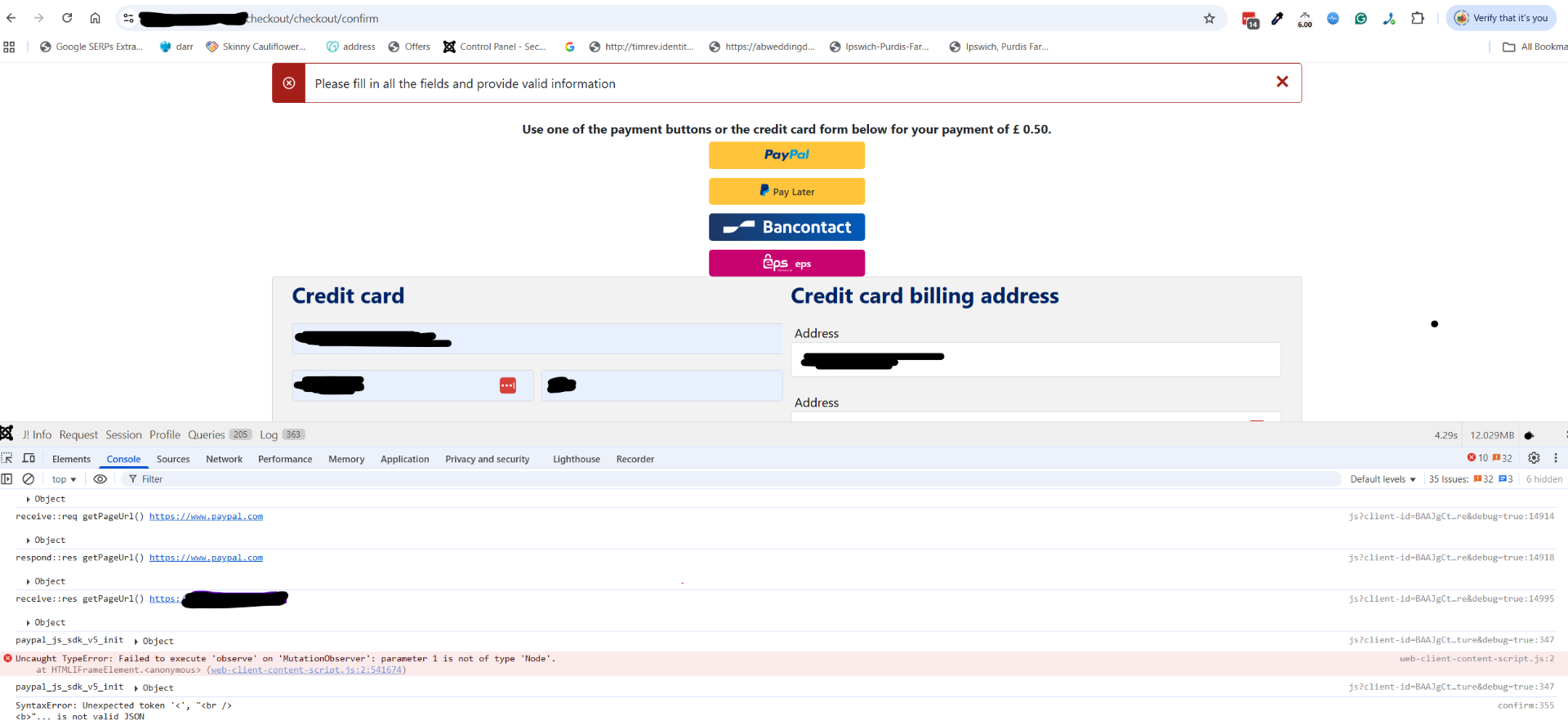 Today I am unable to process the form with the "please fill in all the fields..." comment.
See attacehd screenshot. I do have debug and error reporting maximum (I didn't see any errors). The Consol error is attached in the image. What can I try next please?
Replied by grayt7 on topic PayPal gateway not working
See attacehd screenshot. I do have debug and error reporting maximum (I didn't see any errors). The Consol error is attached in the image. What can I try next please?
Last edit: 1 year 2 weeks ago by grayt7.
Please Log in or Create an account to join the conversation.
1 year 2 weeks ago #368993
by nicolas
Replied by nicolas on topic PayPal gateway not working
Hi,
The console indicates there is a PHP error.
You can see at the bottom left corner of your screenshot the text "SyntaxError: Unexpected token" which points at a PHP error, when it is expecting a JSON text to be returned by the server.
This is probably linked to the error you had in your second screenshot in your first message.
Are you not able to reproduce it with the "debug" setting of the Joomla configuration page activated ?
The extra details would allow us to tell you what to do.
Otherwise, PHP error log should also contain the full error message if you have access to it.
And if nothing is possible, please provide a backend access via our contact form so that we can directly reproduce the issue on your website and investigate deeper.
The console indicates there is a PHP error.
You can see at the bottom left corner of your screenshot the text "SyntaxError: Unexpected token" which points at a PHP error, when it is expecting a JSON text to be returned by the server.
This is probably linked to the error you had in your second screenshot in your first message.
Are you not able to reproduce it with the "debug" setting of the Joomla configuration page activated ?
The extra details would allow us to tell you what to do.
Otherwise, PHP error log should also contain the full error message if you have access to it.
And if nothing is possible, please provide a backend access via our contact form so that we can directly reproduce the issue on your website and investigate deeper.
Please Log in or Create an account to join the conversation.
Time to create page: 0.053 seconds