

- Posts: 39
- Thank you received: 4
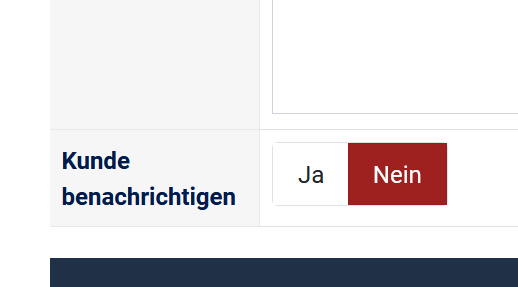
How do I set the Notify Customer field to YES (preselected) by default?
1 year 2 weeks ago #369120
by spike252
-- HikaShop version -- : 6.1.0
-- Joomla version -- : 5.4.0
-- PHP version -- : 8.3
-- Browser(s) name and version -- : Firefox
How do I set the Notify Customer field to YES (preselected) by default? By default, customers should always be notified when the status changes.
Thanks in Advance
-- Joomla version -- : 5.4.0
-- PHP version -- : 8.3
-- Browser(s) name and version -- : Firefox
How do I set the Notify Customer field to YES (preselected) by default? By default, customers should always be notified when the status changes.
Thanks in Advance
Please Log in or Create an account to join the conversation.

1 year 2 weeks ago #369121
by nicolas
Replied by nicolas on topic How do I set the Notify Customer field to YES (preselected) by default?
Hi,
You can follow the instructions here:
www.hikashop.com/forum/4-how-to/15676-re...y-default.html#15677
You can follow the instructions here:
www.hikashop.com/forum/4-how-to/15676-re...y-default.html#15677
The following user(s) said Thank You: spike252
Please Log in or Create an account to join the conversation.
1 year 2 weeks ago #369139
by spike252
Replied by spike252 on topic How do I set the Notify Customer field to YES (preselected) by default?
It worked, thanks 
I would like to set up shop the management (Orders, Orderstatus...) on the site via the frontend. Do the settings also apply to the frontend of the shop, with the your frontend tool: www.hikashop.com/hikamarket-front-end.html
If yes I order it. Thanks in Advance.
I would like to set up shop the management (Orders, Orderstatus...) on the site via the frontend. Do the settings also apply to the frontend of the shop, with the your frontend tool: www.hikashop.com/hikamarket-front-end.html
If yes I order it. Thanks in Advance.
Please Log in or Create an account to join the conversation.
1 year 2 weeks ago #369142
by nicolas
Replied by nicolas on topic How do I set the Notify Customer field to YES (preselected) by default?
Hi,
You'll also have a notify customer checkbox on the frontend of HikaMarket. However, there it is turned on by default, so no modification is necessary for it.
You'll also have a notify customer checkbox on the frontend of HikaMarket. However, there it is turned on by default, so no modification is necessary for it.
The following user(s) said Thank You: spike252
Please Log in or Create an account to join the conversation.
1 year 1 week ago #369164
by spike252
Replied by spike252 on topic How do I set the Notify Customer field to YES (preselected) by default?
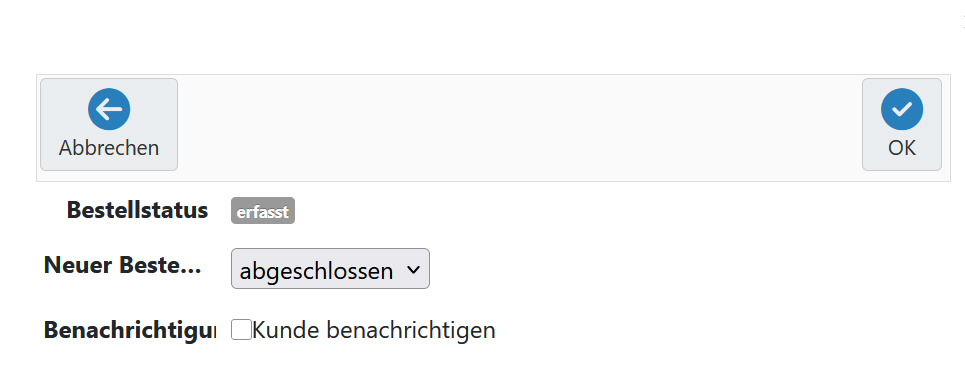
I purchased the Hikamarket frontend today and am currently setting it up. Unfortunately, when the status changes, the "Notify customer" field is not pre-selected by default, as you described. How do I change this, both in the order list (frontend) and in the order itself?
Thanks in Advance.
Thanks in Advance.
Please Log in or Create an account to join the conversation.
1 year 1 week ago #369182
by spike252
Replied by spike252 on topic How do I set the Notify Customer field to YES (preselected) by default?
Any solution? Thx in Advance
Please Log in or Create an account to join the conversation.

1 year 1 week ago #369184
by Jerome
Jerome - Obsidev.com
HikaMarket & HikaSerial developer / HikaShop core dev team.
Replied by Jerome on topic How do I set the Notify Customer field to YES (preselected) by default?
Hello,
The HikaMarket view is : "ordermarket / status".
You need to modify the line
to set the checkbox checked by default
For HikaMarket questions, please use the HikaMarket section of the forum so I'll be notified of your questions.
Regards,
The HikaMarket view is : "ordermarket / status".
You need to modify the line
Code:
<dd id="hikamarket_order_notify_val" style="display:none;" class="hikamarket_order_notify"><input type="checkbox" id="order[notify]" value="1" name="order[notify]"/><label style="display:inline-block" for="order[notify]"><?php echo JText::_('NOTIFY_CUSTOMER'); ?></label></dd>
Code:
<dd id="hikamarket_order_notify_val" style="display:none;" class="hikamarket_order_notify"><input type="checkbox" id="order[notify]" value="1" checked="checked" name="order[notify]"/><label style="display:inline-block" for="order[notify]"><?php echo JText::_('NOTIFY_CUSTOMER'); ?></label></dd>
For HikaMarket questions, please use the HikaMarket section of the forum so I'll be notified of your questions.
Regards,
Jerome - Obsidev.com
HikaMarket & HikaSerial developer / HikaShop core dev team.
The following user(s) said Thank You: spike252
Please Log in or Create an account to join the conversation.
Time to create page: 0.064 seconds