
- Posts: 606
- Thank you received: 13
Weight not showing?
- mohairbears
-
 Topic Author
- Offline
Less
More
7 months 3 weeks ago #370241
by mohairbears
Weight not showing? was created by mohairbears
-- HikaShop version -- : 6.2.0
-- Joomla version -- : 5.4.2
-- PHP version -- : 8.2
Hi, How do I get the 'weight' to show as a selectable 'column' in orders in the back end?
Rgds
-- Joomla version -- : 5.4.2
-- PHP version -- : 8.2
Hi, How do I get the 'weight' to show as a selectable 'column' in orders in the back end?
Rgds
Please Log in or Create an account to join the conversation.

7 months 3 weeks ago #370249
by nicolas
Replied by nicolas on topic Weight not showing?
Hi,
We've added this column to the orders listing with HikaShop 6.3.0 which we've released a few days ago.
The auto update is not yet available. You can either manually update it by downloading the install package of the latest version and then installing it on your website or wait a week before we activate the update system.
Once done, you can use the selector on the top right corner of the listing to activate the weight column.
We've added this column to the orders listing with HikaShop 6.3.0 which we've released a few days ago.
The auto update is not yet available. You can either manually update it by downloading the install package of the latest version and then installing it on your website or wait a week before we activate the update system.
Once done, you can use the selector on the top right corner of the listing to activate the weight column.
Please Log in or Create an account to join the conversation.
- mohairbears
-
Topic Author
- Offline
Less
More
- Posts: 606
- Thank you received: 13
7 months 3 weeks ago - 7 months 3 weeks ago #370266
by mohairbears
Replied by mohairbears on topic Weight not showing?
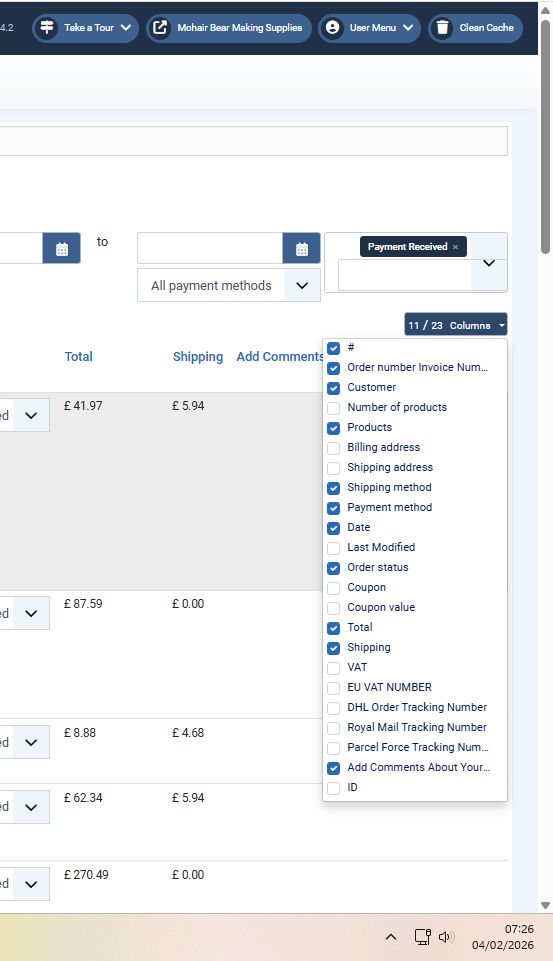
Hi, I have downloaded and updated to 6.3 but the weight box is still not visible?
Rgds
Rgds
Last edit: 7 months 3 weeks ago by mohairbears.
Please Log in or Create an account to join the conversation.
7 months 3 weeks ago #370271
by nicolas
Replied by nicolas on topic Weight not showing?
Mmm. I can see you have the new version installed on your website.
And I double checked on my end that these columns have been properly added in the latest version.
The weight and volume columns should normally be just after the "products" column on your screenshot.
So all l can think is that you might have a view override of order / listing for your backend template which prevents you from seeing the new columns.
Can you check if you have an override for this view file via the menu Display>Views of HikaShop ?
If so, try to delete it.
And I double checked on my end that these columns have been properly added in the latest version.
The weight and volume columns should normally be just after the "products" column on your screenshot.
So all l can think is that you might have a view override of order / listing for your backend template which prevents you from seeing the new columns.
Can you check if you have an override for this view file via the menu Display>Views of HikaShop ?
If so, try to delete it.
Please Log in or Create an account to join the conversation.
- mohairbears
-
Topic Author
- Offline
Less
More
- Posts: 606
- Thank you received: 13
7 months 2 weeks ago - 7 months 2 weeks ago #370312
by mohairbears
Replied by mohairbears on topic Weight not showing?
Hi, Yes I have an edit, removed updated and put back it, works ok now.
Can you consider putting this edit in, may be useful for others please, its displays the Shipping Price paid.?
its now in on line 157
<!-- MY EDIT -->
<th class="hikashop_order_shipping_title title">
<?php echo JHTML::_('grid.sort', JText::_('HIKASHOP_SHIPPING'), 'b.order_full_price', $this->pageInfo->filter->order->dir, $this->pageInfo->filter->order->value ); ?> <!-- END OF EDIT -->
and on line 363
<!--MY EDIT-->
</td>
<td class="hikashop_shipping_total_value">
<?php echo $this->currencyHelper->format($row->order_shipping_price,$row->order_currency_id);?>
</td>
<!--END OF EDIT-->
Rgds
Can you consider putting this edit in, may be useful for others please, its displays the Shipping Price paid.?
its now in on line 157
<!-- MY EDIT -->
<th class="hikashop_order_shipping_title title">
<?php echo JHTML::_('grid.sort', JText::_('HIKASHOP_SHIPPING'), 'b.order_full_price', $this->pageInfo->filter->order->dir, $this->pageInfo->filter->order->value ); ?> <!-- END OF EDIT -->
and on line 363
<!--MY EDIT-->
</td>
<td class="hikashop_shipping_total_value">
<?php echo $this->currencyHelper->format($row->order_shipping_price,$row->order_currency_id);?>
</td>
<!--END OF EDIT-->
Rgds
Last edit: 7 months 2 weeks ago by mohairbears.
Please Log in or Create an account to join the conversation.
7 months 2 weeks ago #370326
by nicolas
Replied by nicolas on topic Weight not showing?
Hi,
That's a good idea. Thanks for your feedback. We'll look at adding this.
That's a good idea. Thanks for your feedback. We'll look at adding this.
Please Log in or Create an account to join the conversation.
- mohairbears
-
Topic Author
- Offline
Less
More
- Posts: 606
- Thank you received: 13
7 months 1 week ago #370451
by mohairbears
Replied by mohairbears on topic Weight not showing?
Hi, Since I updated to the new version to add this 'weight' the email 'out of stock' has stopped being sent to me?
If I remember correctly, it was a Plugin?? the plugin does not seem to be available anymore?
Rgds
If I remember correctly, it was a Plugin?? the plugin does not seem to be available anymore?
Rgds
Please Log in or Create an account to join the conversation.
7 months 1 week ago #370458
by nicolas
Replied by nicolas on topic Weight not showing?
Hi,
Can you check in the HikaShop configuration that you don't have the HikaShop Starter edition ? You might have downgraded your HikaShop while updating it. If so, make sure that you install the Business edition install package to restore the Business edition capabilities.
Also, check the cron task:
www.hikashop.com/support/documentation/5...cron-task.html#check
Also, can you check that the out of stock plugin is still enabled in your Joomla plugins manager ?
Can you check in the HikaShop configuration that you don't have the HikaShop Starter edition ? You might have downgraded your HikaShop while updating it. If so, make sure that you install the Business edition install package to restore the Business edition capabilities.
Also, check the cron task:
www.hikashop.com/support/documentation/5...cron-task.html#check
Also, can you check that the out of stock plugin is still enabled in your Joomla plugins manager ?
Please Log in or Create an account to join the conversation.
- mohairbears
-
Topic Author
- Offline
Less
More
- Posts: 606
- Thank you received: 13
7 months 1 week ago #370466
by mohairbears
Replied by mohairbears on topic Weight not showing?
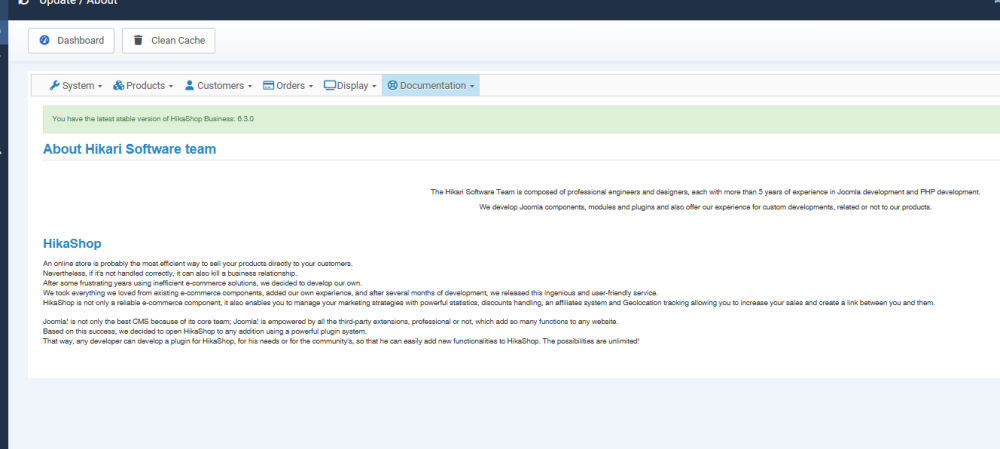
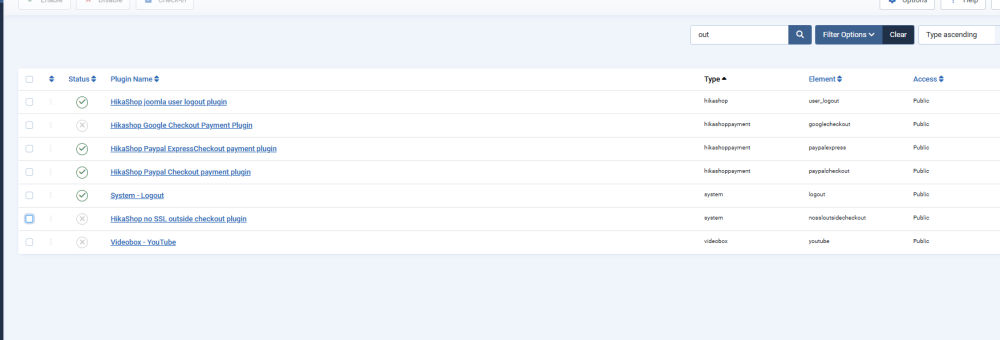
Nope... on 6.3 I have downloaded 6.3 again and the out of stock plugin is not there?
Searched 'out' and 'stock' and neither searches come up with anything?
Rgds
Searched 'out' and 'stock' and neither searches come up with anything?
Rgds
Please Log in or Create an account to join the conversation.
7 months 1 week ago #370467
by nicolas
Replied by nicolas on topic Weight not showing?
Hi,
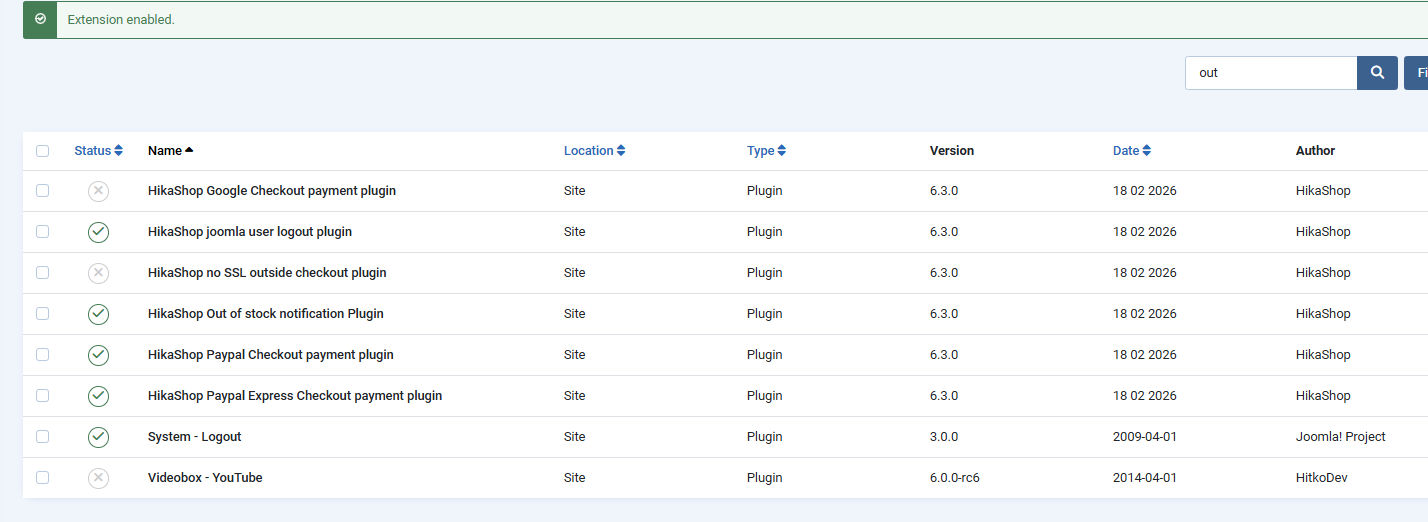
From your screenshot and what you're saying, I suppose the plugin must have been disabled in the extensions manager (not the plugins manager). So go there and check if you can find it. If you do, enable it back and you'll be able to configure it again via the plugins manager.
If you don't see it in the extensions manager either, then it means that its entry in the extensions table of Joomla in the database is corrupted and Joomla doesn't see the plugin at all. In that case, use the Joomla extensions discover function :
docs.joomla.org/Help4.x:Extensions:_Discover
This should find the missing plugin and allow you to restore it. Then, you'll be able to configure it again via the joomla plugins manager.
From your screenshot and what you're saying, I suppose the plugin must have been disabled in the extensions manager (not the plugins manager). So go there and check if you can find it. If you do, enable it back and you'll be able to configure it again via the plugins manager.
If you don't see it in the extensions manager either, then it means that its entry in the extensions table of Joomla in the database is corrupted and Joomla doesn't see the plugin at all. In that case, use the Joomla extensions discover function :
docs.joomla.org/Help4.x:Extensions:_Discover
This should find the missing plugin and allow you to restore it. Then, you'll be able to configure it again via the joomla plugins manager.
Please Log in or Create an account to join the conversation.
- mohairbears
-
Topic Author
- Offline
Less
More
- Posts: 606
- Thank you received: 13
7 months 1 week ago #370469
by mohairbears
Replied by mohairbears on topic Weight not showing?
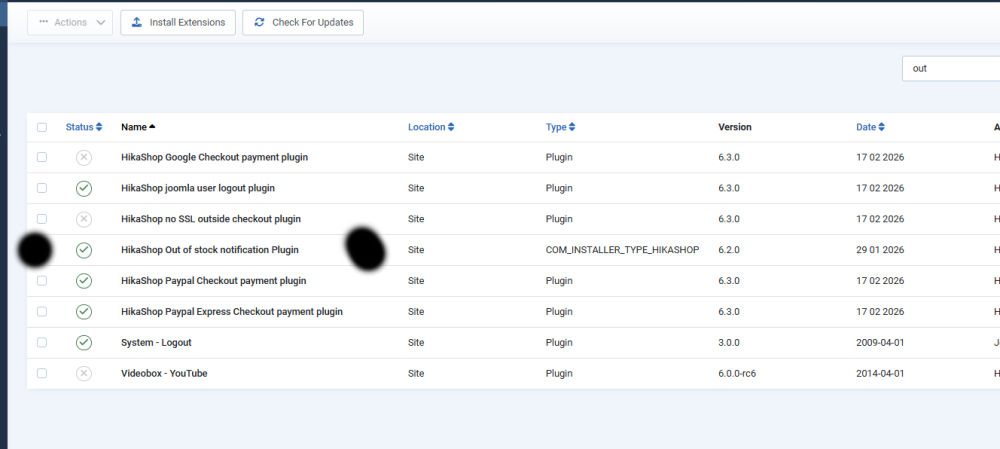
Hi, This is getting weird?? it is where you said it would be and active? I disabled and re-enabled but it still won't show in Pluins??
Rgds
Rgds
Please Log in or Create an account to join the conversation.
7 months 1 week ago #370473
by nicolas
Replied by nicolas on topic Weight not showing?
Hi,
For some reason the "type" of the plugin is "COM_INSTALLER_TYPE_HIKASHOP" instead of "hikashop".
I think that's the problem.
There's two things you can do:
1. Select the plugin in the Joomla extensions manager and delete it. Then, install HikaShop again and it should add it properly.
2. You could open the extensions table of your database via your PHPMyAdmin and change the type of the entry for the plugin.
For some reason the "type" of the plugin is "COM_INSTALLER_TYPE_HIKASHOP" instead of "hikashop".
I think that's the problem.
There's two things you can do:
1. Select the plugin in the Joomla extensions manager and delete it. Then, install HikaShop again and it should add it properly.
2. You could open the extensions table of your database via your PHPMyAdmin and change the type of the entry for the plugin.
Please Log in or Create an account to join the conversation.
- mohairbears
-
Topic Author
- Offline
Less
More
- Posts: 606
- Thank you received: 13
7 months 1 week ago #370480
by mohairbears
Replied by mohairbears on topic Weight not showing?
Hi, Still got issues when trying to delete it? so found the plugin and it looked to be correct??
Ok now what?, risked deleting it in sql, re-installed and it now looks to be correct.
Rgds
Ok now what?, risked deleting it in sql, re-installed and it now looks to be correct.
Rgds
Please Log in or Create an account to join the conversation.
7 months 1 week ago #370481
by nicolas
Replied by nicolas on topic Weight not showing?
Hi,
No, in the column where you see the "plugin" text for the payment plugins, it should also be "plugin" and not "hikashop" for the out of stock plugin. That's what you need to fix.
No, in the column where you see the "plugin" text for the payment plugins, it should also be "plugin" and not "hikashop" for the out of stock plugin. That's what you need to fix.
Please Log in or Create an account to join the conversation.
- mohairbears
-
Topic Author
- Offline
Less
More
- Posts: 606
- Thank you received: 13
7 months 1 week ago - 7 months 1 week ago #370485
by mohairbears
Replied by mohairbears on topic Weight not showing?
Hi, I deleted it and then re-installed Hikashop, this fixed it.
Last edit: 7 months 1 week ago by mohairbears. Reason: add photo
The following user(s) said Thank You: nicolas
Please Log in or Create an account to join the conversation.
Time to create page: 0.246 seconds