
- Posts: 465
- Thank you received: 19
Quantity
- Reincidente
-
 Topic Author
- Offline
Less
More
8 months 2 weeks ago #370274
by Reincidente
Quantity was created by Reincidente
Hi Nicolas,
I’d like your help with something.
On my website, I have many products with only one option (one selector). On those product pages, besides the “Add to cart” button, there is also a quantity box where the customer can increase the quantity (up to the available stock).
However, for other products (custom/personalized ones) that have multiple selectors (model, quantity, printing type, etc.), the quantity box does not appear — customers can only click “Add to cart” (quantity cannot be increased on the product page).
This has been worrying me for a while, and I’m not sure if it’s something I changed a long time ago and I don’t remember, or if for this type of product (with multiple selectors/variants) HikaShop does not allow adding more than one item at a time.
If this is something I changed myself, could you please point me in the right direction (what I might have changed) and whether it can be reverted for some URLs?
Thanks.
I’d like your help with something.
On my website, I have many products with only one option (one selector). On those product pages, besides the “Add to cart” button, there is also a quantity box where the customer can increase the quantity (up to the available stock).
However, for other products (custom/personalized ones) that have multiple selectors (model, quantity, printing type, etc.), the quantity box does not appear — customers can only click “Add to cart” (quantity cannot be increased on the product page).
This has been worrying me for a while, and I’m not sure if it’s something I changed a long time ago and I don’t remember, or if for this type of product (with multiple selectors/variants) HikaShop does not allow adding more than one item at a time.
If this is something I changed myself, could you please point me in the right direction (what I might have changed) and whether it can be reverted for some URLs?
Thanks.
Please Log in or Create an account to join the conversation.

8 months 2 weeks ago #370277
by nicolas
Hi,
When you edit a product, you have the "quantity input" setting near the bottom, which controls how the quantity input field is displayed, if at all.
So that's the first thing I would check.
You also have the "synchronized add to cart" setting in the HikaShop configuration. If that setting is activated, then the quantity input field will display or not based on whether the product is in the cart or not. So make sure it is turned on.
When you edit a product, you have the "quantity input" setting near the bottom, which controls how the quantity input field is displayed, if at all.
So that's the first thing I would check.
You also have the "synchronized add to cart" setting in the HikaShop configuration. If that setting is activated, then the quantity input field will display or not based on whether the product is in the cart or not. So make sure it is turned on.
Please Log in or Create an account to join the conversation.
- Reincidente
-
Topic Author
- Offline
Less
More
- Posts: 465
- Thank you received: 19
8 months 2 weeks ago #370283
by Reincidente
Replied by Reincidente on topic Quantity
Thanks so much Nicolas.
Please Log in or Create an account to join the conversation.
Less
More
- Posts: 609
- Thank you received: 13
8 months 14 hours ago #370572
by mohairbears
Replied by mohairbears on topic Quantity
Hi, I have the same issue. It used to show?
All of what you suggested is on but nothing will show on the product page (cart only?)
thanks
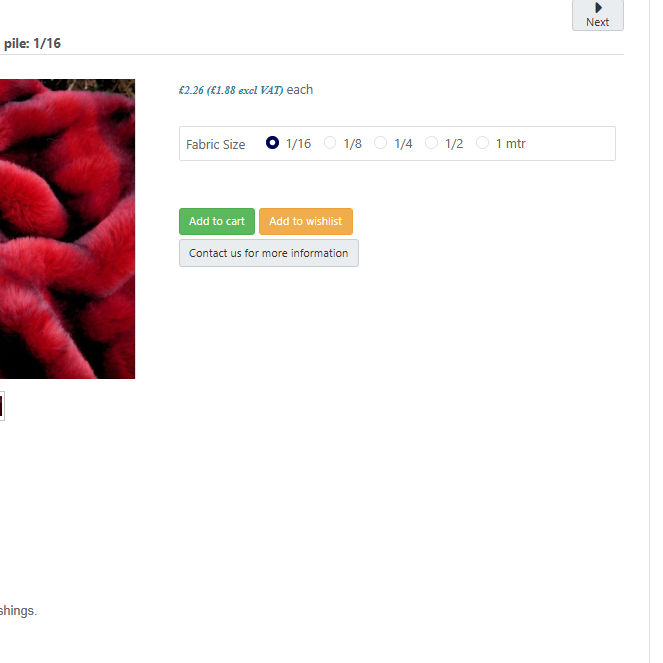
All of what you suggested is on but nothing will show on the product page (cart only?)
thanks
Please Log in or Create an account to join the conversation.
8 months 11 hours ago #370573
by nicolas
Hi,
The "synchronized add to cart" setting should be turned off, not turned on. It's probably your problem.
The "synchronized add to cart" setting should be turned off, not turned on. It's probably your problem.
The following user(s) said Thank You: mohairbears
Please Log in or Create an account to join the conversation.
Less
More
- Posts: 609
- Thank you received: 13
8 months 10 hours ago #370579
by mohairbears
Replied by mohairbears on topic Quantity
sorted:)
Please Log in or Create an account to join the conversation.
Time to create page: 0.354 seconds