
- Posts: 610
- Thank you received: 13
White very difficult to see
- mohairbears
-
 Topic Author
- Offline
Less
More
8 months 3 weeks ago #370513
by mohairbears
White very difficult to see was created by mohairbears
-- HikaShop version -- : 6.3
-- Joomla version -- : 5.4
-- PHP version -- : 8.2
-- Browser(s) name and version -- : chrome
Hi, Please see attached.
How do I change the colour from white to something
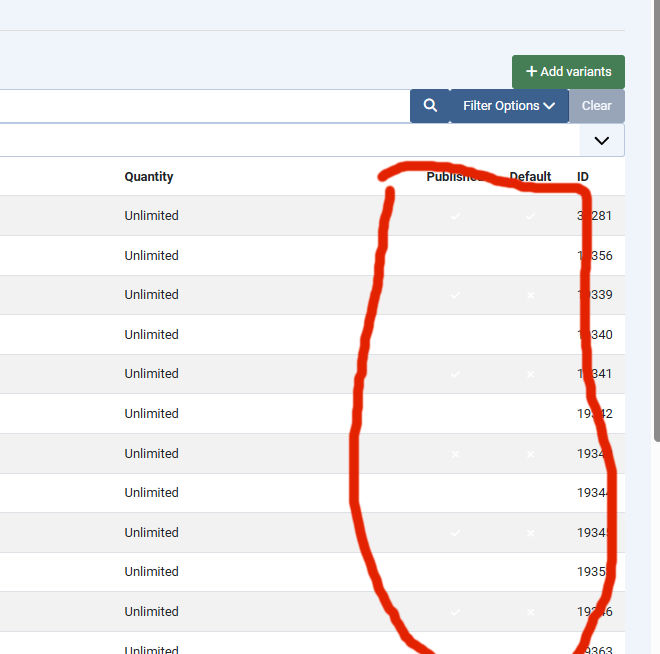 that is visible please?
-- Joomla version -- : 5.4
-- PHP version -- : 8.2
-- Browser(s) name and version -- : chrome
Hi, Please see attached.
How do I change the colour from white to something
Please Log in or Create an account to join the conversation.

8 months 3 weeks ago #370514
by nicolas
Replied by nicolas on topic White very difficult to see
Hi,
I think the problem is on your website. Maybe you have an override of the backend CSS or something, because we are not able to reproduce the problem on our end.
Could you provide a backend access in order to check what's going on ?
I think the problem is on your website. Maybe you have an override of the backend CSS or something, because we are not able to reproduce the problem on our end.
Could you provide a backend access in order to check what's going on ?
Please Log in or Create an account to join the conversation.
- mohairbears
-
Topic Author
- Offline
Less
More
- Posts: 610
- Thank you received: 13
8 months 3 weeks ago #370530
by mohairbears
Replied by mohairbears on topic White very difficult to see
Hi, I did send an email to you yesterday with the required data.
Rgds
Rgds
Please Log in or Create an account to join the conversation.
8 months 3 weeks ago #370531
by nicolas
Replied by nicolas on topic White very difficult to see
Hi,
Thanks for the access. As expected, you've configured the "Back-end CSS File" setting of the HikaShop configuration to "none", disabling the whole CSS of HikaShop for the backend interface. This can be useful if you want to have your own CSS for the HikaShop backend in a custom backend template of yours.
However, normally, you want to leave this to "default". I've changed it back for you and it now displays properly.
Thanks for the access. As expected, you've configured the "Back-end CSS File" setting of the HikaShop configuration to "none", disabling the whole CSS of HikaShop for the backend interface. This can be useful if you want to have your own CSS for the HikaShop backend in a custom backend template of yours.
However, normally, you want to leave this to "default". I've changed it back for you and it now displays properly.
Please Log in or Create an account to join the conversation.
- mohairbears
-
Topic Author
- Offline
Less
More
- Posts: 610
- Thank you received: 13
8 months 3 weeks ago #370532
by mohairbears
Replied by mohairbears on topic White very difficult to see
Hiya thanks for that, I have not really configured much yet and certainly not that?
Trying to add re-captcha now and cannot get it to show? any adivce please?
Thanks
Trying to add re-captcha now and cannot get it to show? any adivce please?
Thanks
Please Log in or Create an account to join the conversation.
8 months 3 weeks ago #370533
by nicolas
Replied by nicolas on topic White very difficult to see
Hi,
I checked the settings of the Recaptcha system plugin on your website and it seems the keys are not correct. If I activate the plugin, I can see the recaptcha area on the registration form with an error about this.
I checked the settings of the Recaptcha system plugin on your website and it seems the keys are not correct. If I activate the plugin, I can see the recaptcha area on the registration form with an error about this.
Please Log in or Create an account to join the conversation.
- mohairbears
-
Topic Author
- Offline
Less
More
- Posts: 610
- Thank you received: 13
8 months 3 weeks ago #370535
by mohairbears
Replied by mohairbears on topic White very difficult to see
Yep put the correct keys in Darren ;o(
Thank you now sorted.
Thank you now sorted.
Please Log in or Create an account to join the conversation.
- mohairbears
-
Topic Author
- Offline
Less
More
- Posts: 610
- Thank you received: 13
8 months 3 weeks ago #370537
by mohairbears
Replied by mohairbears on topic White very difficult to see
Hi Sorry another I can't solve, usernames used to be customers emails address, now they can choose their own, where is the setting to use the email only please?
Please Log in or Create an account to join the conversation.
8 months 3 weeks ago #370538
by nicolas
Replied by nicolas on topic White very difficult to see
Hi,
It's the "registration" setting, under the Checkout tab where you can change this:
www.hikashop.com/support/documentation/5....html#checkout_login
It's the "registration" setting, under the Checkout tab where you can change this:
www.hikashop.com/support/documentation/5....html#checkout_login
Please Log in or Create an account to join the conversation.
- mohairbears
-
Topic Author
- Offline
Less
More
- Posts: 610
- Thank you received: 13
8 months 3 weeks ago #370540
by mohairbears
Replied by mohairbears on topic White very difficult to see
Hi, Sorry, another question. I used to have a popup (add to cart and checkout) cannot find this? is it part of HikaShop or did I use another extension?
thank in advance
thank in advance
Please Log in or Create an account to join the conversation.
8 months 3 weeks ago #370542
by nicolas
Replied by nicolas on topic White very difficult to see
Hi,
It's done with the HikaShop cart notification plugin. You can configure it via the Joomla plugins manager.
It's done with the HikaShop cart notification plugin. You can configure it via the Joomla plugins manager.
The following user(s) said Thank You: mohairbears
Please Log in or Create an account to join the conversation.
- mohairbears
-
Topic Author
- Offline
Less
More
- Posts: 610
- Thank you received: 13
8 months 2 weeks ago #370546
by mohairbears
Replied by mohairbears on topic White very difficult to see
Hi, Issue with tax not showing correctly in the back end, it displays ok front end ?
Can you point me in the right direction please.
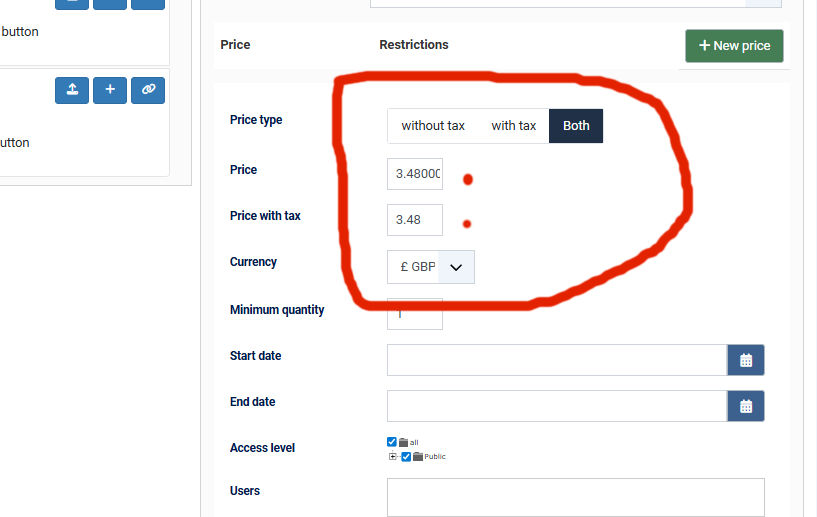
Can you point me in the right direction please.
Please Log in or Create an account to join the conversation.
8 months 2 weeks ago #370549
by nicolas
Replied by nicolas on topic White very difficult to see
Hi,
On this interface, like on the frontend, the system calculates the tax amount based on your tax rules and the zone it believes your account is in.
Please check your user account's default billing and default shipping addresses and check they are in a taxed location. Then, logout/login in your backend and you should see the price of the products taxed accordingly.
On this interface, like on the frontend, the system calculates the tax amount based on your tax rules and the zone it believes your account is in.
Please check your user account's default billing and default shipping addresses and check they are in a taxed location. Then, logout/login in your backend and you should see the price of the products taxed accordingly.
Please Log in or Create an account to join the conversation.
- mohairbears
-
Topic Author
- Offline
Less
More
- Posts: 610
- Thank you received: 13
8 months 2 weeks ago #370560
by mohairbears
Replied by mohairbears on topic White very difficult to see
Hi, That's not worked? our base is set as the admin address so that appears to be correct.
Anything else it could be~?
thanks
Anything else it could be~?
thanks
Please Log in or Create an account to join the conversation.
8 months 2 weeks ago #370567
by nicolas
Replied by nicolas on topic White very difficult to see
Hi,
The issue comes from the "Main tax zone" setting. It was configured to the UK country zone, but that zone is not taxed.
I've configured it to Shropshire so that it is taken into account as taxed.
The issue comes from the "Main tax zone" setting. It was configured to the UK country zone, but that zone is not taxed.
I've configured it to Shropshire so that it is taken into account as taxed.
Please Log in or Create an account to join the conversation.
- mohairbears
-
Topic Author
- Offline
Less
More
- Posts: 610
- Thank you received: 13
8 months 2 weeks ago #370569
by mohairbears
Replied by mohairbears on topic White very difficult to see
Yes you corrected it as I was working in the back end... I thought I was going mad for a minute :lol: :lol:
Thank you
Thank you
Please Log in or Create an account to join the conversation.
- mohairbears
-
Topic Author
- Offline
Less
More
- Posts: 610
- Thank you received: 13
8 months 2 weeks ago #370570
by mohairbears
Replied by mohairbears on topic White very difficult to see
Can you point out where that setting is you changed as I cannot find it? for future reference.
Thanks
Thanks
Please Log in or Create an account to join the conversation.
8 months 2 weeks ago #370571
by nicolas
Replied by nicolas on topic White very difficult to see
It's the "Main tax zone" setting in the Taxes section of the Hikashop configuration page.
The following user(s) said Thank You: mohairbears
Please Log in or Create an account to join the conversation.
- mohairbears
-
Topic Author
- Offline
Less
More
- Posts: 610
- Thank you received: 13
8 months 2 weeks ago #370581
by mohairbears
Replied by mohairbears on topic White very difficult to see
Hi, A width issue that I cannot solve?
the visible area in a few places are not wide enough in the back end?
on the orders page
in a Variant
on a product page
I am using the default Hikashop CSS and Cassiopeia template
Thank is advance
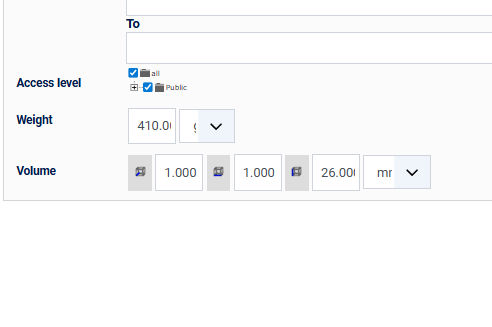
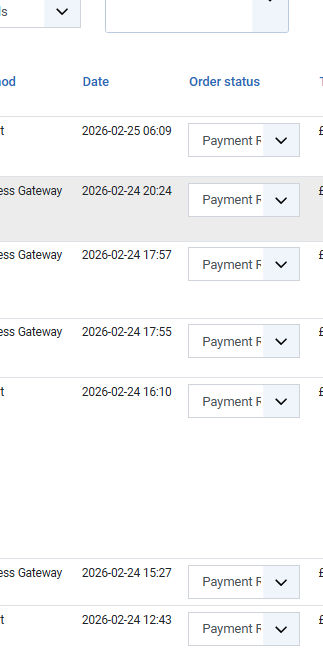
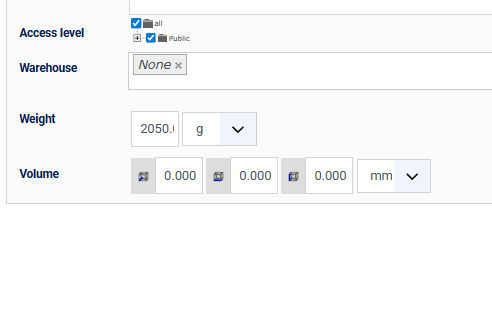
the visible area in a few places are not wide enough in the back end?
on the orders page
in a Variant
on a product page
I am using the default Hikashop CSS and Cassiopeia template
Thank is advance
Please Log in or Create an account to join the conversation.
- mohairbears
-
Topic Author
- Offline
Less
More
- Posts: 610
- Thank you received: 13
8 months 2 weeks ago #370605
by mohairbears
Replied by mohairbears on topic White very difficult to see
Any advice on how to solve these issues please?
Please Log in or Create an account to join the conversation.
Time to create page: 0.100 seconds