

- Posts: 88
- Thank you received: 9
e-mail notification
5 months 4 weeks ago #371801
by duportail
e-mail notification was created by duportail
-- url of the page with the problem -- :
www.ubuntushop.biz
-- HikaShop version -- : 6.4.1
-- Joomla version -- : 5.4
-- PHP version -- : 8.4
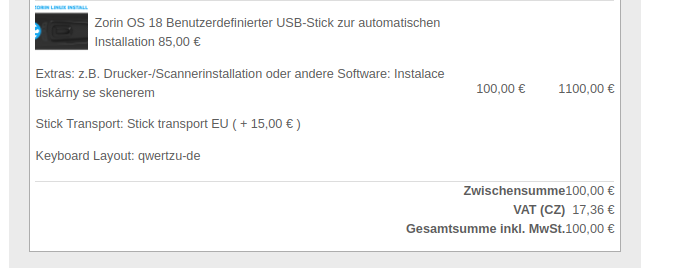
Upon order creation, an e-mail is send. But the quantity of product is too close to the price. See attachment. So it seems price is 1000 euro, but this must be quantity 1 and price 100 euro.
Where to change this (extra spave between quantity and price) . Or should the table be widere?
-- HikaShop version -- : 6.4.1
-- Joomla version -- : 5.4
-- PHP version -- : 8.4
Upon order creation, an e-mail is send. But the quantity of product is too close to the price. See attachment. So it seems price is 1000 euro, but this must be quantity 1 and price 100 euro.
Where to change this (extra spave between quantity and price) . Or should the table be widere?
Please Log in or Create an account to join the conversation.

5 months 4 weeks ago #371803
by nicolas
Replied by nicolas on topic e-mail notification
Hi,
The issue is that your products names are really long and thus they push the column of the name to take all the available space and thus all the other columns get squished together.
Making the table wider is not possible, it already takes all the available width. Emails don't work like websites and a max width on the whole email needs to be set.
So the solution will be to add a bit of CSS to the products table of your email via the menu System>Emails in order to have less width for the name.
The issue is that your products names are really long and thus they push the column of the name to take all the available space and thus all the other columns get squished together.
Making the table wider is not possible, it already takes all the available width. Emails don't work like websites and a max width on the whole email needs to be set.
So the solution will be to add a bit of CSS to the products table of your email via the menu System>Emails in order to have less width for the name.
Please Log in or Create an account to join the conversation.
5 months 1 week ago #372075
by duportail
Replied by duportail on topic e-mail notification
do you have a sample for this css?
Please Log in or Create an account to join the conversation.
5 months 1 week ago #372078
by nicolas
Replied by nicolas on topic e-mail notification
Hello,
Email clients ignore embedded CSS, the styles need to be inline on the cells.
In HikaShop > System > Emails, open the "Order creation notification", switch to the HTML view and append these to the existing style attribute of each cell, both on the header row and on the product line (8 cells total):
- name cell:
- price, quantity, total cells:
Email clients ignore embedded CSS, the styles need to be inline on the cells.
In HikaShop > System > Emails, open the "Order creation notification", switch to the HTML view and append these to the existing style attribute of each cell, both on the header row and on the product line (8 cells total):
- name cell:
Code:
max-width:260px;word-break:break-word;padding-right:12px;
Code:
padding-left:12px;
Please Log in or Create an account to join the conversation.
Time to create page: 0.055 seconds