
- Posts: 608
- Thank you received: 13
Few issues with Vessel Template
- mohairbears
-
 Topic Author
- Offline
Less
More
2 weeks 6 days ago #100000057
by mohairbears
Few issues with Vessel Template was created by mohairbears
-- HikaShop version -- : 6.6.0
-- Joomla version -- : 5.4.9
-- PHP version -- : 8.3
-- Browser(s) name and version -- : Chrome 154.0
Hi, Found a few issues: first one is, I cannot get the Category description to centre and a lot of space is wasted? plus there appears to now be 2 identical boxes for the category description?
2nd: I cannot get the menu to display on a new menu item?? tried all the usual fixes I know of?
-- Joomla version -- : 5.4.9
-- PHP version -- : 8.3
-- Browser(s) name and version -- : Chrome 154.0
Hi, Found a few issues: first one is, I cannot get the Category description to centre and a lot of space is wasted? plus there appears to now be 2 identical boxes for the category description?
2nd: I cannot get the menu to display on a new menu item?? tried all the usual fixes I know of?
Attachment not found
Attachment not found
Please Log in or Create an account to join the conversation.

2 weeks 6 days ago #100000058
by nicolas
Replied by nicolas on topic Few issues with Vessel Template
Hi,
Category description: Vessel limits the description block to 540px wide and keeps it on the left of the content column, so text you centre in the editor is centred inside that narrow strip and the rest of the column stays empty. We have corrected this in Vessel so the description uses the full width of the column; it will be in the next Vessel update.
Until then you can fix it yourself: in System > Site Templates > Vessel Details and Files, open the folder media/templates/site/vessel/css (create a new file there called user.css if it does not exist yet) and add this:
About the two identical boxes: we could not see the description twice. Your long pile page no longer shows the description at all right now, and on your screenshot the only box is the one with the search field and the Filter button, which is the HikaShop filter of that menu item, not a description. Could you give us the address of a page where both boxes show, or a screenshot showing them both?
Missing menu: your main menu is a Maximenu CK module in Vessel's menu position. On the Clearance Faux Furs page that module is simply not loaded, while it is on your other pages, which means the module is not assigned to that new menu item. Go to Content > Site Modules, open your Maximenu CK module and, in its Menu Assignment tab, either choose "On all pages" or tick the Clearance Faux Furs item, then save. If the module is set to "On all pages except selected", check that the new item is not ticked there.
Category description: Vessel limits the description block to 540px wide and keeps it on the left of the content column, so text you centre in the editor is centred inside that narrow strip and the rest of the column stays empty. We have corrected this in Vessel so the description uses the full width of the column; it will be in the next Vessel update.
Until then you can fix it yourself: in System > Site Templates > Vessel Details and Files, open the folder media/templates/site/vessel/css (create a new file there called user.css if it does not exist yet) and add this:
Code:
.hikashop_category_description { max-width: none; }
About the two identical boxes: we could not see the description twice. Your long pile page no longer shows the description at all right now, and on your screenshot the only box is the one with the search field and the Filter button, which is the HikaShop filter of that menu item, not a description. Could you give us the address of a page where both boxes show, or a screenshot showing them both?
Missing menu: your main menu is a Maximenu CK module in Vessel's menu position. On the Clearance Faux Furs page that module is simply not loaded, while it is on your other pages, which means the module is not assigned to that new menu item. Go to Content > Site Modules, open your Maximenu CK module and, in its Menu Assignment tab, either choose "On all pages" or tick the Clearance Faux Furs item, then save. If the module is set to "On all pages except selected", check that the new item is not ticked there.
Please Log in or Create an account to join the conversation.
- mohairbears
-
Topic Author
- Offline
Less
More
- Posts: 608
- Thank you received: 13
2 weeks 6 days ago #100000062
by mohairbears
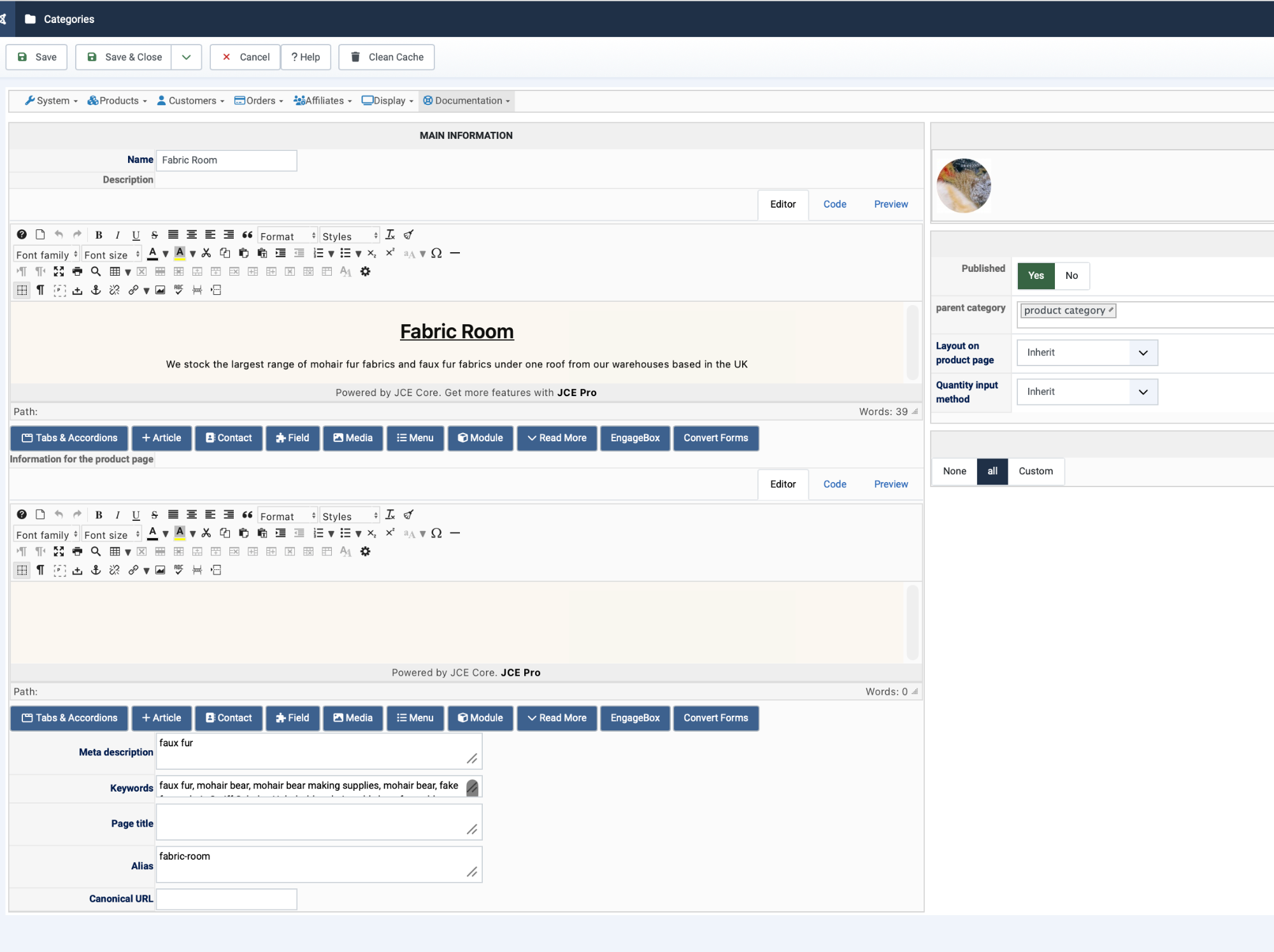
Hi All fixed. Attached is the screen shot of the 2 boxes, its in categories
Replied by mohairbears on topic Few issues with Vessel Template
Hi All fixed. Attached is the screen shot of the 2 boxes, its in categories
Please Log in or Create an account to join the conversation.
2 weeks 6 days ago #100000064
by nicolas
Replied by nicolas on topic Few issues with Vessel Template
Hi,
The one at the top is the description of the category.
The one below is for text you can provide which will be added on the product page for all the products in that category.
The one at the top is the description of the category.
The one below is for text you can provide which will be added on the product page for all the products in that category.
The following user(s) said Thank You: mohairbears
Please Log in or Create an account to join the conversation.
Time to create page: 0.203 seconds