
- Posts: 75
- Thank you received: 1
Product is not clickable
- Scheinbacher
-
 Topic Author
- Offline
Less
More
14 years 7 months ago #39001
by Scheinbacher
Product is not clickable was created by Scheinbacher
Hello Hika-fans
please help me with this challenge:
-The product listed can not be click. However I listed the item via category or and product modul, the product dont show.
plexiglas-deko.de/index.php/de/plexiglas...rylglas-farblos-klar
Thanks for your advice.
please help me with this challenge:
-The product listed can not be click. However I listed the item via category or and product modul, the product dont show.
plexiglas-deko.de/index.php/de/plexiglas...rylglas-farblos-klar
Thanks for your advice.
Please Log in or Create an account to join the conversation.

14 years 7 months ago #39024
by Jerome
Jerome - Obsidev.com
HikaMarket & HikaSerial developer / HikaShop core dev team.
Also helping the HikaShop support team when having some time or couldn't sleep.
By the way, do not send me private message, use the "contact us" form instead.
Replied by Jerome on topic Re: Product is not clickable
Hi,
Please check your HikaShop menu configuration ("Display > Content menus").
There is an option in "Parameters for products" called "Link to the product page".
Otherwise, in the general HikaShop configuration, tab "Display" there is the same option in the fieldset "Default parameters for products".
Regards,
Please check your HikaShop menu configuration ("Display > Content menus").
There is an option in "Parameters for products" called "Link to the product page".
Otherwise, in the general HikaShop configuration, tab "Display" there is the same option in the fieldset "Default parameters for products".
Regards,
Jerome - Obsidev.com
HikaMarket & HikaSerial developer / HikaShop core dev team.
Also helping the HikaShop support team when having some time or couldn't sleep.
By the way, do not send me private message, use the "contact us" form instead.
Please Log in or Create an account to join the conversation.
- Scheinbacher
-
Topic Author
- Offline
Less
More
- Posts: 75
- Thank you received: 1
14 years 7 months ago #39103
by Scheinbacher
Replied by Scheinbacher on topic Re: Product is not clickable
Jerome
I already have done these setting.
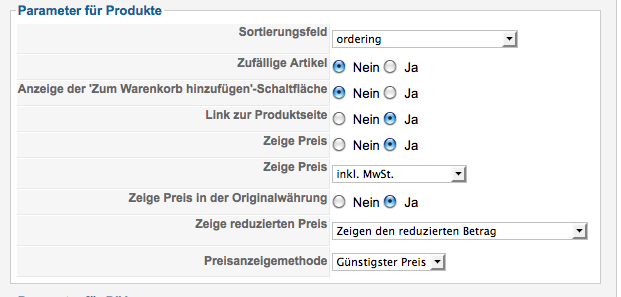
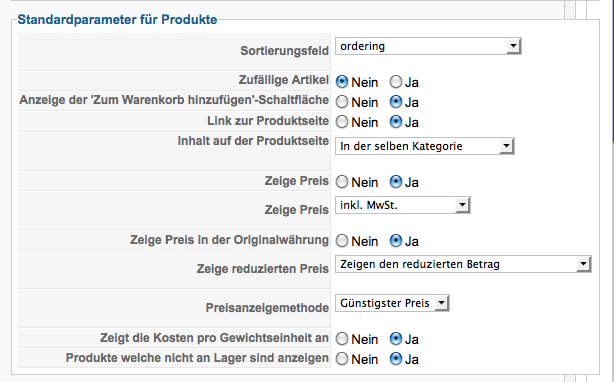
Do you have another ideas?
Thank You
I already have done these setting.
Do you have another ideas?
Thank You
Please Log in or Create an account to join the conversation.

14 years 7 months ago #39194
by nicolas
Replied by nicolas on topic Re: Product is not clickable
You should go in the menu Display->Content modules and edit the module with the id 117. There, you will find the same option that you can turn on to have your products clickable.
Please Log in or Create an account to join the conversation.
- Scheinbacher
-
Topic Author
- Offline
Less
More
- Posts: 75
- Thank you received: 1
14 years 7 months ago #39292
by Scheinbacher
Replied by Scheinbacher on topic Re: Product is not clickable
Thank You.
Now it is clickable!
Now it is clickable!
Please Log in or Create an account to join the conversation.

14 years 3 months ago #54165
by jeremy1128
Replied by jeremy1128 on topic Re: Product is not clickable
I am having the same problem. I followed the steps listed but I do not see a module with ID 117 inside Display->Content Modules. All I see is 168, 165 and 164. Please help if you can.
travellersridge.com/merchandise
Thanks,
Jeremy
travellersridge.com/merchandise
Thanks,
Jeremy
Please Log in or Create an account to join the conversation.
14 years 3 months ago #54168
by Jerome
Jerome - Obsidev.com
HikaMarket & HikaSerial developer / HikaShop core dev team.
Also helping the HikaShop support team when having some time or couldn't sleep.
By the way, do not send me private message, use the "contact us" form instead.
Replied by Jerome on topic Re: Product is not clickable
Hi,
"117" was the ID for the module in Scheinbacher's website.
Nicolas gives this ID because it was easier for Scheinbacher to find his module.
You have to edit an HikaShop category module.
Your page " travellersridge.com/merchandise/category/12-horse " have a product which is not clickable.
Opening the source code ofo the page, you can found into : "hikashop_category_information_module_168".
It means that you have to edit the module "168" and configure the option.
Regards,
"117" was the ID for the module in Scheinbacher's website.
Nicolas gives this ID because it was easier for Scheinbacher to find his module.
You have to edit an HikaShop category module.
Your page " travellersridge.com/merchandise/category/12-horse " have a product which is not clickable.
Opening the source code ofo the page, you can found into : "hikashop_category_information_module_168".
It means that you have to edit the module "168" and configure the option.
Regards,
Jerome - Obsidev.com
HikaMarket & HikaSerial developer / HikaShop core dev team.
Also helping the HikaShop support team when having some time or couldn't sleep.
By the way, do not send me private message, use the "contact us" form instead.
The following user(s) said Thank You: nicolas
Please Log in or Create an account to join the conversation.
14 years 3 months ago #54179
by jeremy1128
Replied by jeremy1128 on topic Re: Product is not clickable
That was exactly it. Thank you so much for clearing that up and helping me out! I really appreciate it.
Have a great day.
Have a great day.
Please Log in or Create an account to join the conversation.
Time to create page: 0.196 seconds