

- Posts: 15
- Thank you received: 0
Show pagination Below the images of Module
13 years 2 months ago #118623
by phanny
Show pagination Below the images of Module was created by phanny
Dear Sir/Madam:
I would like to ask you some techniques that related to pagination.
- I want to put the pagination on the below of products.
( For example, in the HikaShop Content Module,
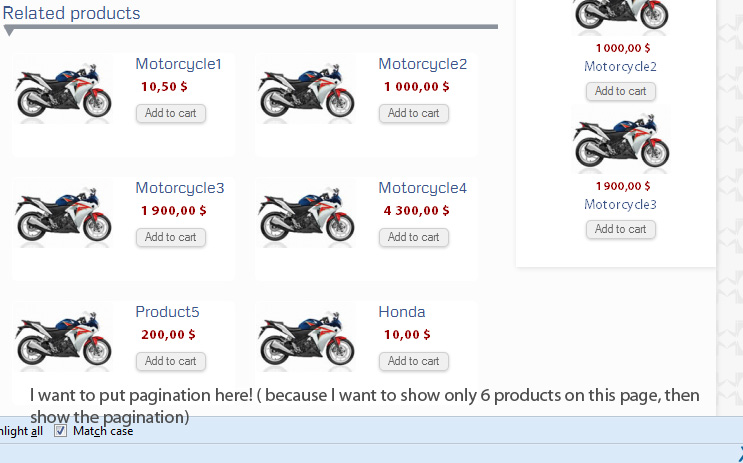
I want to show only 10 products per page, then show the pagination below the products)
I don't know how to put it. Could you please help me?
Please kindly check the attachment file below to see the place that I want to put pagination
Thanks
I would like to ask you some techniques that related to pagination.
- I want to put the pagination on the below of products.
( For example, in the HikaShop Content Module,
I want to show only 10 products per page, then show the pagination below the products)
I don't know how to put it. Could you please help me?
Please kindly check the attachment file below to see the place that I want to put pagination
Thanks
Please Log in or Create an account to join the conversation.

Less
More
- Posts: 12953
- Thank you received: 1778
13 years 2 months ago #118638
by Mohamed Thelji
Replied by Mohamed Thelji on topic Show pagination Below the images of Module
Hi,
The pagination will show only if you for example have more than 6 products in the "Associated category" of your product listing and set the "Number of items" option to 6.
The pagination will show only if you for example have more than 6 products in the "Associated category" of your product listing and set the "Number of items" option to 6.
Please Log in or Create an account to join the conversation.
13 years 2 months ago #119176
by phanny
Replied by phanny on topic Show pagination Below the images of Module
Hi,
Even I have set the number of item equal 6, and the products in the "Associated category" are more than 6 but it still doesn't show the pagination.
So what is the problem? Is it error of coding?
Thanks
Even I have set the number of item equal 6, and the products in the "Associated category" are more than 6 but it still doesn't show the pagination.
So what is the problem? Is it error of coding?
Thanks
Please Log in or Create an account to join the conversation.
Less
More
- Posts: 12953
- Thank you received: 1778
13 years 2 months ago #119187
by Mohamed Thelji
Replied by Mohamed Thelji on topic Show pagination Below the images of Module
Ok, you're maybe editing the wrong content menu/module so can you give me a link to the page where you want to apply this modification ?
Thanks .
.
Thanks
. Please Log in or Create an account to join the conversation.
13 years 1 month ago #122060
by phanny
Replied by phanny on topic Show pagination Below the images of Module
Here is the link:
50.87.134.52/~greenic5/bbs/index.php/motorcycles
I wanna put the pagination the below images because there are more than 14 pictures. I already set the 14 items, but it doesn't show the pagination. I don't know why?
Thanks for your help
I wanna put the pagination the below images because there are more than 14 pictures. I already set the 14 items, but it doesn't show the pagination. I don't know why?
Thanks for your help
Please Log in or Create an account to join the conversation.

13 years 1 month ago #122226
by Jerome
Jerome - Obsidev.com
HikaMarket & HikaSerial developer / HikaShop core dev team.
Replied by Jerome on topic Show pagination Below the images of Module
Hi,
Please provide a screenshot of your HikaShop content module configuration with id "103".
Can you also check the option "Pagination" in your HikaShop configuration ? (tab "display, first section)
Thanks
Please provide a screenshot of your HikaShop content module configuration with id "103".
Can you also check the option "Pagination" in your HikaShop configuration ? (tab "display, first section)
Thanks
Jerome - Obsidev.com
HikaMarket & HikaSerial developer / HikaShop core dev team.
Please Log in or Create an account to join the conversation.
13 years 1 month ago #122271
by phanny
Replied by phanny on topic Show pagination Below the images of Module
Hi,
I am sorry because I cannot find the option "Pagination" in the configuration page. so can you guide me?
Here is a screenshot of your HikaShop content module configuration with id "103".
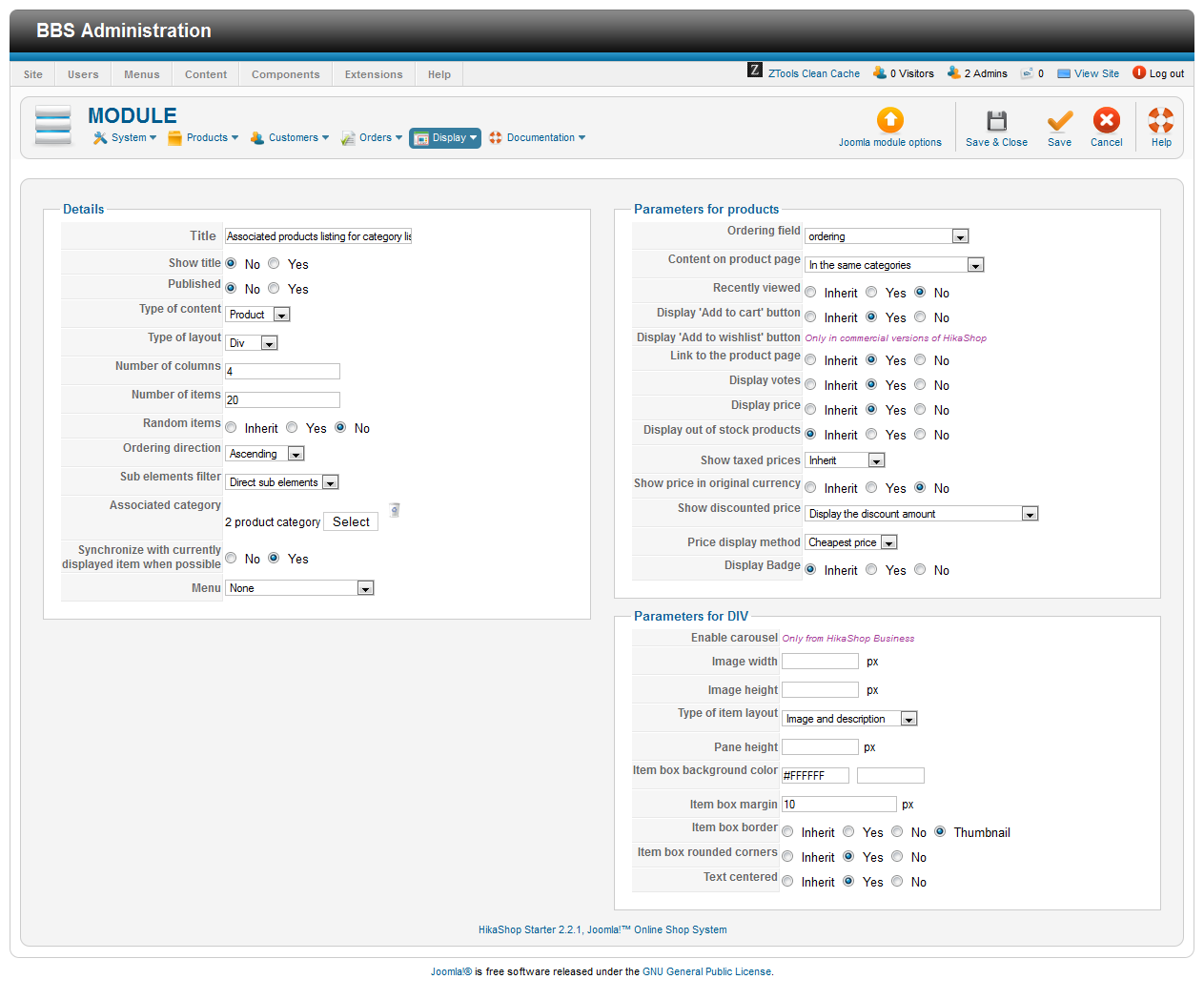
I am sorry because I cannot find the option "Pagination" in the configuration page. so can you guide me?
Here is a screenshot of your HikaShop content module configuration with id "103".
Please Log in or Create an account to join the conversation.
13 years 1 month ago #122304
by Jerome
Jerome - Obsidev.com
HikaMarket & HikaSerial developer / HikaShop core dev team.
Replied by Jerome on topic Show pagination Below the images of Module
Hi,
Thanks.
So with your configuration, you can modify the HikaShop core in order to activate the pagination for your module. It should not generate any problem.
By default there is no pagination for modules, except for "associated modules" which are displayed under HikaShop menus.
After that, for your homepage, I guess that you can create an HikaShop menu (which includes the pagination) and customize it in order to feet to your requirements. Using the category description or simple view override, you can get the same result (but with a pagination).
Otherwise, it is possible to modify the HikaShop core in order to activate the pagination for modules.
Sometimes a module can be associated with a menu and if there is a pagination for the module (with a linked menu), the pagination won't work properly and will change the menu while changing the page.
The modification touch a view but also a core file which means that you will loose your modification by updating/reinstalling HikaShop.
Regards,
Thanks.
So with your configuration, you can modify the HikaShop core in order to activate the pagination for your module. It should not generate any problem.
By default there is no pagination for modules, except for "associated modules" which are displayed under HikaShop menus.
After that, for your homepage, I guess that you can create an HikaShop menu (which includes the pagination) and customize it in order to feet to your requirements. Using the category description or simple view override, you can get the same result (but with a pagination).
Otherwise, it is possible to modify the HikaShop core in order to activate the pagination for modules.
Sometimes a module can be associated with a menu and if there is a pagination for the module (with a linked menu), the pagination won't work properly and will change the menu while changing the page.
The modification touch a view but also a core file which means that you will loose your modification by updating/reinstalling HikaShop.
Regards,
Jerome - Obsidev.com
HikaMarket & HikaSerial developer / HikaShop core dev team.
Please Log in or Create an account to join the conversation.
Time to create page: 0.101 seconds