
- Posts: 25
- Thank you received: 0
Category Image not displaying
- damianhartin
-
 Topic Author
- Offline
Less
More
13 years 2 months ago #120309
by damianhartin
Category Image not displaying was created by damianhartin
-- url of the page with the problem -- :
hartsco.com/index.php/component/hikashop.../13-sonos?Itemid=204
-- HikaShop version -- : 2.2.0
-- Joomla version -- : 3.1.1
-- PHP version -- : 5.3.15
Hi, hopefully this is a simple question - just cant work it out for the life of me :blink:
I have a shop category module that when a category is selected and the related category products page is displayed, the category image is not displayed?
I have a test site at home where this working as expected and I have checked every setting I can think of on the public site (which all match) but no category images will display.
Inspecting the webpage objects using chrome - I can see a DIV "hikashop_category_information_menu_204" on my test site but there is no similar DIV at all on the public site - but I cant see why??
Help please !!
-- HikaShop version -- : 2.2.0
-- Joomla version -- : 3.1.1
-- PHP version -- : 5.3.15
Hi, hopefully this is a simple question - just cant work it out for the life of me :blink:
I have a shop category module that when a category is selected and the related category products page is displayed, the category image is not displayed?
I have a test site at home where this working as expected and I have checked every setting I can think of on the public site (which all match) but no category images will display.
Inspecting the webpage objects using chrome - I can see a DIV "hikashop_category_information_menu_204" on my test site but there is no similar DIV at all on the public site - but I cant see why??
Help please !!
Please Log in or Create an account to join the conversation.

13 years 2 months ago #120379
by nicolas
Replied by nicolas on topic Category Image not displaying
Hi,
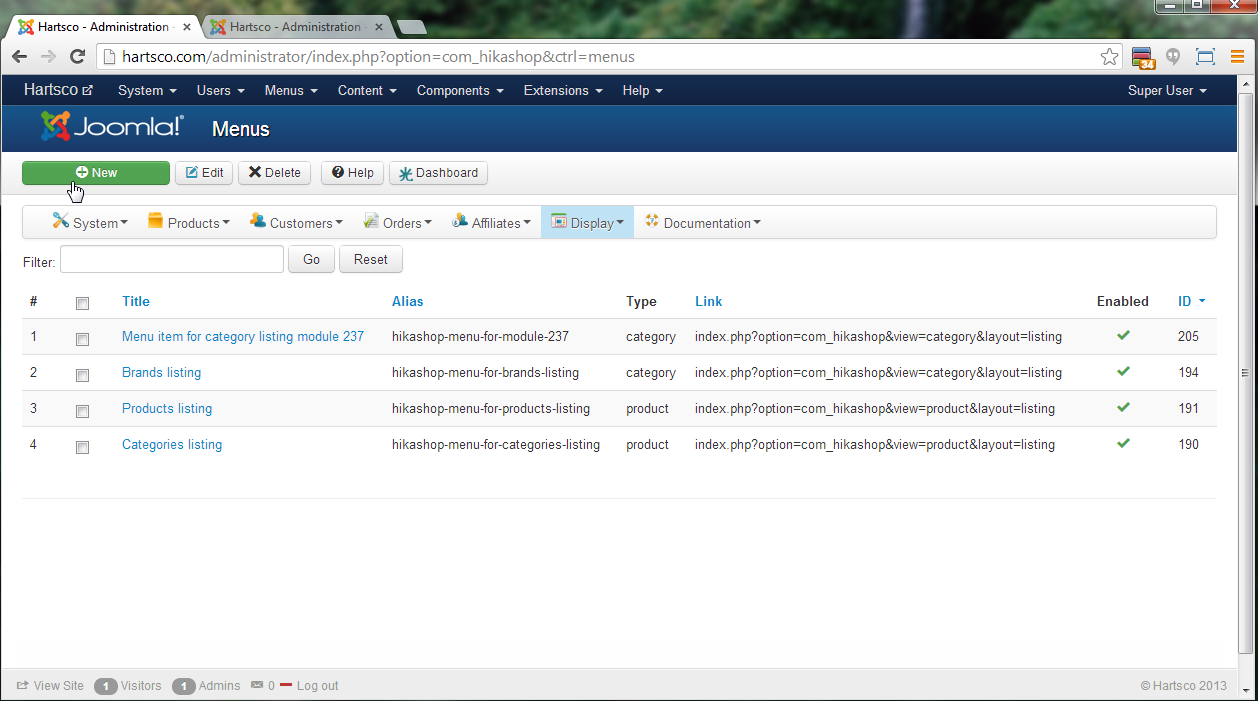
I can see that div on your page. To display the current category image on that page, you need to go in the menu Display>Content menus, edit your menu (with the id 204) and turn on the "show image" option.
I can see that div on your page. To display the current category image on that page, you need to go in the menu Display>Content menus, edit your menu (with the id 204) and turn on the "show image" option.
Please Log in or Create an account to join the conversation.
- damianhartin
-
Topic Author
- Offline
Less
More
- Posts: 25
- Thank you received: 0
13 years 2 months ago - 13 years 2 months ago #120387
by damianhartin
Replied by damianhartin on topic Category Image not displaying
Thanks Nicolas - but I don't seem to have an ID 204?
Last edit: 13 years 2 months ago by damianhartin.
Please Log in or Create an account to join the conversation.
13 years 2 months ago #120401
by nicolas
Replied by nicolas on topic Category Image not displaying
If the menu referenced in the URL doesn't exist, then the system uses the default parameters of the configuration, except that there is no default parameter for the title display.
I would thus recommend instead that module from which comes that link is configured to point to a valid menu item. You can do that by editing your module via the menu Display>Content modules and changing the "menu" option.
I would thus recommend instead that module from which comes that link is configured to point to a valid menu item. You can do that by editing your module via the menu Display>Content modules and changing the "menu" option.
Please Log in or Create an account to join the conversation.
- damianhartin
-
Topic Author
- Offline
Less
More
- Posts: 25
- Thank you received: 0
13 years 2 months ago #120409
by damianhartin
Replied by damianhartin on topic Category Image not displaying
Thanks again Nicolas.
My site references the Joomla menu (Shop) - which works fine on my test site?
Sorry, I still don't understand - are you talking about the Module "Associated products listing for category listing menu 204" ?
Or the Category module that is clicked to show the products for that category (which currently points to the Joomla 'Shop' menu)?
I didn't need to do anything on my test site - just add an image to the category and it appeared - you'll see the same for all the categories on my live site (the coming soon image doesn't display either)
Thanks,
Damian
My site references the Joomla menu (Shop) - which works fine on my test site?
Sorry, I still don't understand - are you talking about the Module "Associated products listing for category listing menu 204" ?
Or the Category module that is clicked to show the products for that category (which currently points to the Joomla 'Shop' menu)?
I didn't need to do anything on my test site - just add an image to the category and it appeared - you'll see the same for all the categories on my live site (the coming soon image doesn't display either)
Thanks,
Damian
Please Log in or Create an account to join the conversation.
13 years 2 months ago #120501
by nicolas
Replied by nicolas on topic Category Image not displaying
What I mean I that you need to look at the origin of those links, ie. your module on your right.
So you need to edit the module of your right (id 245) via the menu Display>Content modules and change the "menu" option to a valid categories listing menu item.
So you need to edit the module of your right (id 245) via the menu Display>Content modules and change the "menu" option to a valid categories listing menu item.
Please Log in or Create an account to join the conversation.
- damianhartin
-
Topic Author
- Offline
Less
More
- Posts: 25
- Thank you received: 0
13 years 2 months ago #120512
by damianhartin
Replied by damianhartin on topic Category Image not displaying
What is a valid "categories listing menu"?
It's set to my Joomla menu (Shop) as per my test site - is that not a valid menu?
It's set to my Joomla menu (Shop) as per my test site - is that not a valid menu?
Please Log in or Create an account to join the conversation.
13 years 2 months ago #120515
by nicolas
Replied by nicolas on topic Category Image not displaying
One which exists, is enabled, not trashed, configured to display a category listing...
Actually the menu that is selected is not valid and because of that; Joomla doesn't find it to create the URLs and that's also why you don't see it in the menu Display>Content menus.
Actually the menu that is selected is not valid and because of that; Joomla doesn't find it to create the URLs and that's also why you don't see it in the menu Display>Content menus.
Please Log in or Create an account to join the conversation.
- damianhartin
-
Topic Author
- Offline
Less
More
- Posts: 25
- Thank you received: 0
13 years 2 months ago #120520
by damianhartin
Replied by damianhartin on topic Category Image not displaying
Ok - so I've created a new Content Menu (MainCategoriesMenu) set the type of content to "Category" and the Associated Category to "2 product category". It then defaulted to an Associated module of "Associated products.... menu 208"
I then set my categories content module (ID:245) to Menu = MainCetegoriesMenu and now I get a 404 not found error?
What have I done wrong now?
I then set my categories content module (ID:245) to Menu = MainCetegoriesMenu and now I get a 404 not found error?
What have I done wrong now?
Please Log in or Create an account to join the conversation.
13 years 2 months ago #120522
by nicolas
Replied by nicolas on topic Category Image not displaying
It apparently comes from the configuration of your menu. Can you do a screenshot of your menu items' hikashop AND joomla options ?
Please Log in or Create an account to join the conversation.
- damianhartin
-
Topic Author
- Offline
Less
More
- Posts: 25
- Thank you received: 0
13 years 2 months ago #120524
by damianhartin
Replied by damianhartin on topic Category Image not displaying
Screenshots
Please Log in or Create an account to join the conversation.
13 years 2 months ago #120575
by nicolas
Replied by nicolas on topic Category Image not displaying
The menu item is correctly configured.
As the alias of the menu is MainCategoriesMenu, that string should be at the beginning of the URL of the links of your categories module of the right (it's actually handled automatically by the SEF system of Joomla).
As it is not the case, it's probably why it doesn't work.
Can you make sure that you turn off/clear all the caching of your website as to make sure that it doesn't come from that ?
As the alias of the menu is MainCategoriesMenu, that string should be at the beginning of the URL of the links of your categories module of the right (it's actually handled automatically by the SEF system of Joomla).
As it is not the case, it's probably why it doesn't work.
Can you make sure that you turn off/clear all the caching of your website as to make sure that it doesn't come from that ?
Please Log in or Create an account to join the conversation.
- damianhartin
-
Topic Author
- Offline
Less
More
- Posts: 25
- Thank you received: 0
13 years 2 months ago #120587
by damianhartin
Replied by damianhartin on topic Category Image not displaying
Yep - no caching set in Joomla - same problem
Please Log in or Create an account to join the conversation.
13 years 2 months ago #120592
by nicolas
Replied by nicolas on topic Category Image not displaying
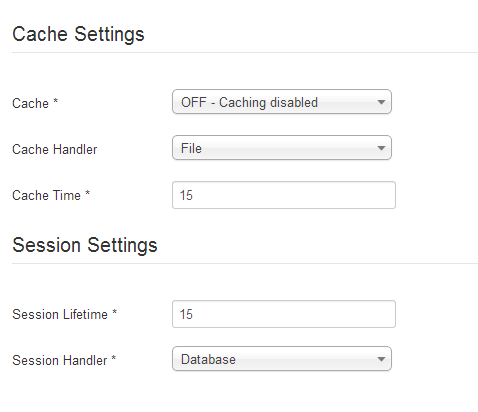
If you have still the old URLs, even though you changed the alias, it means that you still have them cached somehow. Are you sure that the joomla cache plugin is turned off ? The cache options of the configuration ? Any cache setting of your template ?
Please Log in or Create an account to join the conversation.
- damianhartin
-
Topic Author
- Offline
Less
More
- Posts: 25
- Thank you received: 0
13 years 2 months ago #120864
by damianhartin
Replied by damianhartin on topic Category Image not displaying
All caching is turned off as far as I can see - still not working?
Please Log in or Create an account to join the conversation.

13 years 2 months ago #120983
by Xavier
Replied by Xavier on topic Category Image not displaying
Thanks to check too the Joomla cache plugin, in the plugins listing.
You can access this listing from the menu Extension > Plugin manager.
You can access this listing from the menu Extension > Plugin manager.
Please Log in or Create an account to join the conversation.
Time to create page: 0.199 seconds