
Change Pricing Color
- Dragon41673
-
 Topic Author
- Offline
Less
More
13 years 3 weeks ago - 13 years 3 weeks ago #122386
by Dragon41673
Owner - Aries Games & Miniatures
Change Pricing Color was created by Dragon41673
-- url of the page with the problem --
www.ariesgamesandminis.com
-- HikaShop version -- 2.2.1
-- Joomla version -- 2.5.14
-- PHP version -- I have no idea
-- Browser(s) name and version -- Google Chrome
All...I cannot seem to find where to change the color of the price on my site. Please see the attached picture & also visit the site. When you visit the site, the pricing is in blue and sometimes is hard to read on certain monitors (possibly not calibrated properly). I'd like to change the color to red as shown in the image attached...but I cannot seem to find where to do this. Any help would be appreciated...thanks in advance.
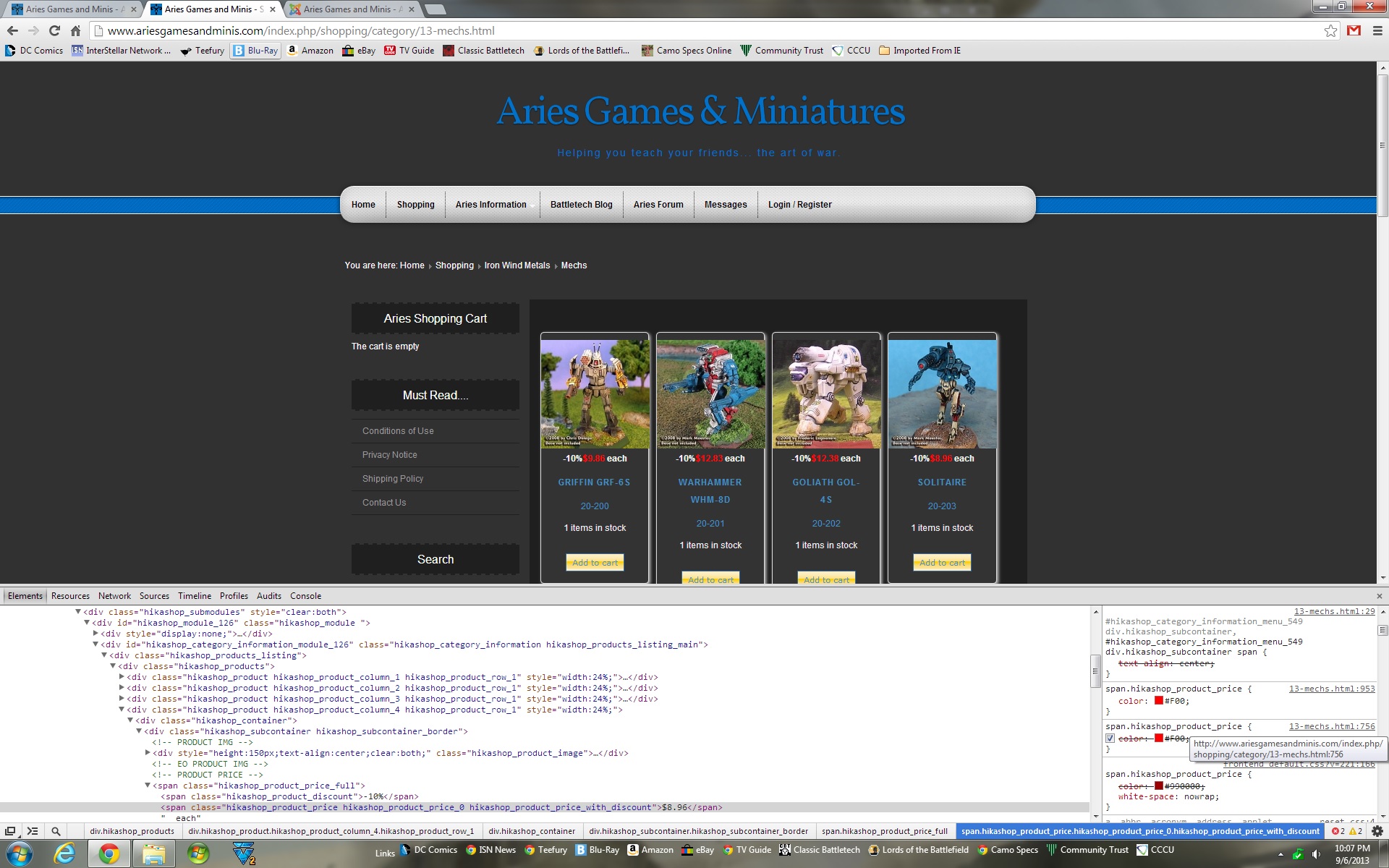
-- HikaShop version -- 2.2.1
-- Joomla version -- 2.5.14
-- PHP version -- I have no idea
-- Browser(s) name and version -- Google Chrome
All...I cannot seem to find where to change the color of the price on my site. Please see the attached picture & also visit the site. When you visit the site, the pricing is in blue and sometimes is hard to read on certain monitors (possibly not calibrated properly). I'd like to change the color to red as shown in the image attached...but I cannot seem to find where to do this. Any help would be appreciated...thanks in advance.
Owner - Aries Games & Miniatures
Last edit: 13 years 3 weeks ago by Dragon41673.
Please Log in or Create an account to join the conversation.

13 years 3 weeks ago #122389
by nicolas
Replied by nicolas on topic Change Pricing Color
You template is overriding the color.
use such CSS instead in HikaShop in order to override your template's override:
span.hikashop_product_price {
color: #900 !important;
white-space: nowrap;
}
www.hikashop.com/support/documentation/8...-styling.html#prices
use such CSS instead in HikaShop in order to override your template's override:
span.hikashop_product_price {
color: #900 !important;
white-space: nowrap;
}
www.hikashop.com/support/documentation/8...-styling.html#prices
Please Log in or Create an account to join the conversation.
- Dragon41673
-
Topic Author
- Offline
13 years 3 weeks ago #122425
by Dragon41673
Owner - Aries Games & Miniatures
Replied by Dragon41673 on topic Change Pricing Color
Ok, I tried that, and it did not change. I think there might be a little confusion due to the image I posted...here's a new image, which I did not manipulate the colors using the F12 function of Google Chrome...
As you can see in the image below, I've changed the required section of the CSS (which I somehow could not find the first time around...so thank you!)...but the 2 sections above it are still showing that they are blue (original image they were showing red because I manipulated them using the F12 function), when I want them red. Where do I find those sections at?
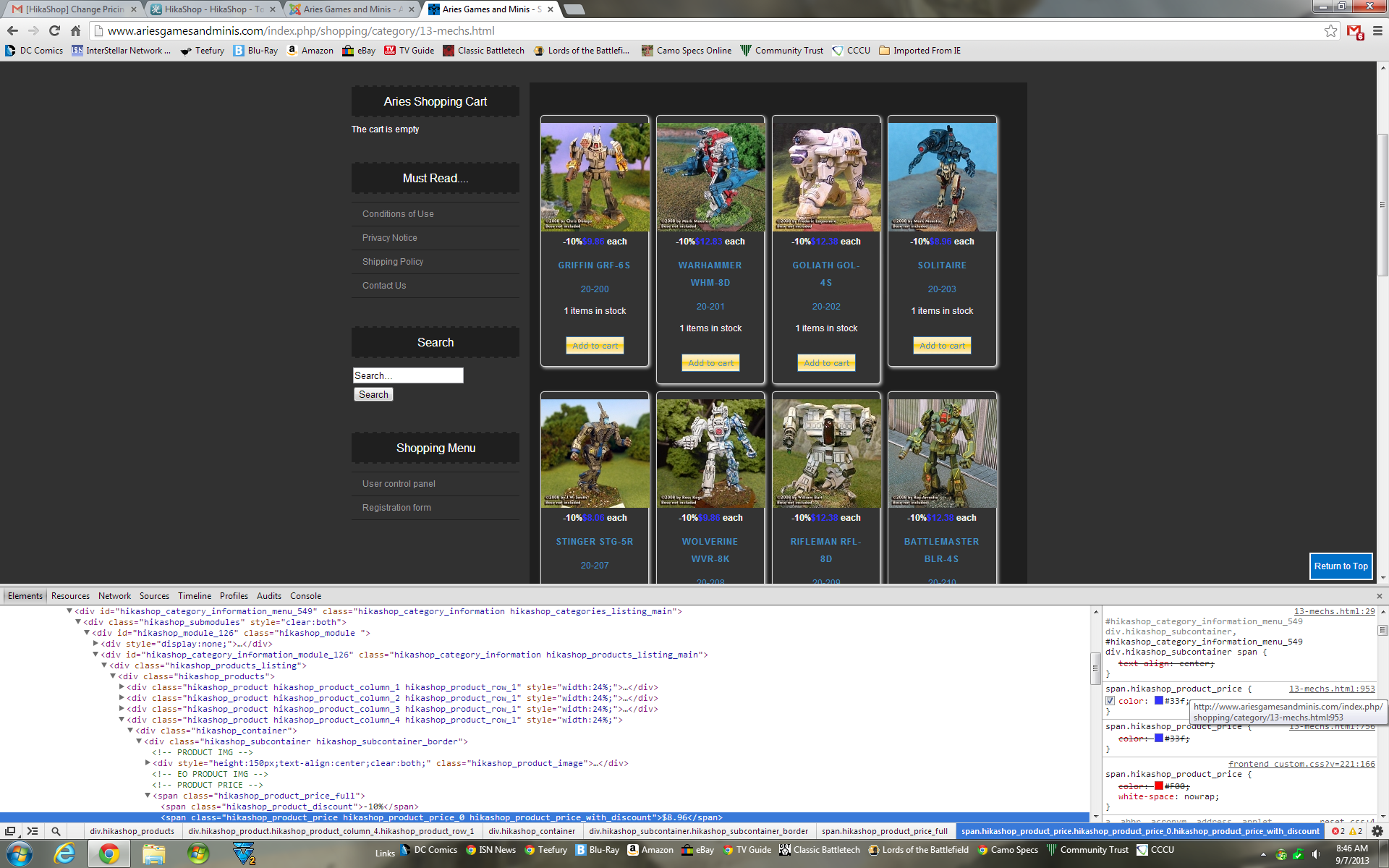
As you can see in the image below, I've changed the required section of the CSS (which I somehow could not find the first time around...so thank you!)...but the 2 sections above it are still showing that they are blue (original image they were showing red because I manipulated them using the F12 function), when I want them red. Where do I find those sections at?
Owner - Aries Games & Miniatures
Please Log in or Create an account to join the conversation.
13 years 3 weeks ago #122431
by nicolas
Replied by nicolas on topic Change Pricing Color
Simply add the CSS code I gave earlier and your prices will be red.
Please Log in or Create an account to join the conversation.
- Dragon41673
-
Topic Author
- Offline
13 years 3 weeks ago #122433
by Dragon41673
Owner - Aries Games & Miniatures
Replied by Dragon41673 on topic Change Pricing Color
Ok...I guess I'm confused. The exact lines were in the Front-End CSS file, and my prices were blue. I changed the #990000 that was there to #F00, in an attempt to make them red.
If that was not what I was supposed to do...where am I supposed to be doing it?
Thanks
If that was not what I was supposed to do...where am I supposed to be doing it?
Thanks
Owner - Aries Games & Miniatures
Please Log in or Create an account to join the conversation.
13 years 3 weeks ago #122439
by nicolas
Replied by nicolas on topic Change Pricing Color
I doubt that the exact same lines were in your frontend CSS file. Otherwise, we would have seen them in your screenshot.
As I said, you need to add the code I gave, not change something else in the frontend CSS file.
As I said, you need to add the code I gave, not change something else in the frontend CSS file.
The following user(s) said Thank You: Jerome
Please Log in or Create an account to join the conversation.
- Dragon41673
-
Topic Author
- Offline
13 years 3 weeks ago #122447
by Dragon41673
Owner - Aries Games & Miniatures
Replied by Dragon41673 on topic Change Pricing Color
Here's what the code said...
span.hikashop_product_price {
color: #990000 !important;
white-space: nowrap;
}
I changed it to...
span.hikashop_product_price {
color: #F00 !important;
white-space: nowrap;
}
I think I see where I did this wrong...I should have replaced the #990000 to #900 correct?
span.hikashop_product_price {
color: #990000 !important;
white-space: nowrap;
}
I changed it to...
span.hikashop_product_price {
color: #F00 !important;
white-space: nowrap;
}
I think I see where I did this wrong...I should have replaced the #990000 to #900 correct?
Owner - Aries Games & Miniatures
Please Log in or Create an account to join the conversation.
- Dragon41673
-
Topic Author
- Offline
13 years 3 weeks ago - 13 years 3 weeks ago #122463
by Dragon41673
Owner - Aries Games & Miniatures
Replied by Dragon41673 on topic Change Pricing Color
Edit...never mind, it worked, guess it took a bit to catch up.
Pricing is now red, thank you very much!
Pricing is now red, thank you very much!
Owner - Aries Games & Miniatures
Last edit: 13 years 3 weeks ago by Dragon41673.
Please Log in or Create an account to join the conversation.
Time to create page: 0.189 seconds