

- Posts: 1
- Thank you received: 0
How to resize the quantity rectangle?
13 years 1 month ago - 13 years 1 month ago #123622
by elisi
How to resize the quantity rectangle? was created by elisi
Hi,
I'm using HikaShop version starter 2.2.1
Joomla 2.5.14
My request is about the quantity sold for a product.
I would like that a customer can buy 10,000 copies of a product so I would like to know how I can change the size of the rectangle where the number of items appears because when I write 10.000, only the first three figures are visible.
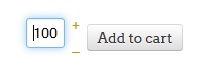
Can someone help me with this please?
I'm using HikaShop version starter 2.2.1
Joomla 2.5.14
My request is about the quantity sold for a product.
I would like that a customer can buy 10,000 copies of a product so I would like to know how I can change the size of the rectangle where the number of items appears because when I write 10.000, only the first three figures are visible.
Can someone help me with this please?
Last edit: 13 years 1 month ago by elisi.
Please Log in or Create an account to join the conversation.

13 years 1 month ago #123648
by Jerome
Jerome - Obsidev.com
HikaMarket & HikaSerial developer / HikaShop core dev team.
Replied by Jerome on topic How to resize the quantity rectangle?
Hi,
You can do it using CSS.
www.hikashop.com/support/documentation/1...ize-the-display.html
Regards,
You can do it using CSS.
www.hikashop.com/support/documentation/1...ize-the-display.html
Regards,
Jerome - Obsidev.com
HikaMarket & HikaSerial developer / HikaShop core dev team.
Please Log in or Create an account to join the conversation.
Time to create page: 0.111 seconds