
- Posts: 3
- Thank you received: 0
Price display method
- fossilwood
-
 Topic Author
- Offline
Less
More
13 years 1 month ago #124957
by fossilwood
Price display method was created by fossilwood
-- url of the page with the problem -- :
berkshire-log-supplies.co.uk/salt-block-granular-tablets
-- HikaShop version -- : 2.1.2
-- Joomla version -- : 2.5.14
-- PHP version -- : 5.3.19
-- Browser(s) name and version -- : chrome
-- Error-message(debug-mod must be tuned on) -- : Error_message
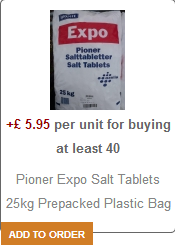
I have an issue with the display price on the product listing when a product has price variants - it displays the cheapest price. I would like it to display all prices, or the price range.
I've search and found that this should be able to be changed using the 'price display method' dropdown and have tried changing it for all relevant entries under 'Display > Content Menus' & 'Display > Content Modules'. None of these make a different - still the cheapest price is shown.
Any suggestions ?
-- HikaShop version -- : 2.1.2
-- Joomla version -- : 2.5.14
-- PHP version -- : 5.3.19
-- Browser(s) name and version -- : chrome
-- Error-message(debug-mod must be tuned on) -- : Error_message
I have an issue with the display price on the product listing when a product has price variants - it displays the cheapest price. I would like it to display all prices, or the price range.
I've search and found that this should be able to be changed using the 'price display method' dropdown and have tried changing it for all relevant entries under 'Display > Content Menus' & 'Display > Content Modules'. None of these make a different - still the cheapest price is shown.
Any suggestions ?
Please Log in or Create an account to join the conversation.

13 years 1 month ago #124978
by Jerome
Jerome - Obsidev.com
HikaMarket & HikaSerial developer / HikaShop core dev team.
Replied by Jerome on topic Price display method
Hi,
Can you please provide a screenshot of the configuration of your HikaShop product listing module with the ID 140 ?
Thanks
Can you please provide a screenshot of the configuration of your HikaShop product listing module with the ID 140 ?
Thanks
Jerome - Obsidev.com
HikaMarket & HikaSerial developer / HikaShop core dev team.
Please Log in or Create an account to join the conversation.
- fossilwood
-
Topic Author
- Offline
Less
More
- Posts: 3
- Thank you received: 0
13 years 1 month ago #125297
by fossilwood
Replied by fossilwood on topic Price display method
Right - I had a look at the product listing module for ID 140 - and set the 'Price display method' to All. This worked 
So, how do you link a product listing to a module ID ??
Thanks for the prompt !
So, how do you link a product listing to a module ID ??
Thanks for the prompt !
Please Log in or Create an account to join the conversation.
- fossilwood
-
Topic Author
- Offline
Less
More
- Posts: 3
- Thank you received: 0
13 years 1 month ago #125298
by fossilwood
Replied by fossilwood on topic Price display method
Quick update - worked out how to find the product ID by inspecting the element with firebug. Anyway to do it from the hikashop admin interface ?
Thanks.
Thanks.
Please Log in or Create an account to join the conversation.
13 years 1 month ago #125301
by Jerome
Jerome - Obsidev.com
HikaMarket & HikaSerial developer / HikaShop core dev team.
Replied by Jerome on topic Price display method
Hi,
You have assigned the module to a menu so you can have it in the admin too.
Regards,
You have assigned the module to a menu so you can have it in the admin too.
Regards,
Jerome - Obsidev.com
HikaMarket & HikaSerial developer / HikaShop core dev team.
Please Log in or Create an account to join the conversation.
Time to create page: 0.104 seconds