
- Posts: 15
- Thank you received: 0
Content Module URL
- RedPlugDesign
-
 Topic Author
- Offline
Less
More
13 years 1 month ago #125000
by RedPlugDesign
Content Module URL was created by RedPlugDesign
-- url of the page with the problem -- : In development and set to offline
-- HikaShop version -- : HikaShop Essential: 2.2.1
-- Joomla version -- : 3.1.5
-- PHP version -- : 5.3.24
I have been ready a lot about issues with the Content Module category list URL structure, and i have tried many different configurations. I would prefer to avoid 3rd party SEF components.
I have created menu links, which created HS menu links and modules. I also have a content module displaying cat's & sub-cat's that points to a HS category menu item. If i visit a category page via a menu link, all is well. When i scroll over the categories in the content, the URL matches the menu, but if i scroll over the module, The same link is not configured. See attached, both link should go to the same page.
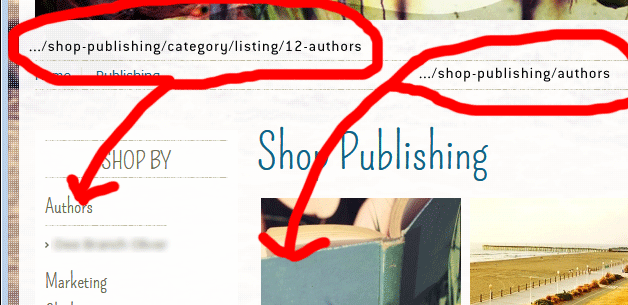
The main issue is content module placement per menu pages and individual category options. When clicked, this links lead to a category with many subs. The main category is set to show no image, the subs do show an image. If i click the left nav link, the main category shows an image, but if i click the content link, the category displays as it should per the setting in the HS menu list. If i cannot link to the menu item, i have no control over individual pages.
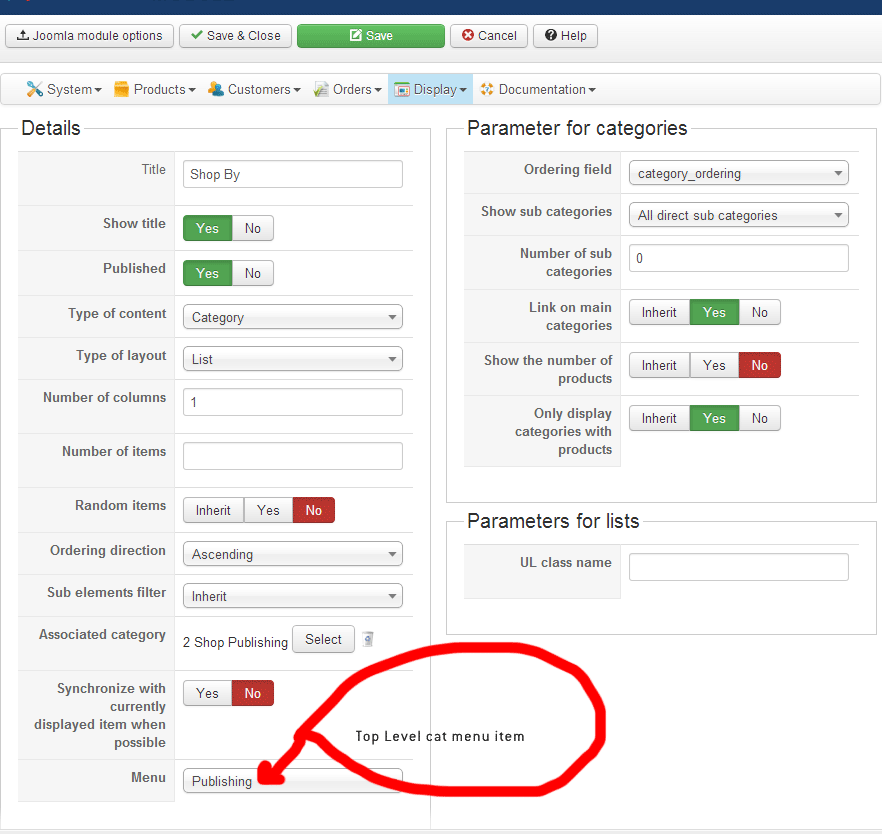
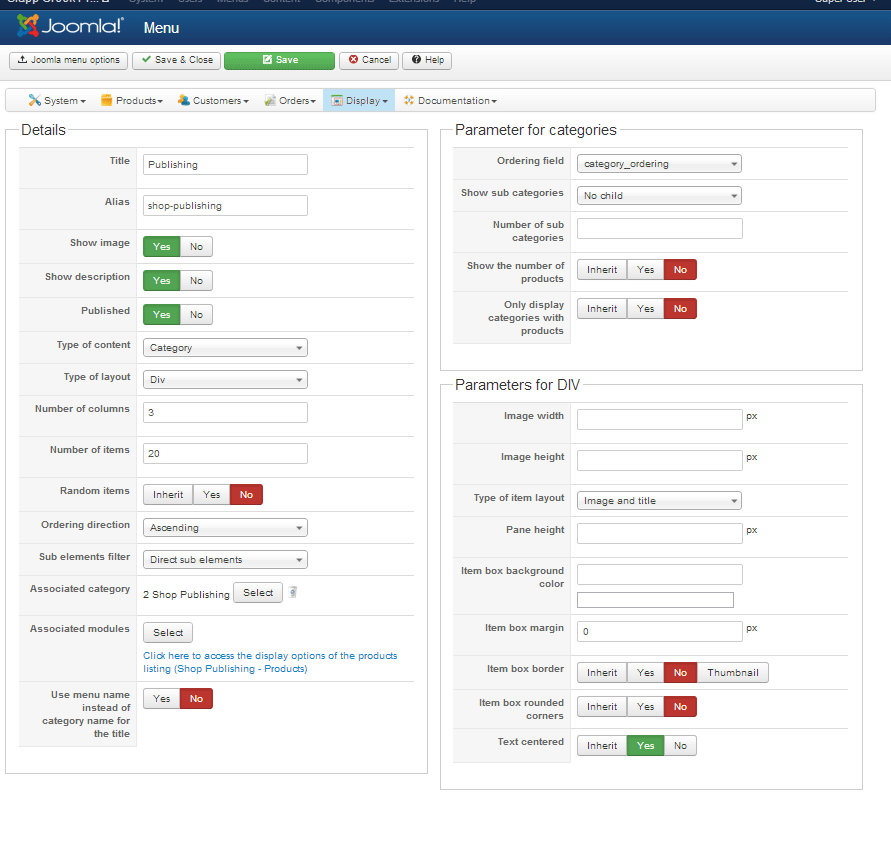
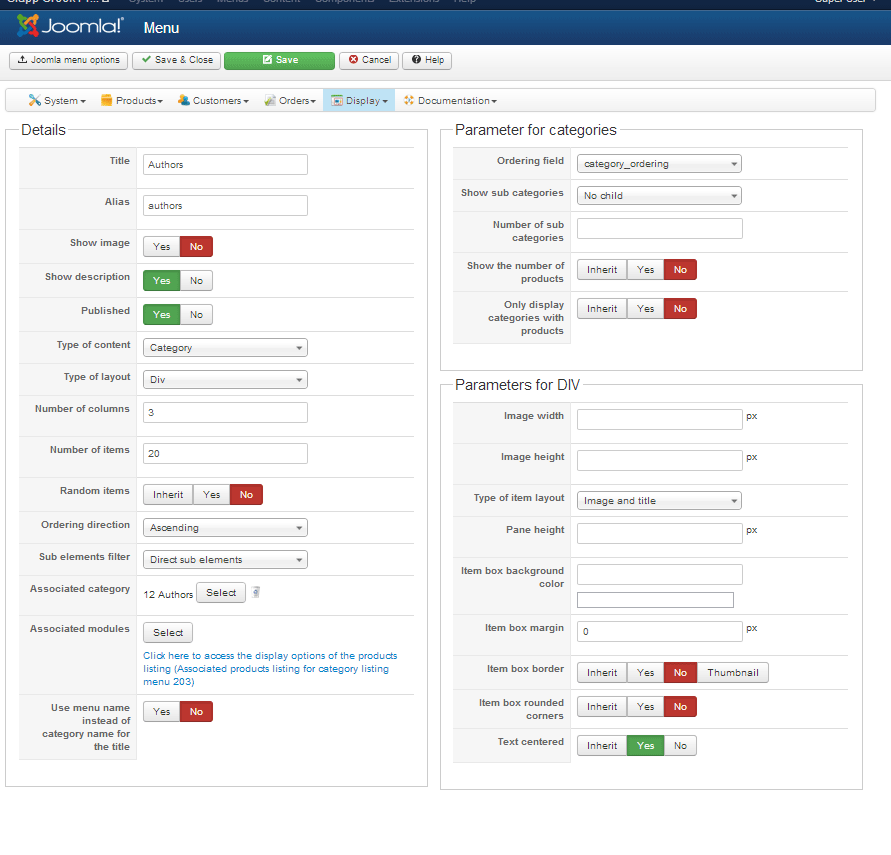
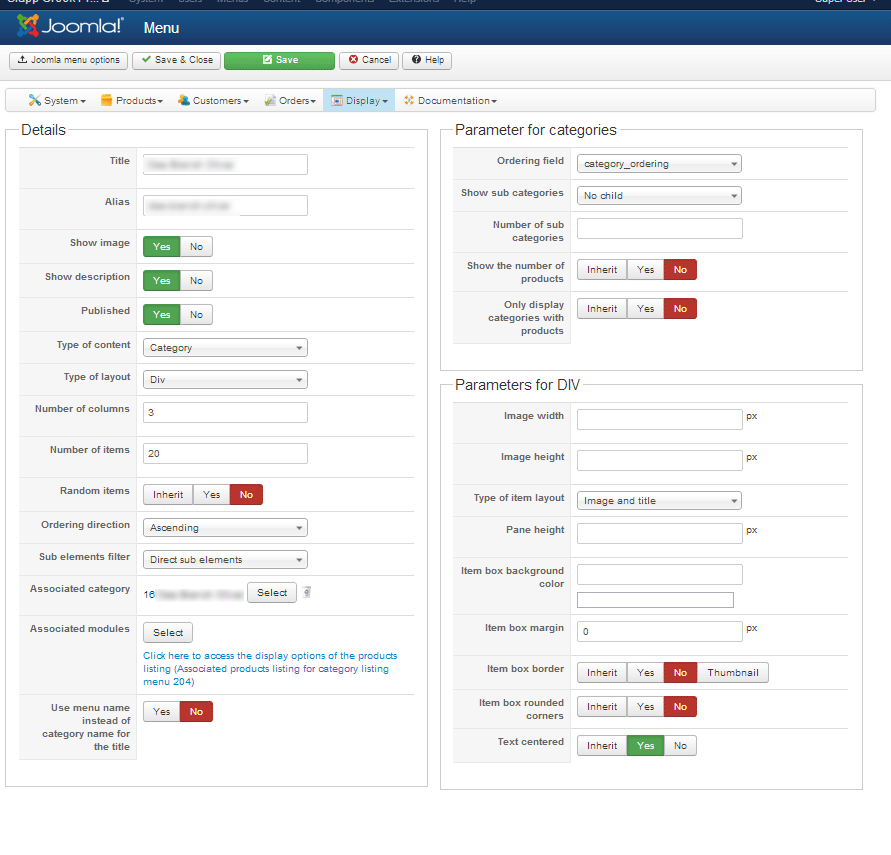
I am confused why 1 display of a category list outputs the proper SEF URL, but the other does not. Does the content module use a different router then the content?
Part of the message is hidden for the guests. Please log in or register to see it.
See attached for images of the settings...
-- HikaShop version -- : HikaShop Essential: 2.2.1
-- Joomla version -- : 3.1.5
-- PHP version -- : 5.3.24
I have been ready a lot about issues with the Content Module category list URL structure, and i have tried many different configurations. I would prefer to avoid 3rd party SEF components.
I have created menu links, which created HS menu links and modules. I also have a content module displaying cat's & sub-cat's that points to a HS category menu item. If i visit a category page via a menu link, all is well. When i scroll over the categories in the content, the URL matches the menu, but if i scroll over the module, The same link is not configured. See attached, both link should go to the same page.
The main issue is content module placement per menu pages and individual category options. When clicked, this links lead to a category with many subs. The main category is set to show no image, the subs do show an image. If i click the left nav link, the main category shows an image, but if i click the content link, the category displays as it should per the setting in the HS menu list. If i cannot link to the menu item, i have no control over individual pages.
I am confused why 1 display of a category list outputs the proper SEF URL, but the other does not. Does the content module use a different router then the content?
Part of the message is hidden for the guests. Please log in or register to see it.
See attached for images of the settings...
Please Log in or Create an account to join the conversation.

13 years 1 month ago #125141
by nicolas
Replied by nicolas on topic Content Module URL
Hi,
The URL shop-publishing/authors is the URL of the menu item authors of the type hikashop category listing and associated with the category authors which is a child of the menu item shop-publishing.
On the other end, the URL shop-publishing/category/listing/12-authors is the URL of the menu item shop-publishing of the type hikashop category listing and associated with your main shop category, with the authors category selected as current category.
Both URLs use different menu items with different things. When HikaShop generates the listing of categories of the shop-publishing menu item, it doesn't know that you have child menu items of that menu for each category of the listing it is displaying so it is using a link which allows it to display the good category while staying on the same menu item.
So to answer your question, the router is the same, however, the non-SEFed URL is different, so the router produce a different URL. Turn off the SEF and you will see how the original URLs are different. On one end you will have a link of the HikaShop joomla menu item of the sub category, and on the other end, you will have a link of the HikaShop joomla menu item of the main category with additional parameters to specify the sub category to display.
The URL shop-publishing/authors is the URL of the menu item authors of the type hikashop category listing and associated with the category authors which is a child of the menu item shop-publishing.
On the other end, the URL shop-publishing/category/listing/12-authors is the URL of the menu item shop-publishing of the type hikashop category listing and associated with your main shop category, with the authors category selected as current category.
Both URLs use different menu items with different things. When HikaShop generates the listing of categories of the shop-publishing menu item, it doesn't know that you have child menu items of that menu for each category of the listing it is displaying so it is using a link which allows it to display the good category while staying on the same menu item.
So to answer your question, the router is the same, however, the non-SEFed URL is different, so the router produce a different URL. Turn off the SEF and you will see how the original URLs are different. On one end you will have a link of the HikaShop joomla menu item of the sub category, and on the other end, you will have a link of the HikaShop joomla menu item of the main category with additional parameters to specify the sub category to display.
Please Log in or Create an account to join the conversation.
- RedPlugDesign
-
Topic Author
- Offline
Less
More
- Posts: 15
- Thank you received: 0
13 years 1 month ago #125224
by RedPlugDesign
Replied by RedPlugDesign on topic Content Module URL
I have tried the non-SEF URL's and can see the appropriate structure. How can i control content, modules and settings on individual pages if the URL structure is constantly changing? A user does not care if it is a Joomla link or a HS link, they just want to see a consistent shopping experience. As it is now, HS is completely unusable since each page will produce a different layout based on the the original link. Right now,the same cat page either displays images or does not based on how the user arrived. This is way too confusing for a user, and even more difficult to try to anticipate and style around.
Is the only solution a 3rd party SEF? Or, can HS URL structure be manipulated to accommodate?
Is the only solution a 3rd party SEF? Or, can HS URL structure be manipulated to accommodate?
Please Log in or Create an account to join the conversation.
13 years 1 month ago #125235
by nicolas
Replied by nicolas on topic Content Module URL
There is no need to style around or anticipate.
The structure is complex because it allows you to display different listings of similar elements in different ways.
But if you configure the listings with the same options, they will display identically.
All the listings can be configured via the menu Display>Content modules/menus of HikaShop. As you will see there, most of the options have an "inherit" choice that you can select and in that case, it will use automatically the corresponding option of the Display tab of the configuration.
So for example, if you set the "number of columns" option of the Display tab of the configuration to "4" and empty all the "number of columns" options of your products listing menus/modules, they will all use that 4 columns display. That way, the day you want to change it to a 5 columns display, you just have to change it in the configuration so that it applies to all your products listings.
If you want to manipulate the URL structure you can edit the file components/com_hikashop/router.php
The structure is complex because it allows you to display different listings of similar elements in different ways.
But if you configure the listings with the same options, they will display identically.
All the listings can be configured via the menu Display>Content modules/menus of HikaShop. As you will see there, most of the options have an "inherit" choice that you can select and in that case, it will use automatically the corresponding option of the Display tab of the configuration.
So for example, if you set the "number of columns" option of the Display tab of the configuration to "4" and empty all the "number of columns" options of your products listing menus/modules, they will all use that 4 columns display. That way, the day you want to change it to a 5 columns display, you just have to change it in the configuration so that it applies to all your products listings.
If you want to manipulate the URL structure you can edit the file components/com_hikashop/router.php
Please Log in or Create an account to join the conversation.
- RedPlugDesign
-
Topic Author
- Offline
Less
More
- Posts: 15
- Thank you received: 0
13 years 1 month ago - 13 years 1 month ago #125251
by RedPlugDesign
Replied by RedPlugDesign on topic Content Module URL
I did a complete reinstall to start from scratch. I am not concerned with the URL structure, but i am concerned with content structure. Hopefully i made an error along the way and starting over will help!
Last edit: 13 years 1 month ago by RedPlugDesign. Reason: Update
Please Log in or Create an account to join the conversation.
- RedPlugDesign
-
Topic Author
- Offline
Less
More
- Posts: 15
- Thank you received: 0
13 years 4 weeks ago #126240
by RedPlugDesign
Replied by RedPlugDesign on topic Content Module URL
Nicolas, i sent you a PM with log in info, have you had an opportunity to review the back end to see if you could find a solution?
Please Log in or Create an account to join the conversation.
13 years 4 weeks ago - 13 years 3 weeks ago #126443
by nicolas
Replied by nicolas on topic Content Module URL
Hi,
The solution is quite simple :
Go here: [link removed]
That will give you a listing of your menus.
There, when you edit one, you will get the options of the categories listing display.
You will also have a link to the options of the products listing display in the "associated modules" option.
If you look at the options of your menus, you will see that one has the option "show image" turned on while the two others have that option turned off. Turn it on for all the menus and you will always see the image.
The solution is quite simple :
Go here: [link removed]
That will give you a listing of your menus.
There, when you edit one, you will get the options of the categories listing display.
You will also have a link to the options of the products listing display in the "associated modules" option.
If you look at the options of your menus, you will see that one has the option "show image" turned on while the two others have that option turned off. Turn it on for all the menus and you will always see the image.
Last edit: 13 years 3 weeks ago by nicolas.
Please Log in or Create an account to join the conversation.
- RedPlugDesign
-
Topic Author
- Offline
Less
More
- Posts: 15
- Thank you received: 0
13 years 4 weeks ago - 13 years 4 weeks ago #126449
by RedPlugDesign
Replied by RedPlugDesign on topic Content Module URL
Thanks for looking, unfortunately, this does not help. I do not want the category image showing for Authors, but i do want it showing in the individual authors sub category. The category module links do not follow the layout options for the menu items. It seems the only option is top have it show for all or none if using the dynamic content module. If i am am still doing this incorrectly, could you implement? Can you configure so the menu item and the category page display the same? Unfort, i cannot
The only way around this is if a category does not have an image, and the parent cat's have "show image" turned on. But, then sub-category listings do not show anything but text. Could a sub category pull one of its product images ?
The only way around this is if a category does not have an image, and the parent cat's have "show image" turned on. But, then sub-category listings do not show anything but text. Could a sub category pull one of its product images ?
Last edit: 13 years 4 weeks ago by RedPlugDesign.
Please Log in or Create an account to join the conversation.

13 years 4 weeks ago #126480
by Jerome
Jerome - Obsidev.com
HikaMarket & HikaSerial developer / HikaShop core dev team.
Replied by Jerome on topic Content Module URL
Hi,
Just arriving in the thread, reading some posts and trying to understand what you want to do exactly and I think that some kind of "mockup" could be useful because, I don't see clearly what you want to do and I am not sure that Nicolas does.
I want to say that "everything" is possible, the most important is knowing what you want and have the time to implement it.
HikaShop is very flexible and thanks to view overrides (and plugins if really not possible using view override) you could customize your store to have the result you expected to.
But for the moment, I can't visualize it.
Regards,
Just arriving in the thread, reading some posts and trying to understand what you want to do exactly and I think that some kind of "mockup" could be useful because, I don't see clearly what you want to do and I am not sure that Nicolas does.
I want to say that "everything" is possible, the most important is knowing what you want and have the time to implement it.
HikaShop is very flexible and thanks to view overrides (and plugins if really not possible using view override) you could customize your store to have the result you expected to.
But for the moment, I can't visualize it.
Regards,
Jerome - Obsidev.com
HikaMarket & HikaSerial developer / HikaShop core dev team.
Please Log in or Create an account to join the conversation.
- RedPlugDesign
-
Topic Author
- Offline
Less
More
- Posts: 15
- Thank you received: 0
13 years 3 weeks ago #126549
by RedPlugDesign
Replied by RedPlugDesign on topic Content Module URL
Thanks for the offer Jerome. I will PM you log in info and details. Once we find a solution, i will post it for others.
Please Log in or Create an account to join the conversation.
13 years 3 weeks ago - 13 years 3 weeks ago #126624
by Jerome
Jerome - Obsidev.com
HikaMarket & HikaSerial developer / HikaShop core dev team.
Replied by Jerome on topic Content Module URL
Hi,
Thanks for the summarize.
Your first (working) url have the menu id : 249.
Your second (no working) url have the menu id : 241
If you open these two configurations in the HikaShop backend (Display > content menu) you will see some differences.
If you want to have the same render, you have to put the same configuration for the menu 241 than the menu 249.
This option was the "Show image", that I changed for you.
Kind regards,
Thanks for the summarize.
Your first (working) url have the menu id : 249.
Your second (no working) url have the menu id : 241
If you open these two configurations in the HikaShop backend (Display > content menu) you will see some differences.
If you want to have the same render, you have to put the same configuration for the menu 241 than the menu 249.
This option was the "Show image", that I changed for you.
Kind regards,
Jerome - Obsidev.com
HikaMarket & HikaSerial developer / HikaShop core dev team.
Last edit: 13 years 3 weeks ago by Jerome.
Please Log in or Create an account to join the conversation.
- RedPlugDesign
-
Topic Author
- Offline
Less
More
- Posts: 15
- Thank you received: 0
13 years 3 weeks ago #126961
by RedPlugDesign
Replied by RedPlugDesign on topic Content Module URL
Jerome, did you receive my last PM?
Please Log in or Create an account to join the conversation.
13 years 3 weeks ago #127053
by Jerome
Jerome - Obsidev.com
HikaMarket & HikaSerial developer / HikaShop core dev team.
Replied by Jerome on topic Content Module URL
Hi,
Yes and I answer you that we can't make support using private message which are used for receiving private information like credentials or private url.
I clearly don't understand anything of your problem and for most I know, Nicolas seems to know what you are expecting.
Our support forum is here to provide a good support service. All our support team is able to see the question and answer them.
Using private message is a wrong and bad way for support. It is hard to work with, we can't know which message we had answered or not, etc.
But it looks like you didn't see my PM (so it give us one more reason to not use PM for making good support).
So as I asked you in my latest message : please explain clearly you problem here.
I asked you some kind of mockup. If you want me to help you, you don't have to use long phrases, I am a developer and long explanations with big phrases have the power to freak me. I prefer visuals
But our support team is not just me, that's why we are a good support team. We are all different with our strong abilities and our weaknesses.
Regards,
Yes and I answer you that we can't make support using private message which are used for receiving private information like credentials or private url.
I clearly don't understand anything of your problem and for most I know, Nicolas seems to know what you are expecting.
Our support forum is here to provide a good support service. All our support team is able to see the question and answer them.
Using private message is a wrong and bad way for support. It is hard to work with, we can't know which message we had answered or not, etc.
But it looks like you didn't see my PM (so it give us one more reason to not use PM for making good support).
So as I asked you in my latest message : please explain clearly you problem here.
I asked you some kind of mockup. If you want me to help you, you don't have to use long phrases, I am a developer and long explanations with big phrases have the power to freak me. I prefer visuals
But our support team is not just me, that's why we are a good support team. We are all different with our strong abilities and our weaknesses.
Regards,
Jerome - Obsidev.com
HikaMarket & HikaSerial developer / HikaShop core dev team.
Please Log in or Create an account to join the conversation.
- RedPlugDesign
-
Topic Author
- Offline
Less
More
- Posts: 15
- Thank you received: 0
13 years 3 weeks ago #127164
by RedPlugDesign
Replied by RedPlugDesign on topic Content Module URL
I was trying to avoid using URL's & the site is currently offline. I have made the site public, but will take it offline after you have another look.
To sum up the issue:
The content menus allow me to choose options for menu links. Theses work well and the Authors link from the menu does not have the category image: www.slappcreekpress.com/publishing/authors
But, the Authors link from the left hand content module has the image: www.slappcreekpress.com/publishing/category/listing/18-authors
What i need is no category image for Publishing & Authors, but individual Authors category images to show. The content module links do not follow the settings from the content menu, so i need to know how to specify which categories show images & which do not.
Or, an option may be to have the category image pull a product image from a sub category, but i do not know if that is possible
To sum up the issue:
The content menus allow me to choose options for menu links. Theses work well and the Authors link from the menu does not have the category image: www.slappcreekpress.com/publishing/authors
But, the Authors link from the left hand content module has the image: www.slappcreekpress.com/publishing/category/listing/18-authors
What i need is no category image for Publishing & Authors, but individual Authors category images to show. The content module links do not follow the settings from the content menu, so i need to know how to specify which categories show images & which do not.
Or, an option may be to have the category image pull a product image from a sub category, but i do not know if that is possible
Please Log in or Create an account to join the conversation.
13 years 3 weeks ago #127438
by nicolas
Replied by nicolas on topic Content Module URL
There is no option for what you want to do. The display options are based on a per menu basis, and not on a per category basis.
So what you configure a menu to display the image of the current category, when you browse the different levels of the categories (you stay on the same menu and thus) you get the same settings and the image displays all the time.
In your module, you configured it to go to another menu and thus all the links of the module go to another menu that your main menu, and that why you don't get the same display options, even though you're displaying the same category pages.
If you want to change that, it would require to always turn on the display of the images in all your menus, and then modify the code at the beginning of the "listing" file of the "category" view via the menu Display>Views to display or not the image based on the current category.
For example, if you want to display it only for the categories with the ids 11 and 15 you could change the line:
to:
So what you configure a menu to display the image of the current category, when you browse the different levels of the categories (you stay on the same menu and thus) you get the same settings and the image displays all the time.
In your module, you configured it to go to another menu and thus all the links of the module go to another menu that your main menu, and that why you don't get the same display options, even though you're displaying the same category pages.
If you want to change that, it would require to always turn on the display of the images in all your menus, and then modify the code at the beginning of the "listing" file of the "category" view via the menu Display>Views to display or not the image based on the current category.
For example, if you want to display it only for the categories with the ids 11 and 15 you could change the line:
Code:
if($this->params->get('show_image') && !empty($this->element->file_path)){
Code:
if($this->params->get('show_image') && !empty($this->element->file_path) && in_array($this->element->category_id, array(11,15))){
Please Log in or Create an account to join the conversation.
- RedPlugDesign
-
Topic Author
- Offline
Less
More
- Posts: 15
- Thank you received: 0
13 years 3 weeks ago #127522
by RedPlugDesign
Replied by RedPlugDesign on topic Content Module URL
Ok, understood, but unfortunately not the answer i was hoping for.
My other though to this is to turn on all category images, that way only categories with images will show them. But, then when categories without images are listed, the generic "No Image" image will show. Could these categories be set up to pull a product image?
My other though to this is to turn on all category images, that way only categories with images will show them. But, then when categories without images are listed, the generic "No Image" image will show. Could these categories be set up to pull a product image?
Please Log in or Create an account to join the conversation.
13 years 3 weeks ago #127593
by nicolas
Replied by nicolas on topic Content Module URL
You could put the images in the description of the categories and turn on the "show description" option of your menus.
That way, if no image is in the description of the category, it won't show anything.
That way, if no image is in the description of the category, it won't show anything.
Please Log in or Create an account to join the conversation.
- RedPlugDesign
-
Topic Author
- Offline
Less
More
- Posts: 15
- Thank you received: 0
13 years 2 weeks ago #127873
by RedPlugDesign
Replied by RedPlugDesign on topic Content Module URL
Nicolas, very good idea, i was playing with the same!
Could you review one of my last questions above? Is it possible to dynamically use a product image for the category listing. In VM, i had it set up that each category image was a random item image
Could you review one of my last questions above? Is it possible to dynamically use a product image for the category listing. In VM, i had it set up that each category image was a random item image
Please Log in or Create an account to join the conversation.
13 years 2 weeks ago #127922
by nicolas
Replied by nicolas on topic Content Module URL
There is no such option in HikaShop.
Nothing is impossible if you code it, but it's not simple to do.
Nothing is impossible if you code it, but it's not simple to do.
Please Log in or Create an account to join the conversation.
Time to create page: 0.129 seconds