

- Posts: 9
- Thank you received: 0
Product Display Page
13 years 1 month ago #125253
by essance
Product Display Page was created by essance
-- HikaShop version -- : 2.21
-- Joomla version -- : 3.15
-- PHP version -- : 5.31
-- Browser(s) name and version -- : Firefox 24
-- Error-message(debug-mod must be tuned on) -- : Error_message
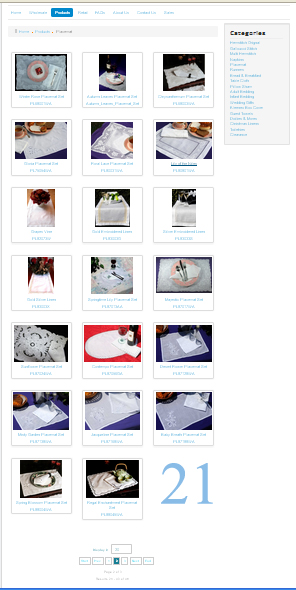
How can I have the product page display 21 item on a page. Current 3 column 7 row. but it will only display 20 items on a play.. I have over 55 some items. So it displays into total of 3 pages.
However, each pages only display 20 items. There is a blank spot (# 21 is blank see image attached) at the last square (3x7) so people think this is the end of the product, think there will be no next page....
See attached
-- Joomla version -- : 3.15
-- PHP version -- : 5.31
-- Browser(s) name and version -- : Firefox 24
-- Error-message(debug-mod must be tuned on) -- : Error_message
How can I have the product page display 21 item on a page. Current 3 column 7 row. but it will only display 20 items on a play.. I have over 55 some items. So it displays into total of 3 pages.
However, each pages only display 20 items. There is a blank spot (# 21 is blank see image attached) at the last square (3x7) so people think this is the end of the product, think there will be no next page....
See attached
Please Log in or Create an account to join the conversation.

13 years 1 month ago - 13 years 1 month ago #125286
by Jerome
Jerome - Obsidev.com
HikaMarket & HikaSerial developer / HikaShop core dev team.
Replied by Jerome on topic Product Display Page
Hi,
You can configure the number of elements per page in the HikaShop contenu menu configuration page (or module).
The default value is "20" but you can easily change it.
Regards,
PS : There is no image attached.
You can configure the number of elements per page in the HikaShop contenu menu configuration page (or module).
The default value is "20" but you can easily change it.
Regards,
PS : There is no image attached.
Jerome - Obsidev.com
HikaMarket & HikaSerial developer / HikaShop core dev team.
Last edit: 13 years 1 month ago by Jerome.
Please Log in or Create an account to join the conversation.
13 years 1 month ago #125394
by essance
Replied by essance on topic Product Display Page
Attached is the image. I would like to possible to display 21 image (item) per pages, if possible.
the display option is 20, 40., 100 or all.. just curious whether I can have it display 21 images on a page with the 3 image per row.
thanks
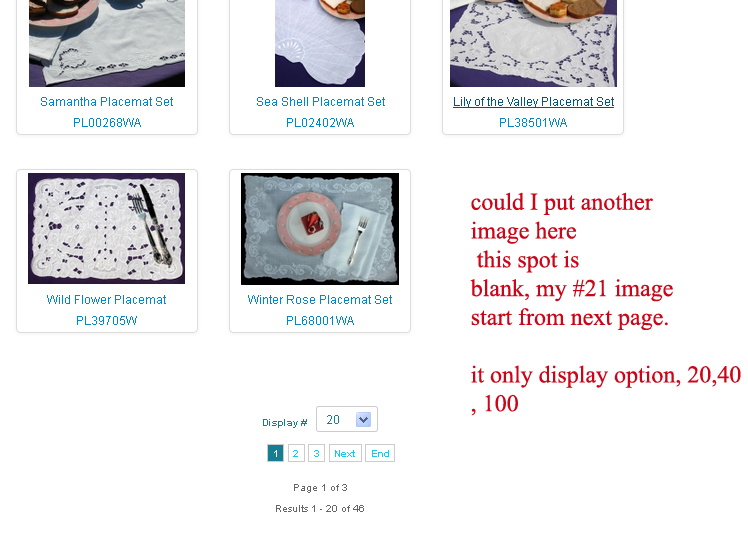
the display option is 20, 40., 100 or all.. just curious whether I can have it display 21 images on a page with the 3 image per row.
thanks
Please Log in or Create an account to join the conversation.

13 years 1 month ago #125526
by nicolas
Replied by nicolas on topic Product Display Page
Hi,
As jerome said, you need to edit your products listing menu/module via the menu Display>Content modules/menus and change the "number of elements" option to 21 and that will do it.
As jerome said, you need to edit your products listing menu/module via the menu Display>Content modules/menus and change the "number of elements" option to 21 and that will do it.
Please Log in or Create an account to join the conversation.
13 years 4 weeks ago #125961
by essance
Replied by essance on topic Product Display Page
I went into the hikashop display content module men and change from 20 to 21.. still it did not do anything..
Please Log in or Create an account to join the conversation.

Less
More
- Posts: 12953
- Thank you received: 1778
13 years 4 weeks ago #125986
by Mohamed Thelji
Replied by Mohamed Thelji on topic Product Display Page
Hi,
You're maybe editing the wrong content module/menu, the best solution would be to give me a link to your product listing then I'll be able to tell you the ID of the content module/menu to edit.
You're maybe editing the wrong content module/menu, the best solution would be to give me a link to your product listing then I'll be able to tell you the ID of the content module/menu to edit.
Please Log in or Create an account to join the conversation.
13 years 4 weeks ago #126093
by essance
Replied by essance on topic Product Display Page
Please Log in or Create an account to join the conversation.
13 years 4 weeks ago #126118
by nicolas
Replied by nicolas on topic Product Display Page
Go in the menu Display>Content modules, edit the module with the id 140 and there set the number of columns to 21 and that should do it.
Please Log in or Create an account to join the conversation.
Time to create page: 0.108 seconds