
- Posts: 10
- Thank you received: 0
No description when characteristics are present
- due7412369
-
 Topic Author
- Offline
Less
More
12 years 11 months ago #131262
by due7412369
No description when characteristics are present was created by due7412369
I have hikashop business 2.2.2 for joomla 2.5.
When I have a characteristic on a product, the description is not present on the front end. When i remove the characteristic from the product in the back end, the description shows up on the front end. I need characteristics on my products, but when they are enabled on products, there is no description on the front end. Any help would be appreciated! thanks!
When I have a characteristic on a product, the description is not present on the front end. When i remove the characteristic from the product in the back end, the description shows up on the front end. I need characteristics on my products, but when they are enabled on products, there is no description on the front end. Any help would be appreciated! thanks!
Please Log in or Create an account to join the conversation.

Less
More
- Posts: 12953
- Thank you received: 1778
12 years 11 months ago #131286
by Mohamed Thelji
Replied by Mohamed Thelji on topic No description when characteristics are present
Hi,
1. Did you done some modifications through the product view of your front-end template via "Hikashop->Display->Views" ?
2. Can you add a description for your product's variants by using the "Manage Variants" button of your product configuration page ?
1. Did you done some modifications through the product view of your front-end template via "Hikashop->Display->Views" ?
2. Can you add a description for your product's variants by using the "Manage Variants" button of your product configuration page ?
Please Log in or Create an account to join the conversation.
- due7412369
-
Topic Author
- Offline
Less
More
- Posts: 10
- Thank you received: 0
12 years 11 months ago #131316
by due7412369
Replied by due7412369 on topic No description when characteristics are present
Hello,
1. No, i have not modified any of the front end product view files via "Hikashop-Display-Views"
2. Yes, when I add a description through the manage variants, it shows on the front end.
1. No, i have not modified any of the front end product view files via "Hikashop-Display-Views"
2. Yes, when I add a description through the manage variants, it shows on the front end.
Please Log in or Create an account to join the conversation.
Less
More
- Posts: 12953
- Thank you received: 1778
12 years 11 months ago #131358
by Mohamed Thelji
Replied by Mohamed Thelji on topic No description when characteristics are present
Ok, so why don't you just set a description for each variants of your product ? Also can you tell me what do you exactly mean by : "but when they are enabled on products, there is no description on the front end".
Please Log in or Create an account to join the conversation.
- due7412369
-
Topic Author
- Offline
Less
More
- Posts: 10
- Thank you received: 0
12 years 11 months ago #131364
by due7412369
Replied by due7412369 on topic No description when characteristics are present
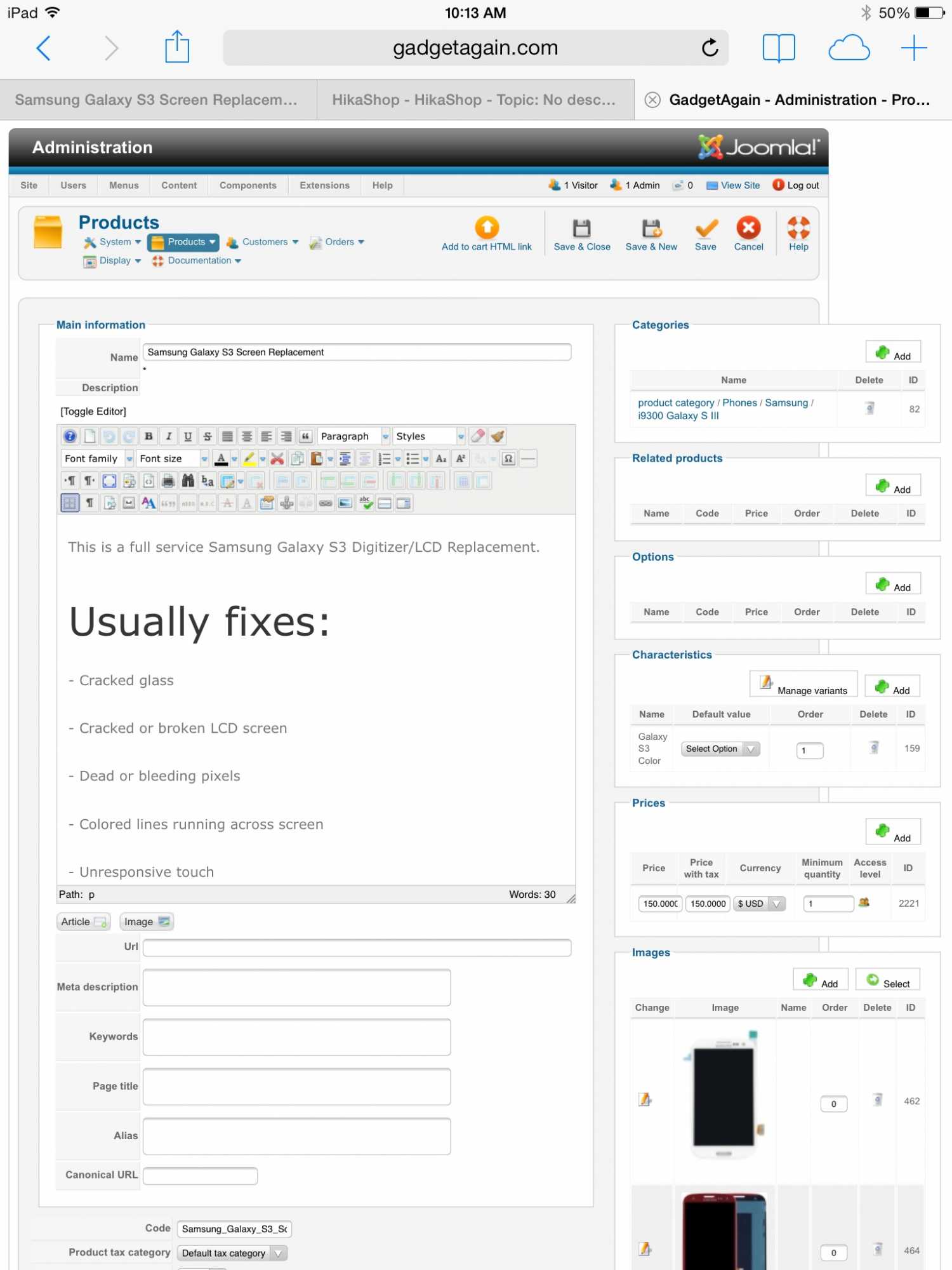
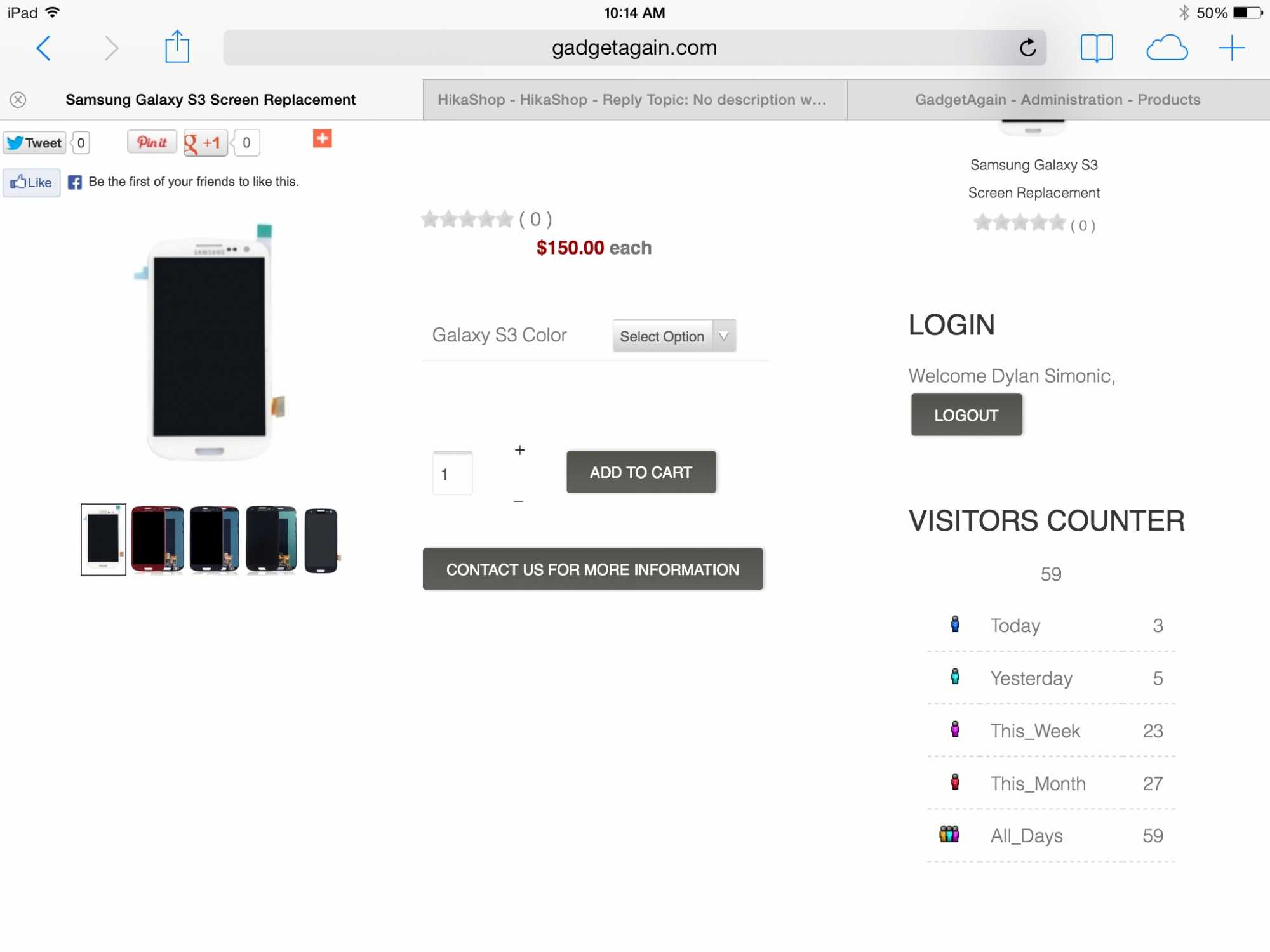
For each of my products, there is a description set in the back end. When there is no set characteristics to a product, the description shows on under the product image on the front end. But when I set a characteristic to a product, the description disappears on the front end but it is still showing In the back end. In the images it shows the backend with the description typed up. But it shows no description on the front end.
Please Log in or Create an account to join the conversation.
- due7412369
-
Topic Author
- Offline
Less
More
- Posts: 10
- Thank you received: 0
12 years 11 months ago #131365
by due7412369
Replied by due7412369 on topic No description when characteristics are present
When there is no characteristic to a product, the description shows as normal on the front end
Please Log in or Create an account to join the conversation.
Less
More
- Posts: 12953
- Thank you received: 1778
12 years 11 months ago #131420
by Mohamed Thelji
Replied by Mohamed Thelji on topic No description when characteristics are present
And if you set an option for the "Galaxy S3 color" characteristic through your product page ?
Please Log in or Create an account to join the conversation.
- due7412369
-
Topic Author
- Offline
Less
More
- Posts: 10
- Thank you received: 0
12 years 11 months ago #131511
by due7412369
Replied by due7412369 on topic No description when characteristics are present
If i select an option though my dropdown menu that is showing and i add a description via "Manage Variants" Then yes, it will show. But i dont see why it wont always show a description whether i have a characteristic selected or not. It was working before, and then something happened and now it isn't working.
Please Log in or Create an account to join the conversation.

12 years 11 months ago #131814
by nicolas
Replied by nicolas on topic No description when characteristics are present
Did you update from a previous version of HikaShop ?
If so, which version was it ?
If it's an old version of HikaShop, it's possible that you would have to edit the entry variant_increase_perf of the table hikashop_config via your phpmyadmin and change it to 0 if it's 1 or 1 if it's 0.
If really you can't make it work, I think that deleting the code:
from the file "show" of the view "product" via the menu Display>Views should make it work.
If so, which version was it ?
If it's an old version of HikaShop, it's possible that you would have to edit the entry variant_increase_perf of the table hikashop_config via your phpmyadmin and change it to 0 if it's 1 or 1 if it's 0.
If really you can't make it work, I think that deleting the code:
Code:
<div id="hikashop_product_description_<?php echo $variant_name;?>" style="display:none;">
<?php echo JHTML::_('content.prepare',preg_replace('#<hr *id="system-readmore" */>#i','',$variant->product_description));?>
</div>
Please Log in or Create an account to join the conversation.
- due7412369
-
Topic Author
- Offline
Less
More
- Posts: 10
- Thank you received: 0
12 years 11 months ago #132150
by due7412369
Replied by due7412369 on topic No description when characteristics are present
Hi Nicolas,
Thanks for your reply. The version of hikashop I have is HikaShop Business 2.2.2. I deleted the code from the "show.php" and had no luck with a description showing if i have a characteristic set to a product
Thanks for your reply. The version of hikashop I have is HikaShop Business 2.2.2. I deleted the code from the "show.php" and had no luck with a description showing if i have a characteristic set to a product
Please Log in or Create an account to join the conversation.
Less
More
- Posts: 12953
- Thank you received: 1778
12 years 11 months ago - 12 years 11 months ago #132390
by Mohamed Thelji
Replied by Mohamed Thelji on topic No description when characteristics are present
Hi,
And can you :
1. Create another test product with variants, and see if the description is showing when characteristics are present ?
2. Try it with another front-end template, and see if it works like this ?
And can you :
1. Create another test product with variants, and see if the description is showing when characteristics are present ?
2. Try it with another front-end template, and see if it works like this ?
Last edit: 12 years 11 months ago by Mohamed Thelji.
Please Log in or Create an account to join the conversation.
- due7412369
-
Topic Author
- Offline
Less
More
- Posts: 10
- Thank you received: 0
12 years 11 months ago #132465
by due7412369
Replied by due7412369 on topic No description when characteristics are present
1. I created a new product with variants and there is no description showing on the front end.
2. I tried another template and I had no luck.
2. I tried another template and I had no luck.
Please Log in or Create an account to join the conversation.
12 years 11 months ago #132699
by nicolas
Replied by nicolas on topic No description when characteristics are present
Could you provide a link to the product page with the issue so that we can analyze the problem more in depth ?
Please Log in or Create an account to join the conversation.
- due7412369
-
Topic Author
- Offline
Less
More
- Posts: 10
- Thank you received: 0
12 years 11 months ago #132705
by due7412369
Replied by due7412369 on topic No description when characteristics are present
Here is a link to a product with characteristics. Keep in mind that if i add a description to each variant of the characteristic, the description will show.
www.gadgetagain.com/index.php/phones/iph...with-characteristics
Here is a product that has no characteristics assigned to it.
www.gadgetagain.com/index.php/phones/iph...hout-characteristics
If you would like back end access just let me know. Thanks!
Here is a product that has no characteristics assigned to it.
www.gadgetagain.com/index.php/phones/iph...hout-characteristics
If you would like back end access just let me know. Thanks!
Please Log in or Create an account to join the conversation.
12 years 11 months ago #132709
by nicolas
Replied by nicolas on topic No description when characteristics are present
Hi,
There seems to be a javascript bug with the pinit button on your product pages. It might be that which prevents the characteristic system from displaying properly. Could you turn off the pinit button of the social networks plugin to see if it helps ?
There seems to be a javascript bug with the pinit button on your product pages. It might be that which prevents the characteristic system from displaying properly. Could you turn off the pinit button of the social networks plugin to see if it helps ?
Please Log in or Create an account to join the conversation.
- due7412369
-
Topic Author
- Offline
Less
More
- Posts: 10
- Thank you received: 0
12 years 11 months ago #132711
by due7412369
Replied by due7412369 on topic No description when characteristics are present
Hello,
I turned off the pin it in the plug in and had no luck. So i turned off the whole plugin itself and i still have nothing.
I turned off the pin it in the plug in and had no luck. So i turned off the whole plugin itself and i still have nothing.
Please Log in or Create an account to join the conversation.
12 years 11 months ago #132712
by nicolas
Replied by nicolas on topic No description when characteristics are present
Hi,
Please provide a backend access via our contact form with a link to these thread so that we can check your settings.
Please provide a backend access via our contact form with a link to these thread so that we can check your settings.
Please Log in or Create an account to join the conversation.
- due7412369
-
Topic Author
- Offline
Less
More
- Posts: 10
- Thank you received: 0
12 years 11 months ago #132714
by due7412369
Replied by due7412369 on topic No description when characteristics are present
Hi Nicolas,
I send my information via the contact form.
I send my information via the contact form.
Please Log in or Create an account to join the conversation.
12 years 11 months ago #132716
by nicolas
Replied by nicolas on topic No description when characteristics are present
When I edit the show view file
www.gadgetagain.com/administrator/index....hop|product|show.php
I see that you have the version 1.5.6 and when I edit the show_default view file, I see that you have the version 2.2.0 :
www.gadgetagain.com/administrator/index....uct|show_default.php
But in the backend it says that you have the latest version 2.2.2.
So that's why it doesn't work. Apparently, not all your HikaShop files have been updated to the latest version. Maybe some access right issues ? Please make sure that you have the latest version of all these files and it should then work fine.
But in the backend it says that you have the latest version 2.2.2.
So that's why it doesn't work. Apparently, not all your HikaShop files have been updated to the latest version. Maybe some access right issues ? Please make sure that you have the latest version of all these files and it should then work fine.
Please Log in or Create an account to join the conversation.
Time to create page: 0.224 seconds