

- Posts: 15
- Thank you received: 2
Product Price Display
12 years 11 months ago - 12 years 11 months ago #132945
by domhan
Product Price Display was created by domhan
Hi, I am playing around with some of the settings till I get a firm base on how I want my store before I put the whole thing online properly. So I was looking at how I would offer a discount on products if so many were bought which I found that if you put in a new price and a minimum quantity for the price that this does it perfectly!!
Although if there is an option that you could offer 10% off if so much is spent without using a coupon code? Or if for example that 12 assorted bottles of wine were added to the cart that it would automatically discount them 10%?
My current problem is though that when I do put in the minimum quantity for the discount it displays the price like "£5.00 per unit for buying at least 6" and then doesn't even display the unit price.
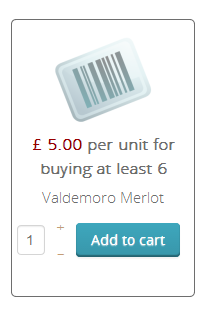
Is there a way that I can get it to display the unit price and then a discount price, for example:
£5.29 each
£5.00 each for 6+
Thanks, Dom.
Although if there is an option that you could offer 10% off if so much is spent without using a coupon code? Or if for example that 12 assorted bottles of wine were added to the cart that it would automatically discount them 10%?
My current problem is though that when I do put in the minimum quantity for the discount it displays the price like "£5.00 per unit for buying at least 6" and then doesn't even display the unit price.
Is there a way that I can get it to display the unit price and then a discount price, for example:
£5.29 each
£5.00 each for 6+
Thanks, Dom.
Last edit: 12 years 11 months ago by domhan.
Please Log in or Create an account to join the conversation.

Less
More
- Posts: 12953
- Thank you received: 1778
12 years 11 months ago #133020
by Mohamed Thelji
Replied by Mohamed Thelji on topic Product Price Display
Hi,
1. Another solution can be to :
- Create a coupon
- Set the Minimum order value option
- Set the percentage option to 10
- Use the Product/Category restriction so that you'll be able to apply the coupon on your "discounted products"
- Set Auto load in cart if possible (commercial editions of HikaShop) to YES
2. You'll be able to change it by using the "Price display method" option through "Hikashop->System->Configuration->display"
Hope this will help you a little.
1. Another solution can be to :
- Create a coupon
- Set the Minimum order value option
- Set the percentage option to 10
- Use the Product/Category restriction so that you'll be able to apply the coupon on your "discounted products"
- Set Auto load in cart if possible (commercial editions of HikaShop) to YES
2. You'll be able to change it by using the "Price display method" option through "Hikashop->System->Configuration->display"
Hope this will help you a little.
Please Log in or Create an account to join the conversation.
12 years 11 months ago #133162
by domhan
Replied by domhan on topic Product Price Display
2. You'll be able to change it by using the "Price display method" option through "Hikashop->System->Configuration->display"
When Changing these absolutely nothing happened to the display what so ever?
When Changing these absolutely nothing happened to the display what so ever?
Please Log in or Create an account to join the conversation.

12 years 11 months ago #133187
by nicolas
Replied by nicolas on topic Product Price Display
Then it means that the options of your module/menu overrides these default options. Edit your menu/module via the menu Display>Content modules/menus and change it there and it will work.
Please Log in or Create an account to join the conversation.
Time to create page: 0.113 seconds