
- Posts: 7
- Thank you received: 0
Blurry Images
- paracycle88
-
 Topic Author
- Offline
Less
More
12 years 10 months ago #135048
by paracycle88
Blurry Images was created by paracycle88
-- url of the page with the problem -- :www.nakedaura.com
-- HikaShop version -- : HikaShop Starter 2.2.2
-- Joomla version -- : Joomla! 3.2.0
-- PHP version -- : 5.3.27
-- Browser(s) name and version -- : Fire Fox
-- Error-message(debug-mod must be tuned on) -- : Error_message
Hello,
My photographer put pics on a disc and are showing up blurry. She made a file that all the pics are re-sized to work on the site...approximately 240 x 360ppi. I even tried reducing the size to 100 x 66ppi. I even tried their original size. They are in Jpeg format. I'm uploading them to my products page through Hikashop. It's an Ignite Joomla Bamboo template. Any thoughts?
-- HikaShop version -- : HikaShop Starter 2.2.2
-- Joomla version -- : Joomla! 3.2.0
-- PHP version -- : 5.3.27
-- Browser(s) name and version -- : Fire Fox
-- Error-message(debug-mod must be tuned on) -- : Error_message
Hello,
My photographer put pics on a disc and are showing up blurry. She made a file that all the pics are re-sized to work on the site...approximately 240 x 360ppi. I even tried reducing the size to 100 x 66ppi. I even tried their original size. They are in Jpeg format. I'm uploading them to my products page through Hikashop. It's an Ignite Joomla Bamboo template. Any thoughts?
Please Log in or Create an account to join the conversation.

Less
More
- Posts: 12953
- Thank you received: 1778
12 years 10 months ago - 12 years 10 months ago #135065
by Mohamed Thelji
Replied by Mohamed Thelji on topic Blurry Images
Hi,
I didn't really understood the problem that you were having, can you show it to me through some screenshots for example ?
I didn't really understood the problem that you were having, can you show it to me through some screenshots for example ?
Last edit: 12 years 10 months ago by Mohamed Thelji.
Please Log in or Create an account to join the conversation.
- paracycle88
-
Topic Author
- Offline
Less
More
- Posts: 7
- Thank you received: 0
12 years 10 months ago #135127
by paracycle88
Replied by paracycle88 on topic Blurry Images
Here's a snippet of the screen
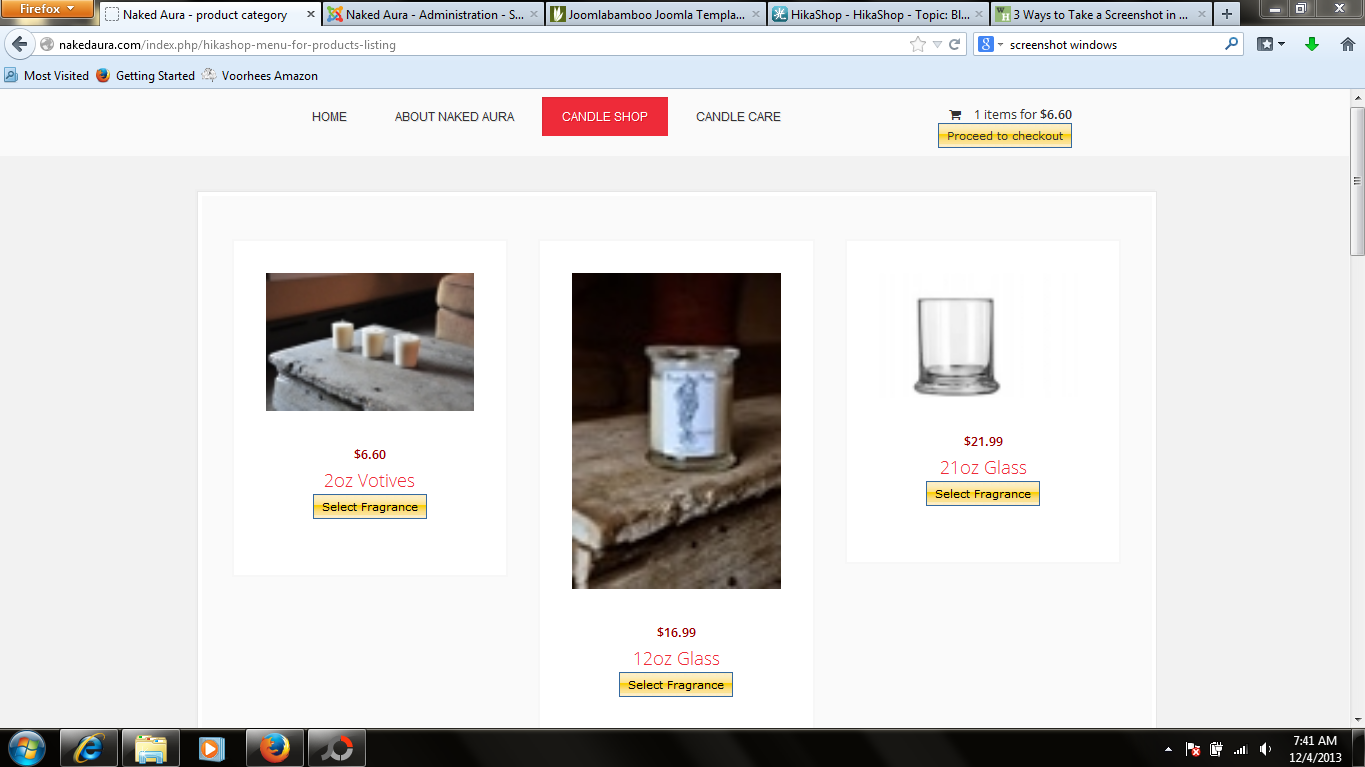
It can also be seen on the website at nakedaura.com/index.php/hikashop-menu-for-products-listing
It can also be seen on the website at nakedaura.com/index.php/hikashop-menu-for-products-listing
Please Log in or Create an account to join the conversation.
Less
More
- Posts: 12953
- Thank you received: 1778
12 years 10 months ago #135191
by Mohamed Thelji
Replied by Mohamed Thelji on topic Blurry Images
Hi,
I just checked your website, and the problem is coming from the fact that your have uploaded a 100x100 picture for your product, and that your re-sized it using some CSS code, the solution will just be to upload a bigger picture.
I just checked your website, and the problem is coming from the fact that your have uploaded a 100x100 picture for your product, and that your re-sized it using some CSS code, the solution will just be to upload a bigger picture.
Please Log in or Create an account to join the conversation.
- paracycle88
-
Topic Author
- Offline
Less
More
- Posts: 7
- Thank you received: 0
12 years 10 months ago #135196
by paracycle88
Replied by paracycle88 on topic Blurry Images
Hello,
Thanks for getting back to me so timely. I originally used the full size that were over 2000ppi ....still was blurry.
Thanks for getting back to me so timely. I originally used the full size that were over 2000ppi ....still was blurry.
Please Log in or Create an account to join the conversation.

12 years 10 months ago #135197
by nicolas
Replied by nicolas on topic Blurry Images
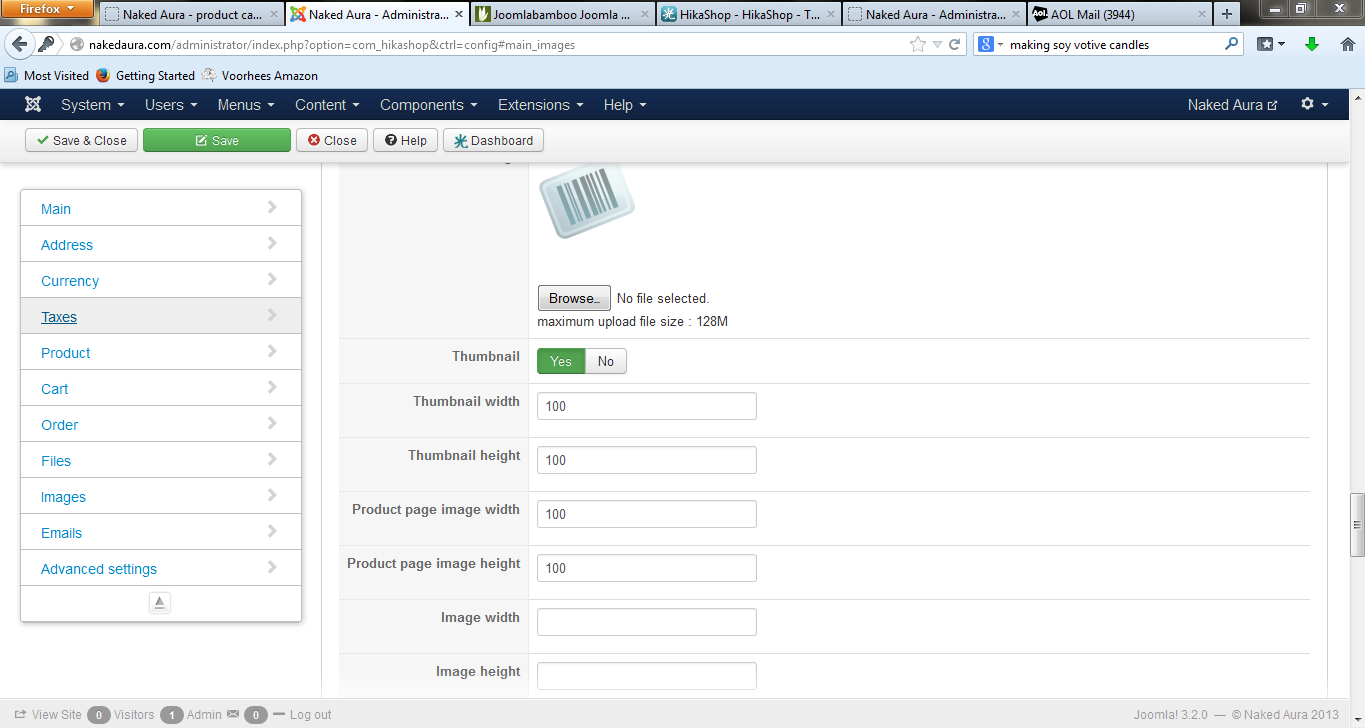
It's probably that in the "image width" and "image height" options of the configuration, you entered 100*100 so the system resize automatically all the image that you upload to that size (that's the goal of that option). If you don't want that, then you should leave these fields empty, as it is by default.
Please Log in or Create an account to join the conversation.
- paracycle88
-
Topic Author
- Offline
Less
More
- Posts: 7
- Thank you received: 0
12 years 10 months ago #135226
by paracycle88
Replied by paracycle88 on topic Blurry Images
Thank you, good to be aware of, but no matter what size I upload, the images still appear blurry. I've tried uploading three different sizes including the original full ppi that was over 2000ppi. Could it be something different besides the image sizing options or should I re-size the actual options?
Thanks for your help
Thanks for your help
Please Log in or Create an account to join the conversation.
- paracycle88
-
Topic Author
- Offline
Less
More
- Posts: 7
- Thank you received: 0
12 years 10 months ago #135244
by paracycle88
Replied by paracycle88 on topic Blurry Images
I have not touched the image settings, here is what that are at. Should they be changed or anything else that might be affecting this? Thanks
Please Log in or Create an account to join the conversation.
12 years 10 months ago #135263
by nicolas
Replied by nicolas on topic Blurry Images
If you look at the image that is uploaded, for example
nakedaura.com/media/com_hikashop/upload/...e_tin_1247252544.jpg
, you can see that its size is small. So there are only two possible explanations, either you uploaded yourself that small image, or it was resized automatically during the upload because these two options were set. There is no other way as all the thumbnails which are created are stored in sub folders starting with "thumbnail" in their name.
Please Log in or Create an account to join the conversation.
Time to create page: 0.175 seconds