
- Posts: 145
- Thank you received: 0
Product images are too small
- southga1974
-
 Topic Author
- Offline
Less
More
12 years 9 months ago #137225
by southga1974
Product images are too small was created by southga1974
-- url of the page with the problem -- :
sumtoycustoms.com/index.php/our-store/pr...y-customs-sun-visors
-- HikaShop version -- : 2.2.3
-- Joomla version -- : 2.5.16
-- PHP version -- : 5.3.14
-- Browser(s) name and version -- : Internet Explorer 9
-- Error-message(debug-mod must be tuned on) -- : N/A
Is there a way to make the product image thumbnail images (the tiny images under the main image) larger? If you'll look on the page I specified, you can see that they are too small. I've set up the image sizes in the main configuration, but it doesn't affect those images.
Thanks.
-- HikaShop version -- : 2.2.3
-- Joomla version -- : 2.5.16
-- PHP version -- : 5.3.14
-- Browser(s) name and version -- : Internet Explorer 9
-- Error-message(debug-mod must be tuned on) -- : N/A
Is there a way to make the product image thumbnail images (the tiny images under the main image) larger? If you'll look on the page I specified, you can see that they are too small. I've set up the image sizes in the main configuration, but it doesn't affect those images.
Thanks.
Please Log in or Create an account to join the conversation.

12 years 9 months ago #137264
by nicolas
Replied by nicolas on topic Product images are too small
The size of the small thumbnails on the product page can be changed as explained here:
www.hikashop.com/support/documentation/8...ling.html#thumbnails
www.hikashop.com/support/documentation/8...ling.html#thumbnails
The following user(s) said Thank You: southga1974, keithstanley
Please Log in or Create an account to join the conversation.
- southga1974
-
Topic Author
- Offline
Less
More
- Posts: 145
- Thank you received: 0
12 years 9 months ago #137363
by southga1974
Replied by southga1974 on topic Product images are too small
Thank you!
Please Log in or Create an account to join the conversation.
Less
More
- Posts: 45
- Thank you received: 1
12 years 8 months ago #141430
by keithstanley
Replied by keithstanley on topic Product images are too small
Hello,
Joomla 2.5.14
HikaShop [1310121421]
I have been searching for almost 2 hours for a way to INCREASE the size of my product "thumbnails".
I think I must be using the wrong search words because I would think someone else would have wanted to do this too...
I have read the information here:
www.hikashop.com/support/documentation/8...ling.html#thumbnails
and I think that is referring to the EXTRA thumbnail images.
I am trying to change the size of the ORIGINAL product thumbnail images.
If you look here:
www.mindsafety.eu/index.php/shop/hikasho...r-categories-listing
you will see the front of the shop I am developing.
The thumbnails are smaller then I would like regardless of the size of the file I upload.
If you look here:
www.mindsafety.eu/index.php/shop/hikasho...ng/product/1-holdall
and click on the Holdall you will see that I have uploaded a larger picture then the thumbnail.
I expect that there is a CSS somewhere that is dictating the size of the thumbnail but I can't find it.
Can you please help?
I STILL LOVE Hikashop!!
Thanks for you excellent support!!!!!
Joomla 2.5.14
HikaShop [1310121421]
I have been searching for almost 2 hours for a way to INCREASE the size of my product "thumbnails".
I think I must be using the wrong search words because I would think someone else would have wanted to do this too...
I have read the information here:
www.hikashop.com/support/documentation/8...ling.html#thumbnails
and I think that is referring to the EXTRA thumbnail images.
I am trying to change the size of the ORIGINAL product thumbnail images.
If you look here:
www.mindsafety.eu/index.php/shop/hikasho...r-categories-listing
you will see the front of the shop I am developing.
The thumbnails are smaller then I would like regardless of the size of the file I upload.
If you look here:
www.mindsafety.eu/index.php/shop/hikasho...ng/product/1-holdall
and click on the Holdall you will see that I have uploaded a larger picture then the thumbnail.
I expect that there is a CSS somewhere that is dictating the size of the thumbnail but I can't find it.
Can you please help?
I STILL LOVE Hikashop!!
Thanks for you excellent support!!!!!
Please Log in or Create an account to join the conversation.

12 years 8 months ago #141461
by Eliot
Replied by Eliot on topic Product images are too small
Hi there,
The size of the thumbnail generated is defined in the main configuration of Hikashop. I guess that's what you're trying to change . To do so, change the value of the corresponding option in System>Configuration>Main>Images. It should do the job!
The size of the thumbnail generated is defined in the main configuration of Hikashop. I guess that's what you're trying to change
. To do so, change the value of the corresponding option in System>Configuration>Main>Images. It should do the job!
The following user(s) said Thank You: keithstanley
Please Log in or Create an account to join the conversation.
Less
More
- Posts: 45
- Thank you received: 1
12 years 8 months ago - 12 years 8 months ago #141533
by keithstanley
Replied by keithstanley on topic Product images are too small
I thought all I could do is click the Thank you button and then I realized that I could post a BIG THANK YOU!!!!!
Hikashop and the people who support it are FANTASTIC!!!!!!!
However I have one more question at the moment.......
If you look here you will see I have made the images bigger and I am happy with the size of them now:
www.mindsafety.eu/index.php/shop/hikasho...r-categories-listing
but you will also see that the alignment of the thumbnails is still to the top center of the area.
How do I change that to display the thumbnail in the precise center of the thumbnail display area.
Just to be sure I have attached 2 pictures.
Picture 1.png shows the thumbnails as they currently are and picture 2.png shows how I would like the thumbnail aligned.
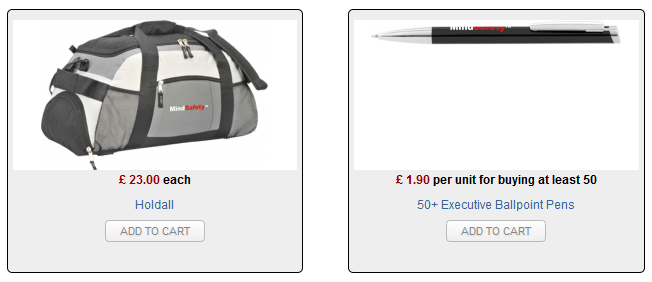
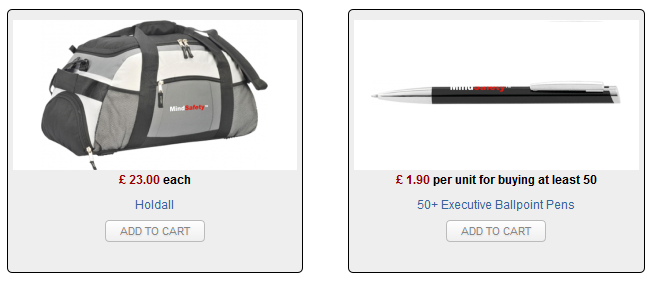
Again I want to say a BIG THANK YOU TO THE HIKASHOP TEAM!!!!!!
Hikashop and the people who support it are FANTASTIC!!!!!!!
However I have one more question at the moment.......
If you look here you will see I have made the images bigger and I am happy with the size of them now:
www.mindsafety.eu/index.php/shop/hikasho...r-categories-listing
but you will also see that the alignment of the thumbnails is still to the top center of the area.
How do I change that to display the thumbnail in the precise center of the thumbnail display area.
Just to be sure I have attached 2 pictures.
Picture 1.png shows the thumbnails as they currently are and picture 2.png shows how I would like the thumbnail aligned.
Again I want to say a BIG THANK YOU TO THE HIKASHOP TEAM!!!!!!
Last edit: 12 years 8 months ago by keithstanley.
Please Log in or Create an account to join the conversation.
12 years 8 months ago #141566
by nicolas
Replied by nicolas on topic Product images are too small
Hi,
There is no option to do that and you can't do it with a simple modification.
We'll actually have options in the next version of HikaShop in order to be able to display the thumbnails like that automatically.
There is no option to do that and you can't do it with a simple modification.
We'll actually have options in the next version of HikaShop in order to be able to display the thumbnails like that automatically.
The following user(s) said Thank You: keithstanley
Please Log in or Create an account to join the conversation.
Less
More
- Posts: 45
- Thank you received: 1
12 years 8 months ago #141643
by keithstanley
Replied by keithstanley on topic Product images are too small
Thanks Nicolas,
I look forward to the launch of the new version.
I look forward to the launch of the new version.
Please Log in or Create an account to join the conversation.
Less
More
- Posts: 45
- Thank you received: 1
12 years 8 months ago #141683
by keithstanley
Replied by keithstanley on topic Product images are too small
I just wanted to let you know I have simply alter the pictures to position the images "better".
Not as elegant as the update you mentioned but it got it done!
Thanks again for a GREAT SHOP!
Not as elegant as the update you mentioned but it got it done!
Thanks again for a GREAT SHOP!
Please Log in or Create an account to join the conversation.
Less
More
- Posts: 45
- Thank you received: 1
11 years 10 months ago #180005
by keithstanley
Replied by keithstanley on topic Product images are too small
I am working on an update of my company site and I have a similar problem that I had last time with my images....
I have successfully changed the Thumbnail to give me the size of image I want, see here:
95.215.225.21/~mindnew/joomla30/index.ph...r-categories-listing
However I can not figure out how to change the size of the image on the actual product page, see here:
95.215.225.21/~mindnew/joomla30/index.ph...isting/product/1-dvd
Clearly it must be possible but I have not found the answer.
Can you please help?
Many thanks
I have successfully changed the Thumbnail to give me the size of image I want, see here:
95.215.225.21/~mindnew/joomla30/index.ph...r-categories-listing
However I can not figure out how to change the size of the image on the actual product page, see here:
95.215.225.21/~mindnew/joomla30/index.ph...isting/product/1-dvd
Clearly it must be possible but I have not found the answer.
Can you please help?
Many thanks
Please Log in or Create an account to join the conversation.

11 years 10 months ago #180015
by Xavier
Replied by Xavier on topic Product images are too small
Hi,
To change this image size, in Configuration > Main > Images you have to change the settings for the options "Product page image width" and "Product page image height".
Please check too if the template is not overriding our properties.
www.hikashop.com/support/support/documen...ize-the-display.html
To change this image size, in Configuration > Main > Images you have to change the settings for the options "Product page image width" and "Product page image height".
Please check too if the template is not overriding our properties.
www.hikashop.com/support/support/documen...ize-the-display.html
The following user(s) said Thank You: keithstanley
Please Log in or Create an account to join the conversation.
Less
More
- Posts: 45
- Thank you received: 1
11 years 10 months ago #180122
by keithstanley
Replied by keithstanley on topic Product images are too small
As usual EXCELLENT SUPPORT!!!!!
Once one knows what changes to make it is so easy.
Once one knows what changes to make it is so easy.
Please Log in or Create an account to join the conversation.
Time to create page: 0.302 seconds