

- Posts: 105
- Thank you received: 1
Dropdown menu with category listing and e.t.c
12 years 10 months ago #138209
by moneymr
Dropdown menu with category listing and e.t.c was created by moneymr
-- url of the page with the problem -- :
mywebsite.com/mypage
-- HikaShop version -- : 2.2.3
-- Joomla version -- : 3.2
Hi. Happy new year.
1. I would like to know how to make dropdown menu with categories of goods?
2. How to change currency view? I would like to show image with beauty value instead text - EUR
3. How to remove quantity of goods in stock?
-- HikaShop version -- : 2.2.3
-- Joomla version -- : 3.2
Hi. Happy new year.
1. I would like to know how to make dropdown menu with categories of goods?
2. How to change currency view? I would like to show image with beauty value instead text - EUR
3. How to remove quantity of goods in stock?
Please Log in or Create an account to join the conversation.
12 years 10 months ago #138211
by moneymr
Replied by moneymr on topic Dropdown menu with category listing and e.t.c
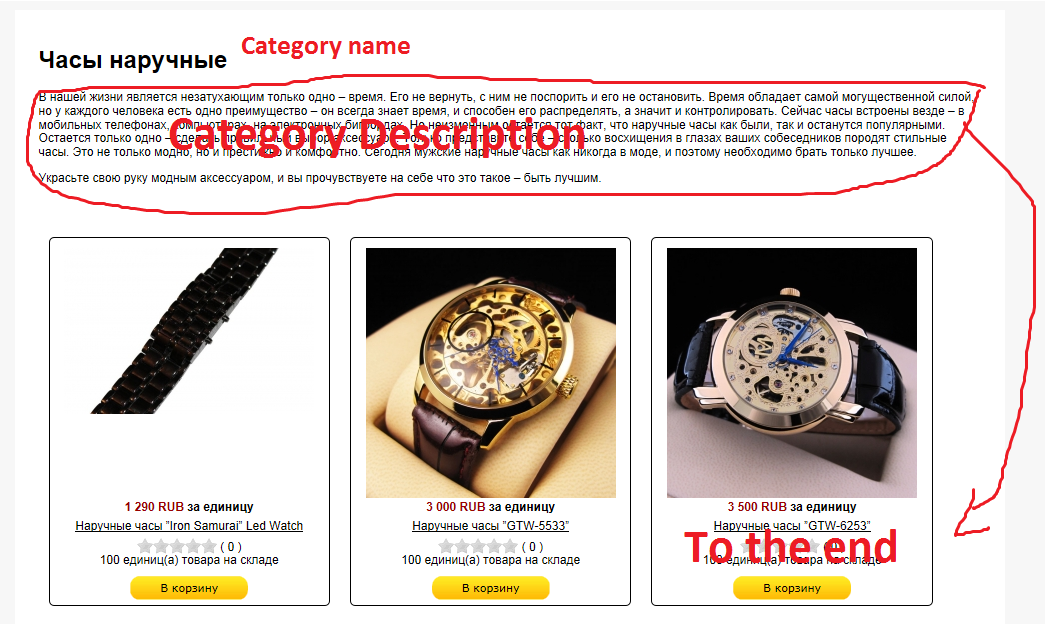
And how to move category description to the end. To show it after product listing?
Please Log in or Create an account to join the conversation.

12 years 10 months ago #138246
by nicolas
Replied by nicolas on topic Dropdown menu with category listing and e.t.c
Hi,
1. You can do it with such extension: www.joomlack.com/extension-joomla-maxime...ch-maximenu-hikashop
2. You can edit the currency display settings via the menu System>Currency:
www.hikashop.com/forum/2-general-talk-ab...-symbol-from-rs.html
3. You can use a translation override to remove it:
www.hikashop.com/download/languages.html#modify
4. You can edit the file "listing" of the view "product" via the menu Display>Views and move the block of code displaying the category description at the end of the file.
1. You can do it with such extension: www.joomlack.com/extension-joomla-maxime...ch-maximenu-hikashop
2. You can edit the currency display settings via the menu System>Currency:
www.hikashop.com/forum/2-general-talk-ab...-symbol-from-rs.html
3. You can use a translation override to remove it:
www.hikashop.com/download/languages.html#modify
4. You can edit the file "listing" of the view "product" via the menu Display>Views and move the block of code displaying the category description at the end of the file.
Please Log in or Create an account to join the conversation.
12 years 10 months ago #138322
by moneymr
Replied by moneymr on topic Dropdown menu with category listing and e.t.c
Hi, thanks for answer.
1. That is the good extension. So, do not exist other ways to show simple dropdown menu?
I need menu only with 1st level categories. Not something difficult.
2.
After saving the "code" field was empty.
3. Thanks.
4. Will try.
1. That is the good extension. So, do not exist other ways to show simple dropdown menu?
I need menu only with 1st level categories. Not something difficult.
2.
Ok, I made it, but it do not worked. I changed "symbol" input field and nothing happens. But when I changed "code" input field to another text, this text changed on fronend too. So I tryed to put this into the "code" field: <img src="yourFile.png" alt="Rs"/>You can add the file path in the currency configuration, in the "symbol" input field you can set:
<img src="yourFile.png" alt="Rs"/>
After saving the "code" field was empty.
3. Thanks.
4. Will try.
Please Log in or Create an account to join the conversation.

12 years 10 months ago #138376
by Xavier
Replied by Xavier on topic Dropdown menu with category listing and e.t.c
Hi,
1. That's the easiest way
2. That must work, I just tried on my end Have you filled the "alt" attribute in order to see if the symbol is changed ?
1. That's the easiest way
2. That must work, I just tried on my end
Have you filled the "alt" attribute in order to see if the symbol is changed ? Please Log in or Create an account to join the conversation.
12 years 10 months ago #138444
by moneymr
Replied by moneymr on topic Dropdown menu with category listing and e.t.c
1. Do you haveplant to include this funtcions in Hikashop in future?
2. Please look
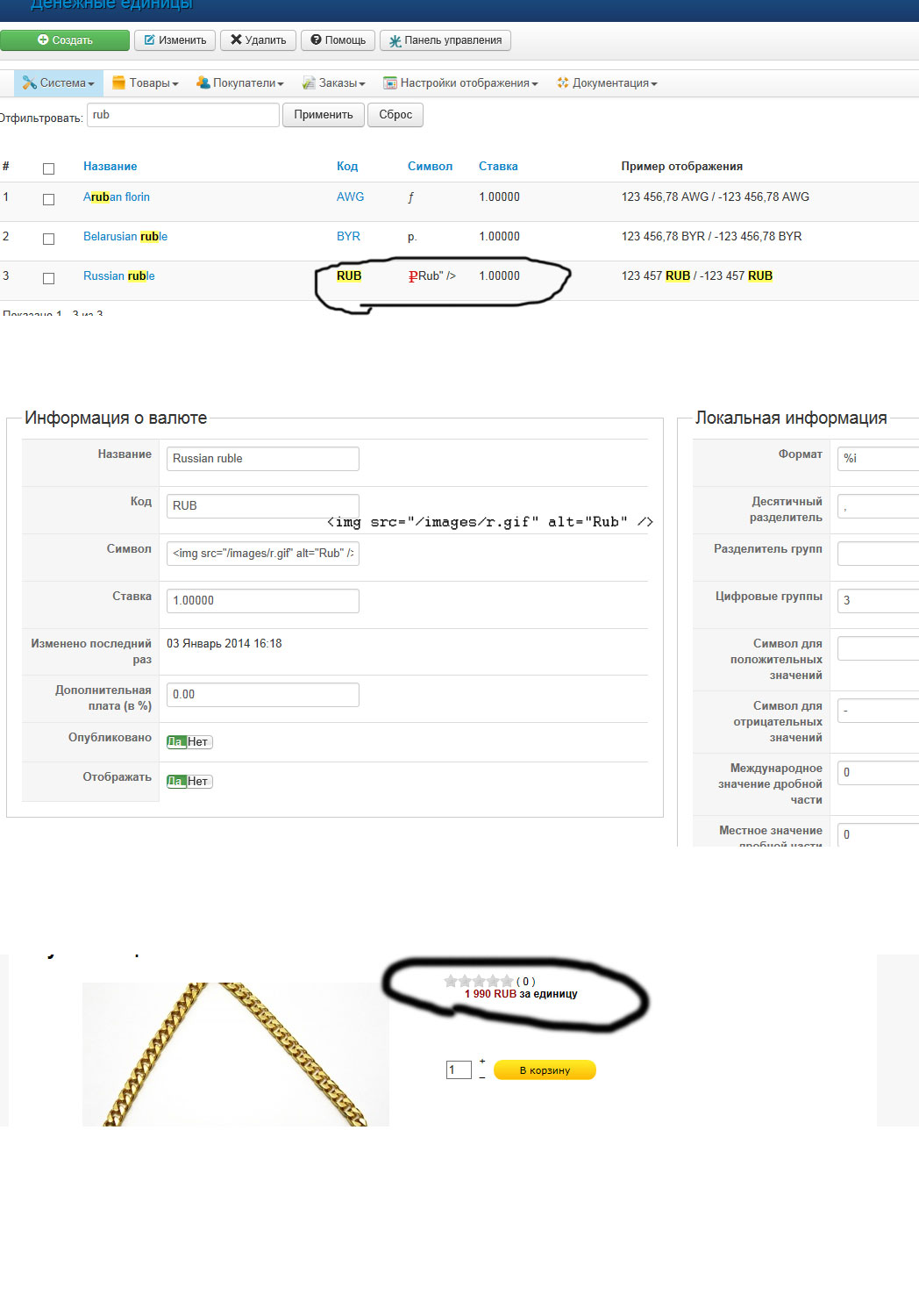
2. Please look
Please Log in or Create an account to join the conversation.
12 years 10 months ago #138453
by nicolas
Replied by nicolas on topic Dropdown menu with category listing and e.t.c
1. Not in the short term.
2. You need to change the format of the currency from %i to %n so that the price display uses the symbol instead of the currency code.
2. You need to change the format of the currency from %i to %n so that the price display uses the symbol instead of the currency code.
Please Log in or Create an account to join the conversation.
12 years 10 months ago - 12 years 10 months ago #138462
by moneymr
Replied by moneymr on topic Dropdown menu with category listing and e.t.c
Thanks!
Better use this code for good view:
Better use this code for good view:
<img style="margin-bottom: 0px;" src="/images/r.gif" alt="Rub" />
Last edit: 12 years 10 months ago by moneymr.
Please Log in or Create an account to join the conversation.

12 years 9 months ago #138885
by zlenko
Ugly design. Do you seriously think that this site will be something to sell?
my project ibaby.com.ua
Replied by zlenko on topic Dropdown menu with category listing and e.t.c
moneymr wrote: And how to move category description to the end. To show it after product listing?
Ugly design. Do you seriously think that this site will be something to sell?
my project ibaby.com.ua
Please Log in or Create an account to join the conversation.
12 years 9 months ago #139011
by moneymr
Replied by moneymr on topic Dropdown menu with category listing and e.t.c
2 zlenko This is default design. If you thought that is ugly - tell it Hikashop developers.
Web designers made design works and I make my.
Web designers made design works and I make my.
Please Log in or Create an account to join the conversation.
Time to create page: 0.113 seconds