

- Posts: 39
- Thank you received: 1
New product gets added to bottom of list - switch?
12 years 10 months ago #138334
by arinehart
New product gets added to bottom of list - switch? was created by arinehart
-- HikaShop version -- :2.1.1
-- Joomla version -- .0.3
.0.3
In the HikaShop BACKEND when a new product is created it gets added to the bottom of the list in whatever category it has been added to. Likewise, when a product is recategorized it gets added to the bottom of THAT list. Is there a way to get new or recategorized products to show up at the top of the list, as item # 1 in the order of the particular category that item has been added to?
Please be clear I am not asking about how to order items on the front end. I just want HikaShop to add newly created product listings to the top of the list in the category the new product has been added to in the backend. We have the front end displaying products according to the ORDER shown in the backend and don't want to have to manually move a new product to the top of the list each time we create one.
Thank you.
-- Joomla version --
.0.3In the HikaShop BACKEND when a new product is created it gets added to the bottom of the list in whatever category it has been added to. Likewise, when a product is recategorized it gets added to the bottom of THAT list. Is there a way to get new or recategorized products to show up at the top of the list, as item # 1 in the order of the particular category that item has been added to?
Please be clear I am not asking about how to order items on the front end. I just want HikaShop to add newly created product listings to the top of the list in the category the new product has been added to in the backend. We have the front end displaying products according to the ORDER shown in the backend and don't want to have to manually move a new product to the top of the list each time we create one.
Thank you.
Please Log in or Create an account to join the conversation.

Less
More
- Posts: 12953
- Thank you received: 1778
12 years 10 months ago #138358
by Mohamed Thelji
Replied by Mohamed Thelji on topic New product gets added to bottom of list - switch?
Hi,
Note that :
- Through your back-end product listing you can re-order your products by using the "ID" header for example, so that newly created products will be shown at the top of your listing
- Through your front-end product listing, you'll be able to re-order your products by using the "Ordering field" option of your product listing content menu/module via "Hikashop->Display->Content menus/modules"
Note that :
- Through your back-end product listing you can re-order your products by using the "ID" header for example, so that newly created products will be shown at the top of your listing
- Through your front-end product listing, you'll be able to re-order your products by using the "Ordering field" option of your product listing content menu/module via "Hikashop->Display->Content menus/modules"
Please Log in or Create an account to join the conversation.
12 years 10 months ago #138734
by arinehart
Replied by arinehart on topic New product gets added to bottom of list - switch?
Unfortunately, the approach you're recommending would be too rigid for our workflow. If all ordering is done by ID then we would have no easy way to alter the order as occasionally we need to make minor adjustments. Yes, ordering by ID would cause new products or recategorized products to appear at the top of the list but then how do we make adjustments within different categories?
Right now, when adding a new product listing or re-categorizing an existing one we have to reorder the item in every category to which the product has been added or reassigned. Since we have numerous categories that products are assigned to this turns into a big lump in the workflow. Ideally, new or reassigned products get added to the top of the list as number 1 in the order column as most (but not all) of the time this is what we'd want.
Is there a way to alter HikaShop to do that?
Right now, when adding a new product listing or re-categorizing an existing one we have to reorder the item in every category to which the product has been added or reassigned. Since we have numerous categories that products are assigned to this turns into a big lump in the workflow. Ideally, new or reassigned products get added to the top of the list as number 1 in the order column as most (but not all) of the time this is what we'd want.
Is there a way to alter HikaShop to do that?
Please Log in or Create an account to join the conversation.

12 years 9 months ago #138924
by nicolas
Replied by nicolas on topic New product gets added to bottom of list - switch?
Why not simply reorder your products listing in the backend based on the ordering but in descending order (it's ascending by default) ?You can just click on the ordering column title for that when you want it in that order.
If you want something more permanent, you would have to hack hikashop products listing view file administrator/components/com_hikashop/views/product/view.html.php and change the default ordering there:
$pageInfo->filter->order->dir = $app->getUserStateFromRequest( $this->paramBase.".filter_order_Dir", 'filter_order_Dir', 'asc', 'word' );
to:
$pageInfo->filter->order->dir = $app->getUserStateFromRequest( $this->paramBase.".filter_order_Dir", 'filter_order_Dir', 'desc', 'word' );
If you want something more permanent, you would have to hack hikashop products listing view file administrator/components/com_hikashop/views/product/view.html.php and change the default ordering there:
$pageInfo->filter->order->dir = $app->getUserStateFromRequest( $this->paramBase.".filter_order_Dir", 'filter_order_Dir', 'asc', 'word' );
to:
$pageInfo->filter->order->dir = $app->getUserStateFromRequest( $this->paramBase.".filter_order_Dir", 'filter_order_Dir', 'desc', 'word' );
Please Log in or Create an account to join the conversation.
12 years 9 months ago #139104
by arinehart
Replied by arinehart on topic New product gets added to bottom of list - switch?
Unfortunately what you are suggesting only provides a solution for the backend (a solution that would work fine for us). Products on the front end still display in ascending order. Is there a way to get products in the front end to display in descending order as well?
Please Log in or Create an account to join the conversation.
12 years 9 months ago #139132
by nicolas
Replied by nicolas on topic New product gets added to bottom of list - switch?
Sure. For the front end, there is an "ordering direction" option that you can just change when you edit your products listings menus/modules via the menu Display>Content menus/modules.
Please Log in or Create an account to join the conversation.
12 years 7 months ago #149437
by PhilP
Replied by PhilP on topic New product gets added to bottom of list - switch?
Picking up on this post, I have a requirement to re-order products within their category, especially for newly created products. These may not need to go at the top of a list, so the 'switch' option is not required.
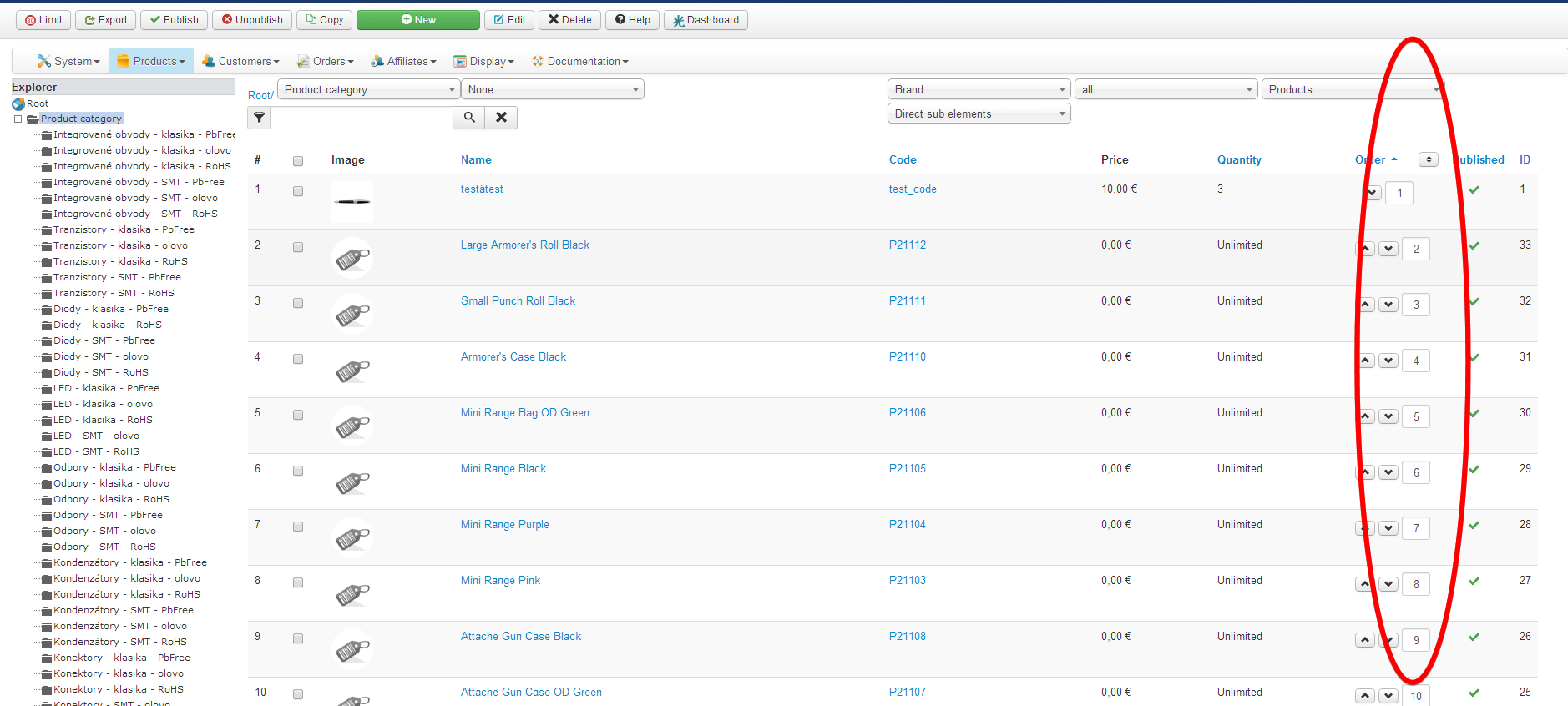
As an example, if I have created a new product which then occupies the last position 25 within it category, but I should like to insert it at position 6. Is there any other way to do this apart from using the manual 'order' button in the listing 19 times?
Advice appreciated.
Thanks
PhilP.
As an example, if I have created a new product which then occupies the last position 25 within it category, but I should like to insert it at position 6. Is there any other way to do this apart from using the manual 'order' button in the listing 19 times?
Advice appreciated.
Thanks
PhilP.
Please Log in or Create an account to join the conversation.
12 years 7 months ago #149460
by nicolas
Replied by nicolas on topic New product gets added to bottom of list - switch?
Sure. You could simply enter 6 in the input field of the order column for your product and click on the save button in the ordering column title and it will move the product in the 6th position automatically.
Please Log in or Create an account to join the conversation.
12 years 7 months ago #149523
by PhilP
Replied by PhilP on topic New product gets added to bottom of list - switch?
Hi Nicolas,
I've been using Hikashop for a couple of years and never noticed that!
Thanks for pointing it out.
I'm going to send myself to the bottom of the class!
Best Regards
PhilP
I've been using Hikashop for a couple of years and never noticed that!
Thanks for pointing it out.
I'm going to send myself to the bottom of the class!
Best Regards
PhilP
Please Log in or Create an account to join the conversation.

12 years 7 months ago #149611
by mfrancke
Replied by mfrancke on topic New product gets added to bottom of list - switch?
Off-topic, but how did you activate that Explorer on the left side?
Please Log in or Create an account to join the conversation.

12 years 7 months ago #149654
by Xavier
Replied by Xavier on topic New product gets added to bottom of list - switch?
Hi,
You have to enable the option "Back end categories explorer" in Configuration > Display > General display options.
You have to enable the option "Back end categories explorer" in Configuration > Display > General display options.
Please Log in or Create an account to join the conversation.
Time to create page: 0.091 seconds