
- Posts: 1
- Thank you received: 0
Product Image Display CSS
- thesedonacleanse
-
 Topic Author
- Offline
Less
More
12 years 9 months ago #141210
by thesedonacleanse
Product Image Display CSS was created by thesedonacleanse
-- url of the page with the problem -- :
www.sedonacleanse.com/purchase-sedona-cl...uct/4-cleansing-meal
-- HikaShop version -- : 2.2.3 (Starter)
-- Joomla version -- : 2.5.17
-- PHP version -- : 5.5.3
-- Browser(s) name and version -- : Chrome (Version 32.0.1700.77), Safari (7.0.1)
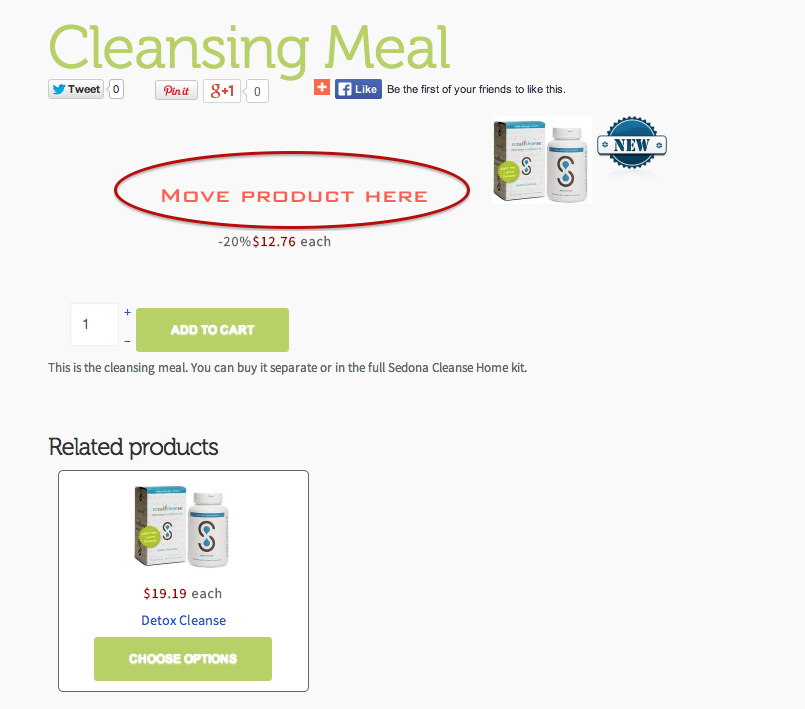
I need some help with the CSS. As you can see from the picture the product is displaying to the right. I would like the product image on the left, with the add to cart button and price on the right. Can you help me with this? Thanks so much!
-- HikaShop version -- : 2.2.3 (Starter)
-- Joomla version -- : 2.5.17
-- PHP version -- : 5.5.3
-- Browser(s) name and version -- : Chrome (Version 32.0.1700.77), Safari (7.0.1)
I need some help with the CSS. As you can see from the picture the product is displaying to the right. I would like the product image on the left, with the add to cart button and price on the right. Can you help me with this? Thanks so much!
Please Log in or Create an account to join the conversation.

12 years 9 months ago #141247
by nicolas
Replied by nicolas on topic Product Image Display CSS
Hi,
You can add such CSS on your website for that:
@media(min-width:1200px){
.span6{
width: 400px !important;
}
}
.hikashop_product_top_part {
height: 100px;
}
You can add such CSS on your website for that:
@media(min-width:1200px){
.span6{
width: 400px !important;
}
}
.hikashop_product_top_part {
height: 100px;
}
Please Log in or Create an account to join the conversation.
Time to create page: 0.097 seconds