
- Posts: 4
- Thank you received: 0
Remove tables and add divs to product quantity
- tylerancell
-
 Topic Author
- Offline
Less
More
12 years 8 months ago #141932
by tylerancell
Remove tables and add divs to product quantity was created by tylerancell
Hi there,
I'm having a little bit of trouble figuring out where to edit the product display to modify some tables and replace them with divs. This is what I'd like to alter:
So what I'd like to do is have all items (plus, minus and quantity) display horizontally like the image I provided. I find tables incredibly frustrating to work with so any help would be appreciated. I should be able to manage the alterations providing I can figure out where exactly to make them.
Thanks!
I'm having a little bit of trouble figuring out where to edit the product display to modify some tables and replace them with divs. This is what I'd like to alter:
Code:
<table>
<tbody>
<tr>
<td rowspan="2">
<input id="hikashop_product_quantity_field_1" type="text" value="1" class="hikashop_product_quantity_field" name="quantity" onchange="hikashopCheckQuantityChange('hikashop_product_quantity_field_1',0,1);">
</td>
<td>
<a id="hikashop_product_quantity_field_change_plus_1" class="hikashop_product_quantity_field_change_plus hikashop_product_quantity_field_change" href="#" onclick="return hikashopQuantityChange('hikashop_product_quantity_field_1',1,0,1);">+</a>
</td>
<td rowspan="2">
<a class="hikashop_cart_button" href="/dunnwright/" onclick="var field=document.getElementById('hikashop_product_quantity_field_1');if(hikashopCheckChangeForm('item','hikashop_product_form')){ return hikashopModifyQuantity('5',field,1,0,'cart'); } else { return false; }">Add to cart</a>
</td>
</tr>
<tr>
<td>
<a id="hikashop_product_quantity_field_change_minus_1" class="hikashop_product_quantity_field_change_minus hikashop_product_quantity_field_change" href="#" onclick="return hikashopQuantityChange('hikashop_product_quantity_field_1',0,0,1);">–</a>
</td>
</tr>
</tbody>
</table>
So what I'd like to do is have all items (plus, minus and quantity) display horizontally like the image I provided. I find tables incredibly frustrating to work with so any help would be appreciated. I should be able to manage the alterations providing I can figure out where exactly to make them.
Thanks!
Please Log in or Create an account to join the conversation.
- tylerancell
-
Topic Author
- Offline
Less
More
- Posts: 4
- Thank you received: 0
12 years 8 months ago #142014
by tylerancell
Replied by tylerancell on topic Remove tables and add divs to product quantity
Anyone have any thoughts?
Please Log in or Create an account to join the conversation.

12 years 8 months ago #142033
by nicolas
Replied by nicolas on topic Remove tables and add divs to product quantity
That code is in the file administrator/components/com_hikashop/helper/cart.php in the displayButton function.
Please Log in or Create an account to join the conversation.
- tylerancell
-
Topic Author
- Offline
Less
More
- Posts: 4
- Thank you received: 0
12 years 8 months ago #142035
by tylerancell
Replied by tylerancell on topic Remove tables and add divs to product quantity
oh, so there's no custom view associated with that particular item?
Please Log in or Create an account to join the conversation.
12 years 8 months ago #142039
by nicolas
Replied by nicolas on topic Remove tables and add divs to product quantity
If you want to do an override for it, I invite you to follow the section "For the quantity input" of our documentation on that:
www.hikashop.com/support/support/documen...tation.html#override
www.hikashop.com/support/support/documen...tation.html#override
The following user(s) said Thank You: tylerancell
Please Log in or Create an account to join the conversation.
- tylerancell
-
Topic Author
- Offline
Less
More
- Posts: 4
- Thank you received: 0
12 years 8 months ago - 12 years 8 months ago #142053
by tylerancell
Replied by tylerancell on topic Remove tables and add divs to product quantity
Thanks a ton, Nicolas 
I've uploaded a screen of the updated quantity section. It's just a placeholder for now, but I think everything is ready to go into full addition mode now thanks to you!
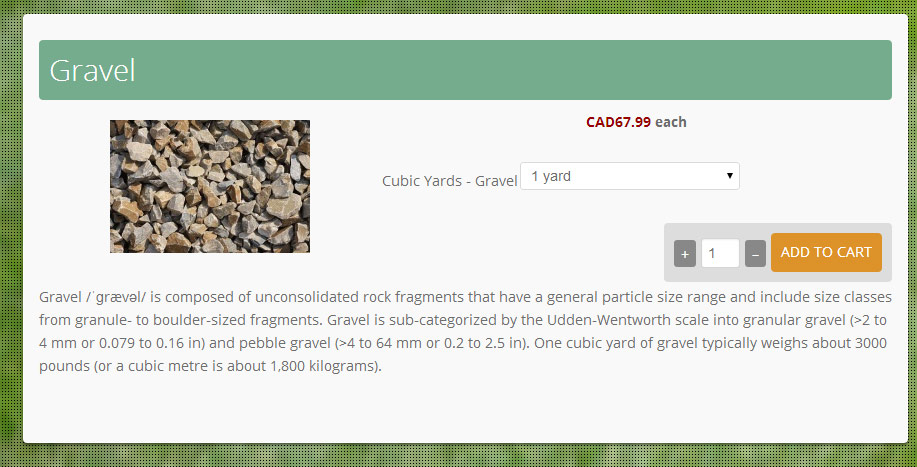
I've uploaded a screen of the updated quantity section. It's just a placeholder for now, but I think everything is ready to go into full addition mode now thanks to you!
Last edit: 12 years 8 months ago by tylerancell.
Please Log in or Create an account to join the conversation.
12 years 2 weeks ago #175360
by sifur
Hi, since version 2.3.3 I can't find the code on "administrator/components/com_hikashop/helper/cart.php" did you moved it to another file? please advice where I can find the code.
Thanks
Replied by sifur on topic Remove tables and add divs to product quantity
nicolas wrote: That code is in the file administrator/components/com_hikashop/helper/cart.php in the displayButton function.
Hi, since version 2.3.3 I can't find the code on "administrator/components/com_hikashop/helper/cart.php" did you moved it to another file? please advice where I can find the code.
Thanks
Please Log in or Create an account to join the conversation.
12 years 2 weeks ago #175409
by nicolas
Replied by nicolas on topic Remove tables and add divs to product quantity
Hi,
Since HikaShop 2.3.2, you have the "Quantity layout on product page" in the Display tab of the configuration which allows you to select the layout that you want for the add to cart area. So now there is already a DIV layout that you can select with that option, without changing any code.
And if you need to adapt it to your needs, you can just edit the file "show_quantity" of the view "product" via the menu Display>Views. Your modifications will be saved as a view override and you won't loose them when you update.
Since HikaShop 2.3.2, you have the "Quantity layout on product page" in the Display tab of the configuration which allows you to select the layout that you want for the add to cart area. So now there is already a DIV layout that you can select with that option, without changing any code.
And if you need to adapt it to your needs, you can just edit the file "show_quantity" of the view "product" via the menu Display>Views. Your modifications will be saved as a view override and you won't loose them when you update.
Please Log in or Create an account to join the conversation.
Time to create page: 0.266 seconds