

- Posts: 12
- Thank you received: 0
How to Remove quantity column
12 years 8 months ago #142608
by punga98
How to Remove quantity column was created by punga98
-- HikaShop version -- : Business 2.2.3
-- Joomla version -- : 3.2.1
-- PHP version -- : 5.3.27
-- Browser(s) name and version -- : Chrome 33.0.1750.46 beta-m
Hi
I want to remove the quantity column in the backend products listing.
How can I do this?
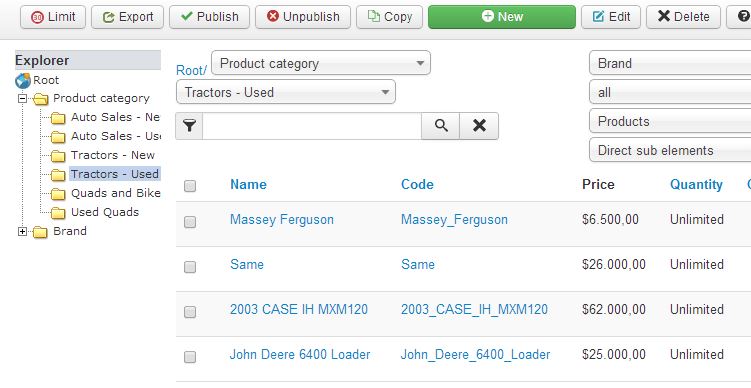
cheers
Jim
-- Joomla version -- : 3.2.1
-- PHP version -- : 5.3.27
-- Browser(s) name and version -- : Chrome 33.0.1750.46 beta-m
Hi
I want to remove the quantity column in the backend products listing.
How can I do this?
cheers
Jim
Please Log in or Create an account to join the conversation.

Less
More
- Posts: 12953
- Thank you received: 1778
12 years 8 months ago - 12 years 8 months ago #142621
by Mohamed Thelji
Replied by Mohamed Thelji on topic How to Remove quantity column
Hi,
To do that the solution will be to edit the "listing" file of the "product" view of your [strike]front-end[/strike] back-end template, through the page "Hikashop->Display->Views"
To do that the solution will be to edit the "listing" file of the "product" view of your [strike]front-end[/strike] back-end template, through the page "Hikashop->Display->Views"
Last edit: 12 years 8 months ago by Mohamed Thelji.
Please Log in or Create an account to join the conversation.
12 years 8 months ago #142772
by punga98
Replied by punga98 on topic How to Remove quantity column
Hi
Thanks for that. It was the Back End Quantity column I wanted to remove. In the listing file in the Back End template I removed all references to Quantity but all it did was to remove the title 'Quantity' and the column data was still there.
How do I remove the Whole column and not just the title?
Thanks for that. It was the Back End Quantity column I wanted to remove. In the listing file in the Back End template I removed all references to Quantity but all it did was to remove the title 'Quantity' and the column data was still there.
How do I remove the Whole column and not just the title?
Please Log in or Create an account to join the conversation.
Less
More
- Posts: 12953
- Thank you received: 1778
12 years 8 months ago #142807
by Mohamed Thelji
Replied by Mohamed Thelji on topic How to Remove quantity column
My bad, yes I was talking of the "listing" file of the "product" view of your back-end template, to do what you want you'll just have to :
- remove these lines :
and also these lines :
- remove these lines :
Code:
<th class="title">
<?php echo JHTML::_('grid.sort', JText::_('PRODUCT_QUANTITY'), 'b.product_quantity', $this->pageInfo->filter->order->dir,$this->pageInfo->filter->order->value ); ?>
</th>
Code:
<td>
<?php echo ($row->product_quantity==-1?JText::_('UNLIMITED'):$row->product_quantity); ?>
</td>
The following user(s) said Thank You: punga98
Please Log in or Create an account to join the conversation.
Time to create page: 0.100 seconds