

- Posts: 16
- Thank you received: 0
Produtcs in category
12 years 8 months ago #143297
by IgorMM
Produtcs in category was created by IgorMM
-- url of the page with the problem -- : http://xxxxx
-- HikaShop version -- : 2.2.3
-- Joomla version -- : 2.5.18
-- PHP version -- : x.x.x
-- Browser(s) name and version -- : FF
hi
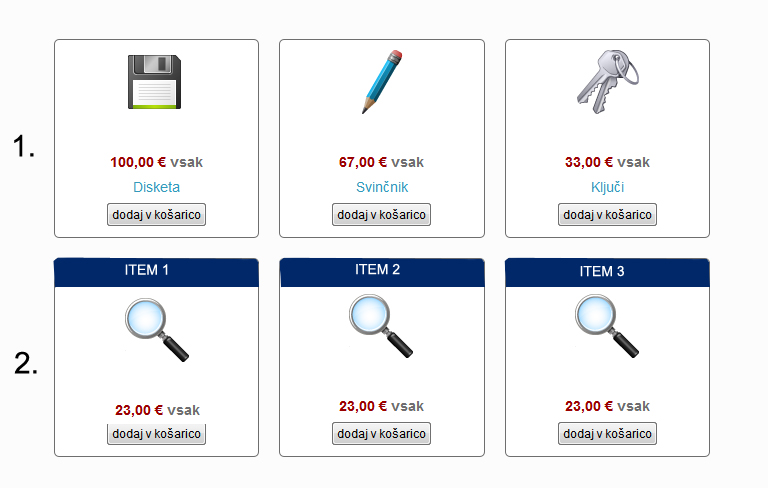
is it possible to change a product in category the look of it, now i have like in the pic 1. buti need it to look like 2.
is it possible?
regards
-- HikaShop version -- : 2.2.3
-- Joomla version -- : 2.5.18
-- PHP version -- : x.x.x
-- Browser(s) name and version -- : FF
hi
is it possible to change a product in category the look of it, now i have like in the pic 1. buti need it to look like 2.
is it possible?
regards
Please Log in or Create an account to join the conversation.

12 years 8 months ago #143329
by nicolas
Replied by nicolas on topic Produtcs in category
Hi,
There is no option to do that by default. You'll have to edit the file "listing_img_title" of the view "product" via the menu Display>views and modify the code there to do what you want.
There is no option to do that by default. You'll have to edit the file "listing_img_title" of the view "product" via the menu Display>views and modify the code there to do what you want.
The following user(s) said Thank You: IgorMM
Please Log in or Create an account to join the conversation.
12 years 8 months ago #143698
by IgorMM
Replied by IgorMM on topic Produtcs in category
yes i know i need to change it manuli, can you help me with this, my html knolage in not so wery good.
Please Log in or Create an account to join the conversation.
12 years 8 months ago #143767
by nicolas
Replied by nicolas on topic Produtcs in category
Moving the product name above the image is easy. Simply copy/paste the block of the product name before the block for the image. It's clearly delimited in the file.
For the blue background, a bit of CSS should do the trick. The exact CSS to use will depend on your joomla template so I can't answer precisely.
For the blue background, a bit of CSS should do the trick. The exact CSS to use will depend on your joomla template so I can't answer precisely.
Please Log in or Create an account to join the conversation.
12 years 8 months ago #144272
by IgorMM
Replied by IgorMM on topic Produtcs in category
hi
i can give you full access of my site so if you can please help me, i would be wery greatfull!
i can give you full access of my site so if you can please help me, i would be wery greatfull!
Please Log in or Create an account to join the conversation.
12 years 8 months ago #144286
by nicolas
Replied by nicolas on topic Produtcs in category
I'm sure you'll be able to do it yourself. There is no need to be a developer. Simply read the file, spot the different blocks of the file and swap them.
Please Log in or Create an account to join the conversation.
12 years 8 months ago #144302
by IgorMM
Replied by IgorMM on topic Produtcs in category
hi
ok i changed title on top, easy
now how to put a blue block behid the item name?
ok i changed title on top, easy
now how to put a blue block behid the item name?
Please Log in or Create an account to join the conversation.

Less
More
- Posts: 12953
- Thank you received: 1778
12 years 8 months ago #144360
by Mohamed Thelji
Replied by Mohamed Thelji on topic Produtcs in category
Please Log in or Create an account to join the conversation.
12 years 8 months ago #144460
by IgorMM
Replied by IgorMM on topic Produtcs in category
wich css? from template or hika?
regards
regards
Please Log in or Create an account to join the conversation.
12 years 8 months ago #144510
by nicolas
Replied by nicolas on topic Produtcs in category
You can add your CSS code in either your template CSS or HikaShop's CSS, it will work the same.
The following user(s) said Thank You: IgorMM
Please Log in or Create an account to join the conversation.
12 years 8 months ago - 12 years 8 months ago #144869
by IgorMM
Replied by IgorMM on topic Produtcs in category
hi
i was now working 2 days with css and no such luck, watched 100 videos tried everything.
no success
in pic no.1 product look's original
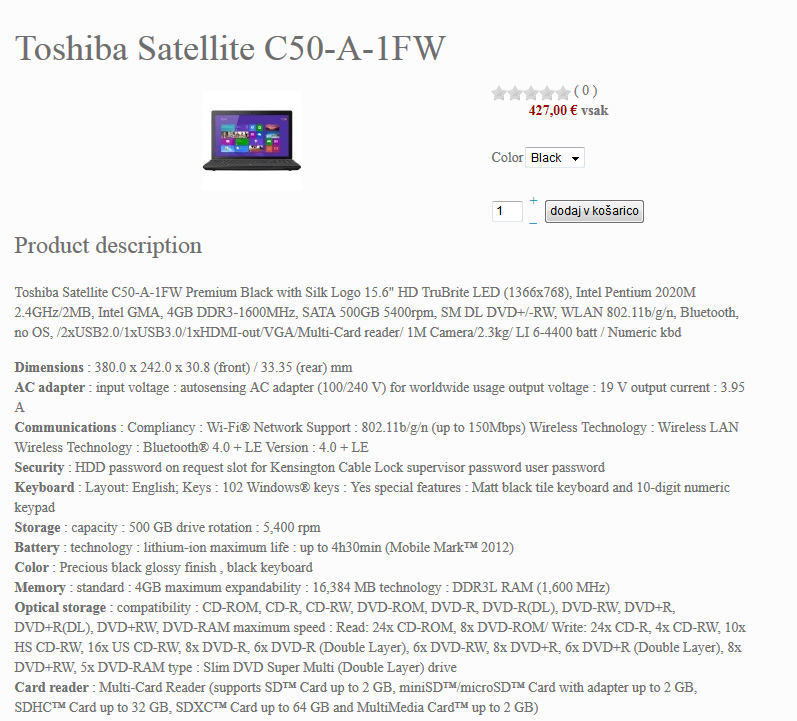
i need it to look like pic no.2
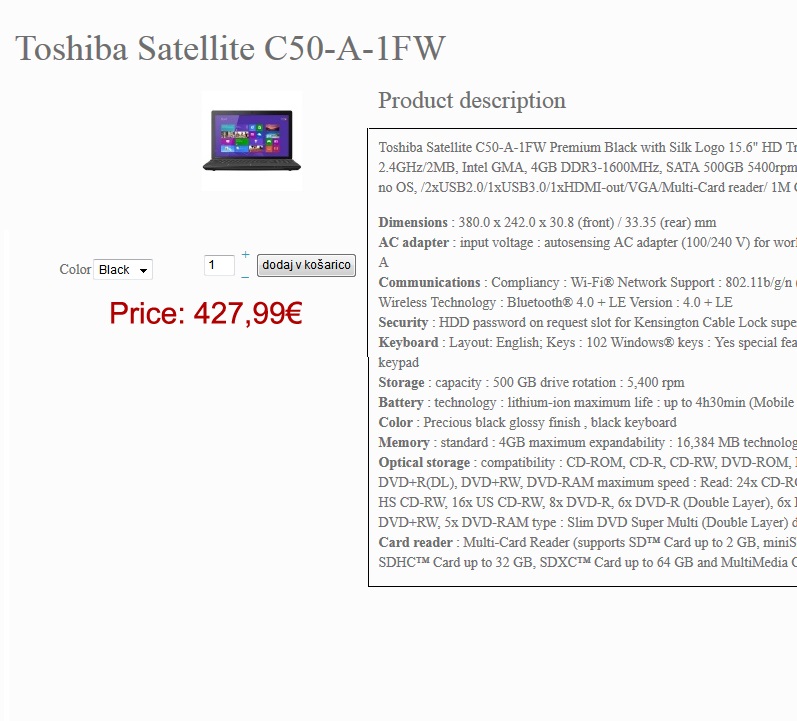
please help me with this problem, i dont need more non slept nights.
i'll pay some one if i have to. for you masters this will be 15min of work for me never ending problem :S :S
i was now working 2 days with css and no such luck, watched 100 videos tried everything.
no success
in pic no.1 product look's original
i need it to look like pic no.2
please help me with this problem, i dont need more non slept nights.
i'll pay some one if i have to. for you masters this will be 15min of work for me never ending problem :S :S
Last edit: 12 years 8 months ago by IgorMM.
Please Log in or Create an account to join the conversation.
Less
More
- Posts: 12953
- Thank you received: 1778
12 years 8 months ago #145021
by Mohamed Thelji
Replied by Mohamed Thelji on topic Produtcs in category
Hi,
To do that you'll also have to edit the code of the "show_default" file of the "product" view of your front-end template through the page "Hikashop->Display->Views".
For example, if your want your product description to show through the right part of your product page, you'll have to move these lines :
Just after this line :
To do that you'll also have to edit the code of the "show_default" file of the "product" view of your front-end template through the page "Hikashop->Display->Views".
For example, if your want your product description to show through the right part of your product page, you'll have to move these lines :
Code:
<div id="hikashop_product_description_main" class="hikashop_product_description_main">
<?php
//DISPLAY the product description
echo JHTML::_('content.prepare',preg_replace('#<hr *id="system-readmore" */>#i','',$this->element->product_description));
?>
</div>
Code:
<div id="hikashop_product_right_part" class="hikashop_product_right_part span6">
The following user(s) said Thank You: IgorMM
Please Log in or Create an account to join the conversation.
12 years 8 months ago - 12 years 8 months ago #145045
by IgorMM
Replied by IgorMM on topic Produtcs in category
heres the resault:
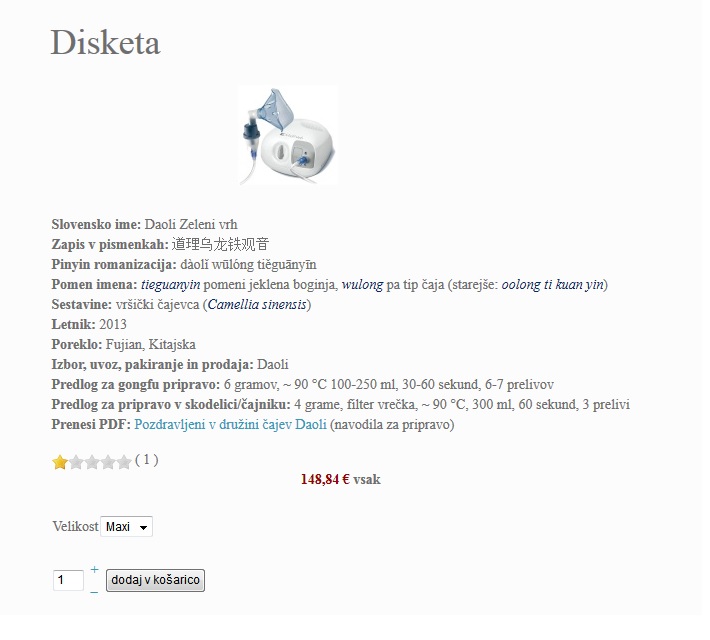
description didnt move to the right position.
description didnt move to the right position.
Last edit: 12 years 8 months ago by IgorMM.
Please Log in or Create an account to join the conversation.
12 years 8 months ago #145082
by nicolas
Replied by nicolas on topic Produtcs in category
Please provide a link to that page.
The following user(s) said Thank You: IgorMM
Please Log in or Create an account to join the conversation.
12 years 8 months ago #145264
by IgorMM
Replied by IgorMM on topic Produtcs in category
i sended you pm with login info
Please Log in or Create an account to join the conversation.
12 years 8 months ago #145356
by nicolas
Replied by nicolas on topic Produtcs in category
As you can see on your screenshot, the description is now above the add to cart button. If you look at the HTML of the page, you can actually see that it's inside the right part of the layout, but that because of the width of the description, the right part moved below the left part.
So on top of the modification given my Mohamed, you'll also need to fore the width of the right part by adding such CSS in your HikaShop frontend CSS:
#hikashop_product_right_part{
width: 45%;
}
The if you want the add to cart button and characteristic on the left below the image, you'll need also to move the code of the add cart and characteristic to the left part of the layout in that same view file.
Please note that customization of HikaShop views is outside the support we provide. We help a bit but we can't adapt the code of all the views of everyone. If you can't do it yourself, I would highly recommend you to hire a professional integrator so that he can do that for you. You can find one via our commercial jobs forum or via joomlancers.com or resources.joomla.org
So on top of the modification given my Mohamed, you'll also need to fore the width of the right part by adding such CSS in your HikaShop frontend CSS:
#hikashop_product_right_part{
width: 45%;
}
The if you want the add to cart button and characteristic on the left below the image, you'll need also to move the code of the add cart and characteristic to the left part of the layout in that same view file.
Please note that customization of HikaShop views is outside the support we provide. We help a bit but we can't adapt the code of all the views of everyone. If you can't do it yourself, I would highly recommend you to hire a professional integrator so that he can do that for you. You can find one via our commercial jobs forum or via joomlancers.com or resources.joomla.org
Please Log in or Create an account to join the conversation.
12 years 8 months ago #145394
by IgorMM
Replied by IgorMM on topic Produtcs in category
thx for help
but you didnt help me nothing.
i'm angry at my self for paying 100€ for a component that looks like a bigest amateur shop, and suport only talking do it your self, i paid so i asumed yull help a custemor and not only try your self or pay on other sites
regards
igor
but you didnt help me nothing.
i'm angry at my self for paying 100€ for a component that looks like a bigest amateur shop, and suport only talking do it your self, i paid so i asumed yull help a custemor and not only try your self or pay on other sites
regards
igor
Please Log in or Create an account to join the conversation.
12 years 8 months ago #145465
by nicolas
Replied by nicolas on topic Produtcs in category
Hi,
Your paid for the commercial features of HikaShop and support regarding the use of HikaShop, not for us to personalize your whole shop for you. And I did gave you tips on what should be done.
I'm sorry but for such level of support, it would have to cost a lot more than 100 euros. I invite you to look at magento which has such support plan and the prices start at $15000 per year. I hope you can understand our point of view.
Your paid for the commercial features of HikaShop and support regarding the use of HikaShop, not for us to personalize your whole shop for you. And I did gave you tips on what should be done.
I'm sorry but for such level of support, it would have to cost a lot more than 100 euros. I invite you to look at magento which has such support plan and the prices start at $15000 per year. I hope you can understand our point of view.
Please Log in or Create an account to join the conversation.
Time to create page: 0.150 seconds