
- Posts: 13
- Thank you received: 0
Add to Cart not remaining on the same page
- joompeach1
-
 Topic Author
- Offline
Less
More
12 years 8 months ago - 12 years 8 months ago #143726
by joompeach1
Add to Cart not remaining on the same page was created by joompeach1
- url of the page with the problem -- : http://localhost/amber%20creations/
-- HikaShop version -- : 2.2.3
-- Joomla version -- : 3.2.2
-- PHP version -- : 5.4.12
-- Browser(s) name and version -- : Google Chrome 32.0.1700.107 m
Upon Adding a product to Shopping Cart, I'm Re-directed to a white content screen with "HikaShop , Joomla!™ Online Store Component" even though I've checked the configuration option within Hikashop to "Stay and display popup notice" or "Always stay on the same page".
All the product's get replaced with "HikaShop , Joomla!™ Online Store Component" but the shopping cart on the right remains with the addition of the extra product.
Peach
-- HikaShop version -- : 2.2.3
-- Joomla version -- : 3.2.2
-- PHP version -- : 5.4.12
-- Browser(s) name and version -- : Google Chrome 32.0.1700.107 m
Upon Adding a product to Shopping Cart, I'm Re-directed to a white content screen with "HikaShop , Joomla!™ Online Store Component" even though I've checked the configuration option within Hikashop to "Stay and display popup notice" or "Always stay on the same page".
All the product's get replaced with "HikaShop , Joomla!™ Online Store Component" but the shopping cart on the right remains with the addition of the extra product.
Peach
Last edit: 12 years 8 months ago by joompeach1.
Please Log in or Create an account to join the conversation.

Less
More
- Posts: 12953
- Thank you received: 1778
12 years 8 months ago #143805
by Mohamed Thelji
Replied by Mohamed Thelji on topic Add to Cart not remaining on the same page
Hi,
Can you give me more information about the issue that you are having through some screenshots for example ? Also, can you check if your have a JavaScript error when you use your Add to cart button ?
Thanks.
Can you give me more information about the issue that you are having through some screenshots for example ? Also, can you check if your have a JavaScript error when you use your Add to cart button ?
Thanks.
Please Log in or Create an account to join the conversation.
- joompeach1
-
Topic Author
- Offline
Less
More
- Posts: 13
- Thank you received: 0
12 years 8 months ago #143846
by joompeach1
Replied by joompeach1 on topic Add to Cart not remaining on the same page
I access my product listing page through my Drop down menu to a page filled with products within a category.
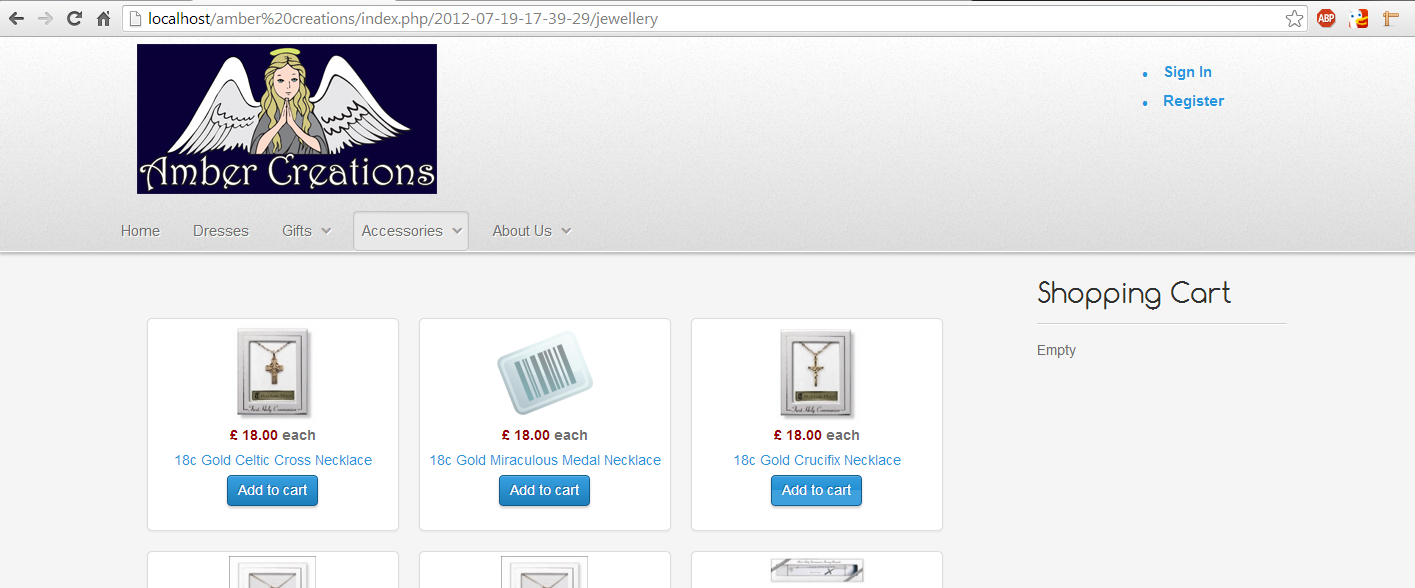
When I press Add to Cart, It does not remain on the same product listing page and refreshes to the following:
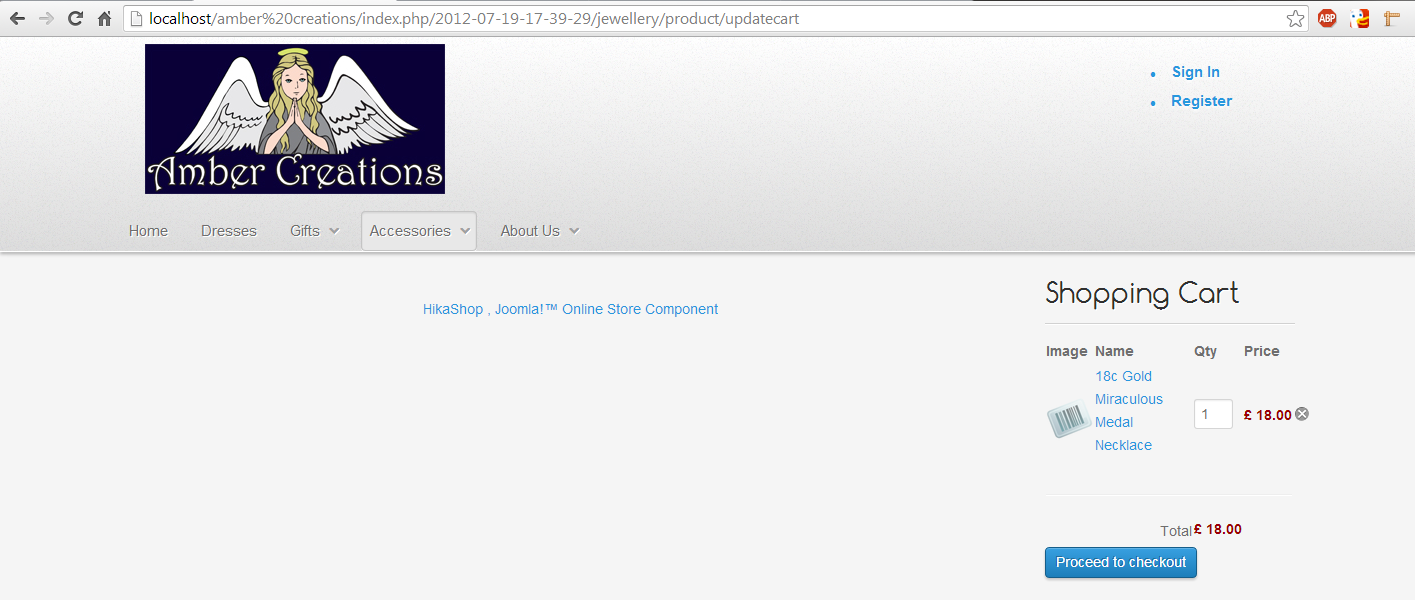
No errors at all during any of this process far as I can see.
Peach
When I press Add to Cart, It does not remain on the same product listing page and refreshes to the following:
No errors at all during any of this process far as I can see.
Peach
Please Log in or Create an account to join the conversation.
Less
More
- Posts: 12953
- Thank you received: 1778
12 years 8 months ago #143876
by Mohamed Thelji
Replied by Mohamed Thelji on topic Add to Cart not remaining on the same page
Ok, and can you :
- Active the Joomla debug mode ("Administration->Global configuration->System->Debug System/Language")
- Set the "error reporting" option of the Joomla configuration to "maximum"
- Test it again so that we can see if it display an error message.
- Active the Joomla debug mode ("Administration->Global configuration->System->Debug System/Language")
- Set the "error reporting" option of the Joomla configuration to "maximum"
- Test it again so that we can see if it display an error message.
Please Log in or Create an account to join the conversation.
- joompeach1
-
Topic Author
- Offline
Less
More
- Posts: 13
- Thank you received: 0
12 years 8 months ago #143881
by joompeach1
Replied by joompeach1 on topic Add to Cart not remaining on the same page
After Adding to the Cart the Joomla! Debug Console appears. I've checked through the tab's and I'm guessing the issue lies in the Database Queries section of the console.
I get the following:
39 Queries Logged 25.5 ms
8 duplicate found!
3 duplicates: #6 #17 #18
2 duplicates: #12 #24
3 duplicates: #13 #25 #27
When I scroll down to the Duplicate queries for #6 #17 and #18 I get:
SELECT id, home, template, s.params
FROM nh1zm_template_styles as s
LEFT JOIN nh1zm_extensions as e
ON e.element=s.template
AND e.type='template'
AND e.client_id=s.client_id
WHERE s.client_id = 0
AND e.enabled = 1
When I scroll down to the Duplicate queries for #12 #24 I get:
SELECT a.*
FROM nh1zm_hikashop_cart AS a
WHERE (a.cart_id =
AND a.cart_type = 'cart'
ORDER BY a.cart_modified DESC
LIMIT 1
When I scroll down to the Duplicate queries for #13 #25 #27 I get:
SELECT b.*,c.*
FROM nh1zm_hikashop_cart_product AS b
LEFT JOIN nh1zm_hikashop_product AS c
ON b.product_id=c.product_id
WHERE b.cart_id = 8
AND b.product_id > 0
ORDER BY c.product_parent_id ASC,b.cart_product_modified ASC
I hope this additional Information helps
Peach
I get the following:
39 Queries Logged 25.5 ms
8 duplicate found!
3 duplicates: #6 #17 #18
2 duplicates: #12 #24
3 duplicates: #13 #25 #27
When I scroll down to the Duplicate queries for #6 #17 and #18 I get:
SELECT id, home, template, s.params
FROM nh1zm_template_styles as s
LEFT JOIN nh1zm_extensions as e
ON e.element=s.template
AND e.type='template'
AND e.client_id=s.client_id
WHERE s.client_id = 0
AND e.enabled = 1
When I scroll down to the Duplicate queries for #12 #24 I get:
SELECT a.*
FROM nh1zm_hikashop_cart AS a
WHERE (a.cart_id =
AND a.cart_type = 'cart'
ORDER BY a.cart_modified DESC
LIMIT 1
When I scroll down to the Duplicate queries for #13 #25 #27 I get:
SELECT b.*,c.*
FROM nh1zm_hikashop_cart_product AS b
LEFT JOIN nh1zm_hikashop_product AS c
ON b.product_id=c.product_id
WHERE b.cart_id = 8
AND b.product_id > 0
ORDER BY c.product_parent_id ASC,b.cart_product_modified ASC
I hope this additional Information helps
Peach
Please Log in or Create an account to join the conversation.

12 years 8 months ago #143887
by Eliot
Replied by Eliot on topic Add to Cart not remaining on the same page
it looks like there are no JS errors or SQL errors.
Could you try to download the last version of Hikashop on our website (2.3.0) and try again?
Also, do you have any other popup system on your site can you open any popup?
Could you try to download the last version of Hikashop on our website (2.3.0) and try again?
Also, do you have any other popup system on your site can you open any popup?
Please Log in or Create an account to join the conversation.
- joompeach1
-
Topic Author
- Offline
Less
More
- Posts: 13
- Thank you received: 0
12 years 8 months ago #143899
by joompeach1
Replied by joompeach1 on topic Add to Cart not remaining on the same page
Tried Installing the Lasted Version but No luck on this either - Exactly the same issue I was having earlier. It just doesn't keep me on the same product page every time I add to Cart. This Isn't as a result or the way my Hikashop Is setup is it?
Not using any other Pop-up system for my website far as I know.
Peach
Not using any other Pop-up system for my website far as I know.
Peach
Please Log in or Create an account to join the conversation.
Less
More
- Posts: 12953
- Thank you received: 1778
12 years 8 months ago #144103
by Mohamed Thelji
Replied by Mohamed Thelji on topic Add to Cart not remaining on the same page
Hi,
Can you change the value of the "Use AJAX when possible for add to cart buttons" option through the page "Hikashop->System->Configuration->Main" ?
Can you change the value of the "Use AJAX when possible for add to cart buttons" option through the page "Hikashop->System->Configuration->Main" ?
The following user(s) said Thank You: joompeach1
Please Log in or Create an account to join the conversation.
- joompeach1
-
Topic Author
- Offline
Less
More
- Posts: 13
- Thank you received: 0
12 years 8 months ago - 12 years 8 months ago #145020
by joompeach1
Replied by joompeach1 on topic Add to Cart not remaining on the same page
Solved, AJAX for Add to Cart Buttons was disabled.
Thank you!
Thank you!
Last edit: 12 years 8 months ago by joompeach1.
Please Log in or Create an account to join the conversation.
- joompeach1
-
Topic Author
- Offline
Less
More
- Posts: 13
- Thank you received: 0
12 years 8 months ago #145358
by joompeach1
Replied by joompeach1 on topic Add to Cart not remaining on the same page
So It seems that Configuration -> Advanced settings - > Use AJAX when possible for add to cart buttons only solved half my issue.
I'm still being Re-directed to a blank page without errors after deleting a product from the shopping cart whilst continuing to shop,
This will likely be confusing and frustrating for the customer - Is there a Use AJAX when deleting from the cart option somewhere or an alternative fix?
Many Thanks
Peach
I'm still being Re-directed to a blank page without errors after deleting a product from the shopping cart whilst continuing to shop,
This will likely be confusing and frustrating for the customer - Is there a Use AJAX when deleting from the cart option somewhere or an alternative fix?
Many Thanks
Peach
Please Log in or Create an account to join the conversation.

12 years 8 months ago #145382
by Jerome
Jerome - Obsidev.com
HikaMarket & HikaSerial developer / HikaShop core dev team.
Replied by Jerome on topic Add to Cart not remaining on the same page
Hi,
We fixed a trouble link to the "user ajax when possible" in a "hot fix" of HikaShop 2.3.0
Can you please download/install it and tell us if the latest package fix totally this problem ?
Thanks
We fixed a trouble link to the "user ajax when possible" in a "hot fix" of HikaShop 2.3.0
Can you please download/install it and tell us if the latest package fix totally this problem ?
Thanks
Jerome - Obsidev.com
HikaMarket & HikaSerial developer / HikaShop core dev team.
Please Log in or Create an account to join the conversation.
- joompeach1
-
Topic Author
- Offline
Less
More
- Posts: 13
- Thank you received: 0
12 years 7 months ago - 12 years 7 months ago #147821
by joompeach1
Replied by joompeach1 on topic Add to Cart not remaining on the same page
I'm running 2.3.0 and still having the same issue. Interestingly enough under the Cart I've added a randomly generated product listing for gift idea's and that module works fine on the multiple pages It's assigned to after I remove an Item from the cart.
My drop dowm menu options take customers directly to a category filled with that categories products, this all works perfectly - I can add products to the cart and the message comes up to let the customer know, I can interact with them all just fine too but soon as I delete a product from the shopping cart all products on the page other then the gift idea's all disapear.
It's almost as if it it's not diverting back to the menu and to another page or not loading the products from the page properly.
Any additional guesses to why this might be?
Thanks
My drop dowm menu options take customers directly to a category filled with that categories products, this all works perfectly - I can add products to the cart and the message comes up to let the customer know, I can interact with them all just fine too but soon as I delete a product from the shopping cart all products on the page other then the gift idea's all disapear.
It's almost as if it it's not diverting back to the menu and to another page or not loading the products from the page properly.
Any additional guesses to why this might be?
Thanks
Last edit: 12 years 7 months ago by joompeach1. Reason: Typo
Please Log in or Create an account to join the conversation.

12 years 7 months ago #147903
by Xavier
Replied by Xavier on topic Add to Cart not remaining on the same page
Hi,
Don't you have fill a value for the option "URL where you will be redirected when the cart is empty" in Configuration > Main > Cart.
Don't you have fill a value for the option "URL where you will be redirected when the cart is empty" in Configuration > Main > Cart.
Please Log in or Create an account to join the conversation.
- joompeach1
-
Topic Author
- Offline
Less
More
- Posts: 13
- Thank you received: 0
12 years 7 months ago #147929
by joompeach1
Replied by joompeach1 on topic Add to Cart not remaining on the same page
Yup It's set to the homepage. It's not re-directing when the cart is empty and if the cart still has products after a deletion then It's still causing the products to disapear from the page forcing the customer to Re-navigate back to the menu again. The same even happens when at the checkout, if a product is removed at check out then all content disappears just leaving the menu's. The AJAX option fixed half of my issue because I was originally having this issue for adding to the cart too but deleting from the cart the issue still persists.
Mike
Mike
Please Log in or Create an account to join the conversation.
- joompeach1
-
Topic Author
- Offline
Less
More
- Posts: 13
- Thank you received: 0
12 years 7 months ago - 12 years 7 months ago #147934
by joompeach1
Replied by joompeach1 on topic Add to Cart not remaining on the same page
Playing with the possibility it may be due to the module positions.
Mike
Mike
Last edit: 12 years 7 months ago by joompeach1.
Please Log in or Create an account to join the conversation.
- joompeach1
-
Topic Author
- Offline
Less
More
- Posts: 13
- Thank you received: 0
12 years 7 months ago - 12 years 7 months ago #147957
by joompeach1
Replied by joompeach1 on topic Add to Cart not remaining on the same page
I've kind of got things working after a lot of playing around.
At first I had each drop down menu item as a HikaShop Category - That menu Category was then linked to an associated product module containing the products. When I checked the product modules in Joomla none of these had a selected menu position on Gantry - So I played around a little.
I changed all the drop down menu's in Joomla to Hikashop Product Listings and un associated all product modules from these. Then I went into the modules I just un-associated within Joomla, set their module positions to Content Top-A and selected each module to display only on the relevant pages. After all I this I selected each Product Listing Menu item not to display any products and now finally it seems to work. When I remove and add products to and from the cart It remains on the same page.
Having an entire new set of issues now. Since all the modules are fixed to a set position when I access the product information by interacting with a product it pushes that information to under the product listings and you have to scroll down to view it (Which most people won't see).
Ideally I need a fix my original problem where deleting an item from a card would wipe the screen of all category products....Why does it do that? I'm trying so many different ways to get around this but nothing is working.
Mike
At first I had each drop down menu item as a HikaShop Category - That menu Category was then linked to an associated product module containing the products. When I checked the product modules in Joomla none of these had a selected menu position on Gantry - So I played around a little.
I changed all the drop down menu's in Joomla to Hikashop Product Listings and un associated all product modules from these. Then I went into the modules I just un-associated within Joomla, set their module positions to Content Top-A and selected each module to display only on the relevant pages. After all I this I selected each Product Listing Menu item not to display any products and now finally it seems to work. When I remove and add products to and from the cart It remains on the same page.
Having an entire new set of issues now. Since all the modules are fixed to a set position when I access the product information by interacting with a product it pushes that information to under the product listings and you have to scroll down to view it (Which most people won't see).
Ideally I need a fix my original problem where deleting an item from a card would wipe the screen of all category products....Why does it do that? I'm trying so many different ways to get around this but nothing is working.
Mike
Last edit: 12 years 7 months ago by joompeach1.
Please Log in or Create an account to join the conversation.
- joompeach1
-
Topic Author
- Offline
Less
More
- Posts: 13
- Thank you received: 0
12 years 7 months ago #148035
by joompeach1
Replied by joompeach1 on topic Add to Cart not remaining on the same page
I've just discovered that when changing my cart from a standard cart to a Mini cart this suddenly fixes all of my issues without need for the above "Fix". Why would the full cart cause my product modules to disappear on the page but not the mini cart and is there any way to solve this?
Please Log in or Create an account to join the conversation.
12 years 7 months ago #148300
by Jerome
Jerome - Obsidev.com
HikaMarket & HikaSerial developer / HikaShop core dev team.
Replied by Jerome on topic Add to Cart not remaining on the same page
Hi,
I am a little lost with your different messages.
Would it be possible to have a summarize of your current problem and trying to separate the different problems in very separated questions/threads ?
We do not have any access to your website and we do not have any of your configuration.
So we are currently blind and it will be very difficult to help you without having information about your problem, your website and your configuration.
Regards,
I am a little lost with your different messages.
Would it be possible to have a summarize of your current problem and trying to separate the different problems in very separated questions/threads ?
We do not have any access to your website and we do not have any of your configuration.
So we are currently blind and it will be very difficult to help you without having information about your problem, your website and your configuration.
Regards,
Jerome - Obsidev.com
HikaMarket & HikaSerial developer / HikaShop core dev team.
Please Log in or Create an account to join the conversation.
12 years 2 months ago #168240
by phil2010
Replied by phil2010 on topic Add to Cart not remaining on the same page
Hello I am having the exact same problem as in this thread.
Here is the website.
www.skin.com.au/shade-sunscreen/product/...el-by-la-roche-posay
when a item is added to the cart the product disappears from the page
I can only imagine I have something configured wrong.
Here is the website.
www.skin.com.au/shade-sunscreen/product/...el-by-la-roche-posay
when a item is added to the cart the product disappears from the page
I can only imagine I have something configured wrong.
Please Log in or Create an account to join the conversation.
12 years 2 months ago #168248
by phil2010
Replied by phil2010 on topic Add to Cart not remaining on the same page
stop the press.. I have found the mistake. I had entered disabled menu item to force menu on the system - configuration - cart - setup. I hope that helps anyone else with same problem 
Please Log in or Create an account to join the conversation.
Time to create page: 0.652 seconds