

- Posts: 122
- Thank you received: 0
HikaShop Content Module not appearing
12 years 7 months ago #145339
by optimized
HikaShop Content Module not appearing was created by optimized
-- url of the page with the problem -- :
optimizedpanama.com/starsupply/
-- HikaShop version -- : 2.2.2
-- Joomla version -- : 3.2.1
-- PHP version -- : x5.4
-- Browser(s) name and version -- : All
-- Error-message(debug-mod must be tuned on) -- : None
I have set HikaShop Content Module to be in module position bottom 4 (which works) but it will not appear
I have read the documentation but still van not make it display
Regards,
Mike
-- HikaShop version -- : 2.2.2
-- Joomla version -- : 3.2.1
-- PHP version -- : x5.4
-- Browser(s) name and version -- : All
-- Error-message(debug-mod must be tuned on) -- : None
I have set HikaShop Content Module to be in module position bottom 4 (which works) but it will not appear
I have read the documentation but still van not make it display
Regards,
Mike
Please Log in or Create an account to join the conversation.

12 years 7 months ago #145407
by nicolas
Replied by nicolas on topic HikaShop Content Module not appearing
Hi,
It's probably that you configured the module options in a way that doesn't display any product/category.
Could you provide a screenshot of the Hikashop options of your module (via the menu Display->Content modules) ?
It's probably that you configured the module options in a way that doesn't display any product/category.
Could you provide a screenshot of the Hikashop options of your module (via the menu Display->Content modules) ?
Please Log in or Create an account to join the conversation.
12 years 7 months ago #145411
by optimized
Replied by optimized on topic HikaShop Content Module not appearing
Hi Nicolas,
Please find screenshots attached
Regards,
Mike
Please find screenshots attached
Regards,
Mike
Please Log in or Create an account to join the conversation.
12 years 7 months ago #145425
by nicolas
Replied by nicolas on topic HikaShop Content Module not appearing
There is nothing attached to your message.
Please Log in or Create an account to join the conversation.
12 years 7 months ago #145436
by optimized
Replied by optimized on topic HikaShop Content Module not appearing
Here we go
Please Log in or Create an account to join the conversation.
12 years 7 months ago #145437
by optimized
Replied by optimized on topic HikaShop Content Module not appearing
Here we go
Please Log in or Create an account to join the conversation.
12 years 7 months ago #145451
by nicolas
Replied by nicolas on topic HikaShop Content Module not appearing
There is still no screenshot attached to your message. Maybe you could upload it on your website and provide a link to it ?
Please Log in or Create an account to join the conversation.
12 years 7 months ago #145460
by optimized
Replied by optimized on topic HikaShop Content Module not appearing
Hi,
The links are optimizedpanama.com/starsupply/images/hika1.png and optimizedpanama.com/starsupply/images/hika2.png
I have also tried to attach again
Mike
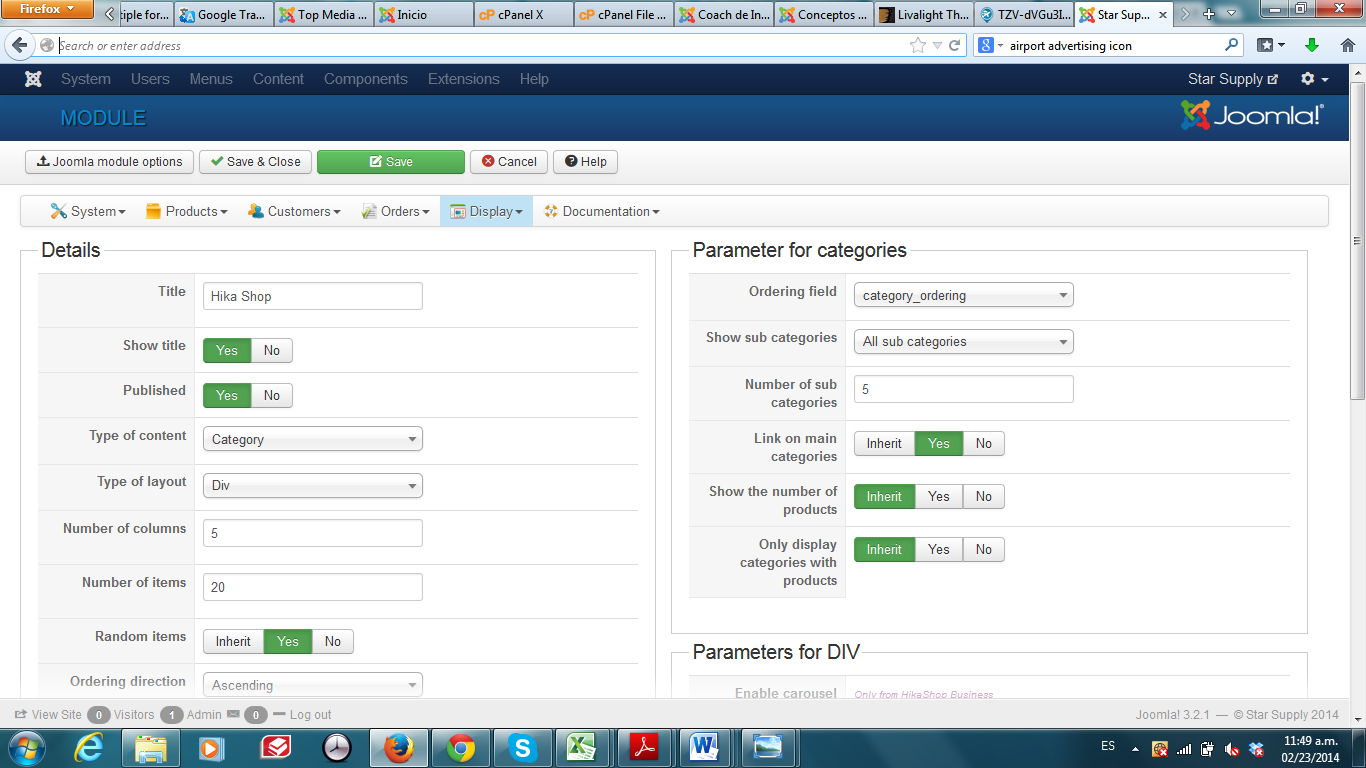
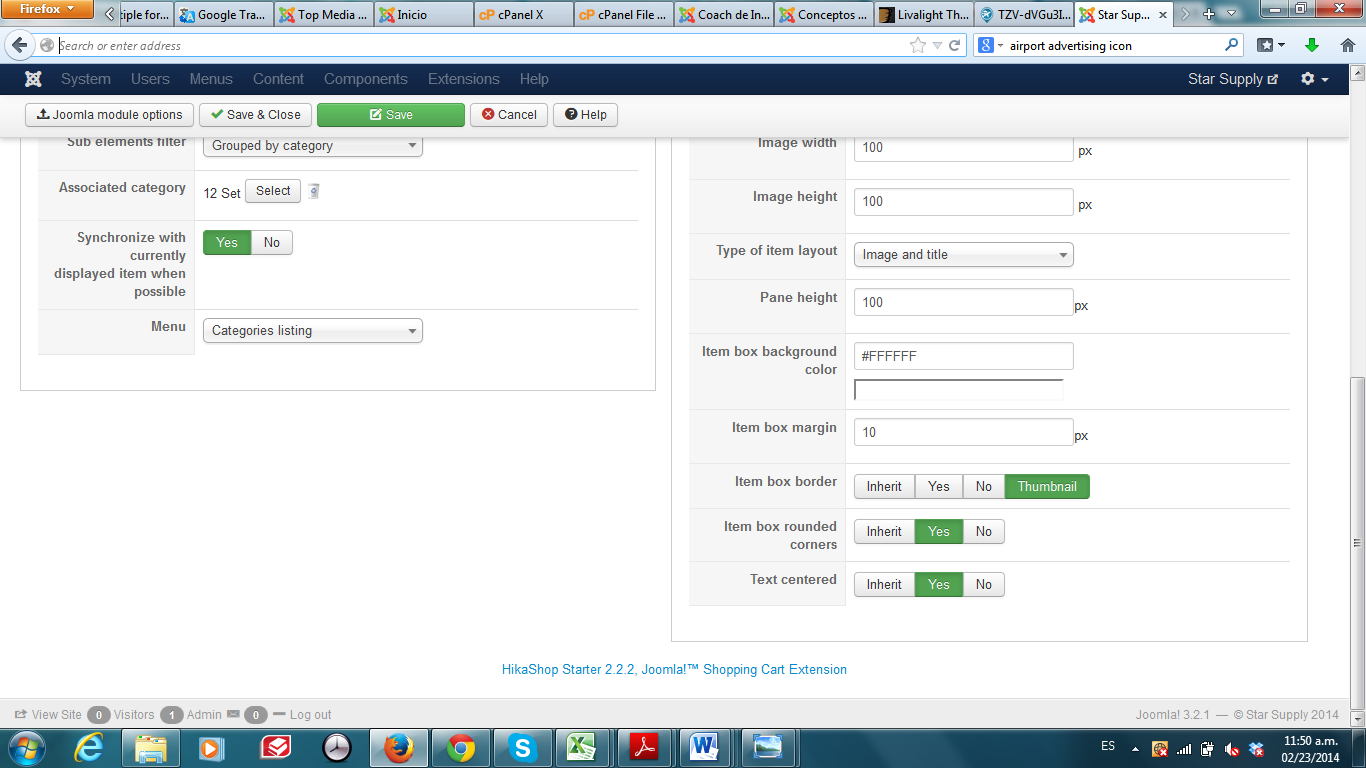
The links are optimizedpanama.com/starsupply/images/hika1.png and optimizedpanama.com/starsupply/images/hika2.png
I have also tried to attach again
Mike
Please Log in or Create an account to join the conversation.
12 years 7 months ago #145462
by nicolas
Replied by nicolas on topic HikaShop Content Module not appearing
The module is not configured properly as far as I can see.
First, the synchronize with currently displayed item when possible option should be turned off, otherwise, you might not see anything based on your page you are on.
Then, in the associated category option, you should select the main category where your categories that you want to display in the module and not select one of them.
Finally, the sub element filter option should be set to either direct sub elements or all sub elements.
First, the synchronize with currently displayed item when possible option should be turned off, otherwise, you might not see anything based on your page you are on.
Then, in the associated category option, you should select the main category where your categories that you want to display in the module and not select one of them.
Finally, the sub element filter option should be set to either direct sub elements or all sub elements.
Please Log in or Create an account to join the conversation.
12 years 7 months ago #145466
by optimized
Replied by optimized on topic HikaShop Content Module not appearing
Hello Nicolas,
I really appreciate your help on this. Is there a use guide that I can refer to so that I do not have to bother you so much?
Regards,
Mike
I really appreciate your help on this. Is there a use guide that I can refer to so that I do not have to bother you so much?
Regards,
Mike
Please Log in or Create an account to join the conversation.
12 years 7 months ago #145470
by nicolas
Replied by nicolas on topic HikaShop Content Module not appearing
On each page, you can click on the help button and that will give you the help related to the current screen.
Also, you can find the full manual of HikaShop here:
www.hikashop.com/support/documentation.html
Also, you can find the full manual of HikaShop here:
www.hikashop.com/support/documentation.html
Please Log in or Create an account to join the conversation.
12 years 7 months ago #145609
by optimized
Replied by optimized on topic HikaShop Content Module not appearing
Thanks,
Are there 'latest products', 'most popular products' modules that I can download?
Mike
Are there 'latest products', 'most popular products' modules that I can download?
Mike
Please Log in or Create an account to join the conversation.

12 years 7 months ago #145659
by Eliot
Replied by Eliot on topic HikaShop Content Module not appearing
Hi Mike,
You don't have to download these modules. It's included when you install Hikashop and you just have to enable them or configure a new one that fits your need.
You don't have to download these modules. It's included when you install Hikashop and you just have to enable them or configure a new one that fits your need.
Please Log in or Create an account to join the conversation.
Time to create page: 0.344 seconds